Post Style View

-
@phenomlab there is one small problem that shown below;

@cagatay There’s a missing
floatby the looks of it. Can you PM me a login and password for the site so I can check? -
@phenomlab there is one small problem that shown below;
Mark Cutting also advises organisations as a Fractional CIO, Fractional CISO and Executive Advisor, helping boards improve technology governance, cyber resilience and executive decision making. Learn more at Phenomlab Ltd
-
@phenomlab yes from now everything is great, thank you dear.
-
@phenomlab yes from now everything is great, thank you dear.
@cagatay Great. Thanks. I’ll mark this as resolved.
Mark Cutting also advises organisations as a Fractional CIO, Fractional CISO and Executive Advisor, helping boards improve technology governance, cyber resilience and executive decision making. Learn more at Phenomlab Ltd
-
 undefined phenomlab has marked this topic as solved on
-
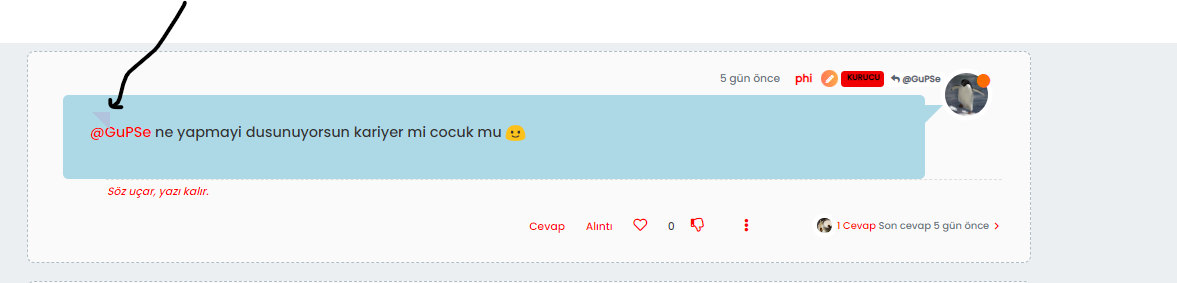
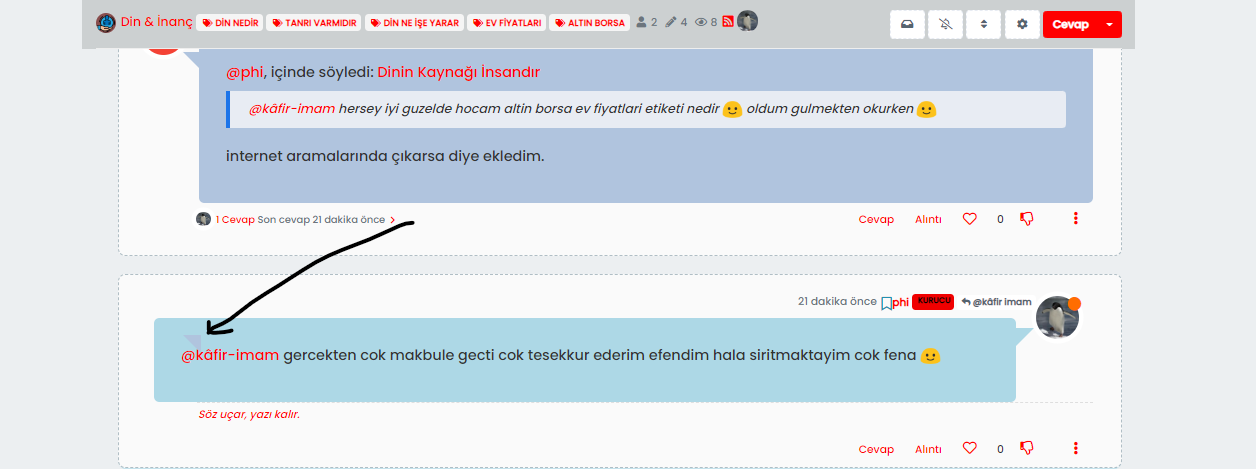
@phenomlab there is one unknown symbol at the post, i cant delete it. This is when i answered seems.
-
@phenomlab there is one unknown symbol at the post, i cant delete it. This is when i answered seems.
@cagatay let me have a look
EDIT - yes, I see why. Because we are using a
pseudoclass, this is being applied to multiple elements, so we are forced to change the colour of the class where you see the erroneous addition to use a darker one so that you do not see it.This is what I had to do on my own install as a workaround. It’s crude, but it’ll work.
Mark Cutting also advises organisations as a Fractional CIO, Fractional CISO and Executive Advisor, helping boards improve technology governance, cyber resilience and executive decision making. Learn more at Phenomlab Ltd
-
@cagatay let me have a look
EDIT - yes, I see why. Because we are using a
pseudoclass, this is being applied to multiple elements, so we are forced to change the colour of the class where you see the erroneous addition to use a darker one so that you do not see it.This is what I had to do on my own install as a workaround. It’s crude, but it’ll work.
-
@phenomlab ok dear, waiting for it. thanks.
@cagatay You need to change the colours yourself, so the
.self-postis darker than the.topic-owner-postMark Cutting also advises organisations as a Fractional CIO, Fractional CISO and Executive Advisor, helping boards improve technology governance, cyber resilience and executive decision making. Learn more at Phenomlab Ltd
-
@cagatay You need to change the colours yourself, so the
.self-postis darker than the.topic-owner-post -
@phenomlab nothing changed dear.
@cagatay You also need to set the same for
.topic-response-postMark Cutting also advises organisations as a Fractional CIO, Fractional CISO and Executive Advisor, helping boards improve technology governance, cyber resilience and executive decision making. Learn more at Phenomlab Ltd
-
@phenomlab said in Post Style View:
.topic-response-post
So i think we can fixed that small problem to use same color all of them

-
@phenomlab said in Post Style View:
.topic-response-post
So i think we can fixed that small problem to use same color all of them
@cagatay You can try this (with different colours), but it might be a bit greedy
li.self-post.topic-response-post:before {
    display: none;
}
Mark Cutting also advises organisations as a Fractional CIO, Fractional CISO and Executive Advisor, helping boards improve technology governance, cyber resilience and executive decision making. Learn more at Phenomlab Ltd
-
@cagatay You can try this (with different colours), but it might be a bit greedy
li.self-post.topic-response-post:before { display: none; }@phenomlab said in Post Style View:
Same color is worked.li.self-post.topic-response-post:before {
display: none;
}also worked
-
@phenomlab said in Post Style View:
Same color is worked.li.self-post.topic-response-post:before {
display: none;
}also worked
@cagatay Good. Keep an eye on that though - as I said, it may produce unexpected results as it’s quite “greedy”
Mark Cutting also advises organisations as a Fractional CIO, Fractional CISO and Executive Advisor, helping boards improve technology governance, cyber resilience and executive decision making. Learn more at Phenomlab Ltd
-
@cagatay Good. Keep an eye on that though - as I said, it may produce unexpected results as it’s quite “greedy”
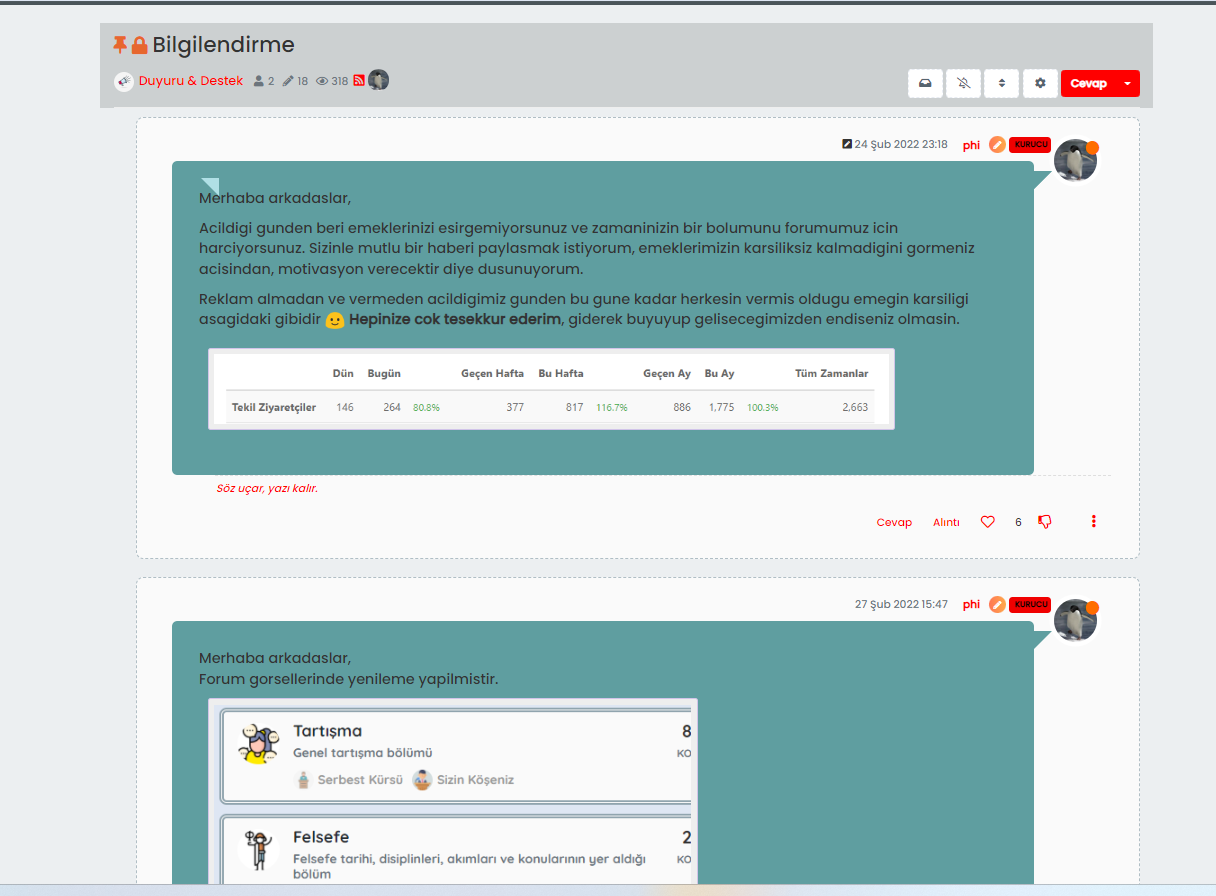
@phenomlab If the post is new one created by me, there is also shown
@phenomlab said in Post Style View:
Good. Keep an eye on that though - as I said, it may produce unexpected results as it’s quite “greedy”
Yes i know dear, it is a no problem for me, i m learning with you thats cool.
-
@phenomlab If the post is new one created by me, there is also shown
@phenomlab said in Post Style View:
Good. Keep an eye on that though - as I said, it may produce unexpected results as it’s quite “greedy”
Yes i know dear, it is a no problem for me, i m learning with you thats cool.
@cagatay This is a bit experimental currently, but the below
jQueryshould detect correctly when the HTML being targeted has no class.Can you please try replacing the below you previously inserted
$(window).on('action:ajaxify.loaded', function(data) {
    $(document).ready(function() {
        if (!$('li[component="post"]').hasClass('.topic-owner-post') || (!$('li[component="post"]').hasClass('.self-post'))) {
            console.log("Adding required classes for messenger type view");
            $('li[component="post"]').addClass('topic-response-post');

        }
    });
});

$(window).on('action:ajaxify.end', function(data) {
    $(document).ready(function() {
        if (!$('li[component="post"]').hasClass('.topic-owner-post') || (!$('li[component="post"]').hasClass('.self-post'))) {
            console.log("Adding required classes for messenger type view");
            $('li[component="post"]').addClass('topic-response-post');

        }
    });
});
with
// Target those elements already loaded in the DOM
$(document).ready(function() {
    $(window).on('action:ajaxify.end', function(data) {
        if ($('li[component="post"]').hasClass("")) {
            console.log("Adding required classes for messenger type view");
            $('li[component="post"]').addClass('topic-response-post');
        }
    });
});
// Target elements dynamically added to the DOM on post load
$(document).ready(function() {
    $(window).on('action:ajaxify.loaded', function(data) {
        if ($('li[component="post"]').hasClass("")) {
            console.log("Adding required classes for messenger type view");
            $('li[component="post"]').addClass('topic-response-post');
        }
    });
});
Try it and let me know.
Mark Cutting also advises organisations as a Fractional CIO, Fractional CISO and Executive Advisor, helping boards improve technology governance, cyber resilience and executive decision making. Learn more at Phenomlab Ltd
-
@cagatay This is a bit experimental currently, but the below
jQueryshould detect correctly when the HTML being targeted has no class.Can you please try replacing the below you previously inserted
$(window).on('action:ajaxify.loaded', function(data) {
    $(document).ready(function() {
        if (!$('li[component="post"]').hasClass('.topic-owner-post') || (!$('li[component="post"]').hasClass('.self-post'))) {
            console.log("Adding required classes for messenger type view");
            $('li[component="post"]').addClass('topic-response-post');

        }
    });
});

$(window).on('action:ajaxify.end', function(data) {
    $(document).ready(function() {
        if (!$('li[component="post"]').hasClass('.topic-owner-post') || (!$('li[component="post"]').hasClass('.self-post'))) {
            console.log("Adding required classes for messenger type view");
            $('li[component="post"]').addClass('topic-response-post');

        }
    });
});
with
// Target those elements already loaded in the DOM
$(document).ready(function() {
    $(window).on('action:ajaxify.end', function(data) {
        if ($('li[component="post"]').hasClass("")) {
            console.log("Adding required classes for messenger type view");
            $('li[component="post"]').addClass('topic-response-post');
        }
    });
});
// Target elements dynamically added to the DOM on post load
$(document).ready(function() {
    $(window).on('action:ajaxify.loaded', function(data) {
        if ($('li[component="post"]').hasClass("")) {
            console.log("Adding required classes for messenger type view");
            $('li[component="post"]').addClass('topic-response-post');
        }
    });
});
Try it and let me know.
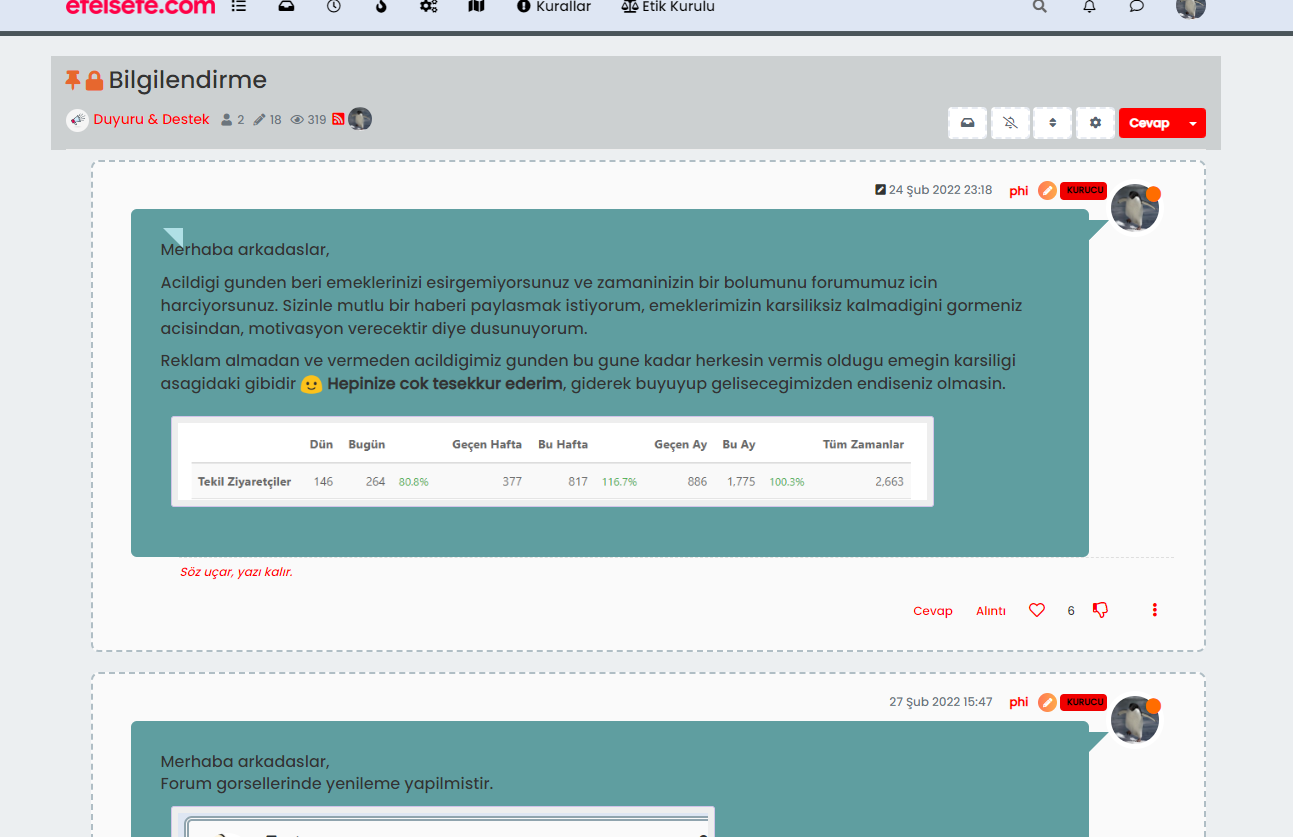
@phenomlab nothing changed for first owner post;
-
@phenomlab nothing changed for first owner post;
@cagatay Is that with or without the new functions I provided, or with both ?
Mark Cutting also advises organisations as a Fractional CIO, Fractional CISO and Executive Advisor, helping boards improve technology governance, cyber resilience and executive decision making. Learn more at Phenomlab Ltd
-
@phenomlab css side;
@media (min-width: 1200px) {
li.topic-owner-post .content, li.topic-response-post .content {
    background: PowderBlue;
    padding: 30px;
    border-radius: 6px;
}
.topic .posts.timeline .timeline-event>div:not(.content), .topic .posts.timeline>[component=post]>div:not(.content) {
    margin-left: 2.5rem;
}
[data-index="0"] .content[component="post/content"]:before, .topic-owner-post:before, .topic-response-post:before {
    border-left: 20px solid transparent;
    border-top: 20px solid PowderBlue;
    top: 66px;
    content: "";
    position: absolute;
    left: 70px;
}
li.self-post .content:not(.isSolved [component="post/content"])[itemprop="text"] {
    background: CadetBlue;
    padding: 30px;
    border-radius: 6px;
    margin-right: 8.5rem !important;
}
li.self-post .content:not(.isSolved [component="post/content"]):after, li.self-post.topic-owner-post:first-child:after {
    border-right: 20px solid transparent;
    border-top: 20px solid var(--self-post);
    top: 66px;
    content: "";
    position: absolute;
    right: 90px;
    left: unset !important;
    border-bottom: none !important;
    bottom: unset !important;
}
li.self-post.topic-response-post .pull-left {
    float: right !important;
}
li.self-post .content:not(.isSolved [component="post/content"]):after, li.self-post.topic-owner-post:first-child:after {
    border-right: 20px solid transparent;
    border-top: 20px solid CadetBlue;
    top: 58px;
    content: "";
    position: absolute;
    right: 95px;
    left: unset !important;
    border-bottom: none !important;
    bottom: unset !important;
}
}
li.self-post.topic-response-post:before {
    display: none;
}
JS side;
$(window).on('action:ajaxify.end', function(data) { $(document).ready(function() { if (!$('li[component="post"]').hasClass('.topic-owner-post') || (!$('li[component="post"]').hasClass('.self-post'))) { console.log("Adding required classes for messenger type view"); $('li[component="post"]').addClass('topic-response-post'); } }); }); // Target those elements already loaded in the DOM $(document).ready(function() { $(window).on('action:ajaxify.end', function(data) { if ($('li[component="post"]').hasClass("")) { console.log("Adding required classes for messenger type view"); $('li[component="post"]').addClass('topic-response-post'); } }); }); // Target elements dynamically added to the DOM on post load $(document).ready(function() { $(window).on('action:ajaxify.loaded', function(data) { if ($('li[component="post"]').hasClass("")) { console.log("Adding required classes for messenger type view"); $('li[component="post"]').addClass('topic-response-post'); } }); }); -
@phenomlab css side;
@media (min-width: 1200px) {
li.topic-owner-post .content, li.topic-response-post .content {
    background: PowderBlue;
    padding: 30px;
    border-radius: 6px;
}
.topic .posts.timeline .timeline-event>div:not(.content), .topic .posts.timeline>[component=post]>div:not(.content) {
    margin-left: 2.5rem;
}
[data-index="0"] .content[component="post/content"]:before, .topic-owner-post:before, .topic-response-post:before {
    border-left: 20px solid transparent;
    border-top: 20px solid PowderBlue;
    top: 66px;
    content: "";
    position: absolute;
    left: 70px;
}
li.self-post .content:not(.isSolved [component="post/content"])[itemprop="text"] {
    background: CadetBlue;
    padding: 30px;
    border-radius: 6px;
    margin-right: 8.5rem !important;
}
li.self-post .content:not(.isSolved [component="post/content"]):after, li.self-post.topic-owner-post:first-child:after {
    border-right: 20px solid transparent;
    border-top: 20px solid var(--self-post);
    top: 66px;
    content: "";
    position: absolute;
    right: 90px;
    left: unset !important;
    border-bottom: none !important;
    bottom: unset !important;
}
li.self-post.topic-response-post .pull-left {
    float: right !important;
}
li.self-post .content:not(.isSolved [component="post/content"]):after, li.self-post.topic-owner-post:first-child:after {
    border-right: 20px solid transparent;
    border-top: 20px solid CadetBlue;
    top: 58px;
    content: "";
    position: absolute;
    right: 95px;
    left: unset !important;
    border-bottom: none !important;
    bottom: unset !important;
}
}
li.self-post.topic-response-post:before {
    display: none;
}
JS side;
$(window).on('action:ajaxify.end', function(data) { $(document).ready(function() { if (!$('li[component="post"]').hasClass('.topic-owner-post') || (!$('li[component="post"]').hasClass('.self-post'))) { console.log("Adding required classes for messenger type view"); $('li[component="post"]').addClass('topic-response-post'); } }); }); // Target those elements already loaded in the DOM $(document).ready(function() { $(window).on('action:ajaxify.end', function(data) { if ($('li[component="post"]').hasClass("")) { console.log("Adding required classes for messenger type view"); $('li[component="post"]').addClass('topic-response-post'); } }); }); // Target elements dynamically added to the DOM on post load $(document).ready(function() { $(window).on('action:ajaxify.loaded', function(data) { if ($('li[component="post"]').hasClass("")) { console.log("Adding required classes for messenger type view"); $('li[component="post"]').addClass('topic-response-post'); } }); });@cagatay Let me have a look
EDIT - I see it. Find class
[data-index="0"] .content[component="post/content"]:before, .topic-owner-post:before, .topic-response-post:beforechange it to
.topic-owner-post:before, .topic-response-post:beforeSo basically, just remove
[data-index="0"] .content[component="post/content"]:before,That should do it
Mark Cutting also advises organisations as a Fractional CIO, Fractional CISO and Executive Advisor, helping boards improve technology governance, cyber resilience and executive decision making. Learn more at Phenomlab Ltd


Hello! It looks like you're interested in this conversation, but you don't have an account yet.
Getting fed up of having to scroll through the same posts each visit? When you register for an account, you'll always come back to exactly where you were before, and choose to be notified of new replies (either via email, or push notification). You'll also be able to save bookmarks and upvote posts to show your appreciation to other community members.
With your input, this post could be even better 💗
Register LoginDid this solution help you?
Related Topics
-
-
-
-
restarting nodebb on boot
Unsolved Configure -
-
Gettin Erors NodeBB
Solved Configure -
-