Change border colour of original poster to match category
-
One simple feature I wanted in Sudonix was for the border of the first post in a new thread to match the colour set by the category. This makes the first post stand out, and looks nice too

The code is based around the same functionality here
https://sudonix.com/topic/256/recent-cards-plugin-customization
It’s relatively simple in it’s approach. Here is is
$(document).ready(function() {
    $(window).on('action:ajaxify.end', function(data) {
   var categoryColor = $('[role="presentation"].icon').css("background-color");
                $('li.topic-owner-post:nth-child(1)').css('border-color', categoryColor);
    });
});
Essentially, this jQuery snippet looks for the
role="presentation"attribute in the topic stream (there’s only the one, so no need for any loop to detect all of them like we do in the previous link), grab the CSS value, and then set it as the border so it looks like this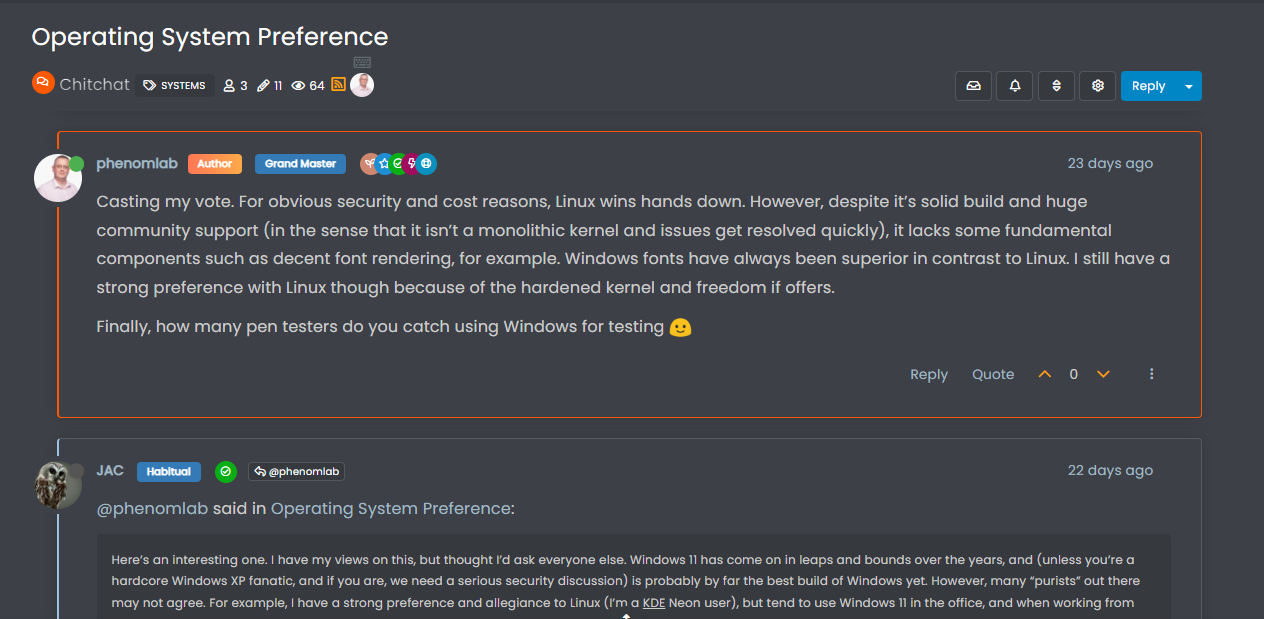
All you need to do is copy the snippet, and place this in your ACP -> Appearance -> Custom JS
Enjoy…
-
 undefined phenomlab has marked this topic as solved on
-
undefined phenomlab referenced this topic on
Hello! It looks like you're interested in this conversation, but you don't have an account yet.
Getting fed up of having to scroll through the same posts each visit? When you register for an account, you'll always come back to exactly where you were before, and choose to be notified of new replies (either via email, or push notification). You'll also be able to save bookmarks and upvote posts to show your appreciation to other community members.
With your input, this post could be even better 💗
Register Login