Skip to content

Changing the look of recent cards
Announcements
1 1 631 1
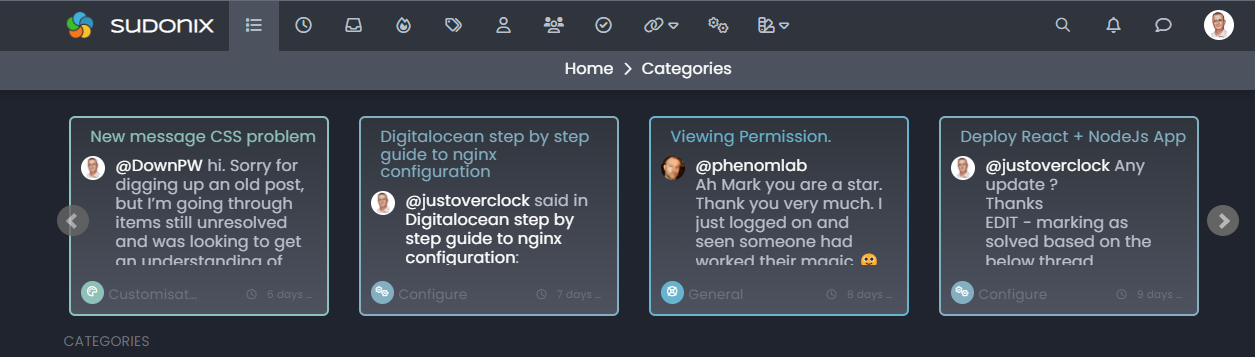
  • I wanted a way to draw attention to the recent cards on the categories page to make them stand out more - and what better way to do this than with some CSS. Here’s a short video of the outcome of that very exercise. Watch the recent cards closely as I cycle through the themes.

    There’s a gradient being set there which is essentially two of the core colours in each theme.

    For example, in swatch “Anthracite”, it’s easy to see how this effect works

    1981b09d-671d-42c7-89ae-555f30916669-image.png

    Essentially, we are setting the border-color and color variables to match the color set by the category itself. Essentially, this is an extension of this thread
    https://sudonix.com/topic/256/recent-cards-plugin-customization

    The minor change here is just one line

    $(document).ready(function() {
        $(window).on('action:ajaxify.end', function(data) {
            $('.recent-card-container').each(function(i) {
                var dataId = $(this).attr("data-cid");
                var color = $('[role="presentation"]', this).css("background-color");
                //console.log("data-cid " + dataId + " is " + color);
                $('[data-cid="' + dataId + '"] .recent-card').attr("style", "border-color: " + color);
                $('[data-cid="' + dataId + '"] .recent-card h4 a').attr("style", "color: " + color);
            });
        });
    });
    

    The line in question is

    $('[data-cid="' + dataId + '"] .recent-card h4 a').attr("style", "color: " + color);
    

    By adding this line, we change both the border color, and the text color to match. I also chose to thicken the border by 1px to give it a bit more depth, which works very well. I did consider a box-shadow but I think that may look somewhat “overdone” and odd when coupled with other elements. The jury is still out on that one 🙂


Related Topics
  • Ch..ch..ch..ch..changes!

    Announcements themes layout
    16
    2
    15 Votes
    16 Posts
    2k Views
    @phenomlab of course, to be recognised is fantastic. @phenomlab said in Ch..ch..ch..ch..changes!: Sadly, no. Web crawlers and scrapers are often JS based and read text only, so styles don’t have any bearing. I’ve read mixed things about this, but no that does make sense, it was something I read a many years back when using Wordpress.
  • 5 Votes
    2 Posts
    1k Views
    Nice. Very good tips Mark
  • 6 Votes
    15 Posts
    3k Views
    No no, I said that in the sense that he told me it was simple ^^ I was able to see that this was not the case by targeting the elements he had advised me.
  • The best css to customize our logo?

    Solved Customisation css
    2
    1 Votes
    2 Posts
    1k Views
    @Sala This should look better .sidenav .navbar-brand { padding-top: 0.5rem; padding-bottom: 0.5rem; } [image: 1669026666905-e5cec20e-be36-4ee8-9129-fd11ad4656ac-image.png] You can increase the top and bottom padding by increasing the values above.
  • tag icon in front of tags

    Solved Customisation css
    5
    3 Votes
    5 Posts
    1k Views
    @phenomlab said in tag icon in front of tags: @crazycells Are you using Font Awesome Free ? If so, try this span.tag:before { content: "\f02b"; font-family: "Font Awesome 5 Free"; margin-right: 5px; margin-left: 5px; font-weight: 900; } yeap, this worked thanks a lot.
  • Avatar on Topic Header

    Solved Customisation css avatar header
    9
    1
    0 Votes
    9 Posts
    2k Views
    @jac said in Avatar on Topic Header: @downpw said in Avatar on Topic Header: Great Plugin I make it a bit cleaner via this CSS code: /*------------------------------------------------------------------*/ /*---------------- nodebb-plugin-browsing-users -----------------*/ /*------------------------------------------------------------------*/ /*Space between the avatar and the RSS icon */ .topic [component="topic/browsing-users"] { margin-bottom: -5px; padding-left: 10px; } /*Space between avatars*/ .pull-left { float: left!important; padding-right: 5px; } Do you have a screenshot of how this looks with the CSS change? Just added this change, thanks @DownPW
  • Reading Meter Progress bar

    Locked Solved Customisation css
    15
    1
    9 Votes
    15 Posts
    3k Views
    For anyone else following this thread, please see https://sudonix.com/topic/467/issues-with-progress-bar-on-v3
  • Theme changes

    Announcements dark
    6
    10 Votes
    6 Posts
    1k Views
    There’s still some very minor bugs in the two themes (light and dark) but these will be resolved in the coming days. Some are specific to firefox, and well require special attention, but will still be resolved nonetheless.