Skip to content

Border Frame WYSIWYG CSS

Solved Customisation
6 2 2.3k 1
  • wrote on last edited by
    #1

    Hello !!

    On 1.18.6 NodeBB Version, when I click in the frame to reply to a post, a blue border appears on Firefox and other browsers except Vivaldi (It’s black).

    Is it possible to change this color?
    I can’t find the CSS variable
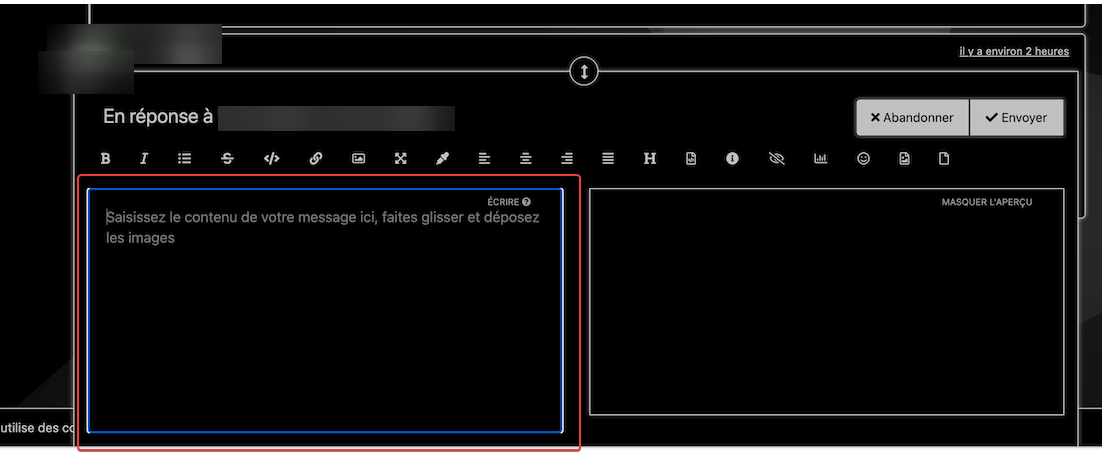
    425c8632-95db-4cd1-86a6-7413a242f7f3-image.png

    Thanks

  • Hello !!

    On 1.18.6 NodeBB Version, when I click in the frame to reply to a post, a blue border appears on Firefox and other browsers except Vivaldi (It’s black).

    Is it possible to change this color?
    I can’t find the CSS variable

    425c8632-95db-4cd1-86a6-7413a242f7f3-image.png

    Thanks

    wrote on last edited by phenomlab
    #2

    @downpw hi. I noticed this also - not been able to track it via css yet and I’m leaning towards it being controlled via JS. I get the same here but haven’t invested any real time in seeing what causes it.

    It’s on my list.

  • Hello !!

    On 1.18.6 NodeBB Version, when I click in the frame to reply to a post, a blue border appears on Firefox and other browsers except Vivaldi (It’s black).

    Is it possible to change this color?
    I can’t find the CSS variable

    425c8632-95db-4cd1-86a6-7413a242f7f3-image.png

    Thanks

    wrote on last edited by
    #3

    @DownPW hi. Just following up on this thread (I know it’s old) but was curious to understand if it’s still an issue or not ?

  • @DownPW hi. Just following up on this thread (I know it’s old) but was curious to understand if it’s still an issue or not ?

    wrote on last edited by
    #4

    @phenomlab

    Nope it’s the same but it’s obviously linked to the browser so I put in resolved.

  • DownPW DownPW has marked this topic as solved on
  • @phenomlab

    Nope it’s the same but it’s obviously linked to the browser so I put in resolved.

    wrote on last edited by
    #5

    @DownPW Ok, thanks

  • Hello !!

    On 1.18.6 NodeBB Version, when I click in the frame to reply to a post, a blue border appears on Firefox and other browsers except Vivaldi (It’s black).

    Is it possible to change this color?
    I can’t find the CSS variable

    425c8632-95db-4cd1-86a6-7413a242f7f3-image.png

    Thanks

    wrote on last edited by phenomlab
    #6

    @DownPW just circling back to this, as I did eventually find the class. Seems you can disable the outline using the below CSS

    textarea {
        outline: none;
    }
    

Did this solution help you?
Did you find the suggested solution useful? Support 💗 Sudonix with a coffee ☕
If your organisation needs deeper expertise around infrastructure, security, or technology leadership, learn more about Phenomlab Ltd. Many of the deeper technical guides behind Sudonix are published there.

Related Topics
  • CSS codes to prevent votes to disappear

    Solved Customisation nodebb
    3
    1 Votes
    3 Posts
    1k Views
    crazycells
    @phenomlab yes, it is thanks a lot…
  • The best css to customize our logo?

    Solved Customisation css
    2
    1 Votes
    2 Posts
    3k Views
    phenomlab
    @Sala This should look better .sidenav .navbar-brand { padding-top: 0.5rem; padding-bottom: 0.5rem; } [image: e5cec20e-be36-4ee8-9129-fd11ad4656ac-image.png] You can increase the top and bottom padding by increasing the values above.
  • Request Sudonix css/js and full analysis info

    Customisation sudonix efelsefe
    2
    1 Votes
    2 Posts
    1k Views
    phenomlab
    Closing this in favour of https://sudonix.com/topic/357/post-style-view/28
  • 2 Votes
    1 Posts
    791 Views
    No one has replied
  • CSS codes for fa-info icon

    Solved Customisation nodebb
    9
    1
    6 Votes
    9 Posts
    3k Views
    crazycells
    I have just figured it out… it can be targeted with text-decoration-color: I was mistakenly using color
  • [NODEBB] Help for my custom CSS

    Solved Customisation nodebb css bugfix
    258
    49 Votes
    258 Posts
    168k Views
    cagatay
    mark hi, Refused to apply style from ‘https://efelsefe.com/assets/customfonts/FontAwesome-6-Pro/pro/css/v4-font-face.css’ because its MIME type (‘text/plain’) is not a supported stylesheet MIME type, and strict MIME checking is enabled. I keep getting this error.
  • [NODEBB] CSS Style Sheets SelectBox

    Locked Solved Customisation css
    112
    24 Votes
    112 Posts
    63k Views
    phenomlab
    @DownPW as discussed in PM Seems to have been solved with the new JS code that you added allowing the version CSS file change!! Cache problem therefore with the JS of the Switcher theme Based on this, I will close this thread and reference https://sudonix.com/topic/207/nodebb-help-for-my-custom-css/27
  • CSS Help on my Flarum

    Solved Customisation
    5
    2
    2 Votes
    5 Posts
    3k Views
    phenomlab
    @mike-jones Yes, you’ll typically see this type of behaviour if there is another style that has higher priority in the sense that yours will be overridden. Using !important will override the higher preference, but should be used sparingly rather than everywhere.