WordPress site
-
@jac said in WordPress site:
@jac said in WordPress site:
@phenomlab said in WordPress site:
@jac Let’s click “Enable Backups”. This way, you don’t need to worry about it, and they are very cheap.
Even though it won’t be using that backup anymore?
What I’m saying is if I won’t be using it I don’t want to pay for it
 .
.As in realistically my County forum is finished unfortunately.
Would that not be the same as the backup I downloaded?
@jac No. This is just the backup for the domain itself. Backup at server level means you can recover the entire machine.
Mark Cutting also advises organisations as a Fractional CIO, Fractional CISO and Executive Advisor, helping boards improve technology governance, cyber resilience and executive decision making. Learn more at Phenomlab Ltd
-
@jac If you don’t want to pay for it anymore, then you’ll need to power off and delete the instance also. Hetzner will still charge you for a powered-off instance, and the only way to stop that charge is to delete.
@phenomlab said in WordPress site:
If you don’t want to pay for it anymore, then you’ll need to power off and delete the instance also. Hetzner will still charge you for a powered-off instance, and the only way to stop that charge is to delete.
I understand mate…
That may be the best option until I come up with something else, do you think?
-
@jac No. This is just the backup for the domain itself. Backup at server level means you can recover the entire machine.
@phenomlab said in WordPress site:
No. This is just the backup for the domain itself. Backup at server level means you can recover the entire machine.
Ah I see. thanks Mark
 .
. -
@phenomlab said in WordPress site:
If you don’t want to pay for it anymore, then you’ll need to power off and delete the instance also. Hetzner will still charge you for a powered-off instance, and the only way to stop that charge is to delete.
I understand mate…
That may be the best option until I come up with something else, do you think?
@jac agreed. Particularly if you intend to leave it for an extended period of time, then yes, that makes the most sense. Just remember that if you do decide to embark on that same journey again, the server itself, plus Webmin, Virtualmin, etc, all has to be created from scratch.
Mark Cutting also advises organisations as a Fractional CIO, Fractional CISO and Executive Advisor, helping boards improve technology governance, cyber resilience and executive decision making. Learn more at Phenomlab Ltd
-
@jac agreed. Particularly if you intend to leave it for an extended period of time, then yes, that makes the most sense. Just remember that if you do decide to embark on that same journey again, the server itself, plus Webmin, Virtualmin, etc, all has to be created from scratch.
@phenomlab said in WordPress site:
@jac agreed. Particularly if you intend to leave it for an extended period of time, then yes, that makes the most sense. Just remember that if you do decide to embark on that same journey again, the server itself, plus Webmin, Virtualmin, etc, all has to be created from scratch.
Thanks for the advice.
Unfortunately yes, I think that would be the best solution.
A blog & forum about Stockport may be hard to do possibly in terms of content, & a church based website and forum could get messy
 it just depends how it was done.
If it’s for a single church then it wouldn’t work out in my eyes, it would have to be for anyone to view.
-
@jac agreed. Particularly if you intend to leave it for an extended period of time, then yes, that makes the most sense. Just remember that if you do decide to embark on that same journey again, the server itself, plus Webmin, Virtualmin, etc, all has to be created from scratch.
@phenomlab said in WordPress site:
Just remember that if you do decide to embark on that same journey again, the server itself, plus Webmin, Virtualmin, etc, all has to be created from scratch.
Ok, what’s the scenario to shut my account down? do I still need to take a full backup via Hetzner?
-
@phenomlab said in WordPress site:
@jac agreed. Particularly if you intend to leave it for an extended period of time, then yes, that makes the most sense. Just remember that if you do decide to embark on that same journey again, the server itself, plus Webmin, Virtualmin, etc, all has to be created from scratch.
Thanks for the advice.
Unfortunately yes, I think that would be the best solution.
A blog & forum about Stockport may be hard to do possibly in terms of content, & a church based website and forum could get messy
it just depends how it was done.If it’s for a single church then it wouldn’t work out in my eyes, it would have to be for anyone to view.
@jac said in WordPress site:
@phenomlab said in WordPress site:
@jac agreed. Particularly if you intend to leave it for an extended period of time, then yes, that makes the most sense. Just remember that if you do decide to embark on that same journey again, the server itself, plus Webmin, Virtualmin, etc, all has to be created from scratch.
Thanks for the advice.
Unfortunately yes, I think that would be the best solution.
A blog & forum about Stockport may be hard to do possibly in terms of content, & a church based website and forum could get messy
it just depends how it was done.If it’s for a single church then it wouldn’t work out in my eyes, it would have to be for anyone to view.
Either that or a tech forum & blog. The idea of something local to me like a Stockport blog would be good but getting hold of information would be difficult.
-
@phenomlab said in WordPress site:
Just remember that if you do decide to embark on that same journey again, the server itself, plus Webmin, Virtualmin, etc, all has to be created from scratch.
Ok, what’s the scenario to shut my account down? do I still need to take a full backup via Hetzner?
@jac No, you can simply power down and delete the machine.
Mark Cutting also advises organisations as a Fractional CIO, Fractional CISO and Executive Advisor, helping boards improve technology governance, cyber resilience and executive decision making. Learn more at Phenomlab Ltd
-
@phenomlab said in WordPress site:
@jac No, you can simply power down and delete the machine.
Thanks. I’ll do this shortly.
-
@phenomlab said in WordPress site:
@jac No, you can simply power down and delete the machine.
Thanks. I’ll do this shortly.
@jac said in WordPress site:
@phenomlab said in WordPress site:
@jac No, you can simply power down and delete the machine.
Thanks. I’ll do this shortly.
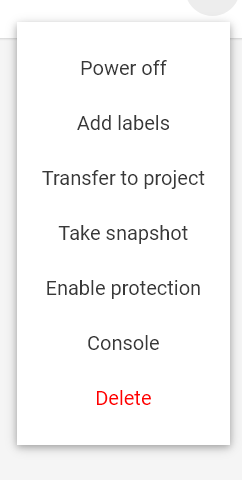
Delete & power off? is there anything else I would need to do before I do this mate?
-
@jac said in WordPress site:
@phenomlab said in WordPress site:
@jac No, you can simply power down and delete the machine.
Thanks. I’ll do this shortly.
Delete & power off? is there anything else I would need to do before I do this mate?
@jac Nope
Mark Cutting also advises organisations as a Fractional CIO, Fractional CISO and Executive Advisor, helping boards improve technology governance, cyber resilience and executive decision making. Learn more at Phenomlab Ltd
-
-
-
For anyone looking at a simple way to blog the new recommendation from @phenomlab is Ghost CMS.
It’s Wordpress OUT, and Ghost IN it seems! *preference based
.From my early viewing Ghost loads up super quick! it also seems very streamlined and modern compared to Wordpress, less bloat with the plugins, and more of a limited approach, something that I’d say helps, but the thing that clearly separates the two CMS’s is speed 100%! I mean who wants a slow loading site? - not me!
I can only say my experience is purely on a viewing basis and not from the admin area (back-end) or anything of that nature, it’s just purely from the front-end only.
Here’s some examples of sites using Ghost.
https://trends.builtwith.com/websitelist/Ghost
Disclaimer: May get hooked after viewing
@jac said in WordPress site:
It’s Wordpress OUT, and Ghost IN it seems! *preference based .
Even County’s site uses Wordpress
. Although that does serve it’s purpose.


Hello! It looks like you're interested in this conversation, but you don't have an account yet.
Getting fed up of having to scroll through the same posts each visit? When you register for an account, you'll always come back to exactly where you were before, and choose to be notified of new replies (either via email, or push notification). You'll also be able to save bookmarks and upvote posts to show your appreciation to other community members.
With your input, this post could be even better 💗
Register LoginRelated Topics
-
-
configure ghost and wordpress combo
Moved Solved WordPress -
-
-
-
-
-