[NODEBB] Help for my custom CSS
-
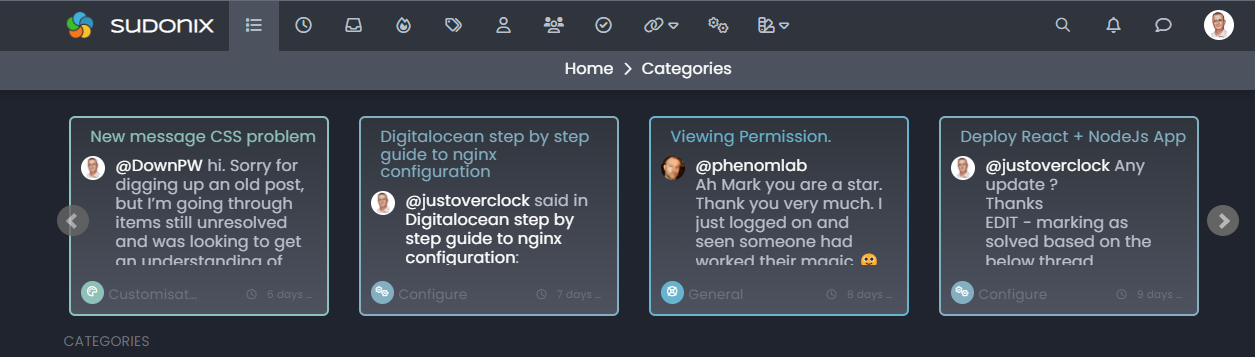
How to add icon on categories span time ?
I will test this code for add Paragraph FA icon for example :
[component="topic/header"] span.timeago:before {
    content: "\f1dd";
    margin-right: 5px;
    margin-left: 5px;
}
Result


PW and WS Spirit alive
-
How to add icon on categories span time ?
I will test this code for add Paragraph FA icon for example :
[component="topic/header"] span.timeago:before {
    content: "\f1dd";
    margin-right: 5px;
    margin-left: 5px;
}
Result
@DownPW that won’t work unless you add a font family to go with it - any Unicode characters typically require an associated font family. Try adding
font-family: "font awesome 5 free";to the CSS you already have. -
I have test this :
[component="topic/header"] span.timeago:before {
    content: "\f1c0";
    font-family: "font awesome 5 free";
    margin-right: 5px;
    margin-left: 5px;
    color: black;
}
But doesn’t work

PW and WS Spirit alive
-
I have test this :
[component="topic/header"] span.timeago:before {
    content: "\f1c0";
    font-family: "font awesome 5 free";
    margin-right: 5px;
    margin-left: 5px;
    color: black;
}
But doesn’t work
@DownPW does it work if you change it to
Font Awesome 5 Free? Might need to access your site directly to test this as it works for mine and should also work for you.One last thing you can try is adding the below into the CSS class - sometimes needed as the FA5 free icons are solid only, therefore may require
font-weight: 900;Let me know how you get on
Mark Cutting also advises organisations as a Fractional CIO, Fractional CISO and Executive Advisor, helping boards improve technology governance, cyber resilience and executive decision making. Learn more at Phenomlab Ltd
-
@DownPW does it work if you change it to
Font Awesome 5 Free? Might need to access your site directly to test this as it works for mine and should also work for you.One last thing you can try is adding the below into the CSS class - sometimes needed as the FA5 free icons are solid only, therefore may require
font-weight: 900;Let me know how you get on
-
@DownPW After spending a lot of time on the theme switcher (see referenced post above), I re-wrote some of it as found that there were caching issues with CSS as it always calls the same version number. The new function below resolves that issue.
I also removed the website prefix, as with relative paths, this is not required

// ------------------------------------------ // Theme Switcher // ------------------------------------------ // On choisit une chaine de caractère aléatoire pour affecter un numéro de version au fichier CSS. // The function below creates a random string which we use for CSS versioning to prevent cache conflicts function generateRandomString(length) { var text=""; var possible="ABCDEFGHIJKLMNOPQRSTUVWXYZabcdefghijklmnopqrstuvwxyz0123456789"; for (var i=0; i < length; i++) { text+=possible.charAt(Math.floor(Math.random() * possible.length)); } return text; } $(document).ready(function () { var string=generateRandomString(10); $("#random_string").text(string); // This variable gets the theme ID // Cette variable obtient l'ID du thème var whichTheme=localStorage.getItem("theme"); // This variable gets the active theme's actual URL //Cette variable obtient l'URL réelle du thème actif var activeTheme=localStorage.getItem("activeTheme"); // This variable appends the dropdown list to the existing panel // Cette variable ajoute la liste déroulante au panneau existant var panel=$('<li id="switcher" class="dropdown text-center"> \ <label for="theme-control-list-check" class="dropdown-toggle" data-toggle="dropdown" id="theme_dropdown" title="" role="button" data-original-title="Theme" aria-expanded="false"> \ <a class="btn-link" title="Theme Switcher" href="#"><i id="ticon" class="fa fa-fw fa-lightbulb-o"></i><span class="visible-xs-inline">Theme Switcher</span></a> \ </label> \ <ul id="theme" class="dropdown-menu"> \ <li><a id="default" href="#" rel="/assets/client.css?v=e02phpkima0">Default</a></li> \ <li><a id="default dark" href="#" rel="/assets/customcss/default_dark.css">Default Dark</a></li> \ <li><a id="Light Flat" href="#" rel="/assets/customcss/testflat.css">Light Flat</a></li> \ <li><a id="Dark Flat" href="#" rel="/assets/customcss/testflat.css">Dark Flat</a></li> \ <li><a id="Dark Neon Aqua" href="#" rel="/assets/customcss/dark_neon_aqua.css">Dark Neon Aqua</a></li> \ <li><a id="Dark Neon Blue" href="#" rel="assets/customcss/dark_neon_blue.css">Dark Neon Blue</a></li> \ <li><a id="Dark Neon Green" href="#" rel="/assets/customcss/dark_neon_green.css">Dark Neon Green</a></li> \ <li><a id="Dark Neon Solary" href="#" rel="/assets/customcss/dark_neon_solary.css">Dark Neon Solary</a></li> \ <li><a id="Dark Neon White" href="#" rel="/assets/customcss/dark_neon_white.css"">Dark Neon White</a></li> \ <li><a id="Eva 00" href="#" rel="/assets/customcss/eva_00.css">Eva.00</a></li> \ <li><a id="Eva 01" href="#" rel="/assets/customcss/eva_01.css">Eva.01</a></li> \ <li><a id="Eva 01 Purple Green"href="#" rel="/assets/customcss/eva_01_purple_green.css">Eva.01: Purple-Green</a></li> \ <li><a id="Eva 02" href="#" rel="/assets/customcss/eva_02.css">Eva.02: Red-Orange</a></li> \ </ul> \ </div> '); // See if there is an active theme selected in localStorage. If none selected, use the default. If there is a theme in localStorage, use that and apply it // Regarde s'il y a un thème actif sélectionné dans "localStorage". Si aucun n'est sélectionné, utilise la valeur par défaut. // S'il y a un thème dans localStorage, on l'utilise et on l'applique. if (whichTheme) { $("head").append("<link href='" + activeTheme + '?version=' + string + "' type=\"text/css\" rel=\'stylesheet\' />"); } else { // No need to include anything here as there's no CSS to add. // Pas besoin d'inclure quoi que ce soit ici car il n'y a pas de CSS à ajouter. } $('ul#logged-in-menu').prepend(panel); $('ul#logged-out-menu').prepend(panel); if (utils.findBootstrapEnvironment()==='xs') { $('#menu').prepend(panel); } $(document).ready(function () { // Listen to the NAV dropdown for any changes // Écoute la liste déroulante NAV pour tout changement de thème $("#theme li a").on("click change", function () { // If we detect a change, append the selected CSS file into the DOM // Si un changement est détecté, on ajoute le fichier CSS sélectionné dans le DOM (Document Object Model) var thishref=$(this).attr('rel'); $("link[rel=stylesheet]").attr('href', thishref + "?version=" + string + ""); //location.reload(); //$("head").append("<link href='" + $(this).attr("rel") + $(this).attr("id") + " type=\'text/css\' rel=\'stylesheet\' />"); location.reload(); // This variable stores the selected theme ID // Cette variable stocke l'ID du thème sélectionné var selected=$(this).attr("id"); // This variable stores the selected theme link // Cette variable stocke le lien du thème sélectionné var theTheme=$(this).attr("rel"); // This variable updates the selected theme ID // See if "default" has been selected. If it has, then... // Cette variable met à jour l'ID du thème sélectionné // Regarde si "default" a été sélectionné. Si c'est le cas, alors... if (selected==='default') { localStorage.setItem("theme", ""); // This variable will strip the current appeneded theme ID // Cette variable supprimera l'ID du thème actuellement ajouté localStorage.setItem("activeTheme", ""); // This variable will strip the current appeneded theme URL (HREF) // Finally, we have to reload the page to effect the changes // Cette variable supprimera l'URL actuelle du thème ajouté (HREF) // Enfin, on recharge la page pour effectuer les modifications location.reload(); } // If any other theme is selected, carry on as normnal, and update localStorage // Si un autre thème est sélectionné, continuez normalement et mettez à jour localStorage else { localStorage.setItem("theme", selected); // This variable updates the actual href of the CSS file // Cette variable met à jour le href réel du fichier CSS localStorage.setItem("activeTheme", theTheme); //window.location.href = window.location.href } // We use return false to prevent the browser from reloading or following any HREF links // On utilise la fonction "return false" pour empêcher le navigateur de recharger ou de suivre les liens HREF //return false; } ); } ); } ); // When hovering over the #switcher element, target the i class and add 'themeoff' // Lorsque du survol de l'élément #switcher, on cible la classe CSS "i" et on ajoute le CSS "themeoff" $(document).on('mouseenter', '#switcher', function() { $('#switcher i').addClass("themeoff"); } ); // When leaving the however state, target the i class and remove 'themeoff' // Lorsque l'on quitte l'état, on cible la classe CSS "i" et on supprime le CSS "themeoff" $(document).on('mouseleave', '#switcher', function() { $('#switcher i').removeClass("themeoff"); } );Hi friend, the code looks great.
Can I post it on my site as well?
And how can one know the path of subject assessments?
I’m talking about this code: https://sudonix.com/post/1809 -
Hi friend, the code looks great.
Can I post it on my site as well?
And how can one know the path of subject assessments?
I’m talking about this code: https://sudonix.com/post/1809@elhana-fine feel free. It’s posted here so that others can also make use of it.
-
We have create this topic for reference.
–> You will find all stuff to deploy it on your server.
ENJOY
-
hi @phenomlab
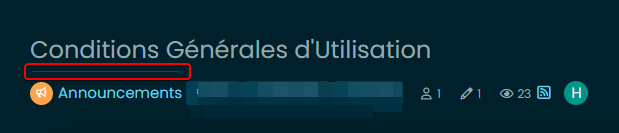
I use .category-item:first-of-type css properties for add a border-top on my principal pages like recent, unread etc…
But this properties add a border too on topic header categories name.
It’s possible to disable it just on topic (topic.header) ?
PW and WS Spirit alive
-
hi @phenomlab
I use .category-item:first-of-type css properties for add a border-top on my principal pages like recent, unread etc…
But this properties add a border too on topic header categories name.
It’s possible to disable it just on topic (topic.header) ?
@DownPW possibly with
:notin the css classMark Cutting also advises organisations as a Fractional CIO, Fractional CISO and Executive Advisor, helping boards improve technology governance, cyber resilience and executive decision making. Learn more at Phenomlab Ltd
-
@DownPW possibly with
:notin the css classI think I understand but I don’t find the good CSS class
here the code for recent page for example :
.category-item:first-of-type {
	border-top: 1px solid #0a769978 !important;
    border-top-left-radius: 4px !important;
    border-top-right-radius: 4px !important;
}
and I will test this for disable border-top on topic page but don’t work:
.category-item:first-of-type:not(.category-item .inline-block){
	border-top: 0px solid #0a769978 !important;
}
here the html code :
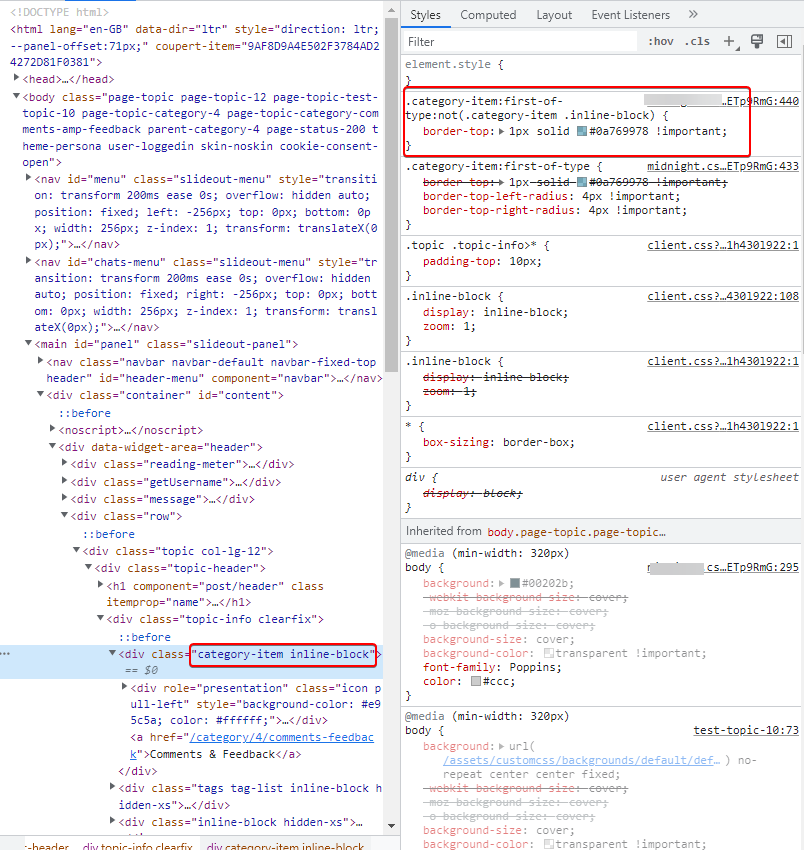
PW and WS Spirit alive
-
I think I understand but I don’t find the good CSS class
here the code for recent page for example :
.category-item:first-of-type {
	border-top: 1px solid #0a769978 !important;
    border-top-left-radius: 4px !important;
    border-top-right-radius: 4px !important;
}
and I will test this for disable border-top on topic page but don’t work:
.category-item:first-of-type:not(.category-item .inline-block){
	border-top: 0px solid #0a769978 !important;
}
here the html code :
@DownPW sorry for late reply. Can you provide me with a url where this issue exists ? PM is fine of course if you don’t want to publish directly here.
-
I think I understand but I don’t find the good CSS class
here the code for recent page for example :
.category-item:first-of-type {
	border-top: 1px solid #0a769978 !important;
    border-top-left-radius: 4px !important;
    border-top-right-radius: 4px !important;
}
and I will test this for disable border-top on topic page but don’t work:
.category-item:first-of-type:not(.category-item .inline-block){
	border-top: 0px solid #0a769978 !important;
}
here the html code :
@DownPW A couple of things here. You are using the
!importantargument twice - one will override the other, meaning they can’t both be set like that - typically, the last marked so will be preferred. Would this not work better ?.category-item.inline-block { border-top: none !important; } .category-item:first-of-type { border-top: 1px solid #0a769978; border-top-left-radius: 4px; border-top-right-radius: 4px; } -
Thanks Mark
I will test that tomorrow and I will tell you if is good or not !
– Other bug i have to resolve my friend :
- When I have plenty of tag on Post, have this :
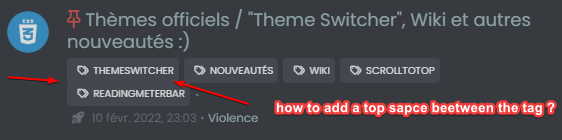
How to add a top space beetween the tag for a better lisibility ?
Thanks in advance @phenomlab
PW and WS Spirit alive
-
Thanks Mark
I will test that tomorrow and I will tell you if is good or not !
– Other bug i have to resolve my friend :
- When I have plenty of tag on Post, have this :
How to add a top space beetween the tag for a better lisibility ?
Thanks in advance @phenomlab
@DownPW said in [NODEBB] Help for my custom CSS:
– Other bug i have to resolve my friend :
When I have plenty of tag on Post, have this :
How to add a top space beetween the tag for a better lisibility ?
Thanks in advance @phenomlaban idea for that @phenomlab ?
PW and WS Spirit alive
-
@DownPW said in [NODEBB] Help for my custom CSS:
– Other bug i have to resolve my friend :
When I have plenty of tag on Post, have this :
How to add a top space beetween the tag for a better lisibility ?
Thanks in advance @phenomlaban idea for that @phenomlab ?
@DownPW I’ll check and get back to you.
-
@DownPW said in [NODEBB] Help for my custom CSS:
– Other bug i have to resolve my friend :
When I have plenty of tag on Post, have this :
How to add a top space beetween the tag for a better lisibility ?
Thanks in advance @phenomlaban idea for that @phenomlab ?
@DownPW Try this
.tag-list {
    display: inline-block;
    margin-top: 5px;
    line-height: 1.7;
}
Because you are using
inline-blockto float the elements on the same line, you cannot use margins to control the space. In this case,line-heightwill provide what you are looking for. -
-
Hello @phenomlab
I have a odd littlebug only on Smartphone chrome based browsers (chrome, vivaldi, brave) only (it’s ok on firefox mobile)
the right border of categories /topic is not visible
Here a screenshot of the problem on chrome based browsers:
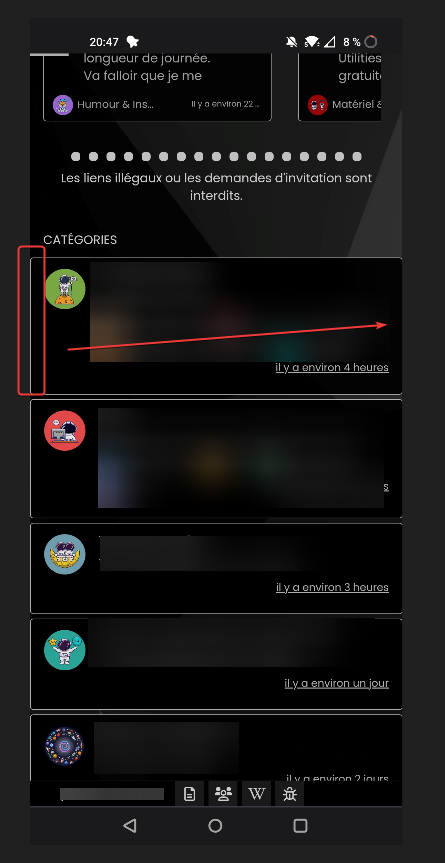
And a good result on firefox mobile (it’s OK) :
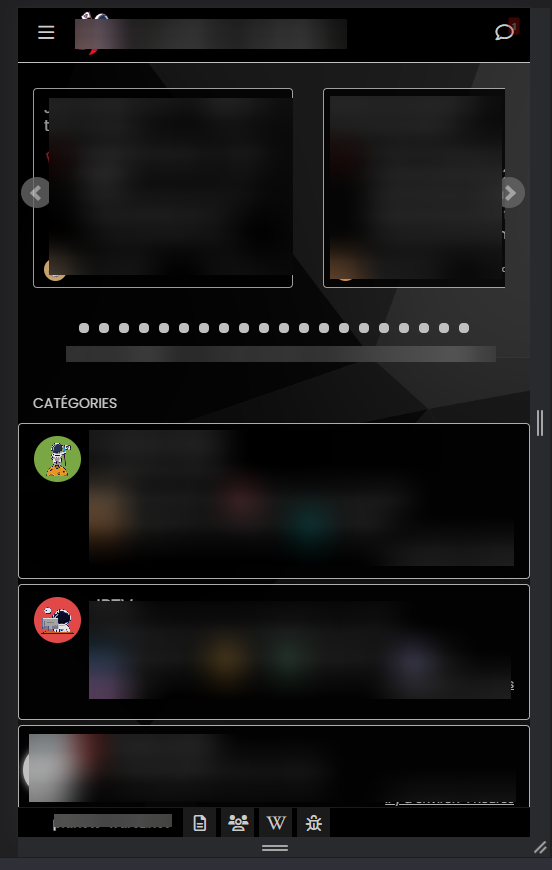
odd

PW and WS Spirit alive
-
Hello @phenomlab
I have a odd littlebug only on Smartphone chrome based browsers (chrome, vivaldi, brave) only (it’s ok on firefox mobile)
the right border of categories /topic is not visible
Here a screenshot of the problem on chrome based browsers:
And a good result on firefox mobile (it’s OK) :
odd
@DownPW odd indeed. Can you send me the CSS you are using for this ?
Mark Cutting also advises organisations as a Fractional CIO, Fractional CISO and Executive Advisor, helping boards improve technology governance, cyber resilience and executive decision making. Learn more at Phenomlab Ltd





Hello! It looks like you're interested in this conversation, but you don't have an account yet.
Getting fed up of having to scroll through the same posts each visit? When you register for an account, you'll always come back to exactly where you were before, and choose to be notified of new replies (either via email, or push notification). You'll also be able to save bookmarks and upvote posts to show your appreciation to other community members.
With your input, this post could be even better 💗
Register LoginDid this solution help you?
Related Topics
-
-
Please help me, I can't install nodebb
Locked Solved Customisation -
-
-
-
-
-