Nodebb and emails
-
I have a Zoho mail account but it will not work on NodeBB for sending out any kind of emails.
Under AdminPanel/email
I selected Zoho in the list
Typed in username@mysite.co.uk
Typed in the Zoho email password
and saved.any email tests get an error
Invalid login: 535 Authentication FailedThis has been a problem for years, the zoho account sends emails fine, but it doesnt seem that my nodebb instance can use it?
-
Finally it works, thanks.
I had to regenerate the app password on fastmail, and the test email send is working.Out of interest, in your custom set up of fastmail, how did you know to pick SMPT port 465?
-
I have a Zoho mail account but it will not work on NodeBB for sending out any kind of emails.
Under AdminPanel/email
I selected Zoho in the list
Typed in username@mysite.co.uk
Typed in the Zoho email password
and saved.any email tests get an error
Invalid login: 535 Authentication FailedThis has been a problem for years, the zoho account sends emails fine, but it doesnt seem that my nodebb instance can use it?
@Panda are you using the standard smtp connector in NodeBB or specific plugin?
Mark Cutting also advises organisations as a Fractional CIO, Fractional CISO and Executive Advisor, helping boards improve technology governance, cyber resilience and executive decision making. Learn more at Phenomlab Ltd
-
@phenomlab
STMP and have tried every email service,
yahoo, hotmail, icloud, fastmail etc
I get 535 error
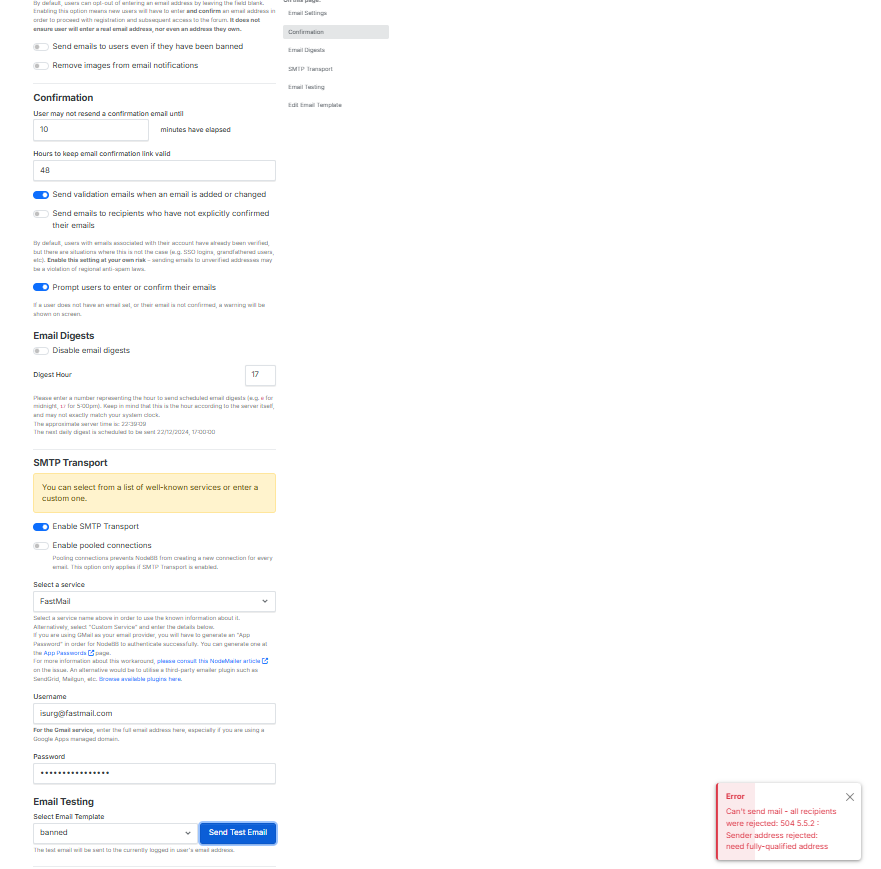
or if its a service thats possible to set up an app password I getError Can't send mail - all recipients were rejected: 504 5.5.2 : Sender address rejected: need fully-qualified address -
@phenomlab
STMP and have tried every email service,
yahoo, hotmail, icloud, fastmail etc
I get 535 error
or if its a service thats possible to set up an app password I getError Can't send mail - all recipients were rejected: 504 5.5.2 : Sender address rejected: need fully-qualified address@Panda the clue is here
Sender address rejected: need fully-qualified addressWhat do you have as your forum email address?
Mark Cutting also advises organisations as a Fractional CIO, Fractional CISO and Executive Advisor, helping boards improve technology governance, cyber resilience and executive decision making. Learn more at Phenomlab Ltd
-
@Panda the clue is here
Sender address rejected: need fully-qualified addressWhat do you have as your forum email address?
@phenomlab
At the top of the manage/email page I put the “sender From” as exactly same as the email server.Is there another place I need to put that?
-
@phenomlab
At the top of the manage/email page I put the “sender From” as exactly same as the email server.Is there another place I need to put that?
@Panda you need to place an email address there. Anything else will result in the error you’ve received
-
-
-
@Panda have you tried to send a great email?
Mark Cutting also advises organisations as a Fractional CIO, Fractional CISO and Executive Advisor, helping boards improve technology governance, cyber resilience and executive decision making. Learn more at Phenomlab Ltd
-
-
@phenomlab yes tried all the templates
@Panda is the error message still the same even after ensuring the email address is correct? After saving, have you restarted nodebb and tried again?
Mark Cutting also advises organisations as a Fractional CIO, Fractional CISO and Executive Advisor, helping boards improve technology governance, cyber resilience and executive decision making. Learn more at Phenomlab Ltd
-
@Panda is the error message still the same even after ensuring the email address is correct? After saving, have you restarted nodebb and tried again?
@phenomlab yes, Ive tried 4 years to get this working. Which mail server do you use?
-
@phenomlab yes, Ive tried 4 years to get this working. Which mail server do you use?
@Panda I use my own internal post fix server. What is the latest error message you receive?
Mark Cutting also advises organisations as a Fractional CIO, Fractional CISO and Executive Advisor, helping boards improve technology governance, cyber resilience and executive decision making. Learn more at Phenomlab Ltd
-
@Panda I use my own internal post fix server. What is the latest error message you receive?
@phenomlab
504 5.5.2 again
with fastmail its always the same error.
And fastmail shows the app has never accessed accountWith all the other emails it gives 535
-
how difficult to set up your own ‘post fix server’ like you have?
Any costs to that? -
how difficult to set up your own ‘post fix server’ like you have?
Any costs to that?@Panda if you are using your own vps and have root access, you can install your own post fix server free. Not difficult, but not easy either if you do not understand the technology.
Mark Cutting also advises organisations as a Fractional CIO, Fractional CISO and Executive Advisor, helping boards improve technology governance, cyber resilience and executive decision making. Learn more at Phenomlab Ltd
-
@Panda if you are using your own vps and have root access, you can install your own post fix server free. Not difficult, but not easy either if you do not understand the technology.
@phenomlab Ive put a plea of Nodebb site for a response to my many threads on this.
Im not overstating it when I say people have left nodebb because of the same headache -
what version of nodebb is this site on now? Theres a bug that when I post it remains blank. If I reload page what I type shows!
-
what version of nodebb is this site on now? Theres a bug that when I post it remains blank. If I reload page what I type shows!
@Panda that’s a css issue I need to fix. Nothing major.
-
@phenomlab Ive put a plea of Nodebb site for a response to my many threads on this.
Im not overstating it when I say people have left nodebb because of the same headache@Panda said in Nodebb and emails:
Im not overstating it when I say people have left nodebb because of the same headache
It’s going to be something simple. PM me the details of your site, and also the details for your fastmail account and I’ll get it to work.
I’ll need your fastmail login and admin access to your forum.


Hello! It looks like you're interested in this conversation, but you don't have an account yet.
Getting fed up of having to scroll through the same posts each visit? When you register for an account, you'll always come back to exactly where you were before, and choose to be notified of new replies (either via email, or push notification). You'll also be able to save bookmarks and upvote posts to show your appreciation to other community members.
With your input, this post could be even better 💗
Register LoginDid this solution help you?
Related Topics
-
Nodebb to Xenforo
Solved Configure -
-
-
NodeBB: hCaptcha
Solved Configure -
Email Server Settings
Solved Configure -
Gettin Erors NodeBB
Solved Configure -
-