
Virgin Media Broadband
-
That would have probably been a better option than the booster? Same sort of thing I know but this seems to be something new or just a remarketed booster?
-
That would have probably been a better option than the booster? Same sort of thing I know but this seems to be something new or just a remarketed booster?
@jac Mmmm - I think that’s a “gimmick”. You could so something similar with an old NetGear Rangemax.
Essentially, you connect this device to same network, and then configure it. The range is 10x wider than usual, so usually good for between 600-1000m.
Cheap, not “Heath Robinson”, and would do what you wanted without high cost, or maximum effort.
I did something similar for a co-worker who shared a house with others. The signal to her room was so weak, I recommended this and it solved all her problems !
Mark Cutting also advises organisations as a Fractional CIO, Fractional CISO and Executive Advisor, helping boards improve technology governance, cyber resilience and executive decision making. Learn more at Phenomlab Ltd
-
@jac Mmmm - I think that’s a “gimmick”. You could so something similar with an old NetGear Rangemax.
Essentially, you connect this device to same network, and then configure it. The range is 10x wider than usual, so usually good for between 600-1000m.
Cheap, not “Heath Robinson”, and would do what you wanted without high cost, or maximum effort.
I did something similar for a co-worker who shared a house with others. The signal to her room was so weak, I recommended this and it solved all her problems !
@phenomlab said in Virgin Media Broadband:
@jac Mmmm - I think that’s a “gimmick”. You could so something similar with an old NetGear Rangemax.
Essentially, you connect this device to same network, and then configure it. The range is 10x wider than usual, so usually good for between 600-1000m.
Cheap, not “Heath Robinson”, and would do what you wanted without high cost, or maximum effort.
I did something similar for a co-worker who shared a house with others. The signal to her room was so weak, I recommended this and it solved all her problems !
Thanks for the advice mate, so would you suggest that box along with the booster would solve the issues upstairs?
Many thanks


-
@phenomlab said in Virgin Media Broadband:
@jac Mmmm - I think that’s a “gimmick”. You could so something similar with an old NetGear Rangemax.
Essentially, you connect this device to same network, and then configure it. The range is 10x wider than usual, so usually good for between 600-1000m.
Cheap, not “Heath Robinson”, and would do what you wanted without high cost, or maximum effort.
I did something similar for a co-worker who shared a house with others. The signal to her room was so weak, I recommended this and it solved all her problems !
Thanks for the advice mate, so would you suggest that box along with the booster would solve the issues upstairs?
Many thanks
@jac You could probably remove the booster and use a simple powerline from the back of the cable modem - or, if the existing one you have accepts a network cable at both ends of the adapter, you can recycle that.
At the other end of the line where your current wifi extension is, replace that with the NetGear router. just connect the cable into any of the 4 LAN ports (not the cable port) and it’ll work out of the box (you’ll need to access it though to configure the settings you want). Just remember that you’ll access effectively a new network (as advertised by the NetGear) instead of the default Virgin one. The Virgin internet connection acts as the transport, whilst the NetGear assumes control of devices directly connected to it.
I’ve done this before numerous times, and it works very well. Above all, it’s incredibly cheap.
Mark Cutting also advises organisations as a Fractional CIO, Fractional CISO and Executive Advisor, helping boards improve technology governance, cyber resilience and executive decision making. Learn more at Phenomlab Ltd
-
@jac You could probably remove the booster and use a simple powerline from the back of the cable modem - or, if the existing one you have accepts a network cable at both ends of the adapter, you can recycle that.
At the other end of the line where your current wifi extension is, replace that with the NetGear router. just connect the cable into any of the 4 LAN ports (not the cable port) and it’ll work out of the box (you’ll need to access it though to configure the settings you want). Just remember that you’ll access effectively a new network (as advertised by the NetGear) instead of the default Virgin one. The Virgin internet connection acts as the transport, whilst the NetGear assumes control of devices directly connected to it.
I’ve done this before numerous times, and it works very well. Above all, it’s incredibly cheap.
@phenomlab said in Virgin Media Broadband:
@jac You could probably remove the booster and use a simple powerline from the back of the cable modem - or, if the existing one you have accepts a network cable at both ends of the adapter, you can recycle that.
At the other end of the line where your current wifi extension is, replace that with the NetGear router. just connect the cable into any of the 4 LAN ports (not the cable port) and it’ll work out of the box (you’ll need to access it though to configure the settings you want). Just remember that you’ll access effectively a new network (as advertised by the NetGear) instead of the default Virgin one. The Virgin internet connection acts as the transport, whilst the NetGear assumes control of devices directly connected to it.
I’ve done this before numerous times, and it works very well. Above all, it’s incredibly cheap.
Sounds complicated
 . I’ll have to buy that box when I can mate and sort it.
 -
@phenomlab said in Virgin Media Broadband:
@jac You could probably remove the booster and use a simple powerline from the back of the cable modem - or, if the existing one you have accepts a network cable at both ends of the adapter, you can recycle that.
At the other end of the line where your current wifi extension is, replace that with the NetGear router. just connect the cable into any of the 4 LAN ports (not the cable port) and it’ll work out of the box (you’ll need to access it though to configure the settings you want). Just remember that you’ll access effectively a new network (as advertised by the NetGear) instead of the default Virgin one. The Virgin internet connection acts as the transport, whilst the NetGear assumes control of devices directly connected to it.
I’ve done this before numerous times, and it works very well. Above all, it’s incredibly cheap.
Sounds complicated
. I’ll have to buy that box when I can mate and sort it.@jac said in Virgin Media Broadband:
@phenomlab said in Virgin Media Broadband:
@jac You could probably remove the booster and use a simple powerline from the back of the cable modem - or, if the existing one you have accepts a network cable at both ends of the adapter, you can recycle that.
At the other end of the line where your current wifi extension is, replace that with the NetGear router. just connect the cable into any of the 4 LAN ports (not the cable port) and it’ll work out of the box (you’ll need to access it though to configure the settings you want). Just remember that you’ll access effectively a new network (as advertised by the NetGear) instead of the default Virgin one. The Virgin internet connection acts as the transport, whilst the NetGear assumes control of devices directly connected to it.
I’ve done this before numerous times, and it works very well. Above all, it’s incredibly cheap.
Sounds complicated
. I’ll have to buy that box when I can mate and sort it.Sorry no mate read it wrong the first time. It sounds simple mate after I’ve read it again!
Definitely interested in doing this! Looks a great way to resolve the issue as you say
 .
. -
@jac said in Virgin Media Broadband:
@phenomlab said in Virgin Media Broadband:
@jac You could probably remove the booster and use a simple powerline from the back of the cable modem - or, if the existing one you have accepts a network cable at both ends of the adapter, you can recycle that.
At the other end of the line where your current wifi extension is, replace that with the NetGear router. just connect the cable into any of the 4 LAN ports (not the cable port) and it’ll work out of the box (you’ll need to access it though to configure the settings you want). Just remember that you’ll access effectively a new network (as advertised by the NetGear) instead of the default Virgin one. The Virgin internet connection acts as the transport, whilst the NetGear assumes control of devices directly connected to it.
I’ve done this before numerous times, and it works very well. Above all, it’s incredibly cheap.
Sounds complicated
. I’ll have to buy that box when I can mate and sort it.Sorry no mate read it wrong the first time. It sounds simple mate after I’ve read it again!
Definitely interested in doing this! Looks a great way to resolve the issue as you say
.@jac
 Keep it super cheap and watch on eBay for a second hand one. You should be able to pick something like this up for less than a tenner these days.
Mark Cutting also advises organisations as a Fractional CIO, Fractional CISO and Executive Advisor, helping boards improve technology governance, cyber resilience and executive decision making. Learn more at Phenomlab Ltd
-
@jac
Keep it super cheap and watch on eBay for a second hand one. You should be able to pick something like this up for less than a tenner these days.@phenomlab said in Virgin Media Broadband:
@jac
Keep it super cheap and watch on eBay for a second hand one. You should be able to pick something like this up for less than a tenner these days.Great, thanks mate, I look forward to hopefully resolving the issue!
-
@jac Mmmm - I think that’s a “gimmick”. You could so something similar with an old NetGear Rangemax.
Essentially, you connect this device to same network, and then configure it. The range is 10x wider than usual, so usually good for between 600-1000m.
Cheap, not “Heath Robinson”, and would do what you wanted without high cost, or maximum effort.
I did something similar for a co-worker who shared a house with others. The signal to her room was so weak, I recommended this and it solved all her problems !
@phenomlab said in Virgin Media Broadband:
@jac Mmmm - I think that’s a “gimmick”. You could so something similar with an old NetGear Rangemax.
Essentially, you connect this device to same network, and then configure it. The range is 10x wider than usual, so usually good for between 600-1000m.
Cheap, not “Heath Robinson”, and would do what you wanted without high cost, or maximum effort.
I did something similar for a co-worker who shared a house with others. The signal to her room was so weak, I recommended this and it solved all her problems !
Once I get back from my travels I’ll sort this out
. -
@phenomlab said in Virgin Media Broadband:
@jac You could probably remove the booster and use a simple powerline from the back of the cable modem - or, if the existing one you have accepts a network cable at both ends of the adapter, you can recycle that.
At the other end of the line where your current wifi extension is, replace that with the NetGear router. just connect the cable into any of the 4 LAN ports (not the cable port) and it’ll work out of the box (you’ll need to access it though to configure the settings you want). Just remember that you’ll access effectively a new network (as advertised by the NetGear) instead of the default Virgin one. The Virgin internet connection acts as the transport, whilst the NetGear assumes control of devices directly connected to it.
I’ve done this before numerous times, and it works very well. Above all, it’s incredibly cheap.
Sounds complicated
. I’ll have to buy that box when I can mate and sort it.@jac said in Virgin Media Broadband:
You could probably remove the booster and use a simple powerline from the back of the cable modem - or, if the existing one you have accepts a network cable at both ends of the adapter, you can recycle that.
Would these be in place of the virgin booster then? They get very very hot so I’m hoping to be able to bin it
 .
. -
@jac said in Virgin Media Broadband:
You could probably remove the booster and use a simple powerline from the back of the cable modem - or, if the existing one you have accepts a network cable at both ends of the adapter, you can recycle that.
Would these be in place of the virgin booster then? They get very very hot so I’m hoping to be able to bin it
.@jac said in Virgin Media Broadband:
@jac said in Virgin Media Broadband:
You could probably remove the booster and use a simple powerline from the back of the cable modem - or, if the existing one you have accepts a network cable at both ends of the adapter, you can recycle that.
Would these be in place of the virgin booster then? They get very very hot so I’m hoping to be able to bin it
.Sorry I should have explained better, with the two adapers is there any need to still have a virgin media booster plugged in and connected too?
Many thanks.
-
@jac said in Virgin Media Broadband:
@jac said in Virgin Media Broadband:
You could probably remove the booster and use a simple powerline from the back of the cable modem - or, if the existing one you have accepts a network cable at both ends of the adapter, you can recycle that.
Would these be in place of the virgin booster then? They get very very hot so I’m hoping to be able to bin it
.Sorry I should have explained better, with the two adapers is there any need to still have a virgin media booster plugged in and connected too?
Many thanks.
@jac you’d still need the powerline adapters plus a network cable at each end for the router to be able to work, but not the Virgin booster, no.
Mark Cutting also advises organisations as a Fractional CIO, Fractional CISO and Executive Advisor, helping boards improve technology governance, cyber resilience and executive decision making. Learn more at Phenomlab Ltd
-
@jac you’d still need the powerline adapters plus a network cable at each end for the router to be able to work, but not the Virgin booster, no.
@phenomlab said in Virgin Media Broadband:
@jac you’d still need the powerline adapters plus a network cable at each end for the router to be able to work, but not the Virgin booster, no.
Thanks mate, looking forward to sorting this
. -
This is my Speedcheck
Business line with fixed ip
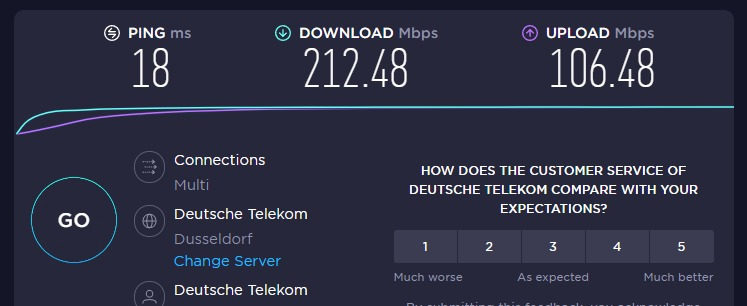
Many greetings
RiekMedia -
@riekmedia Nice ! I get speeds 350Mbps with my line and it’s residential !
Mark Cutting also advises organisations as a Fractional CIO, Fractional CISO and Executive Advisor, helping boards improve technology governance, cyber resilience and executive decision making. Learn more at Phenomlab Ltd
-
@riekmedia Nice ! I get speeds 350Mbps with my line and it’s residential !
@phenomlab said in Virgin Media Broadband:
350Mbps
I could have 1000Mbits down and 500Mbit up… but what do you need it for at home. For me the upload was important and the fixed ip because of my servers that are at home Synology
Many greetings
RiekMedia -
@phenomlab said in Virgin Media Broadband:
350Mbps
I could have 1000Mbits down and 500Mbit up… but what do you need it for at home. For me the upload was important and the fixed ip because of my servers that are at home Synology
@riekmedia Completely agree. I do work from home though, so the speed definitely helps.
-
@riekmedia said in Virgin Media Broadband:
This is my Speedcheck
Business line with fixed ip
Wow, nice!

-
@riekmedia said in Virgin Media Broadband:
This is my Speedcheck
Business line with fixed ip
Wow, nice!
-




Hello! It looks like you're interested in this conversation, but you don't have an account yet.
Getting fed up of having to scroll through the same posts each visit? When you register for an account, you'll always come back to exactly where you were before, and choose to be notified of new replies (either via email, or push notification). You'll also be able to save bookmarks and upvote posts to show your appreciation to other community members.
With your input, this post could be even better 💗
Register Login
