Skip to content

Want to use Sudonix themes ?
Chitchat
80 5 30.4k 1
  • wrote on last edited by
    #40

    here

    image.png

  • here

    image.png

    wrote on last edited by phenomlab
    #41

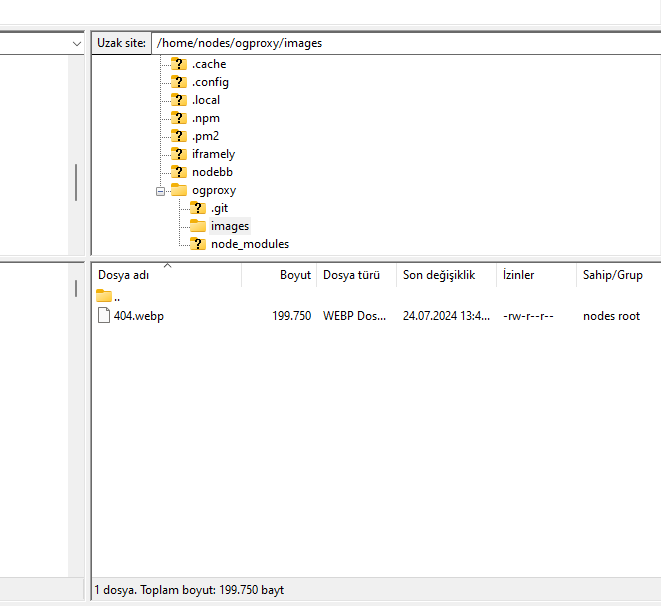
    @cagatay You’ll need to change the owner of that file as it cannot be read. It’s set currently to root but needs to be the same user as your NodeBB runs under. The images folder needs to be set the same way.

  • wrote on last edited by
    #42

    so i add file as user nodes then i add as root but two times not working correctly.

  • so i add file as user nodes then i add as root but two times not working correctly.

    wrote on last edited by
    #43

    @cagatay I can’t see the image at all. Here’s the output from curl

    HTTP/1.1 404 Not Found
    Server: nginx
    Date: Wed, 24 Jul 2024 11:42:02 GMT
    Content-Type: text/html
    Content-Length: 146
    Connection: keep-alive
    
  • wrote on last edited by
    #44

    i cant understand what i should to do,
    folder images i have, i added your file as user and root but not worked …

  • i cant understand what i should to do,
    folder images i have, i added your file as user and root but not worked …

    wrote on last edited by
    #45

    @cagatay I’ll have a look

  • wrote on last edited by
    #46

    thank you Mark.

  • thank you Mark.

    wrote on last edited by
    #47

    @cagatay Should be working now. I found the issue - your nginx.conf file was set incorrectly. It was set to

      location /images {
        index index.php index.htm index.html;
        root /homes/nodes/ogproxy;
      }
    

    Should have been

      location /images {
        index index.php index.htm index.html;
        root /home/nodes/ogproxy;
      }
    

    Basically, homes needed to be home 🙂

  • wrote on last edited by cagatay
    #48

    hahahah 🙂 it was very easy for you but for me not same 🙂

    thank you Mark for all.

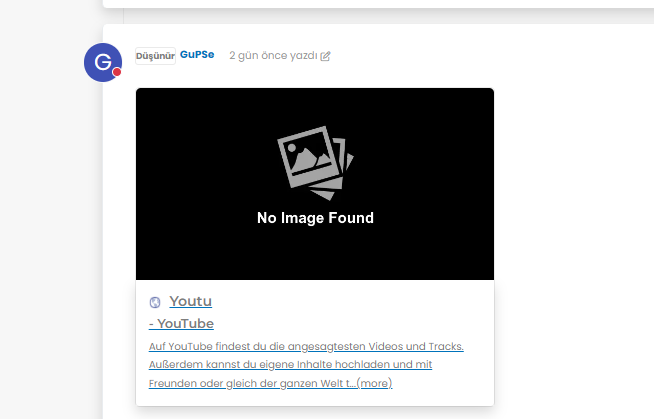
    but as i see there is a problem for image founding,
    8a7e2dc6-4afb-4f03-8a2c-7d5141816612-image.png

  • hahahah 🙂 it was very easy for you but for me not same 🙂

    thank you Mark for all.

    but as i see there is a problem for image founding,

    8a7e2dc6-4afb-4f03-8a2c-7d5141816612-image.png

    wrote on last edited by
    #49

    @cagatay It’s not an issue. The reason as to why OGProxy uses it’s own image is because the provided URL does not present one. This is for a variety of reasons - often to do with security and image scraping. If you want to embed YouTube videos, you should consider using nodebb-plugin-ns-embed for this purpose.

  • wrote on last edited by
    #50

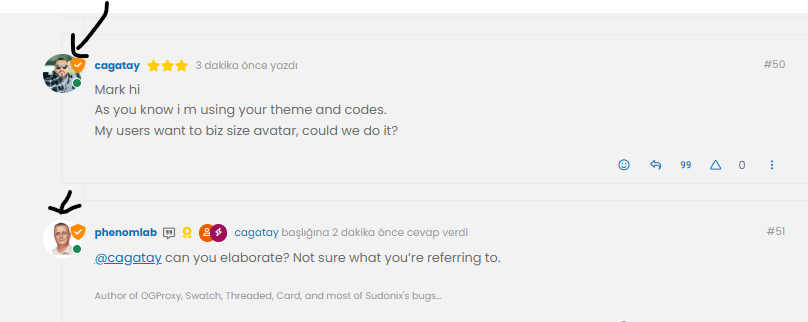
    Mark hi
    As you know i m using your theme and codes.
    My users want to biz size avatar, could we do it?

  • Mark hi
    As you know i m using your theme and codes.
    My users want to biz size avatar, could we do it?

    wrote on last edited by
    #51

    @cagatay can you elaborate? Not sure what you’re referring to.

  • wrote on last edited by
    #52

    size of avatar we can do it big one?

    image.png

  • size of avatar we can do it big one?

    image.png

    wrote on last edited by phenomlab
    #53

    @cagatay yes, that should be fairly simple to do, but what size? There may also be an impact to adjacent elements so I’d need an idea of the size you are looking for.

  • wrote on last edited by
    #54

    twice what it is now

  • twice what it is now

    wrote on last edited by
    #55

    @cagatay that’s probably on for desktop, but might look out of place when viewed on a mobile device.

  • wrote on last edited by
    #56

    could you do for mobile also?

  • could you do for mobile also?

    wrote on last edited by
    #57

    @cagatay yes, but I’d reiterate the concerns I’ve raised above in the sense that it may impact the flow of other elements.

    Essentially, this is fm going to be a relatively simple CSS change.

  • wrote on last edited by
    #58

    Mark hi,
    after upgrading 3.9 i have some problems with my web site.
    Pls see below photos of my problems;
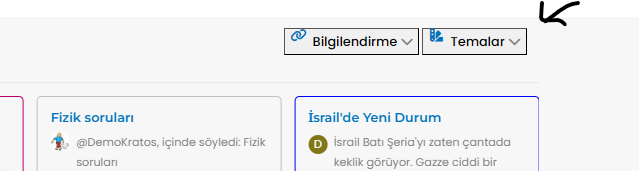
    image.png

    Also recent post and topics options i dont see my header
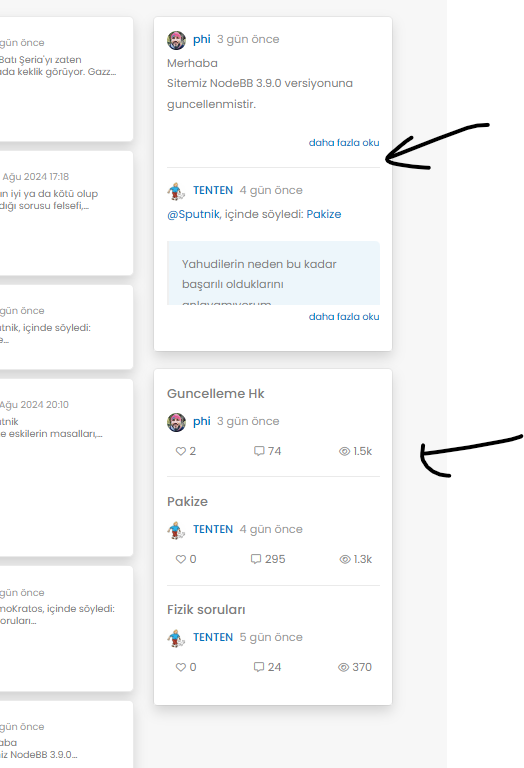
    image.png

  • Mark hi,
    after upgrading 3.9 i have some problems with my web site.
    Pls see below photos of my problems;

    image.png

    Also recent post and topics options i dont see my header

    image.png

    wrote on last edited by phenomlab
    #59

    @cagatay This will be because of the below changes

    https://community.nodebb.org/topic/18292/nodebb-3.9.0

    It’s related to the brand header section here

    <button type="button" class="btn-ghost-sm d-flex gap-2 dropdown-toggle" data-bs-toggle="dropdown"
    

    It needs to be changed to

    <button type="button" class="btn btn-ghost btn-sm d-flex gap-2 dropdown-toggle" data-bs-toggle="dropdown"
    

    I’ve made this change on your site, but you’ll also need some additional CSS. This ought to do it, and it’s been also applied to your forum.

    .btn-ghost {
        --bs-btn-hover-border-color: var(--bs-body-navbar-active);
        --bs-btn-active-bg: var(--bs-body-navbar-active);
    }

    

Related Topics
  • 4 Votes
    3 Posts
    2k Views
    crazycells
    thanks @DownPW ! this is definitely very helpful.
  • Nodebb and emails

    Solved Configure nodebb
    27
    5 Votes
    27 Posts
    10k Views
    phenomlab
    @Panda it will use SMTP. In all cases, I never use any plugin to send email. I’ll always send it raw.
  • Whitespace fixes in Nodebb

    Solved Customisation nodebb
    18
    2
    7 Votes
    18 Posts
    6k Views
    phenomlab
    @Panda Just circling back here with something of an update (which I think you’ll like). I’ve completely restructured the ranking system. There are now less ranks, with a higher point threshold to reach them. More importantly, if you reload the site, you’ll notice that the ranks are now icons. I also removed the “Author” badge, and made this a single icon, which (to me) looks much better.
  • 4 Votes
    8 Posts
    2k Views
    phenomlab
    @Panda said in Upgrade to NodeBB v3? 2BB or not 2BB, that is the question!: So although thats a plugin it has Widget like element and stopped working on the Theme change Which is normal based on the widgets being reset when you change themes.
  • Collapsing blockquotes on Harmony

    General nodebb harmony collapsible quotes
    2
    1
    2 Votes
    2 Posts
    980 Views
    phenomlab
    @dave1904 that’s a really good point actually. I know it was there previously on Persona, but you’re right - no such function exists on harmony. However, putting something in place to mimick the behaviour of Persona won’t be hard from the js standpoint, although I wonder if perhaps we should ask the NodeBB developers is this feature was overlooked?
  • Email validation NodeBB

    Bugs nodebb
    21
    3 Votes
    21 Posts
    10k Views
    phenomlab
    @Panda said in Email validation NodeBB: Did you configure that as a custom change to the usual quote icon. How do you do that? I notice on NodeBB site its a solid blue quotes Yes, I changed it. NodeBB by default users the free font awesome library whereas I use the pro (paid) version SDK have access to a wider set of icons, and at different thicknesses etc. The change of colour is just simple CSS.
  • Bootstrap Version

    Solved Customisation nodebb bootstrap
    8
    5 Votes
    8 Posts
    3k Views
    Madchatthew
    @phenomlab That will be nice once they have completed that. It will be interesting to see how long that takes. So for now I will use custom css to make it look the way I want. Frameworks just make things a little faster. Thanks @phenomlab
  • NodeBB Footer

    Solved Customisation footer nodebb
    10
    1 Votes
    10 Posts
    4k Views
    JAC
    @phenomlab said in NodeBB Footer: @jac and you. Hope all is well and you recover quickly Thanks pal