Skip to content

navigation menu panel on mobile
Solved Customisation
8 3 2.9k 1
  • wrote on last edited by
    #1

    Hi @phenomlab ,

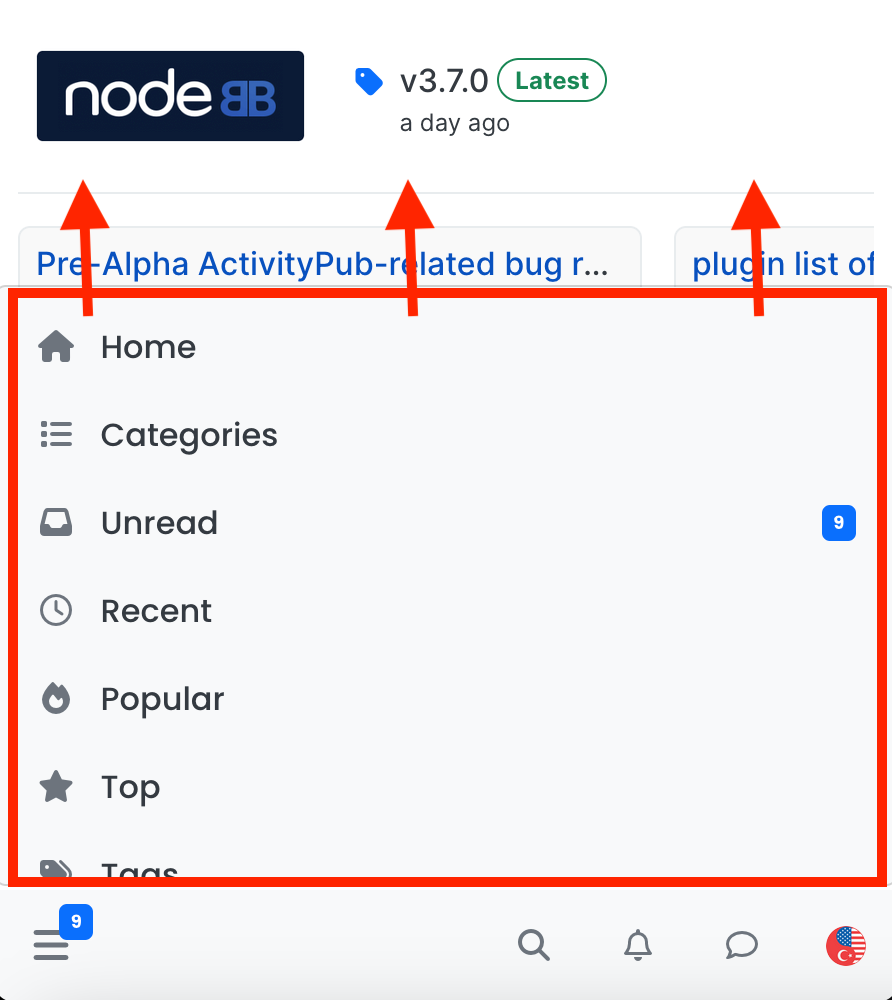
    I am trying to make this menu panel longer… What is the easiest way to do this?

    Screenshot 2024-03-07 at 19.03.19.png

  • wrote on last edited by
    #2

    Well, I figured it out and leaving the codes here in case others are interested…

    .bottombar-nav .navigation-dropdown, .bottombar-nav .user-dropdown {
      max-height: 80vh !important;
    }
    

    max height is coded to be 60vh, I changed it to 80vh…

  • crazycells crazycells has marked this topic as solved on
  • phenomlab phenomlab has marked this topic as solved on
  • wrote on last edited by
    #3

    @phenomlab I have just realized that you are already using this as 80vh in this forum… very smart move 🙂

  • wrote on last edited by
    #4

    You are on your way to becoming a coder. 🙂

  • wrote on last edited by
    #5

    hi @phenomlab , it is hard to browse the sudonix categories on mobile, fyi… I believe there is a bug on ios, but it is not fixed since it is not acting the same on android…

    https://community.nodebb.org/post/98459

  • hi @phenomlab , it is hard to browse the sudonix categories on mobile, fyi… I believe there is a bug on ios, but it is not fixed since it is not acting the same on android…

    https://community.nodebb.org/post/98459

    wrote on last edited by
    #6

    @crazycells I’ve disabled the auto hiding of the bottom bar here. Does this resolve the issue?

  • @crazycells I’ve disabled the auto hiding of the bottom bar here. Does this resolve the issue?

    wrote on last edited by
    #7

    @phenomlab much better… thanks…

    Additionally, somehow bottom menu bar of the sudonix looks smaller than the original? I would even suggest using slightly higher icons for people with sausage fingers lol
    Sausage Party GIF

  • @phenomlab much better… thanks…

    Additionally, somehow bottom menu bar of the sudonix looks smaller than the original? I would even suggest using slightly higher icons for people with sausage fingers lol

    Sausage Party GIF

    wrote on last edited by phenomlab
    #8

    @crazycells hmm. That’s odd. I haven’t made any changes from recollection but I could be wrong. I’ll need to check.

    EDIT - very strange. I honestly don’t recall adding the below CSS block to alter the bottom bar, but you’re right…

    .bottombar-nav {
      padding: 0px !important;
    }
    

    I’ve removed this so it reflects stock Harmony.


Did this solution help you?
Did you find the suggested solution useful? Support 💗 Sudonix with a coffee ☕
If your organisation needs deeper expertise around infrastructure, security, or technology leadership, learn more about Phenomlab Ltd. Many of the deeper technical guides behind Sudonix are published there.

Related Topics
  • 3 Votes
    1 Posts
    1k Views
    No one has replied
  • Opening links in nodebb widget

    Solved Configure nodebb
    6
    4 Votes
    6 Posts
    3k Views
    phenomlab
    A more efficient way of including this would be to not over complicate it and leverage a standard iframe (providing the CSP headers of the remote site permit this) like below <iframe src="https://www.classmarker.com/online-test/start/?quiz=gag66aea7922f0a5" width="700" height="800"></iframe> This works first time every time on your site as intended.
  • Header Menu After Upgrading V3.1.1

    Solved Customisation header nodebb
    2
    1
    2 Votes
    2 Posts
    1k Views
    phenomlab
    @cagatay this relates to a change the css classes used for the brand header meaning it will now float to the left instead of right. If you’d like to retain the original behavior, you can add this css class [data-widget-area="brand-header"] { justify-content: end; display: flex; } Further information here https://community.nodebb.org/topic/17090/manual-build-a-custom-header-in-harmony/19?_=1684069325296
  • NodeBB: Consent page

    Solved Configure nodebb consent
    16
    4 Votes
    16 Posts
    6k Views
    phenomlab
    @DownPW I still do not see any issues.
  • NodeBB Theme/Skin Switcher

    Solved Customisation nodebb
    38
    7 Votes
    38 Posts
    18k Views
    phenomlab
    @Teemberland great spot ! You should create a PR for that so they can include it in the official repository. Just be aware that any subsequent releases will overwrite your fix without the PR.
  • Post Style View

    Solved Customisation post style sudonix nodebb
    67
    2
    18 Votes
    67 Posts
    35k Views
    DownPW
    @cagatay Just add margin-left on the element like @phenomlab said to you : topic [component="post/parent"] { margin-left: 10px; } [image: aa08c62b-4223-4cba-8c0f-c73d50474c0d-image.png] Maybe @phenomlab have a better way
  • ineffecient use of space on mobile

    Solved Customisation nodebb
    10
    2
    7 Votes
    10 Posts
    4k Views
    crazycells
    @phenomlab Thanks
  • CSS Help on my Flarum

    Solved Customisation
    5
    2
    2 Votes
    5 Posts
    3k Views
    phenomlab
    @mike-jones Yes, you’ll typically see this type of behaviour if there is another style that has higher priority in the sense that yours will be overridden. Using !important will override the higher preference, but should be used sparingly rather than everywhere.