

-

@phenomlab Any idea why I get this message in any browser trying to access ntfy.mynodebb.com?:
ntfy.mynodebb.com uses a security technology called “HTTP Strict Transport Security (HSTS)”, by which Firefox is allowed to connect to the website only through secured connections. Therefore, no exception can be added for the website.
That’s my server.conf (part of):
server { server_name ntfy.mynodebb.com; location / { proxy_set_header X-Real-IP $remote_addr; proxy_set_header X-Forwarded-For $proxy_add_x_forwarded_for; proxy_set_header X-Forwarded-Proto $scheme; proxy_set_header Host $http_host; proxy_set_header X-NginX-Proxy true; proxy_pass http://127.0.0.1:2586; proxy_redirect off; proxy_http_version 1.1; proxy_set_header Upgrade $http_upgrade; proxy_set_header Connection "upgrade"; } listen 443 ssl; ssl_certificate /etc/letsencrypt/live/mynodebb-0001/fullchain.pem; ssl_certificate_key /etc/letsencrypt/live/mynodebb-0001/privkey.pem; include /etc/letsencrypt/options-ssl-nginx.conf; ssl_dhparam /etc/letsencrypt/ssl-dhparams.pem; } -
@phenomlab Any idea why I get this message in any browser trying to access ntfy.mynodebb.com?:
ntfy.mynodebb.com uses a security technology called “HTTP Strict Transport Security (HSTS)”, by which Firefox is allowed to connect to the website only through secured connections. Therefore, no exception can be added for the website.
That’s my server.conf (part of):
server {
    server_name ntfy.mynodebb.com;

    location / {
        proxy_set_header X-Real-IP $remote_addr;
        proxy_set_header X-Forwarded-For $proxy_add_x_forwarded_for;
        proxy_set_header X-Forwarded-Proto $scheme;
        proxy_set_header Host $http_host;
        proxy_set_header X-NginX-Proxy true;
        proxy_pass http://127.0.0.1:2586;
        proxy_redirect off;
        proxy_http_version 1.1;
        proxy_set_header Upgrade $http_upgrade;
        proxy_set_header Connection "upgrade";
    }

    listen 443 ssl;
    ssl_certificate /etc/letsencrypt/live/mynodebb-0001/fullchain.pem;
    ssl_certificate_key /etc/letsencrypt/live/mynodebb-0001/privkey.pem;
    include /etc/letsencrypt/options-ssl-nginx.conf;
    ssl_dhparam /etc/letsencrypt/ssl-dhparams.pem;
}
@dave1904 do you get the same if you prefix the site with https:// ?
Mark Cutting also advises organisations as a Fractional CIO, Fractional CISO and Executive Advisor, helping boards improve technology governance, cyber resilience and executive decision making. Learn more at Gratmore Ltd
-
-
@phenomlab yes, it will be forwarded in any case
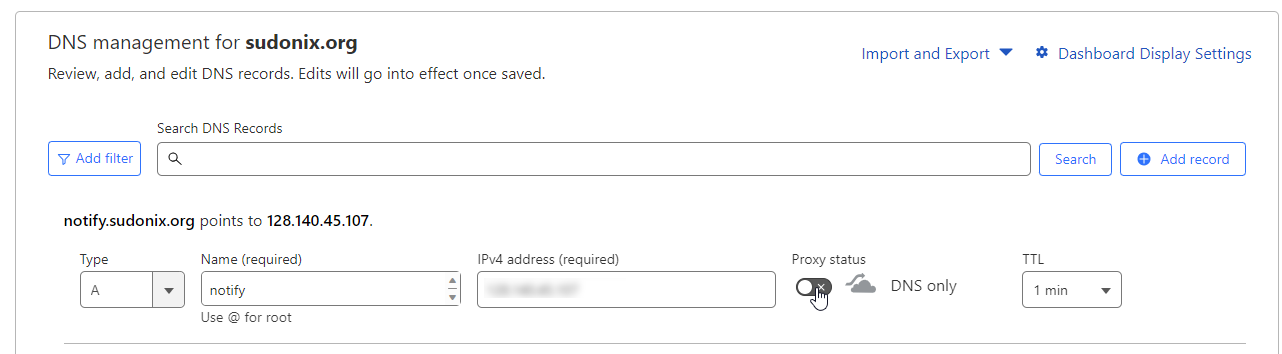
@dave1904 are you using Cloudflare?
Mark Cutting also advises organisations as a Fractional CIO, Fractional CISO and Executive Advisor, helping boards improve technology governance, cyber resilience and executive decision making. Learn more at Gratmore Ltd
-
@phenomlab No, I don’t. What I’m not sure of is the
root <path to your home directory>. I didn’t set this because I’m not sure where to point. -
@phenomlab No, I don’t. What I’m not sure of is the
root <path to your home directory>. I didn’t set this because I’m not sure where to point. -
-
I don’t have a folder for my subdomain. What I did was create a new A-Record on DigitalOcean. ntfy is installed on/etc/ntfy. Then I edited the config as in your example and configured nginx.
Yes, ntfy is serving.
-
-
Ohh yes it could be that I have to configure Certbot
-
-
It’s working now!
 Really missed that point

-
-
Is it possible to directly open the link associated with a notification? It feels like a detour to me to first open ntfy and then to click on the link. So basically click notification -> go to website
-
-
Ok, I have to check this again.
Chat message notifications aren’t working for me at the Moment, can you confirm this? -
@phenomlab Sorry, I was too tired this night.
I upgraded to @1.7.3 and it seems to work now. Only thing I’m still struggling with is to set my own icon in the ACP. It doesn’t seem to be changed here -
@phenomlab Sorry, I was too tired this night.
I upgraded to @1.7.3 and it seems to work now. Only thing I’m still struggling with is to set my own icon in the ACP. It doesn’t seem to be changed here
@dave1904 That relies on the “touch” icon being present - what do you have in
ACP ->
/admin/settings/general -> Touch Icon?Mark Cutting also advises organisations as a Fractional CIO, Fractional CISO and Executive Advisor, helping boards improve technology governance, cyber resilience and executive decision making. Learn more at Gratmore Ltd
-
@dave1904 That relies on the “touch” icon being present - what do you have in
ACP ->
/admin/settings/general -> Touch Icon?
@phenomlab There I have the path to the touch icon. In the ntfy plugin I used this path as full qualified domain
-
Hello! It looks like you're interested in this conversation, but you don't have an account yet.
Getting fed up of having to scroll through the same posts each visit? When you register for an account, you'll always come back to exactly where you were before, and choose to be notified of new replies (either via email, or push notification). You'll also be able to save bookmarks and upvote posts to show your appreciation to other community members.
With your input, this post could be even better 💗
Register Login