Error certification on virtualmin/Nginx
-
Hello mark
It’s strange this evening I no longer had SSL access to my dev environment
I had a zeroSSL CA certificate that was still valid until the end of the month.
I rebooted the machine as well.So I checked my DNS, Cloudflare, domain name, nginx service, all is OK.
I regenerated a certificate on zero SSL but I got an error saying there is a problem with the certificate (invalid certificate)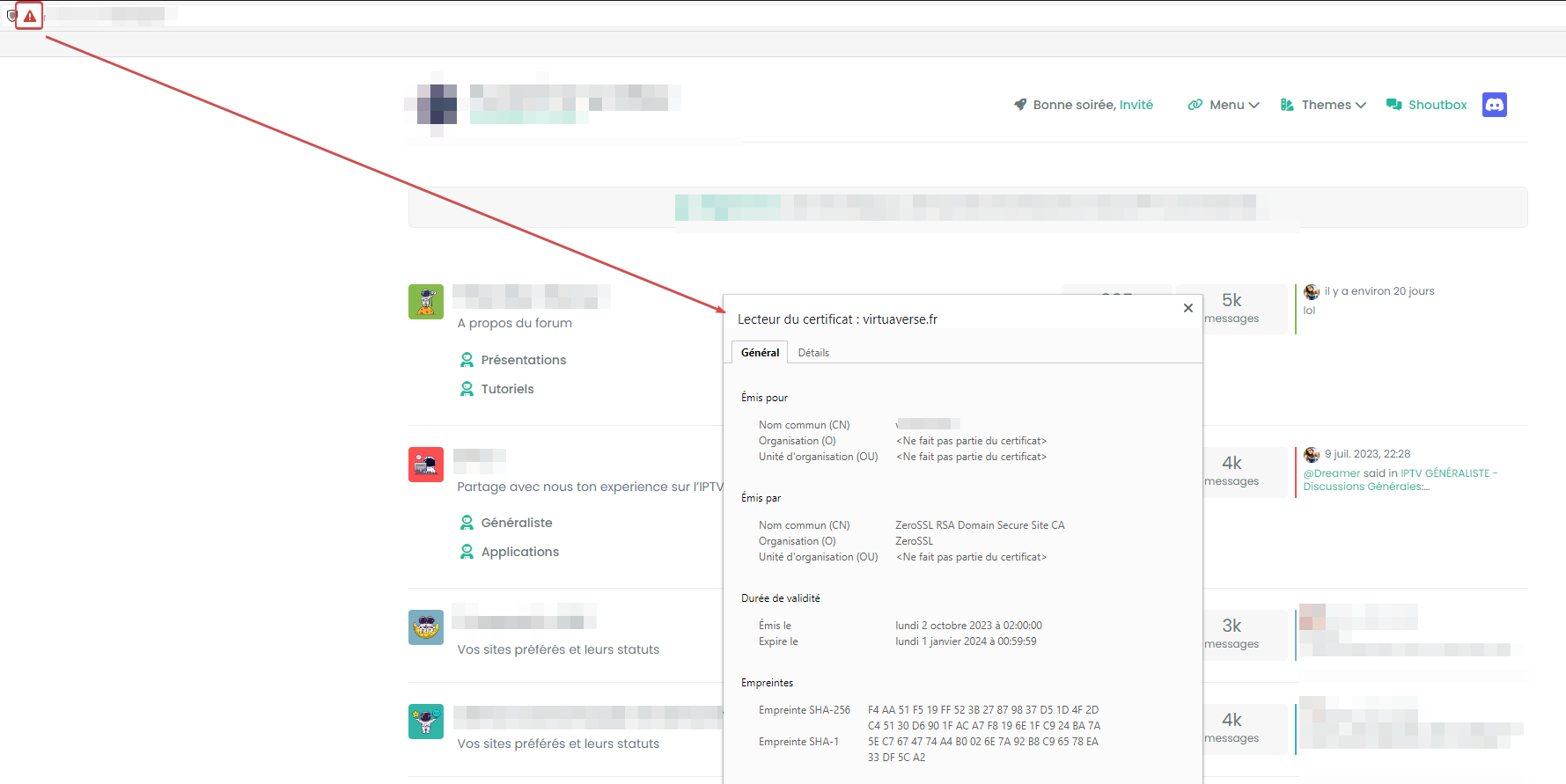
Your connection is not private
Malicious individuals may be trying to steal your personal information from the nodebbdev.xxxxxx.fr site (passwords, messages or credit card numbers, for example). Learn more
NET::ERR_CERT_COMMON_NAME_INVALID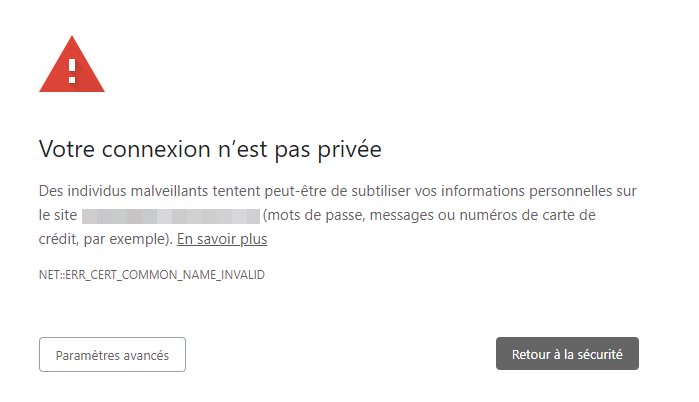
I can Bypass the message but that’s not the goal
-
Maybe better, I don’t know how anymore in Virtualmin, there was a bug with virtualmin/Let’s encrypt, I have to look for it
@DownPW yes, it’s a bit hit and miss, but certbot will work. Have a look at this
-
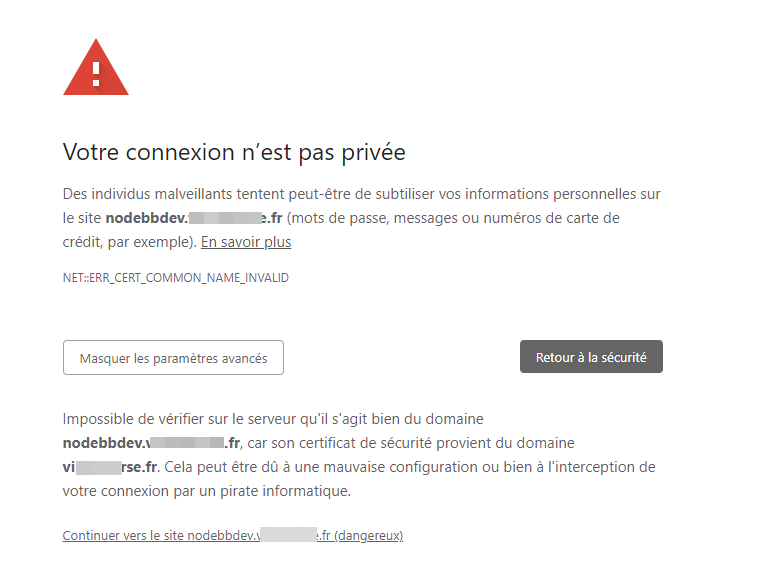
It is impossible to verify on the server that it is indeed the domain nodebbdev.test.fr, because its security certificate comes from the domain test.fr. This could be due to a misconfiguration or your connection being intercepted by a hacker.
Seems to be a configuration problem but don’t know where and why ?
I have installed the ZeroSSL CA certificate on domain and nodebbdev subdomain.PW and WS Spirit alive
-
It is impossible to verify on the server that it is indeed the domain nodebbdev.test.fr, because its security certificate comes from the domain test.fr. This could be due to a misconfiguration or your connection being intercepted by a hacker.
Seems to be a configuration problem but don’t know where and why ?
I have installed the ZeroSSL CA certificate on domain and nodebbdev subdomain.@DownPW it looks to me that the cert you are using isn’t a wildcard or for the subdomain.
-
d**n, maybe you are right because I’m on a ZeroSSL free account
But I can normally generate a certificate for all subdomains. I didn’t get this message before.PW and WS Spirit alive
-
d**n, maybe you are right because I’m on a ZeroSSL free account
But I can normally generate a certificate for all subdomains. I didn’t get this message before.@DownPW how are you generating the certificate?
-
PW and WS Spirit alive
-
@DownPW yes, you need a wildcard cert for the subdomain to work. Can you use LetsEncrypt?
-
Maybe better, I don’t know how anymore in Virtualmin, there was a bug with virtualmin/Let’s encrypt, I have to look for it
PW and WS Spirit alive
-
Maybe better, I don’t know how anymore in Virtualmin, there was a bug with virtualmin/Let’s encrypt, I have to look for it
@DownPW yes, it’s a bit hit and miss, but certbot will work. Have a look at this
-
I did like that from memory and select subdomain but I would like to take a longer time. Memorizing the certificate didn’t last long
sudo certbot --nginx -v
PW and WS Spirit alive
-
I did like that from memory and select subdomain but I would like to take a longer time. Memorizing the certificate didn’t last long
sudo certbot --nginx -v
@DownPW should be 90 days?
-
Yes I guess but it’s not much but it doesn’t matter. I don’t see any commands in the help
Should I delete the Zerro SSL certificate via Webmin before? Think yes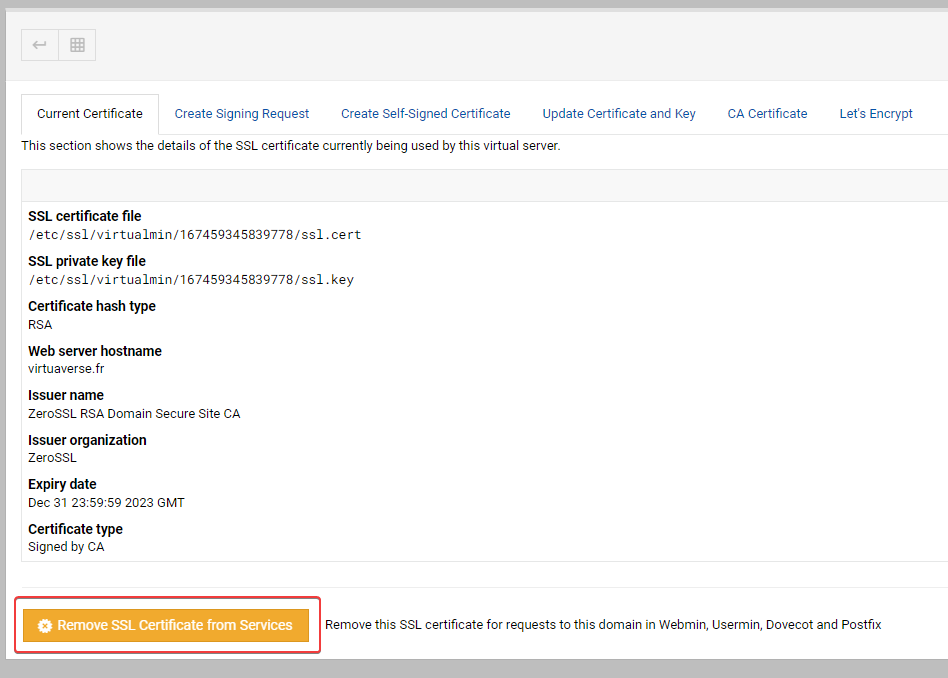
and this bug that we can’t regenerate a certificate without error via virtualmin is really annoying.
PW and WS Spirit alive
-
Yes I guess but it’s not much but it doesn’t matter. I don’t see any commands in the help
Should I delete the Zerro SSL certificate via Webmin before? Think yesand this bug that we can’t regenerate a certificate without error via virtualmin is really annoying.
@DownPW said in Error certification on virtualmin/Nginx:
Should I delete the Zerro SSL certificate via Webmin before? Think yes
Yes.
@DownPW said in Error certification on virtualmin/Nginx:
and this bug that we can’t regenerate a certificate without error via virtualmin is really annoying.
What is the error message?
-
I have regenerate with certbot, reload nginx without errors but it is still the zeroSSL certificate that appears in Webmin/Current Certificate
Do you want to expand and replace this existing certificate with the new
certificate?
- - - - - - - - - - - - - - - - - - - - - - - - - - - - - - - - - - - - - - - -
(E)xpand/(C)ancel: E
Renewing an existing certificate for virtuaverse.fr and 2 more domains

Successfully received certificate.
Certificate is saved at: /etc/letsencrypt/live/nodebbdev.xxx.fr/fullchain.pem
Key is saved at:         /etc/letsencrypt/live/nodebbdev.xxx.fr/privkey.pem
This certificate expires on 2023-12-31.
These files will be updated when the certificate renews.
Certbot has set up a scheduled task to automatically renew this certificate in the background.

Deploying certificate
Deploying Certificate to VirtualHost /etc/nginx/sites-enabled/xxx.fr.conf
Successfully deployed certificate for xxx.fr to /etc/nginx/sites-enabled/xxx.fr.conf
Deploying Certificate to VirtualHost /etc/nginx/sites-enabled/proxy.xxx.fr.conf
Successfully deployed certificate for proxy.xxx.fr to /etc/nginx/sites-enabled/proxy.xxx.fr.conf
Deploying Certificate to VirtualHost /etc/nginx/sites-enabled/nodebbdev.xxx.fr.conf
Successfully deployed certificate for nodebbdev.xxx.fr to /etc/nginx/sites-enabled/nodebbdev.xxx.fr.conf
Traffic on port 80 already redirecting to ssl in /etc/nginx/sites-enabled/xxx.fr.conf
Traffic on port 80 already redirecting to ssl in /etc/nginx/sites-enabled/proxy.xxx.fr.conf
Traffic on port 80 already redirecting to ssl in /etc/nginx/sites-enabled/nodebbdev.xxx.fr.conf
Your existing certificate has been successfully renewed, and the new certificate has been installed.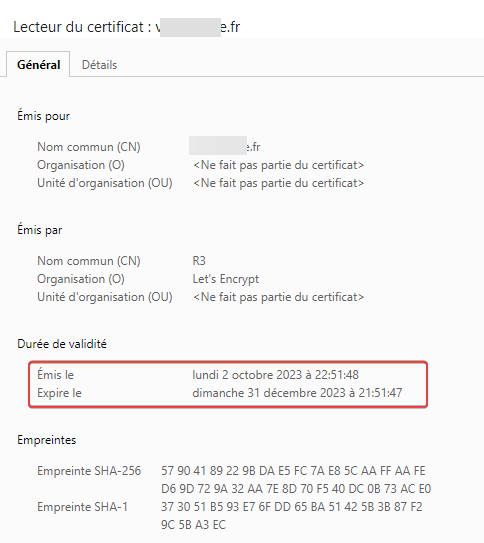
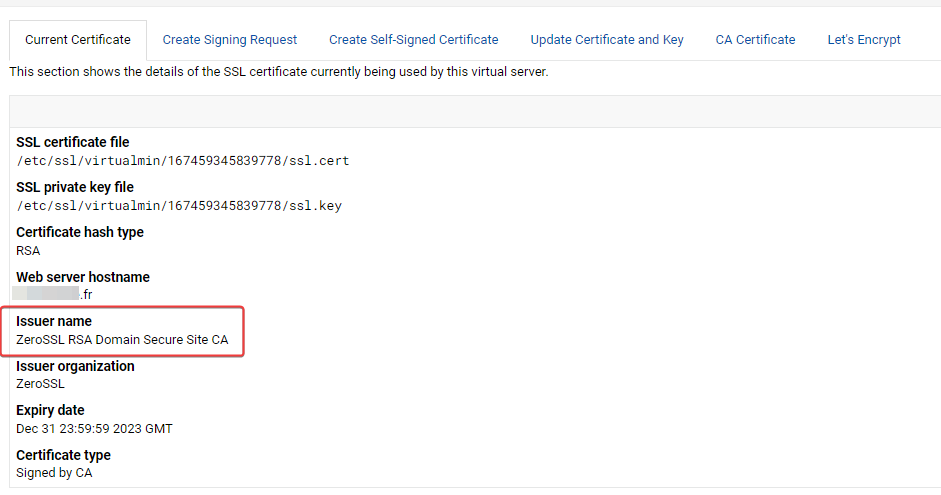
EDIT : Very Strange, i test again to regenerate certificat with let’s encrypt on virtualmin and that’s work and Current certificate is now OK on virtualmin.
it never worked for several months and it works now, very strange
PW and WS Spirit alive
-
I have regenerate with certbot, reload nginx without errors but it is still the zeroSSL certificate that appears in Webmin/Current Certificate
Do you want to expand and replace this existing certificate with the new
certificate?
- - - - - - - - - - - - - - - - - - - - - - - - - - - - - - - - - - - - - - - -
(E)xpand/(C)ancel: E
Renewing an existing certificate for virtuaverse.fr and 2 more domains

Successfully received certificate.
Certificate is saved at: /etc/letsencrypt/live/nodebbdev.xxx.fr/fullchain.pem
Key is saved at:         /etc/letsencrypt/live/nodebbdev.xxx.fr/privkey.pem
This certificate expires on 2023-12-31.
These files will be updated when the certificate renews.
Certbot has set up a scheduled task to automatically renew this certificate in the background.

Deploying certificate
Deploying Certificate to VirtualHost /etc/nginx/sites-enabled/xxx.fr.conf
Successfully deployed certificate for xxx.fr to /etc/nginx/sites-enabled/xxx.fr.conf
Deploying Certificate to VirtualHost /etc/nginx/sites-enabled/proxy.xxx.fr.conf
Successfully deployed certificate for proxy.xxx.fr to /etc/nginx/sites-enabled/proxy.xxx.fr.conf
Deploying Certificate to VirtualHost /etc/nginx/sites-enabled/nodebbdev.xxx.fr.conf
Successfully deployed certificate for nodebbdev.xxx.fr to /etc/nginx/sites-enabled/nodebbdev.xxx.fr.conf
Traffic on port 80 already redirecting to ssl in /etc/nginx/sites-enabled/xxx.fr.conf
Traffic on port 80 already redirecting to ssl in /etc/nginx/sites-enabled/proxy.xxx.fr.conf
Traffic on port 80 already redirecting to ssl in /etc/nginx/sites-enabled/nodebbdev.xxx.fr.conf
Your existing certificate has been successfully renewed, and the new certificate has been installed.
EDIT : Very Strange, i test again to regenerate certificat with let’s encrypt on virtualmin and that’s work and Current certificate is now OK on virtualmin.
it never worked for several months and it works now, very strange@DownPW go figure…
-
yep very very erratic
In any case, thank you for the support.
PW and WS Spirit alive
-
 undefined DownPW has marked this topic as solved on
-
@DownPW anytime

Hello! It looks like you're interested in this conversation, but you don't have an account yet.
Getting fed up of having to scroll through the same posts each visit? When you register for an account, you'll always come back to exactly where you were before, and choose to be notified of new replies (either via email, or push notification). You'll also be able to save bookmarks and upvote posts to show your appreciation to other community members.
With your input, this post could be even better 💗
Register LoginDid this solution help you?
Related Topics
-
configure ghost and wordpress combo
Moved Solved WordPress -
-
-
-
-
-
Email issue (virturalmin)
Solved Hosting -