Skip to content

Nodebb icon on google page

Solved Customisation
9 3 3.7k 1
  • wrote on last edited by
    #1

    When I to google site on my browser, there are some icons of sites previously visited.
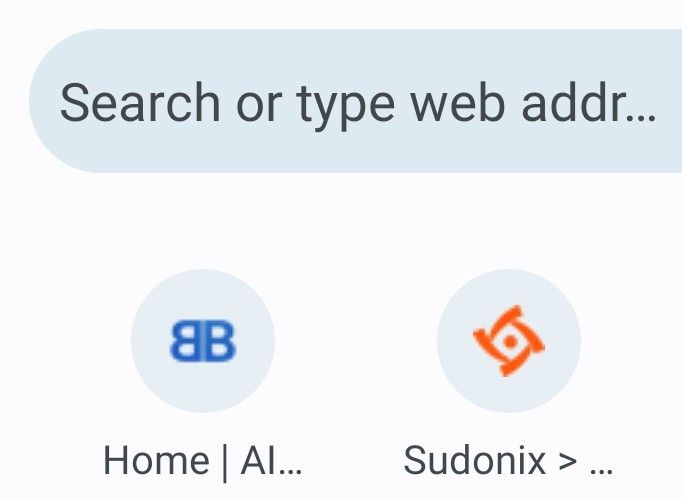
    Screenshot_20230801_211949_Chrome~2.jpg

    I cant get the default nodeBB icon to change here, even though I uploaded a favicon.
    In the Admin menu, is this icon called something else?

  • When I to google site on my browser, there are some icons of sites previously visited.
    Screenshot_20230801_211949_Chrome~2.jpg

    I cant get the default nodeBB icon to change here, even though I uploaded a favicon.
    In the Admin menu, is this icon called something else?

    wrote on last edited by
    #2
  • wrote on last edited by
    #3

    @phenomlab its enough that just add admin panel ico area? or we should add css also codes?

  • @phenomlab its enough that just add admin panel ico area? or we should add css also codes?

    wrote on last edited by
    #4

    @cagatay It should be, yes. You don’t need any CSS though…

  • wrote on last edited by
    #5

    i can not understand mine also shown as nodebb fav
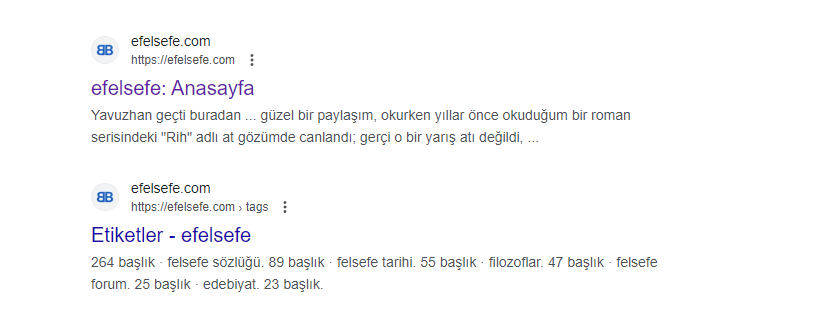
    image.png

  • i can not understand mine also shown as nodebb fav

    image.png

    wrote on last edited by
    #6

    @cagatay I too am confused still
    Although I saw the results of the favicon checker that phenomlab posted
    Im confused what dimension favicon will tick all the boxes
    It’s not made clear in Admin panel what to upload

  • wrote on last edited by phenomlab
    #7

    Hi Both,

    Can you please ensure that the favicon is present in both locations

    /path/to/nodebb/public/favicon.ico
    /path/to/nodebb/public/uploads/system/favicon.ico
    

    Then restart NodeBB? The files need to be present in both paths, and should be the below
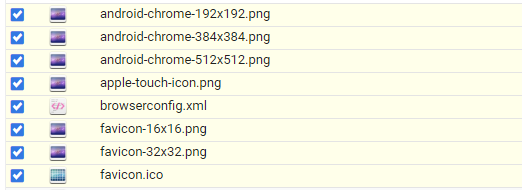
    image.png

    @Panda I’m aware that your site is hosted, so you are going to be at the mercy of NodeBB themselves here.

  • Hi Both,

    Can you please ensure that the favicon is present in both locations

    /path/to/nodebb/public/favicon.ico
    /path/to/nodebb/public/uploads/system/favicon.ico
    

    Then restart NodeBB? The files need to be present in both paths, and should be the below

    image.png

    @Panda I’m aware that your site is hosted, so you are going to be at the mercy of NodeBB themselves here.

    wrote on last edited by
    #8

    @phenomlab yes, so this is a flaw then, if successful Favicon can’t be uploaded from the Admin panel?
    Worth me raising on NodeBB forum?

  • Panda Panda has marked this topic as solved on
  • @phenomlab yes, so this is a flaw then, if successful Favicon can’t be uploaded from the Admin panel?
    Worth me raising on NodeBB forum?

    wrote on last edited by
    #9

    @Panda It’s been raised multiple times, but only for the open source version, and not hosted.


Did this solution help you?
Did you find the suggested solution useful? Support 💗 Sudonix with a coffee ☕
If your organisation needs deeper expertise around infrastructure, security, or technology leadership, learn more about Phenomlab Ltd. Many of the deeper technical guides behind Sudonix are published there.

Related Topics
  • Custom Page - nodebb

    Solved Customisation custom-pages nodebb
    13
    2
    5 Votes
    13 Posts
    3k Views
    DownPW
    I’m happy to see this
  • NodeBB socket with CloudFlare

    Solved Performance socket cloudflare nodebb
    24
    3 Votes
    24 Posts
    14k Views
    DownPW
    Solved. Tuto here and here
  • NodeBB: Favicon upload issue

    Solved Configure nodebb favicon
    12
    1
    3 Votes
    12 Posts
    4k Views
    mventures
    @phenomlab I am on a Mac, so I used the “Option + Command + I”, and then performed the steps. It loaded my favicon! I checked on Firefox which I haven’t used before, and it showed my favicon also! That’s fantastic and thank you for the help!
  • Forum Icons NodeBB

    Solved Customisation icons forum nodebb
    13
    0 Votes
    13 Posts
    5k Views
    phenomlab
    @cagatay That matches what I see [image: 4f0f858d-9812-42b1-9f61-ffb13d31dccd-image.png]
  • ineffecient use of space on mobile

    Solved Customisation nodebb
    10
    2
    7 Votes
    10 Posts
    4k Views
    crazycells
    @phenomlab Thanks
  • NodeBB 1.19.3

    Solved Performance nodebb 1.19.3 performance
    33
    4 Votes
    33 Posts
    16k Views
    DownPW
    @phenomlab I find the problem Mark The error message indicated this path : http://localhost:4567/assets/plugins/nodebb-plugin-emoji/emoji/styles.css?v=6983dobg16u I change the path url on config.json [image: 47bacc80-f141-41e4-a261-3f8d650cc6f6-image.png] And all it’s good Weird, I didn’t have to change that path before 1.19.3 But this does not prevent the problem from a clean install with Emoji Plugin EDIT: After test, that resolv the problem installation for 1.18.x but not for 1.19.x (I have other error message when I run ./nodebb Setup For resume: NodeJS 16_x with 1.18.x is ok
  • [NODEBB] Scroll Button

    Solved Customisation css javascript html scroll button
    7
    1
    0 Votes
    7 Posts
    3k Views
    phenomlab
    @downpw ooops. Forgot that. Thanks for adding.
  • Customising NodeBB

    Locked Customisation nodebb

    3
    0 Votes
    3 Posts
    3k Views
    phenomlab
    Closing this thread as a duplicate of https://sudonix.com/topic/12/nodebb-customisation