Skip to content

fading in /tags page
Solved Customisation
32 3 13.5k 1
  • @phenomlab

    no no my god, not constantly animation !!

    If I hover over the logo, the animation triggers as currently, continues and ends even if I remove the mouse from the logo.

    That’s what’s happening here on Sudonix.

    wrote on last edited by phenomlab
    #18

    @DownPW I see what you mean. The reason for this is that you are calling both rotate180 and rotate0 which are two separate effects.

       animation-name: rotate180, rotate0;
    

    You could remove rotate0 from this section and that will stop the animation as soon as the mouseLeave event is triggered in the DOM (in other words, as soon as you remove the hover)

       animation-name: rotate180;
    
  • wrote on last edited by DownPW
    #19

    hmm not work

    can you provide your CSS code and keyframe for I see it ?
    On sudonix, the animation stop and restart when we leave the mouse over.

  • hmm not work

    can you provide your CSS code and keyframe for I see it ?
    On sudonix, the animation stop and restart when we leave the mouse over.

    wrote on last edited by phenomlab
    #20

    @DownPW it’s here
    https://sudonix.com/post/3590

    The exact CSS I have here is

    @keyframes rotate180 {
            from {
              transform: rotate(0deg);
            }
           
            to {
              transform: rotate(180deg);
            }
          }
           
          @keyframes rotate0 {
            from {
              transform: rotate(180deg);
            }
           
            to {
              transform: rotate(0deg);
            }
          }
        .forum-logo:hover {
            transform: rotate(180deg);
        }
        .hover {
            transform: rotate(180deg);
        }
  • phenomlab phenomlab forked this topic on
  • wrote on last edited by
    #21

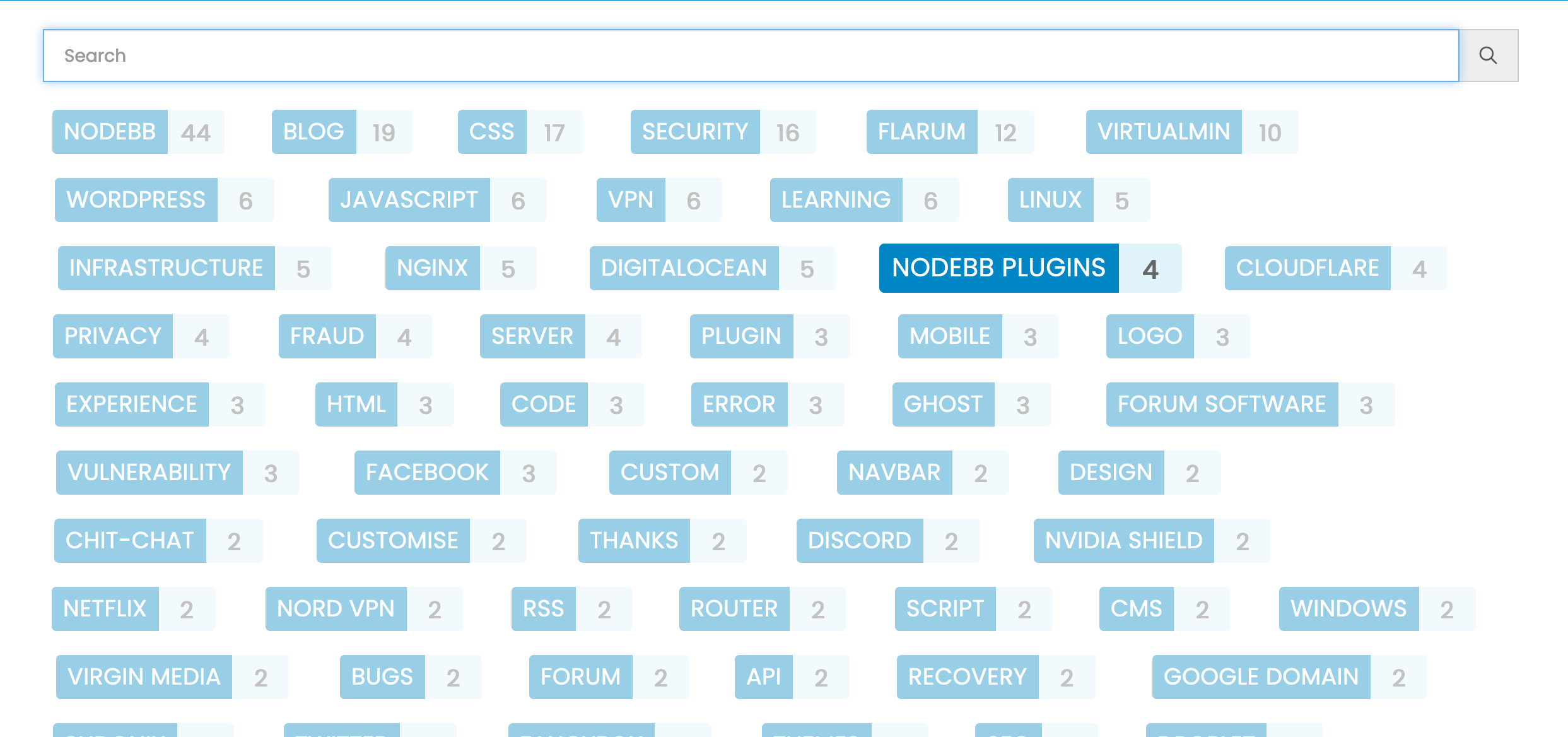
    The tags page looked better before, it does not look good when it is very “ordered”. @phenomlab do you have any intention to change that page in harmony thema?

  • The tags page looked better before, it does not look good when it is very “ordered”. @phenomlab do you have any intention to change that page in harmony thema?

    wrote on last edited by
    #22

    @crazycells I must admit, I’ve neglected the tags page somewhat, but I do agree with you - it’s pretty dull and could do with some magic.

  • The tags page looked better before, it does not look good when it is very “ordered”. @phenomlab do you have any intention to change that page in harmony thema?

    wrote on last edited by
    #23

    @crazycells just for you…

    63332828.jpg

  • @crazycells just for you…

    63332828.jpg

    wrote on last edited by
    #24

    @phenomlab nice 😄 this looks very good…

    On a side note, I have been just watching/listening Doc and Marty’s adventures in the background and then I see this 🤣

    Back To GIF

  • wrote on last edited by
    #25

    @phenomlab can you please share the CSS codes?

  • @phenomlab can you please share the CSS codes?

    wrote on last edited by phenomlab
    #26

    @crazycells Of course… You did ask me for these 🙂

    .tags:not([component="topic/tags"]) a[href*="/tags/"] {
        border: 1px solid var(--bs-border-color);
        border-radius: 0.375rem;
        margin: 8px;
        width: 145px;
        background: var(--bs-body-navbar);
    }
    /* SIBLING FADE: fade out siblings around a hovered item */
    
    .tag-list { visibility: hidden; }
    /* Prevents :hover from triggering in the gaps between items */
    
    .tag-list > * { visibility: visible; }
    /* Brings the child items back in, even though the parent is `hidden` */
    
    .tag-list > * { transition: opacity 150ms linear 100ms, transform 150ms ease-in-out 100ms; }
    /* Makes the fades smooth with a slight delay to prevent jumps as the mouse moves between items */
    
    .tag-list:hover > * { opacity: 0.4; transform: scale(0.9); }
    /* Fade out all items when the parent is hovered */
    
    .tag-list > *:hover { opacity: 1; transform: scale(1); transition-delay: 0ms, 0ms; }
    /* Fade in the currently hovered item */
    
    .tags a[href*="/tags/"] .tag-item {
        border-bottom: 4px solid var(--bs-border-color) !important;
    }
    
  • wrote on last edited by
    #27

    And the magic happens 🙂

    Same effect as on the V2 but I love it ^^

    Magic Unicorn GIF

  • And the magic happens 🙂

    Same effect as on the V2 but I love it ^^

    Magic Unicorn GIF

    wrote on last edited by
    #28

    @DownPW Thanks, and welcome to “Grand Master” status 🙂

  • wrote on last edited by
    #29

    Ohhh yes 👌

  • wrote on last edited by
    #30

    hi mark

    just a small note

    seems to that code break tags on topic header :
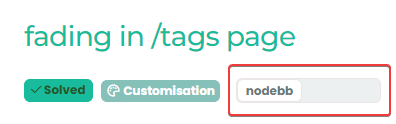
    image.png

  • hi mark

    just a small note

    seems to that code break tags on topic header :

    image.png

    wrote on last edited by phenomlab
    #31

    @DownPW Yes, I am aware. Will address shortly.

    EDIT - replace

    .tags a[href*="/tags/"] {
        border: 1px solid var(--bs-border-color);
        border-radius: 0.375rem;
        margin: 8px;
        width: 145px;
        background: var(--bs-body-navbar);
    }
    

    With

    .tags:not([component="topic/tags"]) a[href*="/tags/"] {
        border: 1px solid var(--bs-border-color);
        border-radius: 0.375rem;
        margin: 8px;
        width: 145px;
        background: var(--bs-body-navbar);
    }
    

    Updating original post

  • wrote on last edited by
    #32

    Fix working perfectly 👍 🙂


Did this solution help you?
Did you find the suggested solution useful? Support 💗 Sudonix with a coffee ☕
If your organisation needs deeper expertise around infrastructure, security, or technology leadership, learn more about Phenomlab Ltd. Many of the deeper technical guides behind Sudonix are published there.

Related Topics
  • Please help me, I can't install nodebb

    Locked Solved Customisation nodebb
    7
    5 Votes
    7 Posts
    2k Views
    phenomlab
    Installation completed, verified, and tested. Correct installation methodology is below https://docs.nodebb.org/installing/os/ubuntu/
  • 14 Votes
    17 Posts
    5k Views
    DownPW
    No problem dude ! I hope you have a good vacation. Enjoy your loved ones!
  • Page control arrows for PWA

    Solved Customisation nodebb
    27
    25 Votes
    27 Posts
    15k Views
    phenomlab
    @crazycells it is, yes - I think I’ll leave it as there is no specific PWA CSS classes I know of. Well, you could use something like the below, but this means multiple CSS files for different operating systems. /** * Determine the mobile operating system. * This function returns one of 'iOS', 'Android', 'Windows Phone', or 'unknown'. * * @returns {String} */ function getMobileOperatingSystem() { var userAgent = navigator.userAgent || navigator.vendor || window.opera; // Windows Phone must come first because its UA also contains "Android" if (/windows phone/i.test(userAgent)) { return "Windows Phone"; } if (/android/i.test(userAgent)) { return "Android"; } if (/iPad|iPhone|iPod/.test(userAgent) && !window.MSStream) { return "iOS"; } return "unknown"; // return “Android” - one should either handle the unknown or fallback to a specific platform, let’s say Android } Once you’re in that rabbit hole, it’s impossible to get out of it.
  • Collapsing blockquotes on Harmony

    General nodebb harmony collapsible quotes
    2
    1
    2 Votes
    2 Posts
    980 Views
    phenomlab
    @dave1904 that’s a really good point actually. I know it was there previously on Persona, but you’re right - no such function exists on harmony. However, putting something in place to mimick the behaviour of Persona won’t be hard from the js standpoint, although I wonder if perhaps we should ask the NodeBB developers is this feature was overlooked?
  • Header Menu After Upgrading V3.1.1

    Solved Customisation header nodebb
    2
    1
    2 Votes
    2 Posts
    1k Views
    phenomlab
    @cagatay this relates to a change the css classes used for the brand header meaning it will now float to the left instead of right. If you’d like to retain the original behavior, you can add this css class [data-widget-area="brand-header"] { justify-content: end; display: flex; } Further information here https://community.nodebb.org/topic/17090/manual-build-a-custom-header-in-harmony/19?_=1684069325296
  • Title on homepage of nodebb forum

    Solved Customisation nodebb
    2
    1 Votes
    2 Posts
    2k Views
    phenomlab
    @eveh Welcome board The code you are referring to is custom written as no such functionality exists under NodeBB. However, adding the functionality is relatively trivial. Below are the required steps Navigate to /admin/appearance/customise#custom-header Add the below code to your header, and save once completed <ol id="mainbanner" class="breadcrumb"><li id="addtext">Your Title Goes Here</li></ol> Navigate to /admin/appearance/customise#custom-js and add the below code, then save $(document).ready(function() { $(window).on('action:ajaxify.end', function(data) { // Initialise mainbanner ID, but hide it from view $('#mainbanner').hide(); var pathname = window.location.pathname; if (pathname === "/") { $("#addtext").text("Your Title"); $('#mainbanner').show(); } else {} // If we want to add a title to a sub page, uncomment the below and adjust accordingly //if (pathname === "/yourpath") { //$("#addtext").text("Your Title"); //$('#mainbanner').show(); //} }); }); Navigate to /admin/appearance/customise#custom-css and add the below CSS block .breadcrumb { right: 0; margin-right: auto; text-align: center; background: #0086c4; color: #ffffff; width: 100vw; position: relative; margin-left: -50vw; left: 50%; top: 50px; position: fixed; z-index: 1020; } Note, that you will need to adjust your CSS code to suit your own site / requirements.
  • background color of the footer area

    Solved Customisation nodebb
    7
    1
    7 Votes
    7 Posts
    4k Views
    crazycells
    @phenomlab thank you very much
  • nodebb dropdown menu

    Solved Configure nodebb
    5
    1
    0 Votes
    5 Posts
    3k Views
    JAC
    @phenomlab said in nodebb dropdown menu: @kurulumu-net You set it like the below example taken from this site [image: aae36790-3257-4bb2-ad5a-0d744309876a-image.png] Which presents this [image: 77f47260-2941-4afe-9614-8e17dcfc8c19-image.png] Very interesting… I actually thought this wasn’t possible, as I remember it being asked in the NodeBB forum. Is this something new that’s been implemented? I’ll 100% be doing that when I’m on the laptop over the weekend.