Skip to content

Email validation NodeBB

Bugs
21 2 10.1k 1
  • @phenomlab I use Zoho mail service.

    Back to editing the text in the signup messages. I installed the plugin but its confusing.
    It shows two boxes:-

    1. TRANSLATION CUSTOMIZATIONS
      Language Namespace Key Original Replacement
      English (United Kingdom/Canada) (en-GB)

    2. TEMPLATE CUSTOMIZATIONS

    Should I be using 1) or 2) ?
    I tried clicking on everything but cant seem to get the Text that you get at signup to edit it

    wrote on last edited by
    #8

    @Panda should be 1 as you want to modify the text being used.

  • @phenomlab I use Zoho mail service.

    Back to editing the text in the signup messages. I installed the plugin but its confusing.
    It shows two boxes:-

    1. TRANSLATION CUSTOMIZATIONS
      Language Namespace Key Original Replacement
      English (United Kingdom/Canada) (en-GB)

    2. TEMPLATE CUSTOMIZATIONS

    Should I be using 1) or 2) ?
    I tried clicking on everything but cant seem to get the Text that you get at signup to edit it

    wrote on last edited by
    #9

    @Panda said in Email validation NodeBB:

    I use Zoho mail service

    Can you confirm if you have correct DNS records for spf, dmarc and dkim configured on your domain?

  • @Panda said in Email validation NodeBB:

    I use Zoho mail service

    Can you confirm if you have correct DNS records for spf, dmarc and dkim configured on your domain?

    wrote on last edited by Panda
    #10

    @phenomlab I dont know what spf, dmarc and dkim are so I guess not!
    Do I need them?

    By the way I tried to upvote your response in regard to using option 1) - its worked now, but you already have 99 upvotes! Upvote count is at 99 for all posts?!

  • @phenomlab I dont know what spf, dmarc and dkim are so I guess not!
    Do I need them?

    By the way I tried to upvote your response in regard to using option 1) - its worked now, but you already have 99 upvotes! Upvote count is at 99 for all posts?!

    wrote on last edited by
    #11

    @Panda yes, as without them, virtually none of your email will be delivered correctly. At best, the email may land up in spam at the recipient end, but at worst, the emails will simply be deleted by the recipient server.

  • wrote on last edited by Panda
    #12

    where do I even go to set those things?
    P.S. Please see my edit about all posts on this forum showing at +99 votes, is that just myside or a bug?

  • where do I even go to set those things?
    P.S. Please see my edit about all posts on this forum showing at +99 votes, is that just myside or a bug?

    wrote on last edited by
    #13

    @Panda I think that’s your side as someone else has just upvoted without issue. Can you try in an incognito session as let me know if the issue remains ?

    You’d need to set those records in your domain’s DNS.

  • wrote on last edited by
    #14

    Yes all posts in this thread showing ^99 even in incognito on laptop. But it is fine (showing 0) on my mobile

  • Yes all posts in this thread showing ^99 even in incognito on laptop. But it is fine (showing 0) on my mobile

    wrote on last edited by
    #15

    @Panda very strange. I’ll need to check that 😱

  • Yes all posts in this thread showing ^99 even in incognito on laptop. But it is fine (showing 0) on my mobile

    wrote on last edited by
    #16

    @Panda I can’t replicate this issue at all on 3 PC’s and 6 different browsers… 😕

  • wrote on last edited by Panda
    #17

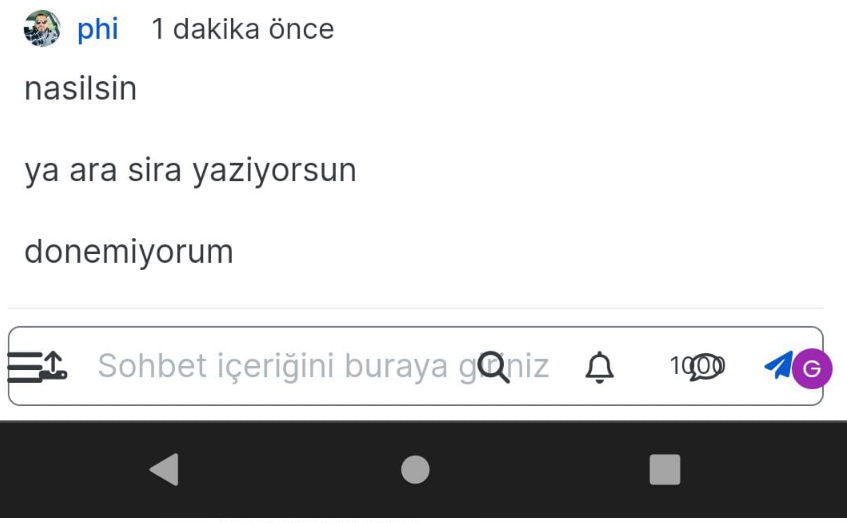
    Screenshot below, happening on my windows laptop, windows PC, but not mobile

  • wrote on last edited by Panda
    #18

    99.png

  • wrote on last edited by
    #19

    @Panda 🤭 that “99” you are seeing is actually a quote symbol. Click it and see what happens…

  • @Panda 🤭 that “99” you are seeing is actually a quote symbol. Click it and see what happens…

    wrote on last edited by Panda
    #20

    @phenomlab said in Email validation NodeBB:

    @Panda 🤭 that “99” you are seeing is actually a quote symbol. Click it and see what happens…

    Oh! Silly me lol
    Did you configure that as a custom change to the usual quote icon. How do you do that?
    I notice on NodeBB site its a solid blue quotes

  • @phenomlab said in Email validation NodeBB:

    @Panda 🤭 that “99” you are seeing is actually a quote symbol. Click it and see what happens…

    Oh! Silly me lol
    Did you configure that as a custom change to the usual quote icon. How do you do that?
    I notice on NodeBB site its a solid blue quotes

    wrote on last edited by
    #21

    @Panda said in Email validation NodeBB:

    Did you configure that as a custom change to the usual quote icon. How do you do that?
    I notice on NodeBB site its a solid blue quotes

    Yes, I changed it. NodeBB by default users the free font awesome library whereas I use the pro (paid) version SDK have access to a wider set of icons, and at different thicknesses etc. The change of colour is just simple CSS.


Related Topics
  • nodebb error logs

    Bugs nodebb
    6
    2
    4 Votes
    6 Posts
    2k Views
    ahmed
    I just wanted to ask because I don’t have much knowledge about the new installation. Thank you for the explanatory answer.
  • Nodebb 3.2.2

    Bugs nodebb 3.2.2
    27
    1
    11 Votes
    27 Posts
    11k Views
    phenomlab
    @crazycells yes, I’ve just seen that and modified the post. It seems to only happen if you have a space between the “greater than” symbol and the actual text. Clearly a markdown thing.
  • Bug in Nodebb route when clicking title

    Moved Configure nodebb
    3
    2 Votes
    3 Posts
    1k Views
    Panda
    Ah silly me, thanks for finding that!
  • Nodebb design

    Solved General nodebb
    2
    1 Votes
    2 Posts
    1k Views
    phenomlab
    @Panda said in Nodebb design: One negative is not being so good for SEO as more Server side rendered forums, if web crawlers dont run the JS to read the forum. From recollection, Google and Bing have the capability to read and process JS, although it’s not in the same manner as a physical person will consume content on a page. It will be seen as plain text, but will be indexed. However, it’s important to note that Yandex and Baidu will not render JS, although seeing as Google has a 90% share of the content available on the web in terms of indexing, this isn’t something you’ll likely lose sleep over. @Panda said in Nodebb design: The “write api” is preferred for server-to-server interactions. This is mostly based around overall security - you won’t typically want a client machine changing database elements or altering data. This is why you have “client-side” which could be DOM manipulation etc, and “server-side” which performs more complex operations as it can communicate directly with the database whereas the client cannot (and if it can, then you have a serious security flaw). Reading from the API is perfectly acceptable on the client-side, but not being able to write. A paradigm here would be something like SNMP. This protocol exists as a UDP (UDP is very efficient, as it is “fire and forget” and does not wait for a response like TCP does) based service which reads performance data from a remote source, thus enabling an application to parse that data for use in a monitoring application. In all cases, SNMP access should be “RO” (Read Only) and not RW (Read Write). It is completely feasible to assume complete control over a firewall for example by having RW access to SNMP and then exposing it to the entire internet with a weak passphrase. You wouldn’t do it (at least, I hope you wouldn’t) and the same ethic applies to server-side rendering and the execution of commands.
  • Can you adjust Admin settings on your NodeBB?

    Bugs nodebb
    5
    0 Votes
    5 Posts
    2k Views
    phenomlab
    @Panda as, yes, now I understand and that makes 100% sense. It means those who get down voted can still have an opinion and use common services. And yes, you’re right. Rather than down vote, just ignore if you don’t agree.
  • NodeBB v3 Android Problem

    Solved Configure nodebb android
    4
    4 Votes
    4 Posts
    2k Views
    cagatay
    thank you fixed.
  • NodeBB v3

    Announcements nodebb v3 nodebb
    2
    3 Votes
    2 Posts
    1k Views
    phenomlab
    @cagatay JS will work fine - no changes there, and there are no plans to drop support for jQuery. More of an issue is the CSS - for which there are quite a few breaking changes. Keep an eye on sudonix.dev (my development site) where you can see progress in relation to how I am tackling the compatibility issues.
  • How to downgrade plugin version on NodeBB

    Solved Customisation downgrade nodebb
    11
    3 Votes
    11 Posts
    4k Views
    phenomlab
    @cagatay no problems