Skip to content

CSS Help on my Flarum

Solved Customisation
5 2 2.7k
  • wrote on last edited by phenomlab
    #1

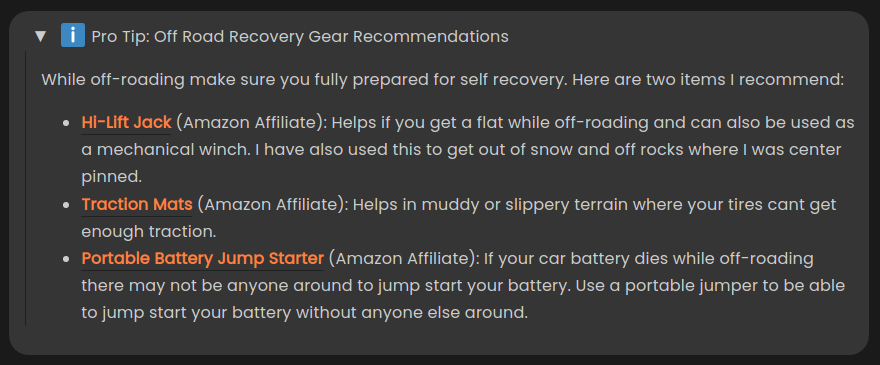
    SO I really like the details plugin in and use it in a lot of my posts on my own flarum. To add drop downs for extra information or well placed affiliate links 😃

    FPEyph9.png

    I have some custom CSS so far:

    details {
    
        padding: .8em !important;
        background: #353535;
        border-radius: 20px;
        margin-bottom: .8em;
    }
    
    summary::-webkit-details-marker {display: none; }
    
    details summary::before { 
        content:"►"; 
        padding: .7em;
    }
    
    details[open] summary::before { 
        content:"▼"; 
        padding: .7em;
    }
    

    I am struggling with the CSS though and couldn’t figure one of my issues out while using inspect element on Google Chrome. When I open the details I get this line on the left side and cant figure out how to remove it:

    sdHCCsQ.png

    If you need to see it live, you can see the example from the picture above here.

  • SO I really like the details plugin in and use it in a lot of my posts on my own flarum. To add drop downs for extra information or well placed affiliate links 😃

    FPEyph9.png

    I have some custom CSS so far:

    details {
    
        padding: .8em !important;
        background: #353535;
        border-radius: 20px;
        margin-bottom: .8em;
    }
    
    summary::-webkit-details-marker {display: none; }
    
    details summary::before { 
        content:"►"; 
        padding: .7em;
    }
    
    details[open] summary::before { 
        content:"▼"; 
        padding: .7em;
    }
    

    I am struggling with the CSS though and couldn’t figure one of my issues out while using inspect element on Google Chrome. When I open the details I get this line on the left side and cant figure out how to remove it:
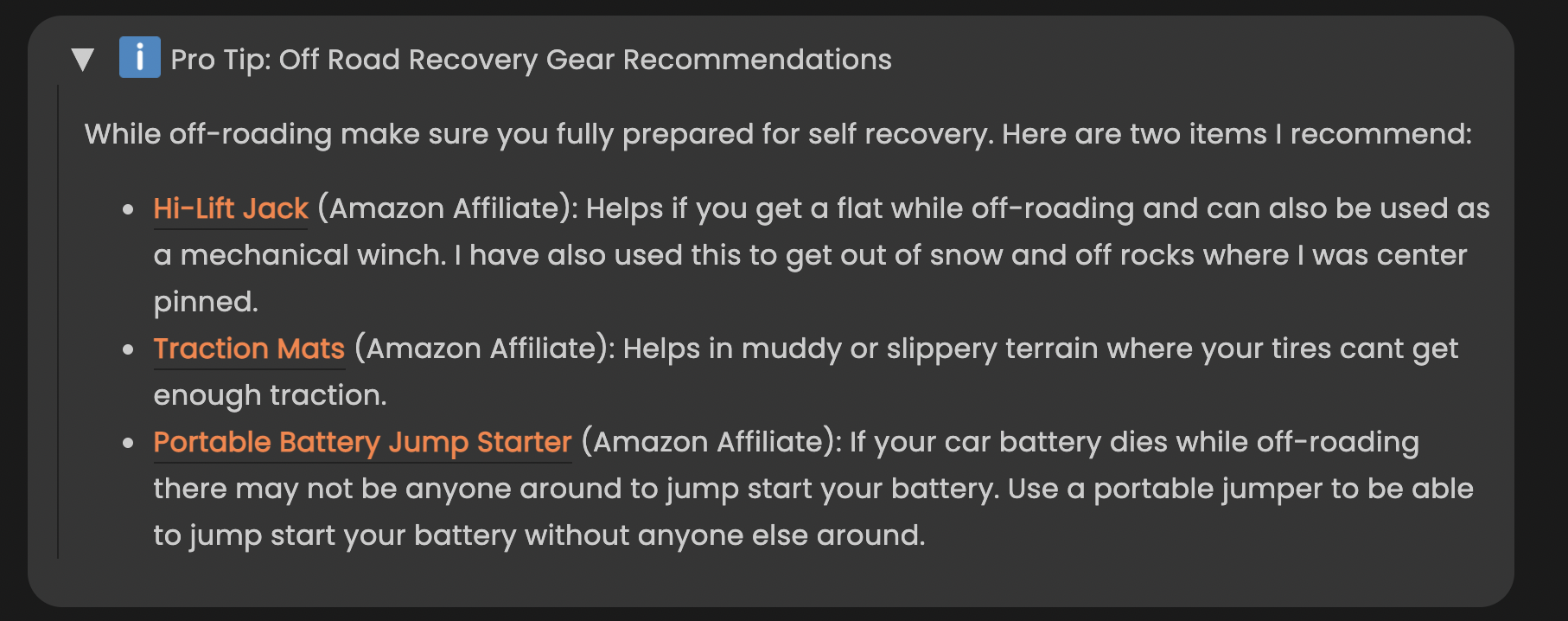
    sdHCCsQ.png

    If you need to see it live, you can see the example from the picture above here.

    wrote on last edited by
    #2

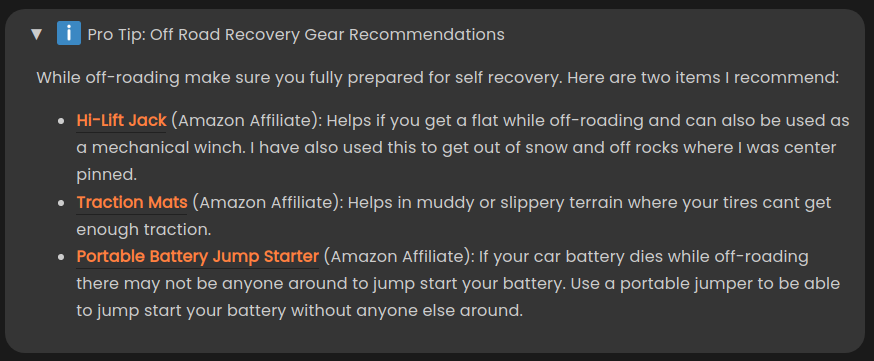
    @mike-jones Hey Mike - this CSS will fix that

    details>div {
        border-left: none;
    }
    

    Before

    f5d3f045-d571-4cb5-b51c-e8d2f0264573-image.png

    After

    abf773d1-0b39-4a00-b02e-e2fa3f822e14-image.png

  • @mike-jones Hey Mike - this CSS will fix that

    details>div {
        border-left: none;
    }
    

    Before

    f5d3f045-d571-4cb5-b51c-e8d2f0264573-image.png

    After

    abf773d1-0b39-4a00-b02e-e2fa3f822e14-image.png

    wrote on last edited by
    #3

    @phenomlab said in CSS Help on my Flarum:

    details>div {
    border-left: none;
    }

    Si I just added that and cleared my flarum and recache cache and it didn’t go away. Not sure what I am doing wrong.

  • wrote on last edited by
    #4

    So maybe not the right answer but I had to add

    !important
    

    to get it to work…

  • phenomlab phenomlab has marked this topic as solved on
  • So maybe not the right answer but I had to add

    !important
    

    to get it to work…

    wrote on last edited by
    #5

    @mike-jones Yes, you’ll typically see this type of behaviour if there is another style that has higher priority in the sense that yours will be overridden. Using !important will override the higher preference, but should be used sparingly rather than everywhere.

  • phenomlab phenomlab unlocked this topic on

Did this solution help you?
Did you find the suggested solution useful? Support 💗 Sudonix with a coffee ☕
If your organisation needs deeper expertise around infrastructure, security, or technology leadership, learn more about Phenomlab Ltd. Many of the deeper technical guides behind Sudonix are published there.

Related Topics
  • CSS code customization for the link preview plugin

    Solved Customisation css nodebb
    6
    2
    3 Votes
    6 Posts
    3k Views
    phenomlab
    @kadir-ay-0 marking as resolved based on https://community.nodebb.org/topic/17109/manual-build-a-night-mode-for-harmony/5 Please do not raise requests in two places - here and the NodeBB forums. All this does is create unnecessary load for both parties.
  • Request Sudonix css/js and full analysis info

    Customisation sudonix efelsefe
    2
    1 Votes
    2 Posts
    1k Views
    phenomlab
    Closing this in favour of https://sudonix.com/topic/357/post-style-view/28
  • answers appearance css code request

    Solved Customisation css answers
    11
    1
    1 Votes
    11 Posts
    4k Views
    phenomlab
    @DownPW yes, because of the modifications that Sudonix uses, you’ll need to tailor to fit your needs.
  • New message CSS problem

    Unsolved Customisation css
    11
    1
    2 Votes
    11 Posts
    4k Views
    phenomlab
    @DownPW hi. Sorry for digging up an old post, but I’m going through items still unresolved and was looking to get an understanding of where you are currently with this?
  • help me to get rid of my old CDN

    Moved Customisation stackpath cdn
    13
    2 Votes
    13 Posts
    4k Views
    phenomlab
    @Hari Ok. Good. Thanks
  • Border Frame WYSIWYG CSS

    Solved Customisation css wysiwyg
    6
    1
    2 Votes
    6 Posts
    2k Views
    phenomlab
    @DownPW just circling back to this, as I did eventually find the class. Seems you can disable the outline using the below CSS textarea { outline: none; }
  • [NODEBB] CSS Style Sheets SelectBox

    Locked Solved Customisation css
    112
    24 Votes
    112 Posts
    63k Views
    phenomlab
    @DownPW as discussed in PM Seems to have been solved with the new JS code that you added allowing the version CSS file change!! Cache problem therefore with the JS of the Switcher theme Based on this, I will close this thread and reference https://sudonix.com/topic/207/nodebb-help-for-my-custom-css/27
  • NodeBB Design help

    Solved Customisation
    8
    3
    2 Votes
    8 Posts
    4k Views
    phenomlab
    @riekmedia I’ve applied some new CSS to your site. Can you reload the page and try again ? For the record, this is what I added #footer { background: #2d343e; border-top: 4px solid #2d343e; font-size: 0.9em; margin-top: 70px; padding: 80px 0 0; position: relative; clear: both; bottom: 0; left: 0; right: 0; z-index: 1000; margin-left: -15px; margin-right: -338px; } The /categories page seems a bit messed up, so looking at that currently EDIT - issued some override CSS in the CATEGORIES widget <!--- CSS fix for overspill on /categories page - DO NOT DELETE --> <style> #footer { margin-right: -45px; } </style> That should resolve the /categories issue.