
setting up Matomo
-
@jac I see it - you’ll need to create the new subdomain in your Virtualmin instance
@phenomlab logged in to Virtualmin now.
Just looking how to do this.
-
@phenomlab logged in to Virtualmin now.
Just looking how to do this.
@jac looks tricky if you don’t know what you’re doing

-
-
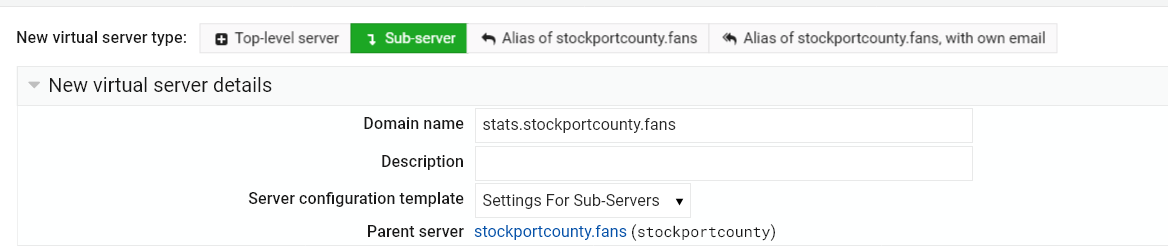
@jac I don’t want to post sensitive information but is this correct?
-
@jac Yep, that’s it.
Mark Cutting also advises organisations as a Fractional CIO, Fractional CISO and Executive Advisor, helping boards improve technology governance, cyber resilience and executive decision making. Learn more at Phenomlab Ltd
-
-
@phenomlab thanks, now to proceed

@jac said in setting up Matomo:
@phenomlab thanks, now to proceed
rookie error
“Failed to create virtual server : A sub-server cannot have MySQL enabled unless the parent server does”
-
@jac said in setting up Matomo:
@phenomlab thanks, now to proceed
rookie error
“Failed to create virtual server : A sub-server cannot have MySQL enabled unless the parent server does”
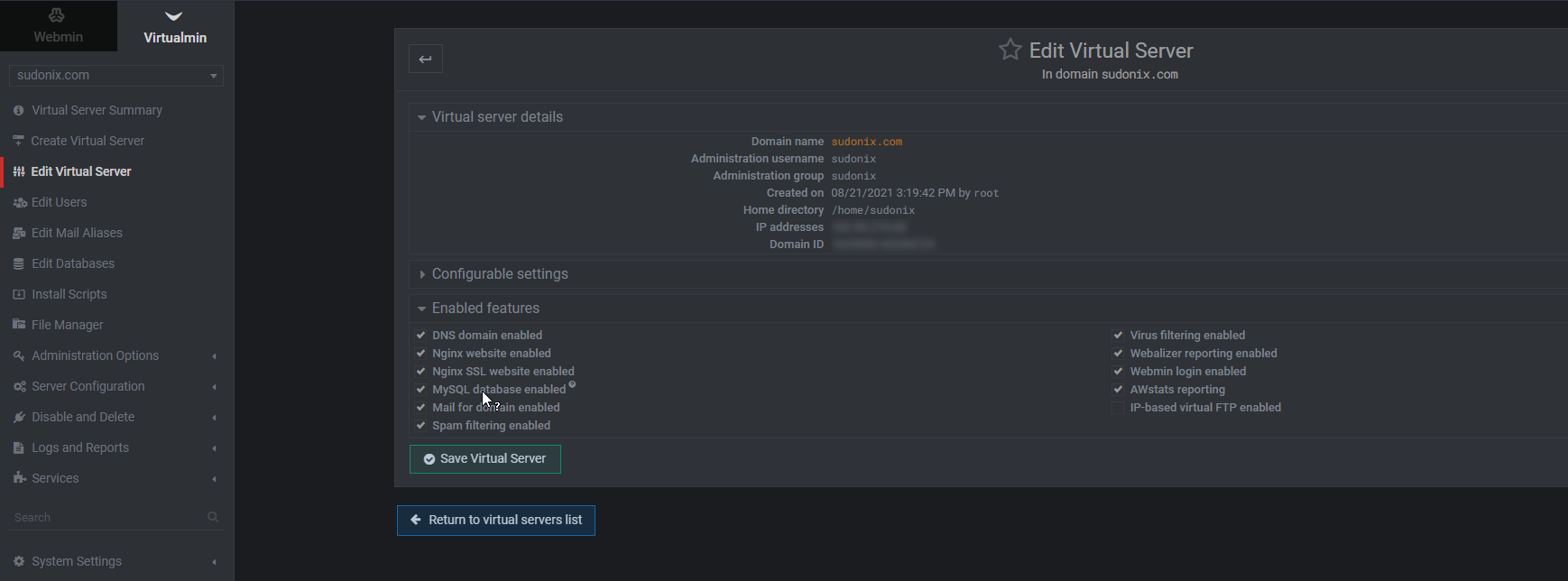
@jac Yes, that means that MySQL isn’t enabled at the root domain. You’ll need to go to the root domain, and enable that feature for it to work on subdomains.
The reason for it being missing is that you do not require MySQL for NodeBB as it uses MongoDB instead.
Mark Cutting also advises organisations as a Fractional CIO, Fractional CISO and Executive Advisor, helping boards improve technology governance, cyber resilience and executive decision making. Learn more at Phenomlab Ltd
-
@jac Yes, that means that MySQL isn’t enabled at the root domain. You’ll need to go to the root domain, and enable that feature for it to work on subdomains.
The reason for it being missing is that you do not require MySQL for NodeBB as it uses MongoDB instead.
@phenomlab Thanks Mark,
I’ll go and locate this now.
-
@phenomlab Thanks Mark,
I’ll go and locate this now.
-
@jac Yes, this probably helps
-
@jac Now re-add the subdomain
-
@jac “Requesting a certificate for stats.stockportcounty.fans, www.stats.stockportcounty.fans from Let’s Encrypt …”
that will be interesting…

-
@jac “Requesting a certificate for stats.stockportcounty.fans, www.stats.stockportcounty.fans from Let’s Encrypt …”
that will be interesting…
@jac Should be fine. It may bomb on the www request - let me know if that’s the case.
Mark Cutting also advises organisations as a Fractional CIO, Fractional CISO and Executive Advisor, helping boards improve technology governance, cyber resilience and executive decision making. Learn more at Phenomlab Ltd
-
@jac Should be fine. It may bomb on the www request - let me know if that’s the case.
@phenomlab said in setting up Matomo:
@jac Should be fine. It may bomb on the www request - let me know if that’s the case.
Requesting a certificate for stats.stockportcounty.fans, www.stats.stockportcounty.fans from Let's Encrypt .. .. request failed : Web-based validation failed : Saving debug log to /var/log/letsencrypt/letsencrypt.log Plugins selected: Authenticator webroot, Installer None Obtaining a new certificate Performing the following challenges: http-01 challenge for stats.stockportcounty.fans http-01 challenge for www.stats.stockportcounty.fans Using the webroot path /home/stockportcounty/domains/stats.stockportcounty.fans/public_html for all unmatched domains. Waiting for verification... Challenge failed for domain www.stats.stockportcounty.fans http-01 challenge for www.stats.stockportcounty.fans Cleaning up challenges Some challenges have failed. IMPORTANT NOTES: - The following errors were reported by the server: Domain: www.stats.stockportcounty.fans Type: dns Detail: DNS problem: NXDOMAIN looking up A for www.stats.stockportcounty.fans - check that a DNS record exists for this domain DNS-based validation failed : Saving debug log to /var/log/letsencrypt/letsencrypt.log Plugins selected: Authenticator manual, Installer None Obtaining a new certificate Performing the following challenges: dns-01 challenge for www.stats.stockportcounty.fans Running manual-auth-hook command: /etc/webmin/webmin/letsencrypt-dns.pl Waiting for verification... Challenge failed for domain www.stats.stockportcounty.fans dns-01 challenge for www.stats.stockportcounty.fans Cleaning up challenges Running manual-cleanup-hook command: /etc/webmin/webmin/letsencrypt-cleanup.pl Some challenges have failed. IMPORTANT NOTES: - The following errors were reported by the server: Domain: www.stats.stockportcounty.fans Type: dns Detail: DNS problem: NXDOMAIN looking up TXT for _acme-challenge.www.stats.stockportcounty.fans - check that a DNS record exists for this domain -
@phenomlab said in setting up Matomo:
@jac Should be fine. It may bomb on the www request - let me know if that’s the case.
Requesting a certificate for stats.stockportcounty.fans, www.stats.stockportcounty.fans from Let's Encrypt .. .. request failed : Web-based validation failed : Saving debug log to /var/log/letsencrypt/letsencrypt.log Plugins selected: Authenticator webroot, Installer None Obtaining a new certificate Performing the following challenges: http-01 challenge for stats.stockportcounty.fans http-01 challenge for www.stats.stockportcounty.fans Using the webroot path /home/stockportcounty/domains/stats.stockportcounty.fans/public_html for all unmatched domains. Waiting for verification... Challenge failed for domain www.stats.stockportcounty.fans http-01 challenge for www.stats.stockportcounty.fans Cleaning up challenges Some challenges have failed. IMPORTANT NOTES: - The following errors were reported by the server: Domain: www.stats.stockportcounty.fans Type: dns Detail: DNS problem: NXDOMAIN looking up A for www.stats.stockportcounty.fans - check that a DNS record exists for this domain DNS-based validation failed : Saving debug log to /var/log/letsencrypt/letsencrypt.log Plugins selected: Authenticator manual, Installer None Obtaining a new certificate Performing the following challenges: dns-01 challenge for www.stats.stockportcounty.fans Running manual-auth-hook command: /etc/webmin/webmin/letsencrypt-dns.pl Waiting for verification... Challenge failed for domain www.stats.stockportcounty.fans dns-01 challenge for www.stats.stockportcounty.fans Cleaning up challenges Running manual-cleanup-hook command: /etc/webmin/webmin/letsencrypt-cleanup.pl Some challenges have failed. IMPORTANT NOTES: - The following errors were reported by the server: Domain: www.stats.stockportcounty.fans Type: dns Detail: DNS problem: NXDOMAIN looking up TXT for _acme-challenge.www.stats.stockportcounty.fans - check that a DNS record exists for this domain@jac Unsurprising. There are two ways to do this
- Create a CNAME record called WWW and have it point to the subdomain in DNS
- Create a custom request for LE so that it ignores the www value, and only processes the actual domain you want
VirtualMin -> Server Configuration -> SSL Certificate
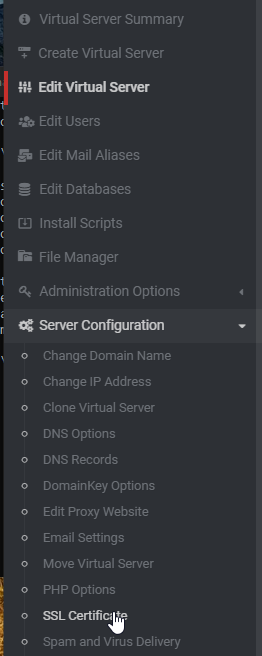
Let’s Encrypt
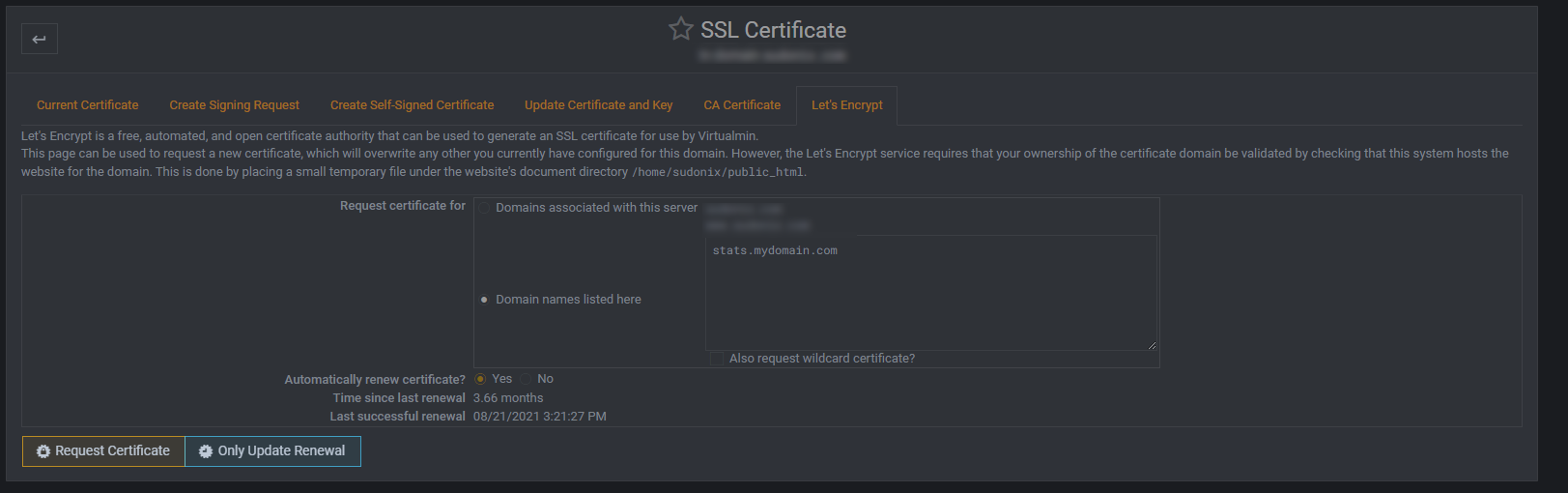
Set as per the example, so you only request the domain you want. Ensure that “Automatically renew certificate” is selected, then “Request Certificate”
Mark Cutting also advises organisations as a Fractional CIO, Fractional CISO and Executive Advisor, helping boards improve technology governance, cyber resilience and executive decision making. Learn more at Phenomlab Ltd
-
@jac Unsurprising. There are two ways to do this
- Create a CNAME record called WWW and have it point to the subdomain in DNS
- Create a custom request for LE so that it ignores the www value, and only processes the actual domain you want
VirtualMin -> Server Configuration -> SSL Certificate
Let’s Encrypt
Set as per the example, so you only request the domain you want. Ensure that “Automatically renew certificate” is selected, then “Request Certificate”
@phenomlab said in setting up Matomo:
@jac Unsurprising. There are two ways to do this
- Create a CNAME record called WWW and have it point to the subdomain in DNS
- Create a custom request for LE so that it ignores the www value, and only processes the actual domain you want
VirtualMin -> Server Configuration -> SSL Certificate
Let’s Encrypt
Set as per the example, so you only request the domain you want. Ensure that “Automatically renew certificate” is selected, then “Request Certificate”
Thanks,
which is the best solution?
-
@phenomlab said in setting up Matomo:
@jac Unsurprising. There are two ways to do this
- Create a CNAME record called WWW and have it point to the subdomain in DNS
- Create a custom request for LE so that it ignores the www value, and only processes the actual domain you want
VirtualMin -> Server Configuration -> SSL Certificate
Let’s Encrypt
Set as per the example, so you only request the domain you want. Ensure that “Automatically renew certificate” is selected, then “Request Certificate”
Thanks,
which is the best solution?
@jac Well, depending on configuration, they are as simple as each other. If you choose the first, then you need to add DNS records, and ensure your server is capable of handling them on arrival (it should be by default).
If you choose the second, it’s the easiest (and probably laziest
), but it will work. We just then need to set a redirect so that all traffic lands up at https://site.domain.com even if we try with or without the www prefix.Mark Cutting also advises organisations as a Fractional CIO, Fractional CISO and Executive Advisor, helping boards improve technology governance, cyber resilience and executive decision making. Learn more at Phenomlab Ltd
-
@jac Well, depending on configuration, they are as simple as each other. If you choose the first, then you need to add DNS records, and ensure your server is capable of handling them on arrival (it should be by default).
If you choose the second, it’s the easiest (and probably laziest
), but it will work. We just then need to set a redirect so that all traffic lands up at https://site.domain.com even if we try with or without the www prefix.@phenomlab said in setting up Matomo:
If you choose the second, it’s the easiest (and probably laziest ), but it will work. We just then need to set a redirect so that all traffic lands up at https://site.domain.com even if we try with or without the www prefix.
Will try this now mate
-
@phenomlab said in setting up Matomo:
If you choose the second, it’s the easiest (and probably laziest ), but it will work. We just then need to set a redirect so that all traffic lands up at https://site.domain.com even if we try with or without the www prefix.
Will try this now mate
@jac As per PM, this has been completed.
Mark Cutting also advises organisations as a Fractional CIO, Fractional CISO and Executive Advisor, helping boards improve technology governance, cyber resilience and executive decision making. Learn more at Phenomlab Ltd
-
 undefined phenomlab marked this topic as a question on
-
undefined phenomlab has marked this topic as solved on

Hello! It looks like you're interested in this conversation, but you don't have an account yet.
Getting fed up of having to scroll through the same posts each visit? When you register for an account, you'll always come back to exactly where you were before, and choose to be notified of new replies (either via email, or push notification). You'll also be able to save bookmarks and upvote posts to show your appreciation to other community members.
With your input, this post could be even better 💗
Register Login

