
Virgin Media Broadband
-
@jac Good. That means it has two frequencies. 5Ghz will be faster (but supports less distance from the router) so try that first.

@phenomlab strangely enough as soon as I connected to the 5G one my internet wouldn’t load. I then connected to the other one and it loads. Is that normal? Will try repeat.
-
@phenomlab ok great, says connected ( which now needs setting up
 )

@jac Great. Get that done and you’re almost set

One thing we might have is what’s known as subnet overlap. This is where two devices are attempting to issue network IP addresses from the same range which will cause problems. We’ll need to test that, but it can wait until you’re done with the setup.
Mark Cutting also advises organisations as a Fractional CIO, Fractional CISO and Executive Advisor, helping boards improve technology governance, cyber resilience and executive decision making. Learn more at Gratmore Ltd
-
@jac Great. Get that done and you’re almost set
One thing we might have is what’s known as subnet overlap. This is where two devices are attempting to issue network IP addresses from the same range which will cause problems. We’ll need to test that, but it can wait until you’re done with the setup.
@phenomlab said in Virgin Media Broadband:
@jac Great. Get that done and you’re almost set
One thing we might have is what’s known as subnet overlap. This is where two devices are attempting to issue network IP addresses from the same range which will cause problems. We’ll need to test that, but it can wait until you’re done with the setup.
Many thanks mate.
-
@phenomlab strangely enough as soon as I connected to the 5G one my internet wouldn’t load. I then connected to the other one and it loads. Is that normal? Will try repeat.
-
@phenomlab said in Virgin Media Broadband:
@jac Great. Get that done and you’re almost set
One thing we might have is what’s known as subnet overlap. This is where two devices are attempting to issue network IP addresses from the same range which will cause problems. We’ll need to test that, but it can wait until you’re done with the setup.
Many thanks mate.
-
@jac No, that was for the Virgin Hub. There should be a default IP address for that new router. Have a look in the manual. They tend to be all the same out of the factory. Username/Password is probably something really weak like
admin/adminMark Cutting also advises organisations as a Fractional CIO, Fractional CISO and Executive Advisor, helping boards improve technology governance, cyber resilience and executive decision making. Learn more at Gratmore Ltd
-
@jac No, that was for the Virgin Hub. There should be a default IP address for that new router. Have a look in the manual. They tend to be all the same out of the factory. Username/Password is probably something really weak like
admin/admin
@phenomlab the SSID address is the same as the virgin one? Loads up Hub 3.0 settings?
-
@phenomlab the SSID address is the same as the virgin one? Loads up Hub 3.0 settings?
-
@phenomlab the SSID address is the same as the virgin one? Loads up Hub 3.0 settings?
@jac No, you should be accessing the Tenda router now ? You’ll need to access it from the device you connected to it with. Make sure you’re connected to the Tenda router Wifi and not the hub itself.
Mark Cutting also advises organisations as a Fractional CIO, Fractional CISO and Executive Advisor, helping boards improve technology governance, cyber resilience and executive decision making. Learn more at Gratmore Ltd
-
@jac No, you should be accessing the Tenda router now ? You’ll need to access it from the device you connected to it with. Make sure you’re connected to the Tenda router Wifi and not the hub itself.
@phenomlab said in Virgin Media Broadband:
@jac No, you should be accessing the Tenda router now ? You’ll need to access it from the device you connected to it with. Make sure you’re connected to the Tenda router Wifi and not the hub itself.
Hmm!
 .
I am connected to the Tenda router yes mate but when I put in the details it just loads up the virgin hub settings. Strange.
-
@phenomlab said in Virgin Media Broadband:
@jac No, you should be accessing the Tenda router now ? You’ll need to access it from the device you connected to it with. Make sure you’re connected to the Tenda router Wifi and not the hub itself.
Hmm!
.I am connected to the Tenda router yes mate but when I put in the details it just loads up the virgin hub settings. Strange.
@jac What device are you using ? Is it a laptop ?
Mark Cutting also advises organisations as a Fractional CIO, Fractional CISO and Executive Advisor, helping boards improve technology governance, cyber resilience and executive decision making. Learn more at Gratmore Ltd
-
@phenomlab said in Virgin Media Broadband:
@jac No, you should be accessing the Tenda router now ? You’ll need to access it from the device you connected to it with. Make sure you’re connected to the Tenda router Wifi and not the hub itself.
Hmm!
.I am connected to the Tenda router yes mate but when I put in the details it just loads up the virgin hub settings. Strange.
-
@phenomlab said in Virgin Media Broadband:
@jac What device are you using ? Is it a laptop ?
Tablet mate.
-
Ok…
I’m connected to Tenda on the tablet and doing a Google search and it brings back results?
@jac Yes, it’s connected, but we need to determine what address it has. Does the tablet have 4G (a SIM card) or is it Wifi only ?
Mark Cutting also advises organisations as a Fractional CIO, Fractional CISO and Executive Advisor, helping boards improve technology governance, cyber resilience and executive decision making. Learn more at Gratmore Ltd
-
@jac Yes, it’s connected, but we need to determine what address it has. Does the tablet have 4G (a SIM card) or is it Wifi only ?
-
@jac Yes, it’s connected, but we need to determine what address it has. Does the tablet have 4G (a SIM card) or is it Wifi only ?
@phenomlab I’m going to need access to your Virgin Hub mate. Can you do the following
- On the Virgin hub
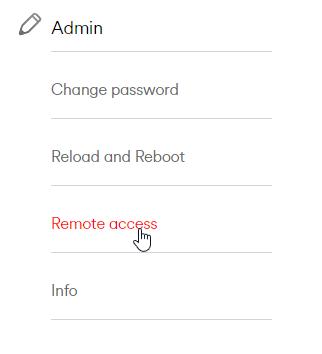
- Enable remote access and save
- On any machine you have, go to https://whatsmyip.org
- It’ll respond with Your IP Address is x.x.x.x (where x.x.x.x is the IP address)
- Send me the IP address and the password to access your hub via PM
Thanks
-
@phenomlab WiFi only pal.
-
@jac ok so I’ve got an image I’d like to share with you over on Discord.
I’ve clicked manage router and it’s now loaded this.
@jac said in Virgin Media Broadband:
@jac ok so I’ve got an image I’d like to share with you over on Discord.
I’ve clicked manage router and it’s now loaded this.
We got there in the end Mark
 .
Many thanks for all your help as always mate, it just shows how helpful this forum and your services are, you really do go above and beyond!


-
phenomlab has marked this topic as solved on
-
@jac said in Virgin Media Broadband:
@jac ok so I’ve got an image I’d like to share with you over on Discord.
I’ve clicked manage router and it’s now loaded this.
We got there in the end Mark
.Many thanks for all your help as always mate, it just shows how helpful this forum and your services are, you really do go above and beyond!
-
Will be testing this further later on, it seemed to work very well last night.
I need to replicate what you helped me achieve with the Power line adapters.
I’m looking to do the same for my grandad, will these do the job? - https://www.amazon.co.uk/dp/B0746H97SX/ref=cm_sw_r_apan_glt_i_MNKKPJ2XZ5ZZCVX8AWB5?_encoding=UTF8&psc=1
Many thanks


Hello! It looks like you're interested in this conversation, but you don't have an account yet.
Getting fed up of having to scroll through the same posts each visit? When you register for an account, you'll always come back to exactly where you were before, and choose to be notified of new replies (either via email, or push notification). You'll also be able to save bookmarks and upvote posts to show your appreciation to other community members.
With your input, this post could be even better 💗
Register Login
