Custom Page - nodebb
-
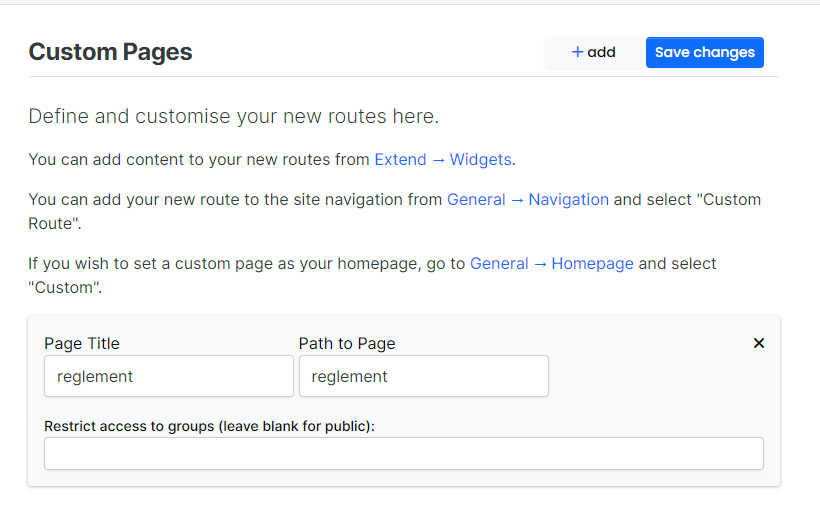
Hi I am trying to create a custom page called GameTracker. I head to Navigation and add a custom route. Do i type /gametracker or gametracket.tpl in the route. ? To be honest none of them work. When I go to extend/widgets I do not see the template. I have uninstalled and reinstalled but with same problem. Nothing in logs what I can see. What am I doing wrong. I did this in the past no worries. Many of these older plugins to not install at all for me in the ACP. I get a huge error. Now I cannot even uninstall it without error.

I tried to gove nodebb the benefit of the doubt. I had new OS install, new mongo blah blah blah but soon as I touch this nodebb its a nightmare lol.
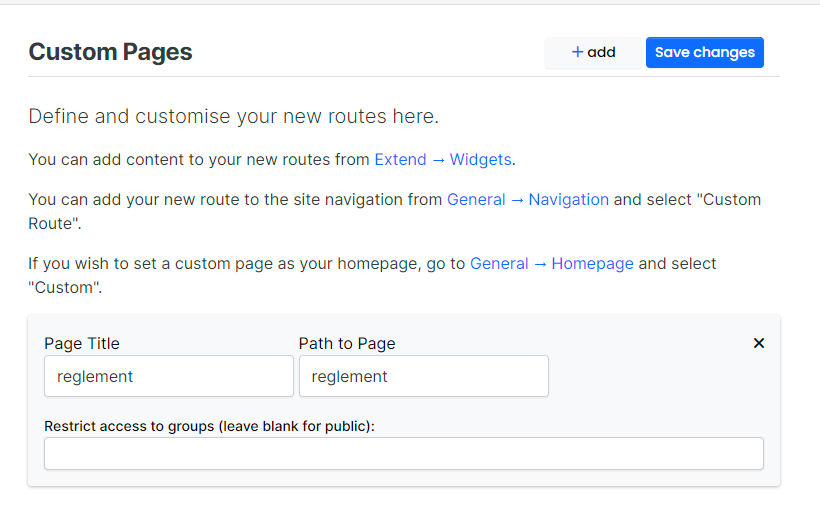
I also did not have this below on my page. Maybe thats an older version. Someone was mentioning this here in Sudonix some time ago.
-
If you’re running the latest NodeBB version, then Node 21 and npm 10 are normally fine. Your error is most likely caused by a legacy dependency left over from an older install or from a plugin (probably something pulling
grunt 0.3.x).Modern NodeBB versions should not depend on old Grunt packages anymore, so something in your dependency tree is outdated.
What is probably happening
You likely have:
- Latest NodeBB

- Modern Node/npm
- Old dependency still present

Usually caused by:
- an old plugin
- an upgrade from an older NodeBB version
- a package.json that was never fully cleaned
Recommended clean fix
Do a clean reinstall of dependencies:
cd ~/nodebb
rm -rf node_modules
rm package-lock.json
npm cache clean --force
npm install
If it still fails
Try:
npm install --legacy-peer-depsThis is sometimes necessary when plugins have outdated peer dependencies.
Also check your installed plugins
Run:
./nodebb pluginsOften the issue comes from an outdated plugin (possibly
nodebb-plugin-iframelysince you were uninstalling it or other.Reliable NodeBB admin fix procedure
A typical safe rebuild process:
./nodebb stop
rm -rf node_modules package-lock.json
npm install --legacy-peer-deps
./nodebb build
./nodebb start
if the problems persist maybe open a thread at nodebb communauty
@DownPW Sorry for late reply. But, thank you so much. All is working ok again

cd ~/nodebb
rm -rf node_modules
rm package-lock.json
npm cache clean --force
npm install
This worked perfectly. Much appreciated your help.
- Latest NodeBB
-
Personally, I don’t use custom routes in navigation. I put the link in a classic HTML href to access the page in an HTML menu of the BrandHeader, then I use the widget to generate the HTML for the page itself.
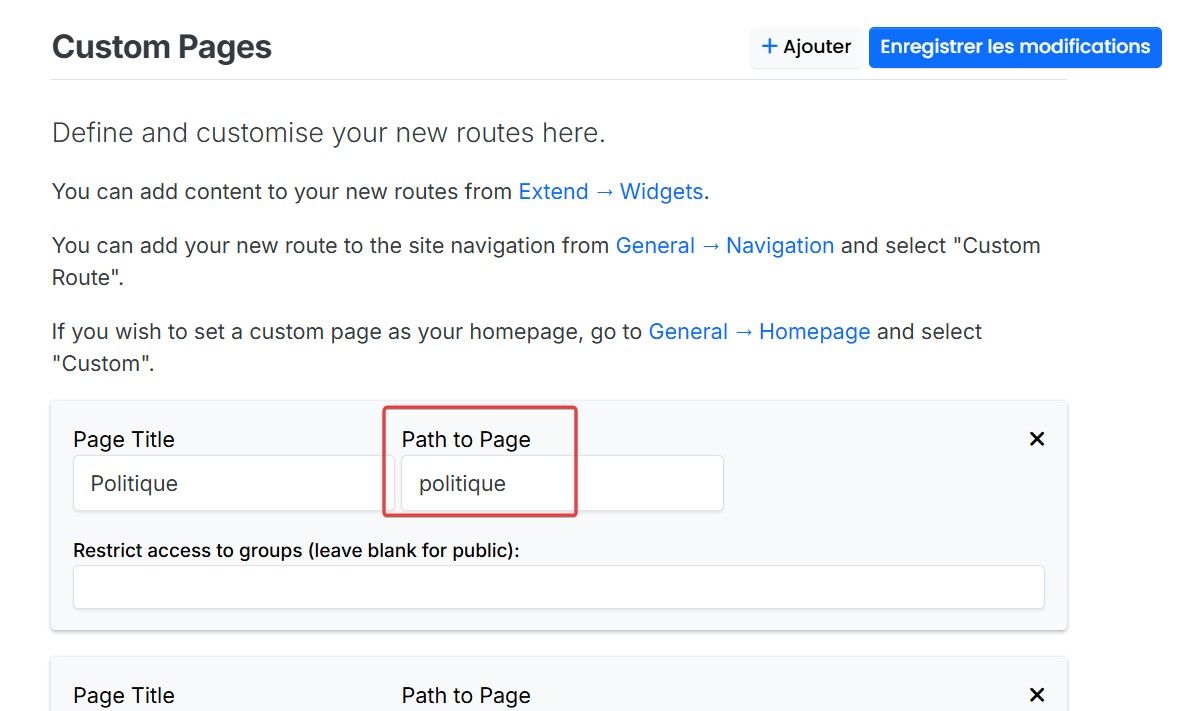
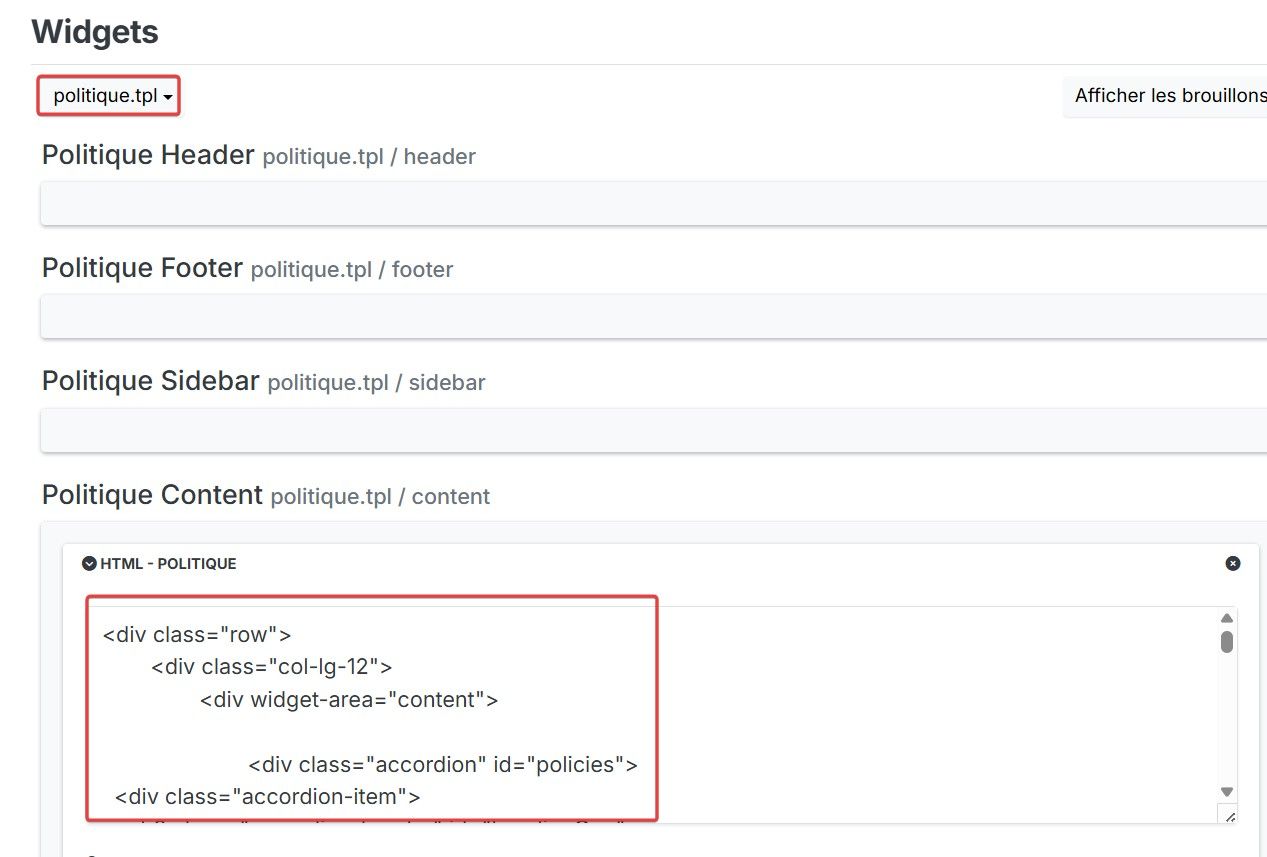
Seems you have problem with npm for uninstall the plugin in your screeshot
-
Hi, thx for the reply. I managed to get the page up now. But still have a problem when trying to uninstall anything.
This is all a clean install.
-
What is the error when you uninstall in nodebb log ?
PW and WS Spirit alive
-
npm resolution error report
While resolving: grunt-contrib-watch@0.4.4
Found: grunt@0.3.17
node_modules/grunt
dev grunt@“^0.3.17” from the root projectCould not resolve dependency:
peer grunt@“~0.4.0” from grunt-contrib-watch@0.4.4
node_modules/grunt-contrib-watch
dev grunt-contrib-watch@“^0.4.4” from the root projectConflicting peer dependency: grunt@0.4.5
node_modules/grunt
peer grunt@“~0.4.0” from grunt-contrib-watch@0.4.4
node_modules/grunt-contrib-watch
dev grunt-contrib-watch@“^0.4.4” from the root projectFix the upstream dependency conflict, or retry
this command with --force or --legacy-peer-deps
to accept an incorrect (and potentially broken) dependency resolution. -
The debug.
0 verbose cli /home/smiley/.nvm/versions/node/v21.7.3/bin/node /home/smiley/.nvm/versions/node/v21.7.3/bin/npm
1 info using npm@10.9.1
2 info using node@v21.7.3
3 silly config load:file:/home/smiley/.nvm/versions/node/v21.7.3/lib/node_modules/npm/npmrc
4 silly config load:file:/home/smiley/nodebb/.npmrc
5 silly config load:file:/home/smiley/.npmrc
6 silly config load:file:/home/smiley/.nvm/versions/node/v21.7.3/etc/npmrc
7 verbose title npm uninstall nodebb-plugin-iframely
8 verbose argv “uninstall” “nodebb-plugin-iframely” “–save”
9 verbose logfile logs-max:10 dir:/home/smiley/.npm/_logs/2026-03-15T10_02_42_147Z-
10 verbose logfile /home/smiley/.npm/_logs/2026-03-15T10_02_42_147Z-debug-0.log
11 silly logfile start cleaning logs, removing 1 files
12 silly logfile done cleaning log files
13 silly packumentCache heap:2197815296 maxSize:549453824 maxEntrySize:274726912
14 silly idealTree buildDeps
15 silly fetch manifest grunt@~0.4.0
16 silly packumentCache full:https://registry.npmjs.org/grunt cache-miss
17 http fetch GET 200 https://registry.npmjs.org/grunt 1238ms (cache revalidated)
18 silly packumentCache full:https://registry.npmjs.org/grunt set size:169561 disposed:false
19 verbose stack Error: could not resolve
19 verbose stack at PlaceDep.failPeerConflict (/home/smiley/.nvm/versions/node/v21.7.3/lib/node_modules/npm/node_modules/@npmcli/arborist/lib/place-dep.js:503:25)
19 verbose stack at new PlaceDep (/home/smiley/.nvm/versions/node/v21.7.3/lib/node_modules/npm/node_modules/@npmcli/arborist/lib/place-dep.js:157:21)
19 verbose stack at #buildDepStep (/home/smiley/.nvm/versions/node/v21.7.3/lib/node_modules/npm/node_modules/@npmcli/arborist/lib/arborist/build-ideal-tree.js:920:18)
19 verbose stack at async Arborist.buildIdealTree (/home/smiley/.nvm/versions/node/v21.7.3/lib/node_modules/npm/node_modules/@npmcli/arborist/lib/arborist/build-ideal-tree.js:181:7)
19 verbose stack at async Promise.all (index 1)
19 verbose stack at async Arborist.reify (/home/smiley/.nvm/versions/node/v21.7.3/lib/node_modules/npm/node_modules/@npmcli/arborist/lib/arborist/reify.js:131:5)
19 verbose stack at async Uninstall.exec (/home/smiley/.nvm/versions/node/v21.7.3/lib/node_modules/npm/lib/commands/uninstall.js:51:5)
19 verbose stack at async Npm.exec (/home/smiley/.nvm/versions/node/v21.7.3/lib/node_modules/npm/lib/npm.js:207:9)
19 verbose stack at async module.exports (/home/smiley/.nvm/versions/node/v21.7.3/lib/node_modules/npm/lib/cli/entry.js:74:5)
20 error code ERESOLVE
21 error ERESOLVE could not resolve
22 error
23 error While resolving: grunt-contrib-watch@0.4.4
23 error Found: grunt@0.3.17
23 error node_modules/grunt
23 error dev grunt@“^0.3.17” from the root project
23 error
23 error Could not resolve dependency:
23 error peer grunt@“~0.4.0” from grunt-contrib-watch@0.4.4
23 error node_modules/grunt-contrib-watch
23 error dev grunt-contrib-watch@“^0.4.4” from the root project
23 error
23 error Conflicting peer dependency: grunt@0.4.5
23 error node_modules/grunt
23 error peer grunt@“~0.4.0” from grunt-contrib-watch@0.4.4
23 error node_modules/grunt-contrib-watch
23 error dev grunt-contrib-watch@“^0.4.4” from the root project
23 error
23 error Fix the upstream dependency conflict, or retry
23 error this command with --force or --legacy-peer-deps
23 error to accept an incorrect (and potentially broken) dependency resolution.
24 error
24 error
24 error For a full report see:
24 error /home/smiley/.npm/_logs/2026-03-15T10_02_42_147Z-eresolve-report.txt
25 silly unfinished npm timer reify 1773568962435
26 silly unfinished npm timer reify:loadTrees 1773568962435
27 silly unfinished npm timer idealTree:buildDeps 1773568963186
28 silly unfinished npm timer idealTree:node_modules/grunt-contrib-watch 1773568963198
29 verbose cwd /home/smiley/nodebb
30 verbose os Linux 6.0.12-76060012-generic
31 verbose node v21.7.3
32 verbose npm v10.9.1
33 verbose exit 1
34 verbose code 1
35 error A complete log of this run can be found in: /home/smiley/.npm/_logs/2026-03-15T10_02_42_147Z-debug-0.log -
Which version of NodeBB do you have?
It doesn’t look like it’s recent, does it?
This error is caused by a Grunt version conflict.
It seems yiu currently uses grunt 0.3.17, but grunt-contrib-watch 0.4.4 requires grunt ~0.4.0. Modern npm versions (7+) are stricter with peer dependencies and will refuse to install conflicting versions.
have you try to bypass the error (common with old NodeBB installs):
npm install --legacy-peer-depsor in your case:
npm uninstall nodebb-plugin-iframely --legacy-peer-depsMaybe @phenomlab can help too
PW and WS Spirit alive
-
Which version of NodeBB do you have?
It doesn’t look like it’s recent, does it?
This error is caused by a Grunt version conflict.
It seems yiu currently uses grunt 0.3.17, but grunt-contrib-watch 0.4.4 requires grunt ~0.4.0. Modern npm versions (7+) are stricter with peer dependencies and will refuse to install conflicting versions.
have you try to bypass the error (common with old NodeBB installs):
npm install --legacy-peer-depsor in your case:
npm uninstall nodebb-plugin-iframely --legacy-peer-depsMaybe @phenomlab can help too
npm install --legacy-peer-depsI have tried already and still did not want to work.
npm uninstall nodebb-plugin-iframely --legacy-peer-depsthis got rid of iframely though.
-
DownPW said:
Which version of NodeBB do you have?
It doesn’t look like it’s recent, does it?
This error is caused by a Grunt version conflict.
It seems yiu currently uses grunt 0.3.17, but grunt-contrib-watch 0.4.4 requires grunt ~0.4.0. Modern npm versions (7+) are stricter with peer dependencies and will refuse to install conflicting versions.
PW and WS Spirit alive
-
DownPW said:
Which version of NodeBB do you have?
It doesn’t look like it’s recent, does it?
This error is caused by a Grunt version conflict.
It seems yiu currently uses grunt 0.3.17, but grunt-contrib-watch 0.4.4 requires grunt ~0.4.0. Modern npm versions (7+) are stricter with peer dependencies and will refuse to install conflicting versions.
-
If you’re running the latest NodeBB version, then Node 21 and npm 10 are normally fine. Your error is most likely caused by a legacy dependency left over from an older install or from a plugin (probably something pulling
grunt 0.3.x).Modern NodeBB versions should not depend on old Grunt packages anymore, so something in your dependency tree is outdated.
What is probably happening
You likely have:
- Latest NodeBB
- Modern Node/npm
- Old dependency still present
Usually caused by:
- an old plugin
- an upgrade from an older NodeBB version
- a package.json that was never fully cleaned
Recommended clean fix
Do a clean reinstall of dependencies:
cd ~/nodebb
rm -rf node_modules
rm package-lock.json
npm cache clean --force
npm install
If it still fails
Try:
npm install --legacy-peer-depsThis is sometimes necessary when plugins have outdated peer dependencies.
Also check your installed plugins
Run:
./nodebb pluginsOften the issue comes from an outdated plugin (possibly
nodebb-plugin-iframelysince you were uninstalling it or other.Reliable NodeBB admin fix procedure
A typical safe rebuild process:
./nodebb stop
rm -rf node_modules package-lock.json
npm install --legacy-peer-deps
./nodebb build
./nodebb start
if the problems persist maybe open a thread at nodebb communauty
PW and WS Spirit alive
- Latest NodeBB
-
If you’re running the latest NodeBB version, then Node 21 and npm 10 are normally fine. Your error is most likely caused by a legacy dependency left over from an older install or from a plugin (probably something pulling
grunt 0.3.x).Modern NodeBB versions should not depend on old Grunt packages anymore, so something in your dependency tree is outdated.
What is probably happening
You likely have:
- Latest NodeBB
- Modern Node/npm
- Old dependency still present
Usually caused by:
- an old plugin
- an upgrade from an older NodeBB version
- a package.json that was never fully cleaned
Recommended clean fix
Do a clean reinstall of dependencies:
cd ~/nodebb
rm -rf node_modules
rm package-lock.json
npm cache clean --force
npm install
If it still fails
Try:
npm install --legacy-peer-depsThis is sometimes necessary when plugins have outdated peer dependencies.
Also check your installed plugins
Run:
./nodebb pluginsOften the issue comes from an outdated plugin (possibly
nodebb-plugin-iframelysince you were uninstalling it or other.Reliable NodeBB admin fix procedure
A typical safe rebuild process:
./nodebb stop
rm -rf node_modules package-lock.json
npm install --legacy-peer-deps
./nodebb build
./nodebb start
if the problems persist maybe open a thread at nodebb communauty
@DownPW Sorry for late reply. But, thank you so much. All is working ok again
cd ~/nodebb
rm -rf node_modules
rm package-lock.json
npm cache clean --force
npm install
This worked perfectly. Much appreciated your help.
- Latest NodeBB
-
 undefined Sampo2910 has marked this topic as solved on
-
I’m happy to see this
PW and WS Spirit alive


Hello! It looks like you're interested in this conversation, but you don't have an account yet.
Getting fed up of having to scroll through the same posts each visit? When you register for an account, you'll always come back to exactly where you were before, and choose to be notified of new replies (either via email, or push notification). You'll also be able to save bookmarks and upvote posts to show your appreciation to other community members.
With your input, this post could be even better 💗
Register LoginDid this solution help you?
Related Topics
-
-
-
-
NodeBB: Consent page
Solved Configure -
-
-
-
Customising NodeBB
Locked Customisation