NodeBB socket with CloudFlare
-
@phenomlab done
@DownPW Also remove these lines and restart
nginxroot /home/XXXXX/domains/socket.XXXX.fr/public_html;index index.php index.htm index.html; -
Same
-
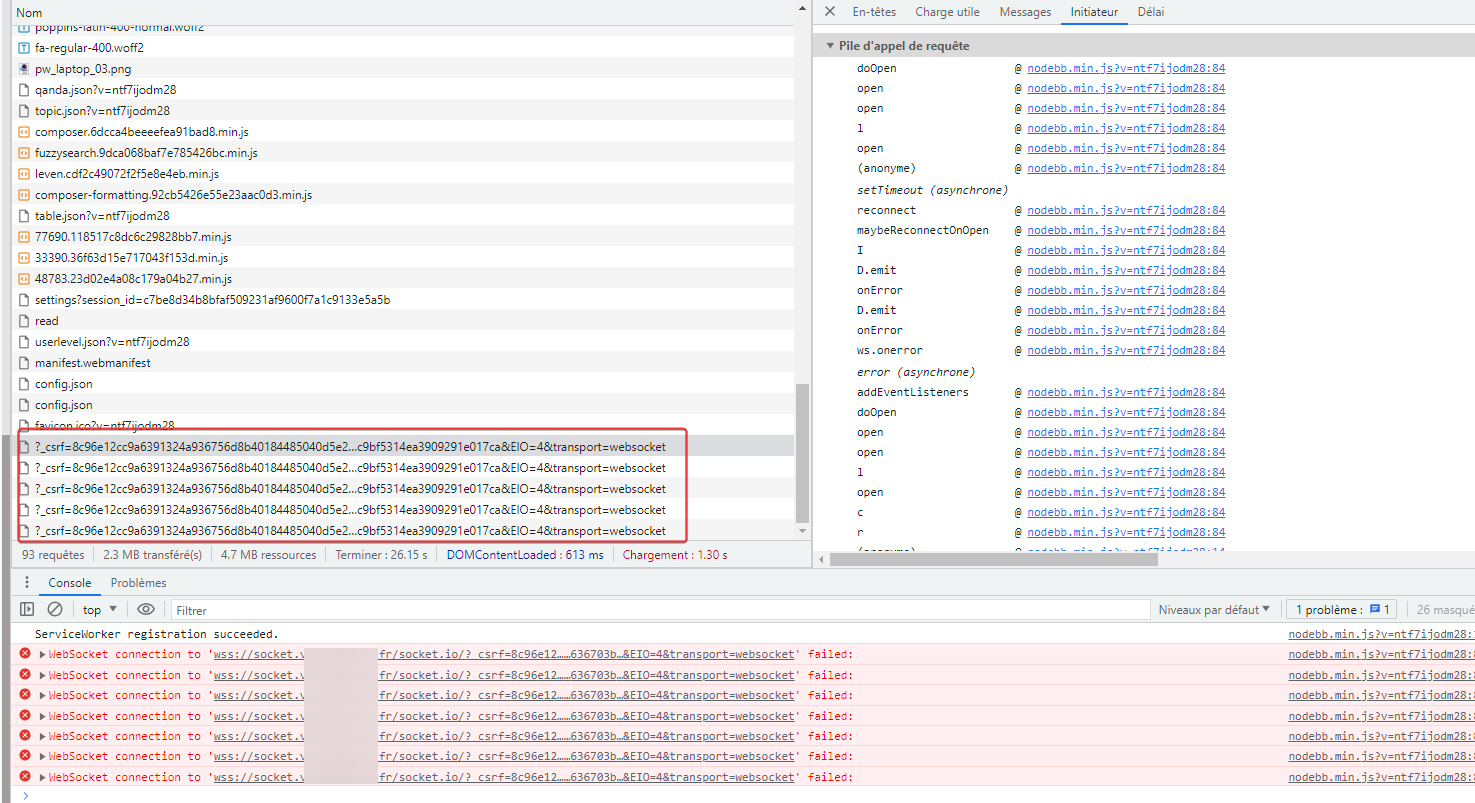
I see this on start log nodebb

PW and WS Spirit alive
-
 undefined phenomlab forked this topic on
-
There’s more of an issue here - try to change any CSS or JS in the ACP, and you’ll see that it does not save.
Mark Cutting also advises organisations as a Fractional CIO, Fractional CISO and Executive Advisor, helping boards improve technology governance, cyber resilience and executive decision making. Learn more at Phenomlab Ltd
-
???
-
@DownPW Now working for me in Incognito. Can you check
-
There’s more of an issue here - try to change any CSS or JS in the ACP, and you’ll see that it does not save.
@phenomlab said in NodeBB socket with CloudFlare:
There’s more of an issue here - try to change any CSS or JS in the ACP, and you’ll see that it does not save.
due to socket.io configuration in nodebb config.json file
Actually I have delete socket.io block and change CSS and save is good.
PW and WS Spirit alive
-
@phenomlab said in NodeBB socket with CloudFlare:
There’s more of an issue here - try to change any CSS or JS in the ACP, and you’ll see that it does not save.
due to socket.io configuration in nodebb config.json file
Actually I have delete socket.io block and change CSS and save is good.
@DownPW Ok, but that now means you should not need the socket A record anymore because it’s not used. From the logs, the socket is running on the site’s URL.
-
normal that it is not used (A record) @phenomlab because there currently, I do not use it because the socket.io block is removed from config.json.
I’m just in normal mode with Cloudflare :
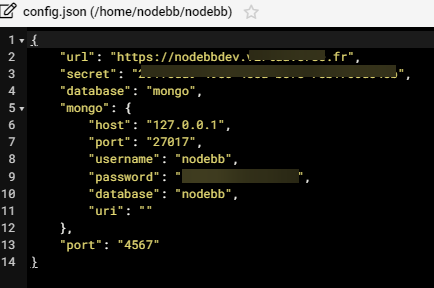
I can put it back if you want ?
PW and WS Spirit alive
-
normal that it is not used (A record) @phenomlab because there currently, I do not use it because the socket.io block is removed from config.json.
I’m just in normal mode with Cloudflare :
I can put it back if you want ?
@DownPW It seems to be working fine without it, so I’d leave it. I see zero socket errors, so all good.
-
because I’m alone on the server.
The goal is to try to market this method before putting it into production where i have a lot of errors
And we can see that it doesn’t work when I try to reroute the web sockets in non-proxied mode. (socket error, no save when chnage in ACP, etc…)
I don’t know if I can make myself understood. @phenomlab

PW and WS Spirit alive
-
because I’m alone on the server.
The goal is to try to market this method before putting it into production where i have a lot of errors
And we can see that it doesn’t work when I try to reroute the web sockets in non-proxied mode. (socket error, no save when chnage in ACP, etc…)
I don’t know if I can make myself understood. @phenomlab
@DownPW Understood. Even with just the two of us connected, I was still getting the websocket error, but I think that was related to config etc. In all honesty, this is yet another reason why I stopped using CF. I know you need it to hide your IP address, but if you bypass CF for the socket, you are exposing your IP anyway.
-
I know, I know,
too bad… I just wanted to test this method but it seems more complex than it looks to make it work correctly
The reverse proxy method is currently too expensive for me and technically too abstract
PW and WS Spirit alive
-
I know, I know,
too bad… I just wanted to test this method but it seems more complex than it looks to make it work correctly
The reverse proxy method is currently too expensive for me and technically too abstract
@DownPW it’s your only realistic option at this stage.
-
-
 undefined DownPW has marked this topic as solved on
Hello! It looks like you're interested in this conversation, but you don't have an account yet.
Getting fed up of having to scroll through the same posts each visit? When you register for an account, you'll always come back to exactly where you were before, and choose to be notified of new replies (either via email, or push notification). You'll also be able to save bookmarks and upvote posts to show your appreciation to other community members.
With your input, this post could be even better 💗
Register Login