Skip to content

Targeting a disappearing element for its CSS
Moved Let's Build It
2 2 1.2k 2
  • Have you ever tried to target dynamic elements such as as Tooltips under bootstrap only to find that they disappear when you try to inspect them? You’re not alone.

    Fortunately (and inspired by this post), there is a workaround in case you find yourself in a similar boat.

    The Problem

    You locate the popover element you’d like to change, right-click then select Inspect Element and then element itself disappears - along with any hope of you finding the related CSS.

    The Solution

    We need to use a bit of ingenuity here. This is where the browser (in the case of Webkit, such as Google Chrome etc) debug facilities come in handy.

    1. Fire up the page where the element appears that you want to inspect
    2. Press F8 to open the developer tools
    3. Click on the console tab
    4. Paste the below into the console
    setTimeout(function(){debugger;},5000);
    

    Note that 5000 is adjustable (and the inspiration for the Mission: impossible - Rogue Nation sequence 🙂 ) It should look like the below - essentially, 5000 is 5 seconds… Now you see (hopefully) the paradigm.

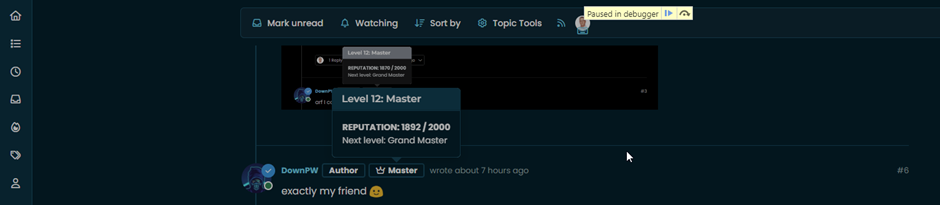
    4f721beb-9f2f-42b2-8b64-c497df50eb98-image.png

    1. Now press enter
    2. You have 5 seconds before the debugger will launch, which should be enough time for you to active the element you want to target

    4741514b-83c0-4195-8d41-e673a8fbf36a-image.png

    1. Wait until the debugger fires

    6c706df4-ebbb-4d84-ae2e-2e25e63f5736-image.png

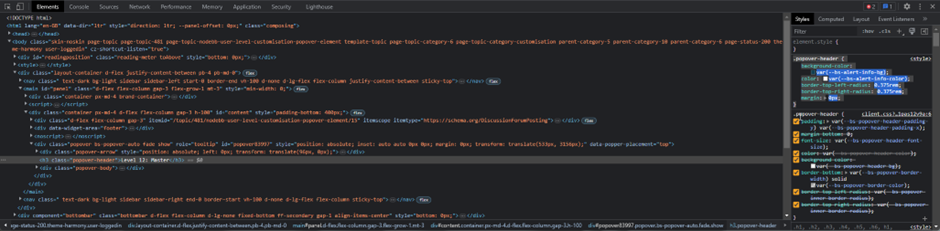
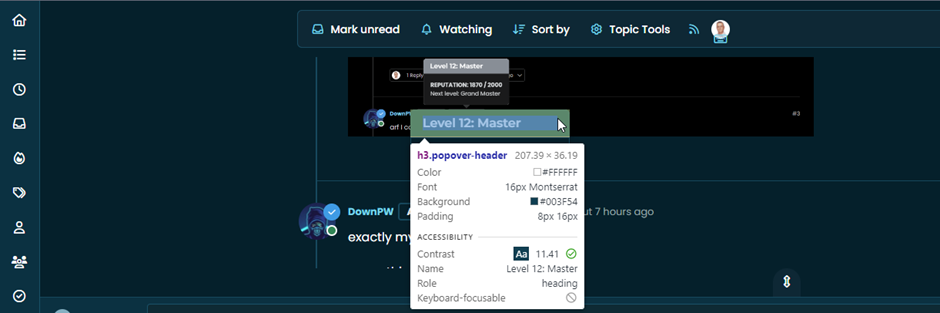
    1. Now select the element you want to inspect in the usual manner
    3d9cd04f-a769-41b7-a4f7-4524deb7e8b6-image.png

    1. Expose the CSS as required

    a55a0a2a-81af-401e-9ac4-69065c2f23d7-image.png

    Customise as necessary 🙂

  • phenomlabundefined phenomlab marked this topic as a regular topic on
  • phenomlabundefined phenomlab moved this topic from Configure on
  • Nice. Very good tips Mark 😁

  • phenomlabundefined phenomlab moved this topic from Guides on
  • phenomlabundefined phenomlab referenced this topic on

Related Topics
  • 5 Votes
    4 Posts
    2k Views
    @DownPW thanks. I forgot about that.
  • Quote design CSS

    Solved Customisation css quote
    15
    1
    4 Votes
    15 Posts
    4k Views
    @DownPW yes, that does make sense actually. I forgot to mention the layout of Sudonix is custom so that would have an impact on the positioning. Good spot
  • 9 Votes
    32 Posts
    10k Views
    @DownPW said in Bottom footer navbar button extend: Oh my god, it’s beautiful mark I liked this design so much, I’ve implemented it here. I intend to do a lot more with the footer in due course, so hiding it makes a lot of sense. Thanks @DownPW for the idea and initial concept
  • New message CSS problem

    Unsolved Customisation css
    11
    1
    2 Votes
    11 Posts
    3k Views
    @DownPW hi. Sorry for digging up an old post, but I’m going through items still unresolved and was looking to get an understanding of where you are currently with this?
  • 4 Votes
    8 Posts
    4k Views
    @DownPW done
  • [NODEBB] Help for my custom CSS

    Solved Customisation nodebb css bugfix
    237
    49 Votes
    237 Posts
    99k Views
    @baris said: You should change your selectors so it doesn’t look at the entire document. You probably only want to apply fancybox to stuff inside the #content element which is what changes when the user navigates around the page. So use $('#content a').... for your selectors then the forum logo in the header won’t be selected. I modified the JS Fancybox code now and this code and it seem better // --------------------------------------------- // Fancybox Media Reader (Without Website Logo) // --------------------------------------------- if (top.location.pathname !== '/login') { $(window).on('action:posts.loaded', function(data) { console.log("Polling DOM for lazyLoaded images to apply Fancybox"); $(document).ready(function() { $('#content a').not('.forum-logo').not(".avatar").not(".emoji").not(".bmac-noanimate").each(function() { $('#content a[href*=".jpg"], #content a[href*=".jpeg"], #content a[href*=".png"], #content a[href*=".gif"], #content a[href*=".webp"]').addClass("noanimate"); }); }); }); } if (top.location.pathname !== '/login') { $(document).ready(function() { $(window).on('action:ajaxify.end', function(data) { $('#content a').not('.logo').not(".avatar").not(".emoji").not(".bmac-noanimate").each(function() { $('#content a[href*=".jpg"], #content a[href*=".jpeg"], #content a[href*=".png"], #content a[href*=".gif"], #content a[href*=".webp"]').addClass("noanimate"); data.preventDefault() // Strip out the images contained inside blockquotes as this looks nasty :) $('#content blockquote img').remove(); }); Fancybox.bind( '#content a[href*=".jpg"], #content a[href*=".jpeg"], #content a[href*=".png"], #content a[href*=".gif"], #content a[href*=".webp"]', { groupAll: true, } ); }); }); } // Chat fancybox - fires when chat module loaded and AJAX calls new chat $(document).ready(function() { $(window).on('action:chat.loaded', function(data) { // >>> Se limiter au contenu principal uniquement <<< $('#content img').not('.forum-logo').not(".avatar").not(".emoji").not(".bmac-noanimate").each(function() { var newHref = $(this).attr("src"); $(this).wrap("<a class='fancybox' href='" + newHref + "'/>"); $('#content a[href*=".jpg"], #content a[href*=".jpeg"], #content a[href*=".png"], #content a[href*=".gif"], #content a[href*=".webp"]').addClass("noanimate"); data.preventDefault(); // Strip out the images contained inside blockquotes as this looks nasty :) $('#content blockquote img').remove(); }); Fancybox.bind( '#content a[href*=".jpg"], #content a[href*=".jpeg"], #content a[href*=".png"], #content a[href*=".gif"], #content a[href*=".webp"]', { groupAll: true, } ); }); }); For the logo, I must use overflow: visible !important; on [component="brand/logo"] /* --- Logo --- */ [component="brand/logo"] { max-height: 50px; width: auto; height: auto; max-width: 100%; display: block; object-fit: contain; object-position: left center; overflow: visible !important; } Better result !!
  • [NODEBB] Scroll Button

    Solved Customisation css javascript html scroll button
    7
    1
    0 Votes
    7 Posts
    2k Views
    @downpw ooops. Forgot that. Thanks for adding.
  • Bug Navbar CSS

    Solved Customisation navbar css
    3
    1 Votes
    3 Posts
    1k Views
    Not better way. Thanks.