NodeBB v3 Chat Very Slow
-
Hi Mark
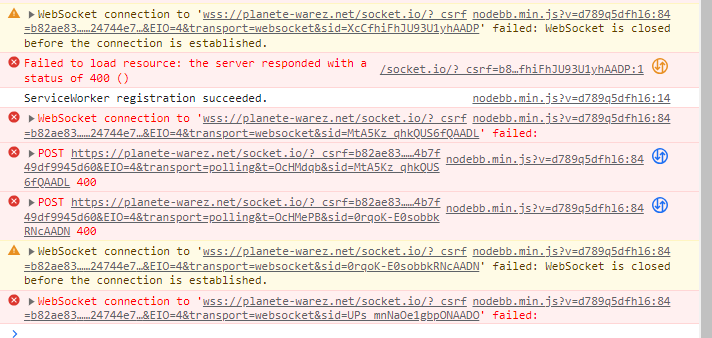
Chat area is very slow after uprading. Keyboard is very slow and it is locked some times. -
Hi Mark
Chat area is very slow after uprading. Keyboard is very slow and it is locked some times.@cagatay I’m testing this on your site from my PC - responses are immediate with no delays. have you tried clearing the cache on your browser, and the Cloudflare cache ? I am unable to replicate this issue - could you try with another web browser and see if the issue persists ?
-
it was via android phone not computer. maybe it was a problem?
-
@cagatay I’m also testing from my Android phone and unable to replicate.
-
@cagatay I’m not convinced that this is coming from your server, or NodeBB. Having tested myself, it works instantly for me.
-
 undefined phenomlab moved this topic from Bugs on
-
it’s odd, It’s not all the time but I had the same problem on Sudonix on Smartphone yesterday or before last night.
I would have to look at my instancePW and WS Spirit alive
-
it’s odd, It’s not all the time but I had the same problem on Sudonix on Smartphone yesterday or before last night.
I would have to look at my instance@DownPW interesting. You both use Android from memory as I do, but I’ve yet to come across this.
-
This is certainly interesting. Looks like others are reporting the same issue
https://community.nodebb.org/topic/17167/reduce-speed-in-v3-0-0/8?_=1683170989623
-
Chat page is freezing, speed is ok but sometimes it is freezing.
-
@cagatay This is going to be something that NodeBB themselves need to address.
Mark Cutting also advises organisations as a Fractional CIO, Fractional CISO and Executive Advisor, helping boards improve technology governance, cyber resilience and executive decision making. Learn more at Phenomlab Ltd
-
@phenomlab yes i think so.
-
this is one of the reasons why I haven’t upgraded to V3 yet.
I’m waiting for a fix from nodeBB for this bug.A topic has been created on nodebb forum communauty but does not provide an answer.
PW and WS Spirit alive
-
this is one of the reasons why I haven’t upgraded to V3 yet.
I’m waiting for a fix from nodeBB for this bug.A topic has been created on nodebb forum communauty but does not provide an answer.
-
-
yes we tested with baris, will be fixed 3.1.4
-
@cagatay 3.1.4 has been released.

Mark Cutting also advises organisations as a Fractional CIO, Fractional CISO and Executive Advisor, helping boards improve technology governance, cyber resilience and executive decision making. Learn more at Phenomlab Ltd
-
@phenomlab upgraded thank you

-
I need to upgrade and do my CSS themes but I have no time grrr
I work on the garden
PW and WS Spirit alive
-
I need to upgrade and do my CSS themes but I have no time grrr
I work on the garden


 no rest for you then!
Hello! It looks like you're interested in this conversation, but you don't have an account yet.
Getting fed up of having to scroll through the same posts each visit? When you register for an account, you'll always come back to exactly where you were before, and choose to be notified of new replies (either via email, or push notification). You'll also be able to save bookmarks and upvote posts to show your appreciation to other community members.
With your input, this post could be even better 💗
Register LoginRelated Topics
-
-
-
-
-
-
-
NodeBB 1.19.3
Solved Performance -