Skip to content

nodebb-plugin-reactions not working @v1.0.2 with Harmony theme

Solved General
47 3 16.5k 1
  • @phenomlab I’m very thankful for taking your time and fixing most of the peer dependencies. That’s really strange

    wrote on last edited by
    #9

    @dave1904 No issues. See my comment above about npm

  • @phenomlab I’m very thankful for taking your time and fixing most of the peer dependencies. That’s really strange

    wrote on last edited by phenomlab
    #10

    @dave1904 I’ll look more into this tomorrow, but you could

    1. Upgrade npm
    2. Stop NodeBB
    3. Run the NodeBB upgrade process again
    4. Start NodeBB
    5. Test
  • @dave1904 I’ll look more into this tomorrow, but you could

    1. Upgrade npm
    2. Stop NodeBB
    3. Run the NodeBB upgrade process again
    4. Start NodeBB
    5. Test
    wrote on last edited by
    #11

    @phenomlab said in nodebb-plugin-reactions not working @v1.0.2 with Harmony theme:

    @dave1904 I’ll look more into this tomorrow, but you could

    1. Upgrade npm
    2. Stop NodeBB
    3. Run the NodeBB upgrade process again
    4. Start NodeBB
    5. Test

    I tried your steps but still no success unfortunately

  • @phenomlab said in nodebb-plugin-reactions not working @v1.0.2 with Harmony theme:

    @dave1904 I’ll look more into this tomorrow, but you could

    1. Upgrade npm
    2. Stop NodeBB
    3. Run the NodeBB upgrade process again
    4. Start NodeBB
    5. Test

    I tried your steps but still no success unfortunately

    wrote on last edited by
    #12

    @dave1904 what’s the output of npm --version and node --version ?

  • @dave1904 what’s the output of npm --version and node --version ?

    wrote on last edited by
    #13

    @phenomlab

    npm --version
    9.6.5

    node --version
    v18.16.0

  • @phenomlab

    npm --version
    9.6.5

    node --version
    v18.16.0

    wrote on last edited by
    #14

    @dave1904 hmm. Nothing wrong with those.

  • wrote on last edited by dave1904
    #15

    @phenomlab After upgrading npm and node I did upgrade nodebb again but that didn’t do any changes. Can you please tell me which commands I have to use to see those peer dependencies listed in the screenshot you sent me via pn?

  • @phenomlab After upgrading npm and node I did upgrade nodebb again but that didn’t do any changes. Can you please tell me which commands I have to use to see those peer dependencies listed in the screenshot you sent me via pn?

    wrote on last edited by
    #16

    @dave1904 if you stop NodeBB and use ./nodebb upgrade, they should appear in the console.

  • wrote on last edited by
    #17
    2. Bringing base dependencies up to date...  started
    
    up to date, audited 1180 packages in 8s
    
    139 packages are looking for funding
      run `npm fund` for details


    Looks better doesn’t it?

  • 2. Bringing base dependencies up to date...  started
    
    up to date, audited 1180 packages in 8s
    
    139 packages are looking for funding
      run `npm fund` for details


    Looks better doesn’t it?

    wrote on last edited by
    #18

    @dave1904 yes, it does.

  • wrote on last edited by
    #19

    @dave1904 did you manage to get any further with this ?

  • wrote on last edited by
    #20

    @phenomlab I gave up on this yesterday

  • @phenomlab I gave up on this yesterday

    wrote on last edited by
    #21

    @dave1904 Ok. I’ll login again later and take a look at this. I still think it’s related to dependencies.

  • wrote on last edited by phenomlab
    #22

    @dave1904 I’ve managed to resolve this issue - see below
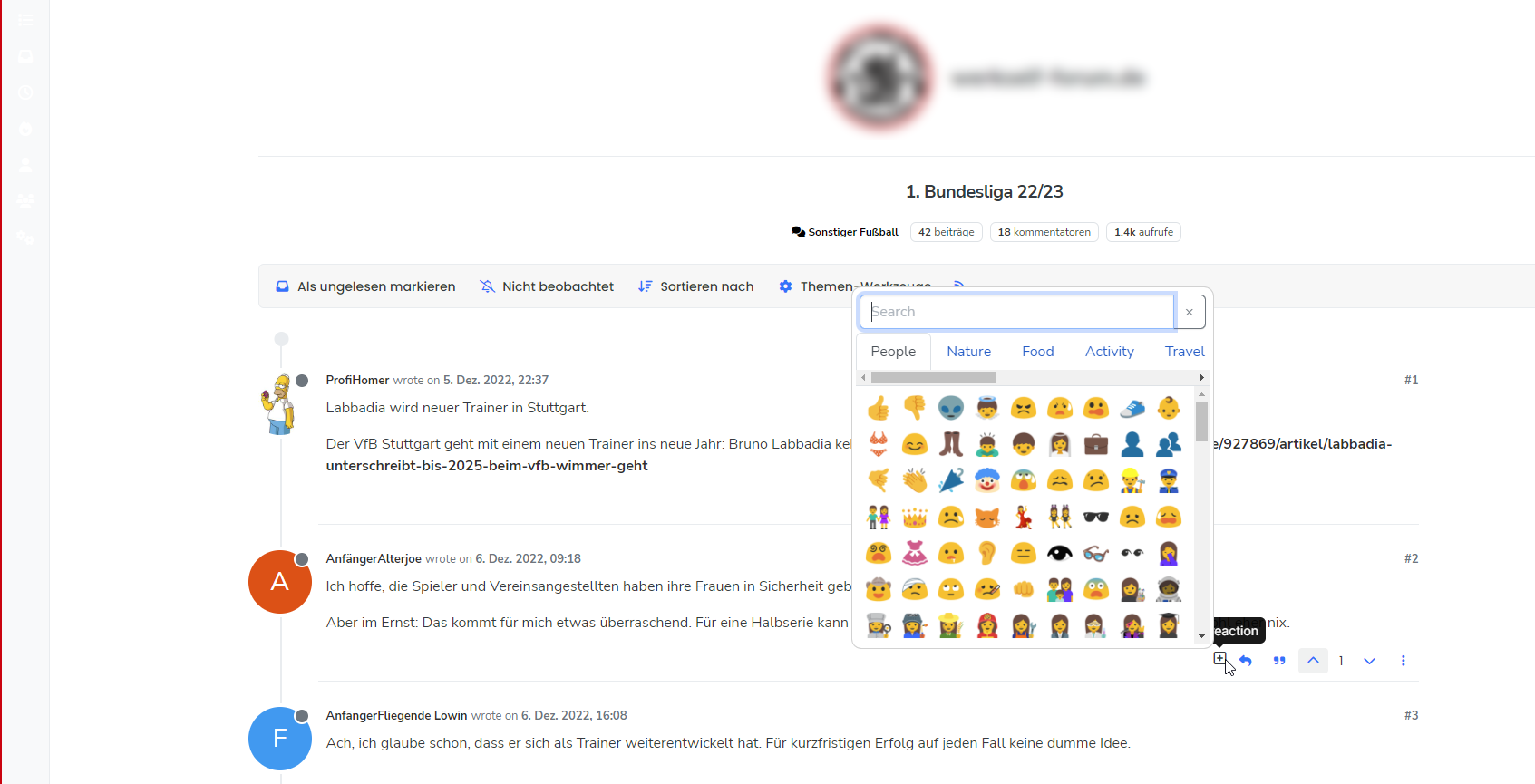
    204f1bd9-ede2-4c07-a357-a09ccddb379b-image.png

    It seems that there is a conflicting plugin somewhere that causes reactions to not fire. Not sure which one it is, but below are the steps I took to resolve

    1. Issue ./nodebb reset -t - this essentially resets everything back to default - be warned, as it will strip literally all customisations also
    2. Reactivate only the essential plugins (typically those that come with the stock installation)
    3. Install and activate nodebb-plugin-emoji, nodebb-plugin-emoji-android and @nodebb/nodebb-plugin-reactions@latest
    4. Rebuild and restart

    Obviously, these steps are quite dramatic and would mean some downtime for your forum. You’d also need to put everything back the way it was in terms of CSS, Widgets, etc, so quite invasive. My suggestion would be to try a minimal approach on prod to see if we can get that to work without having to use the somewhat “sledgehammer” approach above.

  • phenomlab phenomlab has marked this topic as solved on
  • wrote on last edited by
    #23

    Again, thank you very much for taking your time. Very happy that you could fix it. 🙂 I guess the minimal approach would be to deactivate plugins one after another, rebuild and restart and see if the reactions plugin works?

  • Again, thank you very much for taking your time. Very happy that you could fix it. 🙂 I guess the minimal approach would be to deactivate plugins one after another, rebuild and restart and see if the reactions plugin works?

    wrote on last edited by
    #24

    @dave1904 yes, that’s the route I would take.

  • @dave1904 yes, that’s the route I would take.

    wrote on last edited by
    #25

    @phenomlab

    I will try this later and keep you updated.

  • @phenomlab

    I will try this later and keep you updated.

    wrote on last edited by
    #26

    @dave1904 any update? More to the point, so you need any help?

  • @dave1904 any update? More to the point, so you need any help?

    wrote on last edited by
    #27

    @phenomlab

    At the moment I try it the other way around so avoid downtime on prod: Activating plugins on dev to see if reactions stops working. Will keep you updated!

  • @phenomlab

    At the moment I try it the other way around so avoid downtime on prod: Activating plugins on dev to see if reactions stops working. Will keep you updated!

    wrote on last edited by
    #28

    @dave1904 ok but I think you might need the steps I provided in previous posts in this thread.


Did this solution help you?
Did you find the suggested solution useful? Support 💗 Sudonix with a coffee ☕
If your organisation needs deeper expertise around infrastructure, security, or technology leadership, learn more about Phenomlab Ltd. Many of the deeper technical guides behind Sudonix are published there.

Related Topics
  • What plugins are being used here on Sudonix?

    Solved General nodebb plugins development
    6
    5 Votes
    6 Posts
    2k Views
    phenomlab
    @Roki-Antic Welcome! This site isn’t running Persona, but Harmony - a very heavily customised version at that. Do you have a URL where your site is currently located that is publicly accessible? Feel free to PM this info if you do not want to disclose here. Happy to help with any customisation needs.
  • Nodebb design

    Solved General nodebb
    2
    1 Votes
    2 Posts
    1k Views
    phenomlab
    @Panda said in Nodebb design: One negative is not being so good for SEO as more Server side rendered forums, if web crawlers dont run the JS to read the forum. From recollection, Google and Bing have the capability to read and process JS, although it’s not in the same manner as a physical person will consume content on a page. It will be seen as plain text, but will be indexed. However, it’s important to note that Yandex and Baidu will not render JS, although seeing as Google has a 90% share of the content available on the web in terms of indexing, this isn’t something you’ll likely lose sleep over. @Panda said in Nodebb design: The “write api” is preferred for server-to-server interactions. This is mostly based around overall security - you won’t typically want a client machine changing database elements or altering data. This is why you have “client-side” which could be DOM manipulation etc, and “server-side” which performs more complex operations as it can communicate directly with the database whereas the client cannot (and if it can, then you have a serious security flaw). Reading from the API is perfectly acceptable on the client-side, but not being able to write. A paradigm here would be something like SNMP. This protocol exists as a UDP (UDP is very efficient, as it is “fire and forget” and does not wait for a response like TCP does) based service which reads performance data from a remote source, thus enabling an application to parse that data for use in a monitoring application. In all cases, SNMP access should be “RO” (Read Only) and not RW (Read Write). It is completely feasible to assume complete control over a firewall for example by having RW access to SNMP and then exposing it to the entire internet with a weak passphrase. You wouldn’t do it (at least, I hope you wouldn’t) and the same ethic applies to server-side rendering and the execution of commands.
  • Collapsing blockquotes on Harmony

    General nodebb harmony collapsible quotes
    2
    1
    2 Votes
    2 Posts
    980 Views
    phenomlab
    @dave1904 that’s a really good point actually. I know it was there previously on Persona, but you’re right - no such function exists on harmony. However, putting something in place to mimick the behaviour of Persona won’t be hard from the js standpoint, although I wonder if perhaps we should ask the NodeBB developers is this feature was overlooked?
  • Welcome to NodeBB V3!

    Pinned Moved General v3-prod code changes
    1
    0 Votes
    1 Posts
    862 Views
    No one has replied
  • Issues with 2nd NodeBB installation

    Solved General
    22
    3 Votes
    22 Posts
    10k Views
    phenomlab
    @cagatay yes, that will be fine. Just watch for potential caching conflicts as you will have two sites writing to the one instance of iframely.
  • Fresher in Nodebb install

    General nodebb
    24
    15 Votes
    24 Posts
    11k Views
    phenomlab
    @Hari I’ve been reading a lot about APO. Looks impressive.
  • NodeBB v2.4.0

    Solved General nodebb version error
    3
    1
    2 Votes
    3 Posts
    2k Views
    Sampo2910
    @phenomlab As always…Thank you. Worked for me.
  • Discord Login - OAuth2 - NodeBB

    Solved General discord nodebb plugins
    32
    11 Votes
    32 Posts
    14k Views
    phenomlab
    @Galaxian hi, and welcome to Sudonix Can you check your config.json file and ensure that your forum URL doesn’t have a trailing backslash or forward slash in it ? This was the issue @Sampo2910 had.