Skip to content

NodeBB: The global Search option

Solved Configure
5 2 799 1
  • Hi,
    I noticed both on the NodeBB forum, Sudonix forum, and mine also, there is no Search functionality. I would like this very much because I would like people to search for a past answer before asking for a new one. Maybe, I am looking at the wrong place, or do I need to activate it from admin?

  • My apologies! I have found the Search field on NodeBB and your site. I just need to figure out how to get it on my site. Could it be because I have no posts yet?

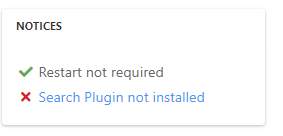
    @mventures Not quite - it’s because of this
    ff0a9849-5815-4c7a-853a-808fd325a779-image.png

    It’s installed, but not activated by default
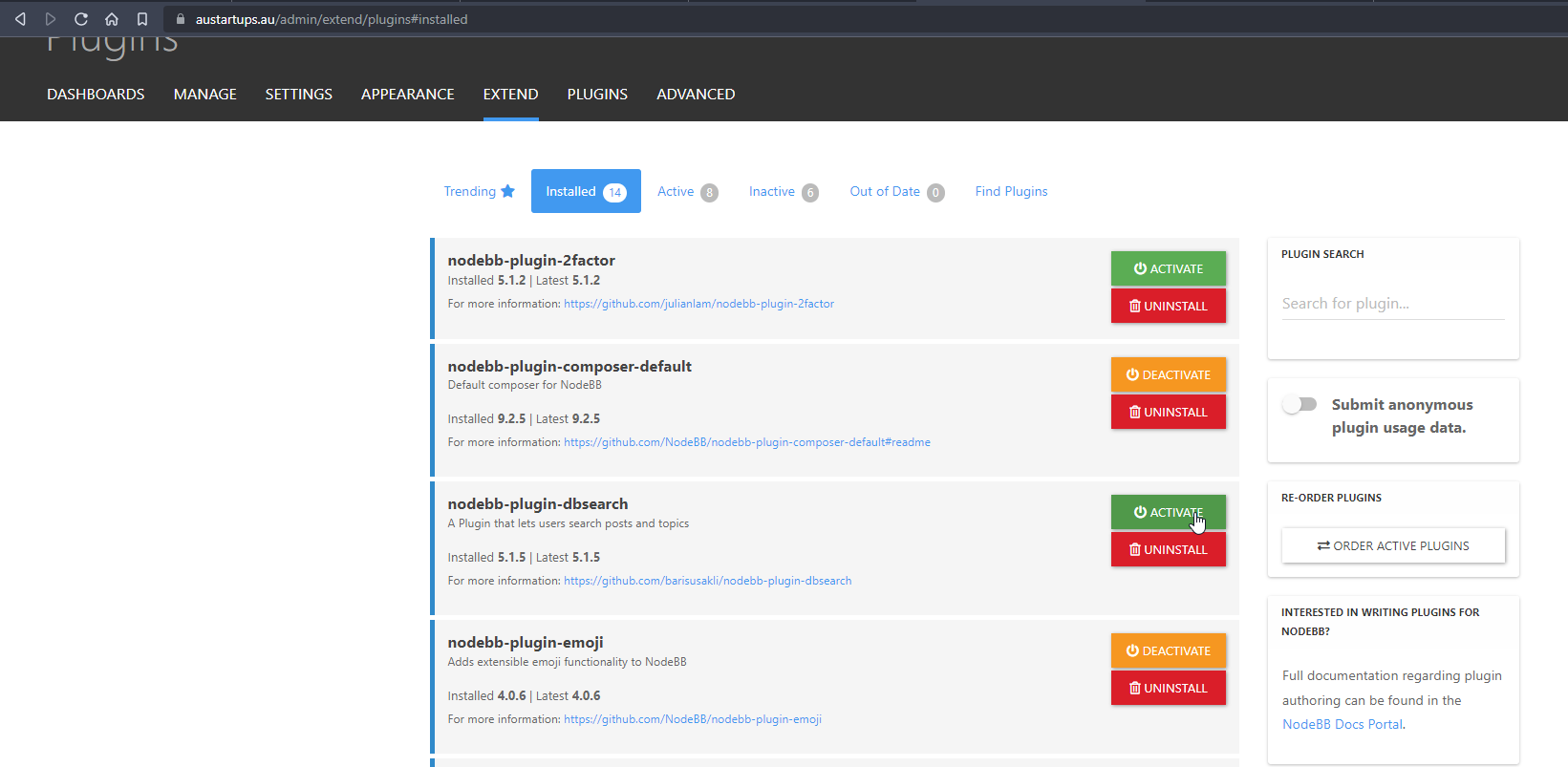
    f6280a04-ace2-43a6-8e9a-4614efecba84-image.png

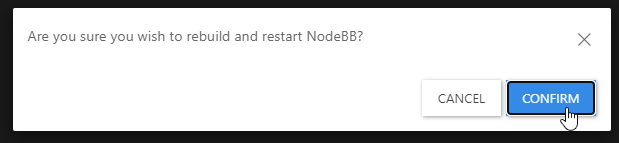
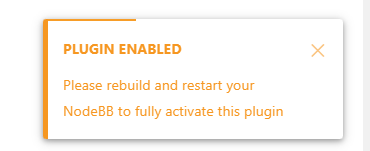
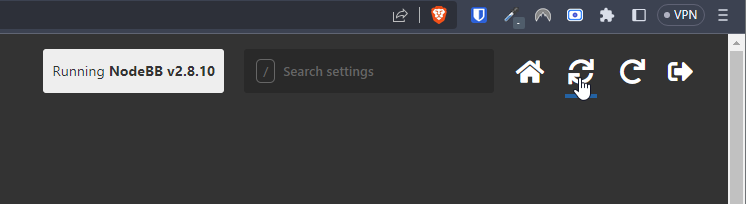
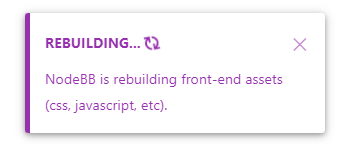
    Every time you install or uninstall a plugin, you need to rebuild NodeBB
    c638615a-4597-41f6-ad32-b552c8433c06-image.png

    f539df98-cb0c-4875-abf4-b61a60333ad5-image.png

    f311a7a0-05b7-4036-820d-85661410369b-image.png

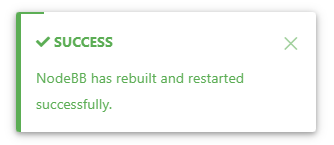
    Confirm, and wait for NodeBB to restart

    bd46bebc-58c6-400a-a3f3-1bd09e17a5b0-image.png

    b1b5263e-f68a-4a34-99b6-5147979fb8af-image.png

    Now go back to your site

    You should see that Search has appeared

    39af2e82-15ec-4add-a758-f422b60c43ba-image.png

    I’ve done all of this for you, so this is for reference.

    Regds

  • My apologies! I have found the Search field on NodeBB and your site. I just need to figure out how to get it on my site. Could it be because I have no posts yet?

  • My apologies! I have found the Search field on NodeBB and your site. I just need to figure out how to get it on my site. Could it be because I have no posts yet?

    @mventures Not quite - it’s because of this

    ff0a9849-5815-4c7a-853a-808fd325a779-image.png

    It’s installed, but not activated by default

    f6280a04-ace2-43a6-8e9a-4614efecba84-image.png

    Every time you install or uninstall a plugin, you need to rebuild NodeBB
    c638615a-4597-41f6-ad32-b552c8433c06-image.png

    f539df98-cb0c-4875-abf4-b61a60333ad5-image.png

    f311a7a0-05b7-4036-820d-85661410369b-image.png

    Confirm, and wait for NodeBB to restart
    bd46bebc-58c6-400a-a3f3-1bd09e17a5b0-image.png

    b1b5263e-f68a-4a34-99b6-5147979fb8af-image.png

    Now go back to your site

    You should see that Search has appeared

    39af2e82-15ec-4add-a758-f422b60c43ba-image.png

    I’ve done all of this for you, so this is for reference.

    Regds

  • phenomlabundefined phenomlab has marked this topic as solved on
  • That’s awesome @phenomlab! Thank you. I can see it 🙂

    What did you mean by, “rebuild NodeBB”? And the whole rebuild happens by just clicking that “recycle” button?

  • That’s awesome @phenomlab! Thank you. I can see it 🙂

    What did you mean by, “rebuild NodeBB”? And the whole rebuild happens by just clicking that “recycle” button?

    @mventures Yes, exactly. The other icon will restart NodeBB whilst the first icon I referenced will rebuild (recompile) it.

    The huge strength of NodeBB over Flarum (for example) is that the code is precompiled, and called once at boot. PHP’s code has to repeatedly reload code from source making it much slower.


Did this solution help you?
Did you find the suggested solution useful? Support 💗 Sudonix with a coffee
If your organisation needs deeper expertise around infrastructure, security, or technology leadership, learn more about Phenomlab Ltd. Many of the deeper technical guides behind Sudonix are published there.

Related Topics
  • What’s going on with NodeBB?

    Performance nodebb script die
    8
    2 Votes
    8 Posts
    768 Views
    @cagatay That is quite the jump as importers from one forum platform to another are notoriously unreliable and could land up being quite costly if it requires managed services.
  • Want to use Sudonix themes ?

    Chitchat themes nodebb
    80
    1
    34 Votes
    80 Posts
    14k Views
    omg thank you Mark.
  • nodebb loading emojis

    Solved Configure nodebb emojis
    16
    1
    1 Votes
    16 Posts
    3k Views
    @DownPW sure. Let me have a look at this in more detail. I know nginx plus has extensive support for this, but it’s not impossible to get somewhere near acceptable with the standard version. You might be better off handling this at the Cloudflare level given that it sits in between the requesting client and your server.
  • 5 Votes
    13 Posts
    2k Views
    'use strict'; const winston = require('winston'); const user = require('../user'); const notifications = require('../notifications'); const sockets = require('../socket.io'); const plugins = require('../plugins'); const meta = require('../meta'); module.exports = function (Messaging) { Messaging.notifyQueue = {}; // Only used to notify a user of a new chat message, see Messaging.notifyUser Messaging.notifyUsersInRoom = async (fromUid, roomId, messageObj) => { let uids = await Messaging.getUidsInRoom(roomId, 0, -1); uids = await user.blocks.filterUids(fromUid, uids); let data = { roomId: roomId, fromUid: fromUid, message: messageObj, uids: uids, }; data = await plugins.hooks.fire('filter:messaging.notify', data); if (!data || !data.uids || !data.uids.length) { return; } uids = data.uids; uids.forEach((uid) => { data.self = parseInt(uid, 10) === parseInt(fromUid, 10) ? 1 : 0; Messaging.pushUnreadCount(uid); sockets.in(`uid_${uid}`).emit('event:chats.receive', data); }); if (messageObj.system) { return; } // Delayed notifications let queueObj = Messaging.notifyQueue[`${fromUid}:${roomId}`]; if (queueObj) { queueObj.message.content += `\n${messageObj.content}`; clearTimeout(queueObj.timeout); } else { queueObj = { message: messageObj, }; Messaging.notifyQueue[`${fromUid}:${roomId}`] = queueObj; } queueObj.timeout = setTimeout(async () => { try { await sendNotifications(fromUid, uids, roomId, queueObj.message); } catch (err) { winston.error(`[messaging/notifications] Unabled to send notification\n${err.stack}`); } }, meta.config.notificationSendDelay * 1000); }; async function sendNotifications(fromuid, uids, roomId, messageObj) { const isOnline = await user.isOnline(uids); uids = uids.filter((uid, index) => !isOnline[index] && parseInt(fromuid, 10) !== parseInt(uid, 10)); if (!uids.length) { return; } if (roomId != 11) { // 5 Is the ID of the ID of the global chat room. Messaging.getUidsInRoom(roomId, 0, -1); // Proceed as normal. } else { user.getUidsFromSet('users:online', 0, -1); // Only notify online users. } const { displayname } = messageObj.fromUser; const isGroupChat = await Messaging.isGroupChat(roomId); const notification = await notifications.create({ type: isGroupChat ? 'new-group-chat' : 'new-chat', subject: `email:notif.chat.subject, ${displayname}`, bodyShort: `notifications:new_message_from, ${displayname}`, bodyLong: messageObj.content, nid: `chat_${fromuid}_${roomId}`, from: fromuid, path: `/chats/${messageObj.roomId}`, }); delete Messaging.notifyQueue[`${fromuid}:${roomId}`]; notifications.push(notification, uids); } };
  • restarting nodebb on boot

    Unsolved Configure nodebb
    3
    1 Votes
    3 Posts
    1k Views
    @eeeee said in restarting nodebb on boot: can I just run nodebb under nodemon for auto restarts? It’s a better method. Nodemon just looks for file system changes and would effectively die if the server was rebooted meaning you’d have to start it again anyway. Systemd is the defacto standard which is how the operating system interacts in terms of services, scheduled tasks etc.
  • MailGun Not Working NodeBB

    Solved Configure mail mailgun
    6
    1 Votes
    6 Posts
    1k Views
    @phenomlab did it i did not create smtp user on mailgun. everything is working now. [image: 1667569376261-6cc6061f-ed5d-41f6-8eb7-5d98f98b3706-image.png]
  • 0 Votes
    5 Posts
    1k Views
    @qwinter this particular site uses the code I wrote if you want to see it in action. It’s a information and intelligence gatherer I designed for collecting various information security articles from around the globe and consolidating them in one place. Essentially, each “post” is in fact generated by the script, and the NodeBB API. https://hostrisk.com/
  • Configure SMTP for Nodebb

    Solved Configure
    14
    5 Votes
    14 Posts
    2k Views
    @marusaky based on the work completed thus far (in relation to PM exchanges), I’m going to mark this completed. Sending email from the server itself works fine without issue, and DNS appears to be clean (valid SPF, DMARC, and DKIM records). It appears that only Gmail marks incoming messages from your domain as spam - perhaps because of the domain age, which there is nothing we can do to prevent this. Mail delivery to all other domains appears to work fine in al of my tests.