Skip to content

background color of the footer area

Solved Customisation
7 3 1.4k 1
  • How can I change the background color of the footer area?

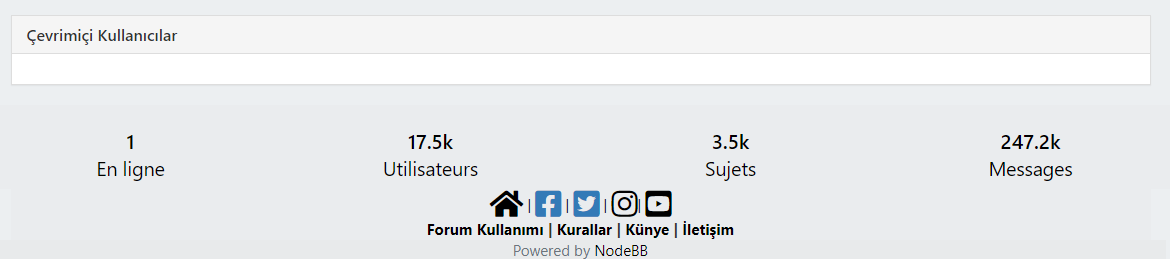
    we have forum-stats widget, social media links and “powered by NodeBB” label at the bottom as “global footer widgets”. We would like to change the color of this background (whole this footer area from right to left)
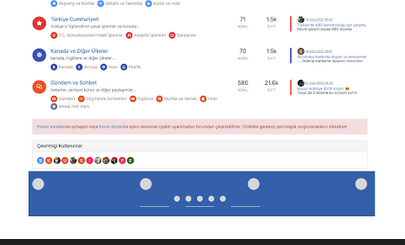
    Screen Shot 2022-02-28 at 7.06.17 PM.png

  • @crazycells Can you provide me access to your site (details over PM obviously) so I can look at this ? I have an idea as to how this should work, but would like to see how you have it working now.

    @phenomlab For your footers, I changed to

    div class="row text-center adjust">
    

    For the “Powered by…” I changed this to

    <div class="row pad-10 text-center adjust">
    

    And finally, added a new class

    .row.text-center.adjust {
        margin-left: -30px;
        margin-right: -30px;
    }
    

    At the top of your custom CSS
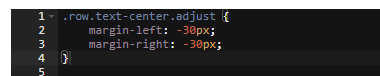
    24169304-5dc7-47ca-b143-26e9d9ef2fd8-image.png

    Reload your page and have a look 🙂

    f3154da1-4da3-447a-a169-e57c82f022cb-image.png

    The class of row exists already (part of Bootstrap) and .row.text-center.adjust is explicit and will only apply to that code

  • How can I change the background color of the footer area?

    we have forum-stats widget, social media links and “powered by NodeBB” label at the bottom as “global footer widgets”. We would like to change the color of this background (whole this footer area from right to left)

    Screen Shot 2022-02-28 at 7.06.17 PM.png

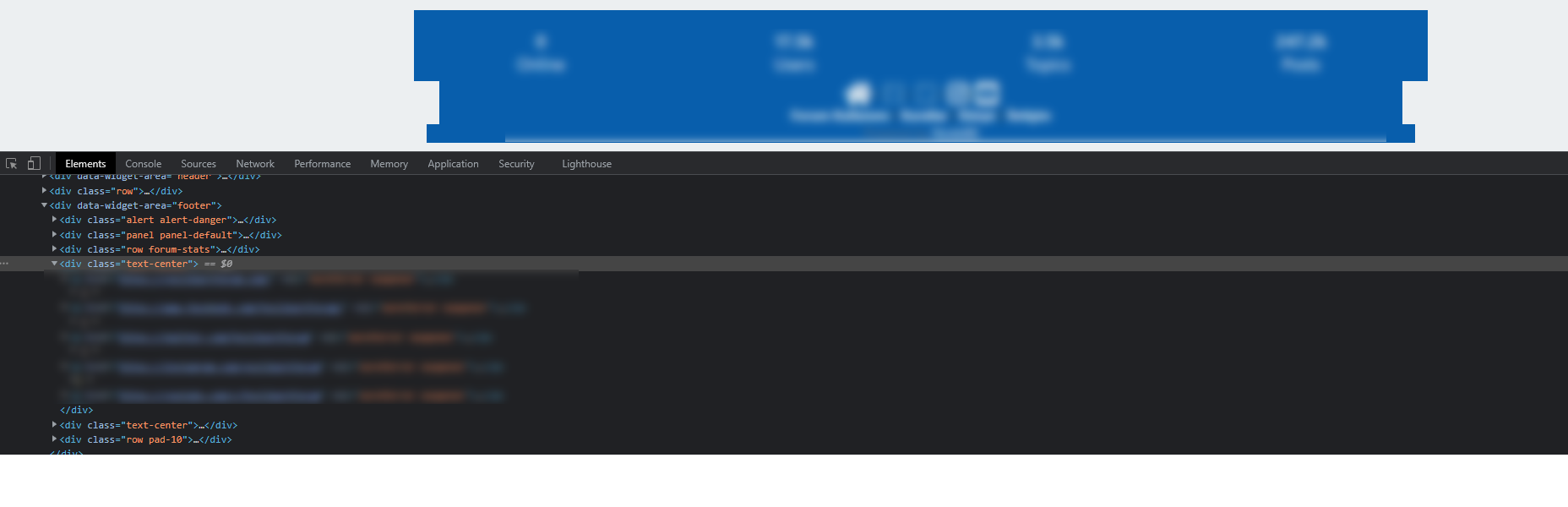
    @crazycells from what I currently see, this is a custom HTML widget added directly below the forum-stats widget ?
    7e12893c-e0e4-404e-b3b5-cfaee242d0c1-image.png

    As this appears outside of the row element from the stats widget, it won’t automatically inherit the space you desire. The way to fix this would typically be with classes and CSS. Can you provide the code you’ve used for this ?

    Thanks

  • Or just play with transparent color and font-color maybe :

    ef0dc066-8d1a-4201-9819-1347f343a031-image.png

    but @phenomlab is always right 😉

  • @crazycells from what I currently see, this is a custom HTML widget added directly below the forum-stats widget ?

    7e12893c-e0e4-404e-b3b5-cfaee242d0c1-image.png

    As this appears outside of the row element from the stats widget, it won’t automatically inherit the space you desire. The way to fix this would typically be with classes and CSS. Can you provide the code you’ve used for this ?

    Thanks

    @phenomlab thanks. I need all footer region (from left side to right side) to be the same color, the current form of the site is just experiments 😄

    Do you think it is possible to easily add a “custom global footer” to the nodebb? I could move the links there… (I am OK with leaving the forum-stats widget outside of this custom footer region)

    Here is the code I am using currently:

    //footer color modifications start
    .forum-stats {
        .row {
        background-color: #085EAC;
        }
    
        h2 {
            color: #eceff1;
        
            small {
            color: #eceff1;
            }
            
        }
    }
    
    
    [data-widget-area="footer"] {    
        .text-center {
            background-color: #085EAC;
        
            a {
                color: #eceff1;
            }        
        }
    }
    //footer color modifications end
    

    This is what I am trying to achieve:
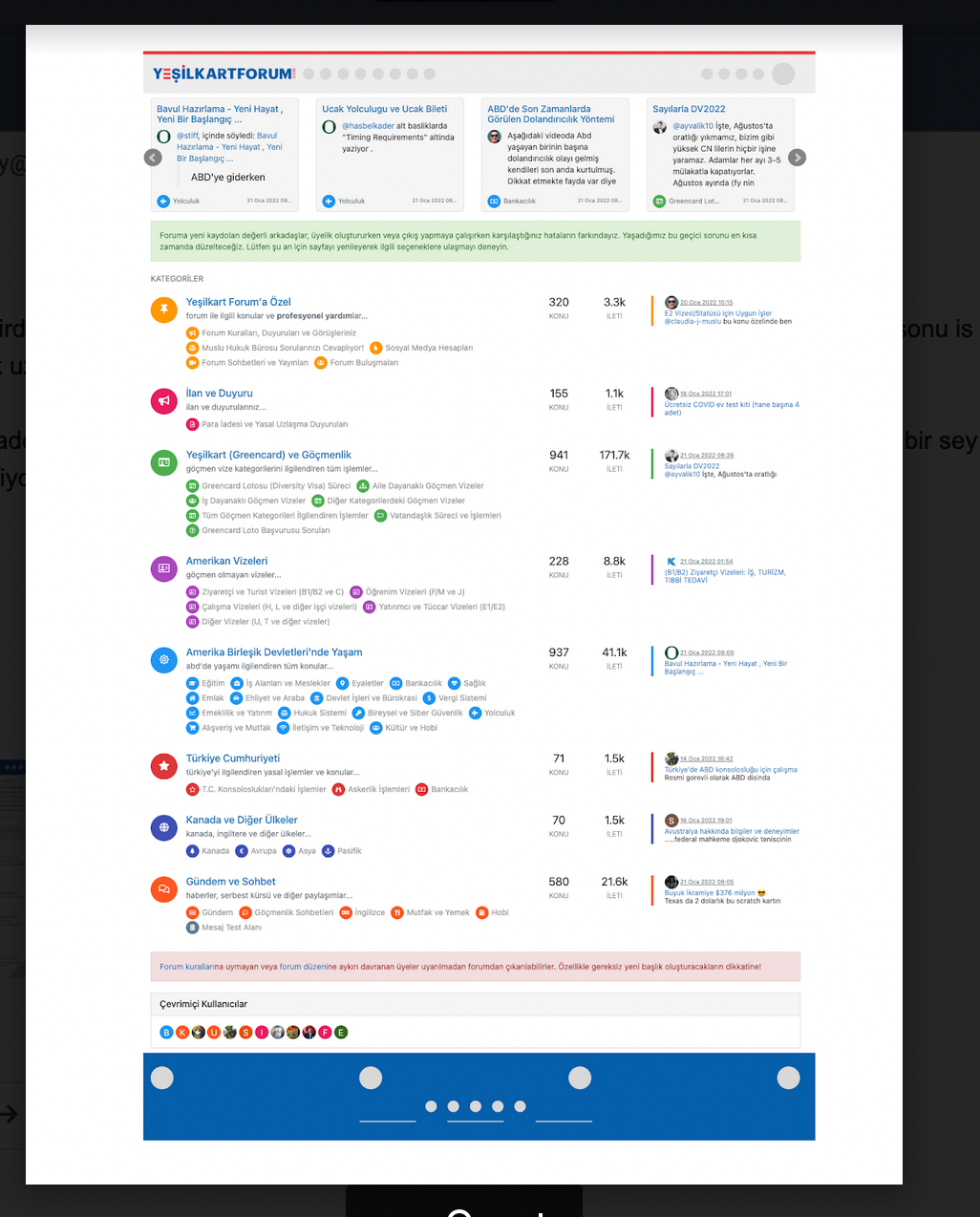
    Screen Shot 2022-03-01 at 11.40.59 AM.png

  • @phenomlab thanks. I need all footer region (from left side to right side) to be the same color, the current form of the site is just experiments 😄

    Do you think it is possible to easily add a “custom global footer” to the nodebb? I could move the links there… (I am OK with leaving the forum-stats widget outside of this custom footer region)

    Here is the code I am using currently:

    //footer color modifications start
    .forum-stats {
        .row {
        background-color: #085EAC;
        }
    
        h2 {
            color: #eceff1;
        
            small {
            color: #eceff1;
            }
            
        }
    }
    
    
    [data-widget-area="footer"] {    
        .text-center {
            background-color: #085EAC;
        
            a {
                color: #eceff1;
            }        
        }
    }
    //footer color modifications end
    

    This is what I am trying to achieve:

    Screen Shot 2022-03-01 at 11.40.59 AM.png

    @crazycells Can you provide me access to your site (details over PM obviously) so I can look at this ? I have an idea as to how this should work, but would like to see how you have it working now.

  • @crazycells Can you provide me access to your site (details over PM obviously) so I can look at this ? I have an idea as to how this should work, but would like to see how you have it working now.

    @phenomlab For your footers, I changed to

    div class="row text-center adjust">
    

    For the “Powered by…” I changed this to

    <div class="row pad-10 text-center adjust">
    

    And finally, added a new class

    .row.text-center.adjust {
        margin-left: -30px;
        margin-right: -30px;
    }
    

    At the top of your custom CSS

    24169304-5dc7-47ca-b143-26e9d9ef2fd8-image.png

    Reload your page and have a look 🙂

    f3154da1-4da3-447a-a169-e57c82f022cb-image.png

    The class of row exists already (part of Bootstrap) and .row.text-center.adjust is explicit and will only apply to that code

  • phenomlabundefined phenomlab has marked this topic as solved on
  • @phenomlab For your footers, I changed to

    div class="row text-center adjust">
    

    For the “Powered by…” I changed this to

    <div class="row pad-10 text-center adjust">
    

    And finally, added a new class

    .row.text-center.adjust {
        margin-left: -30px;
        margin-right: -30px;
    }
    

    At the top of your custom CSS

    24169304-5dc7-47ca-b143-26e9d9ef2fd8-image.png

    Reload your page and have a look 🙂

    f3154da1-4da3-447a-a169-e57c82f022cb-image.png

    The class of row exists already (part of Bootstrap) and .row.text-center.adjust is explicit and will only apply to that code

    @phenomlab thank you very much 🙂


Did this solution help you?
Did you find the suggested solution useful? Support 💗 Sudonix with a coffee
If your organisation needs deeper expertise around infrastructure, security, or technology leadership, learn more about Phenomlab Ltd. Many of the deeper technical guides behind Sudonix are published there.

Related Topics
  • Spam spam spam

    Solved Configure nodebb
    6
    2 Votes
    6 Posts
    854 Views
    @Panda said in Spam spam spam: ok, yes Ive seen the queue, it shows IP, but doesnt have a field for comments from registrant. It’s not designed for that. It merely serves as a gateway between posts appearing on your form or not. @Panda said in Spam spam spam: It would be better if nodebb had this plugin included in ACP list, as not only then do you know its approved and should work, but many people cant or dont want to use CLI on the server That’s a question for the NodeBB devs but in all honesty you can’t not use the CLI when installing nodebb so to be this isn’t a big deal.
  • Planned sunset of NTFY plugin

    Pinned Announcements push nodebb ntfy
    7
    1
    8 Votes
    7 Posts
    1k Views
    I’ve noticed that I’m the only one subscribed to the push notifications on this site. If you were using NTFY previously, and have noticed that you’ve not had any alerts for a while, it’s because this feature has been disabled. You’ll now need to use the push notification to replace NTFY as mentioned in the first post.
  • Footer bar add center text

    Solved Customisation css
    41
    1
    8 Votes
    41 Posts
    9k Views
    @phenomlab said in Footer bar add center text: div#console-nav-tab Ah ok test with bottom: 0px !important; idem
  • 9 Votes
    32 Posts
    8k Views
    @DownPW said in Bottom footer navbar button extend: Oh my god, it’s beautiful mark I liked this design so much, I’ve implemented it here. I intend to do a lot more with the footer in due course, so hiding it makes a lot of sense. Thanks @DownPW for the idea and initial concept
  • NodeBB changing color of the text

    Solved Customisation
    7
    2 Votes
    7 Posts
    2k Views
    @phenomlab said in NodeBB changing color of the text: @marusaky This ought to to it a.permalink, a.permalink:active, a.permalink:focus, a.permalink:hover { color: #ffffff; } works great, thanks a lot
  • 5 Votes
    9 Posts
    4k Views
    @phenomlab Very very great Mark Thanks again, It’s perfect now ! –> I share my code that I modified. I’ve added French and English comments. If you see things to change Mark, don’t hesitate. As usual, all the access paths (FA icons, logo) will have to be modified according to your architecture. You can also very well add/remove time slots and change welcome messages to suit your needs. Widgets ACP/HTML Widget Footer Logo <center> <br><br> <img id="thislogo" src="path/to/my/image"> </center> Widget Welcome Message <!-- IF loggedIn --> <div class="getUsername">, <a href="/me"><span class="username"></span></a></div> <!-- ENDIF loggedIn --> CSS – I added the size font-weight: 900; in the CSS because otherwise some FA icon wasn’t displayed correctly and reduce margin : i#thisicon { font-family: "Font Awesome 5 Free"; font-style: normal; margin-right: 8px; font-weight: 900; } .getUsername { padding-top: 20px; text-align: right; } /*Smartphone*/ /*On désactive le message de bienvenue"*/ /*We disable the welcome message"*/ @media all and (max-width: 1024px) { .getUsername { display: none; } } JAVASCRIPT // ------------------------------------------ // Welcome Message avec icône et Footer logo // Welcome Message with icon and Footer logo // ------------------------------------------ $(window).on('action:ajaxify.end', function (data) { //On récupère le username dans le DOM et on l'affiche //We retrieve the username from the DOM and display it function updateUsername() { $('.getUsername .username').text(app.user.username); } if (document.readyState === 'loading') { document.addEventListener('DOMContentLoaded', updateUsername); } else { updateUsername(); } //On déclare les variables principales (themessage & thehours) ainsi que les variables secondaires correspondants aux plages horaires //We declare the main variables (themessage & thehours) as well as the secondary variables corresponding to the time slots var thehours = new Date().getHours(); var themessage; var wakeup = ('Good day'); var morning = ('Good morning'); var lunch = ('Bon appétit'); var afternoon = ('Good afternoon'); var drink = ('Cheers'); var evening = ('Good evening'); var night = ('Good night'); var welcome = ('Welcome'); var matched = false; //On peux ici tester le résultat du code en spécifiant une heure (!!!IMPORTANT: Commenter une fois le script testé!!!) //Here we can test the result of the code by specifying a time (!!!IMPORTANT: Comment once the script has been tested!!!) //thehours = 20 //On déclare les plages horaires avec les icones FA et les logos //We declare the time slots with FA icons and logos path if (thehours >= 0 && thehours < 6) { themessage = night; theicon = "fa-solid fa-moon"; thelogo = "/assets/customlogo/XXX.png"; } else if (thehours >= 6 && thehours < 8) { themessage = wakeup; theicon = "fa-solid fa-mug-hot"; thelogo = "/assets/customlogo/XXX.png"; } else if (thehours >= 8 && thehours < 12) { themessage = morning; theicon = "fa-solid fa-sun"; thelogo = "/assets/customlogo/XXX.png"; } else if (thehours >= 12 && thehours < 13) { themessage = lunch; theicon = "fas fa-hamburger"; thelogo = "/assets/customlogo/XXX.png"; } else if (thehours >= 13 && thehours < 16) { themessage = afternoon; theicon = "fa-solid fa-sun"; thelogo = "/assets/customlogo/XXX.png"; } else if (thehours >= 16 && thehours < 18) { themessage = welcome; theicon = "fa-solid fa-rocket"; thelogo = "/assets/customlogo/XXX.png"; } else if (thehours >= 18 && thehours < 19) { themessage = drink; theicon = "fa-solid fa-wine-glass"; thelogo = "/assets/customlogo/XXX.png"; } else if (thehours >= 19 && thehours < 20) { themessage = lunch; theicon = "fas fa-pizza-slice"; thelogo = "/assets/customlogo/XXX.png"; } else if (thehours >= 20 && thehours < 24) { themessage = evening; theicon = "fa-solid fa-tv"; thelogo = "/assets/customlogo/XXX.png"; } // Si la page active est un topic, on désactive/cache le message de bienvenue // If the active page is a topic, we deactivate/hide the welcome message if (window.location.href.indexOf("topic") > -1) { console.log("This is a topic, so hide the user welcome message"); $('#thisuser').hide(); } // Sinon, on affiche le message en fonction, l'icone FA et son emplacement (prepend) // Otherwise, we display the message in function, the FA icon and its location (prepend) else { $('.getUsername').prepend("<i id='thisicon' class='" + theicon + "'></i>" + themessage); $("#thislogo").attr("src", thelogo); //$('.getUsername').prepend("<img id='thisicon' src='" + thelogo + "'></>" + themessage); } });
  • CSS codes for fa-info icon

    Solved Customisation nodebb
    9
    1
    6 Votes
    9 Posts
    2k Views
    I have just figured it out… it can be targeted with text-decoration-color: I was mistakenly using color
  • NodeBB Discord Plugins

    Unsolved Customisation nodebb discord plugin
    7
    0 Votes
    7 Posts
    2k Views
    @RiekMedia hi. Just following up on this thread (I know it’s old) but was curious to understand if it’s still an issue or not ?