Dark Theme Upper Padding
-
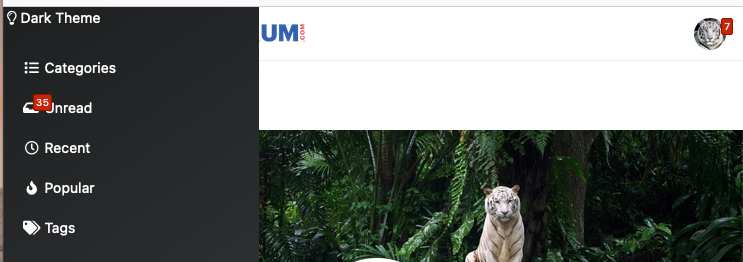
Hi @phenomlab , we have the dark theme on the left menu, however, it is very close to the top. How can I lower its position?
-
-
-
you can test that ?
@media (max-width: 767px) {
.fa.fa-lightbulb-o {
    padding-top: 25px;
}
}
PW and WS Spirit alive
-
you can test that ?
@media (max-width: 767px) { .fa.fa-lightbulb-o { padding-top: 25px; } }@DownPW thanks. it works.
how can I move that to the right?
-
@DownPW thanks. it works.
how can I move that to the right?
@media (max-width: 767px) {
.fa.fa-lightbulb-o {
    padding-top: 25px;
    margin-left: 15px;
}
}
PW and WS Spirit alive
-
@media (max-width: 767px) { .fa.fa-lightbulb-o { padding-top: 25px; margin-left: 15px; } }@DownPW great! thanks a lot… this code solves my problem.
-
 undefined crazycells has marked this topic as solved on

Hello! It looks like you're interested in this conversation, but you don't have an account yet.
Getting fed up of having to scroll through the same posts each visit? When you register for an account, you'll always come back to exactly where you were before, and choose to be notified of new replies (either via email, or push notification). You'll also be able to save bookmarks and upvote posts to show your appreciation to other community members.
With your input, this post could be even better 💗
Register LoginDid this solution help you?
Related Topics
-
-
Nodebb and emails
Solved Configure -
-
-
-
-
-