Skip to content

NodeBB 1.19.3

Solved Performance
33 2 16.5k 1
  • @phenomlab

    here a gif for the problem of perf.
    On a clean install of nodeBB on a clean install server VM

    The problem is just when I refresh the page entierly or ACP access

    alt text

    No problem on 1.18.x or 1.19.2

    very odd

    wrote on last edited by
    #15

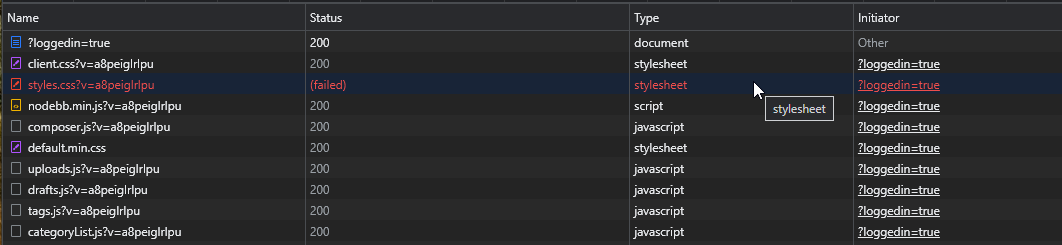
    @DownPW Looks like that’s waiting for a response from something. Have you run this site through the F12 developer tools -> Network tab to see where the delay is ?

  • wrote on last edited by DownPW
    #16

    @phenomlab

    Thanks for the tip

    chance 😉

    335905d5-03e1-4f81-83a6-93e5f30d9bfa-image.png

  • @phenomlab

    Thanks for the tip

    chance 😉

    335905d5-03e1-4f81-83a6-93e5f30d9bfa-image.png

    wrote on last edited by
    #17

    @DownPW 8ms is nothing - less than one second… ?

  • wrote on last edited by DownPW
    #18

    @phenomlab

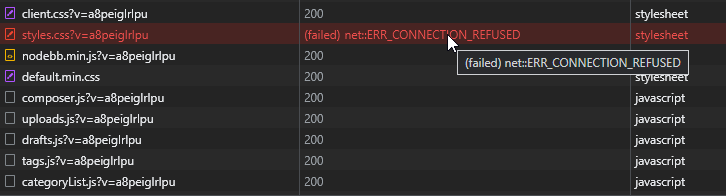
    you not see at the good place 🙂
    EDIT:

    dcba37d8-db4f-4b8d-93a9-ac883171bebc-image.png

    coincidence? Emoji CSS failed !
    I don’t believe

    I think we put the finger on something

  • @phenomlab

    you not see at the good place 🙂
    EDIT:

    dcba37d8-db4f-4b8d-93a9-ac883171bebc-image.png

    coincidence? Emoji CSS failed !
    I don’t believe

    I think we put the finger on something

    wrote on last edited by
    #19

    @DownPW Yes, you’re right. For some strange reason, that CSS file is not being served - but should be on your server if you check the path.

  • wrote on last edited by DownPW
    #20

    yes it still here

    EDIT:

    I have remove the directory when I have the problem of install with 1.18.x

    But when I upgrade to 1.19.3, he have reinstalled by default

  • yes it still here

    EDIT:

    I have remove the directory when I have the problem of install with 1.18.x

    But when I upgrade to 1.19.3, he have reinstalled by default

    wrote on last edited by
    #21

    @DownPW I see this

    a325f036-d5d1-44b8-b583-fd6a913a1b43-image.png

  • @DownPW I see this

    a325f036-d5d1-44b8-b583-fd6a913a1b43-image.png

    wrote on last edited by
    #22

    @phenomlab on your website ?

  • @phenomlab on your website ?

    wrote on last edited by
    #23

    @DownPW No - on yours.

  • wrote on last edited by
    #24

    ha lol ok

  • wrote on last edited by DownPW
    #25

    @phenomlab

    because you are guest maybe because not me

  • wrote on last edited by
    #26

    test admin:nodebb

  • test admin:nodebb

    wrote on last edited by
    #27

    @DownPW Same error when logged in

    a42f594b-29be-4ddc-b52f-587f2c8948c9-image.png

  • @DownPW Same error when logged in

    a42f594b-29be-4ddc-b52f-587f2c8948c9-image.png

    wrote on last edited by DownPW
    #28

    @phenomlab

    yes I think there is a problem with that plugin.
    Maybe open a topic with this on nodeBB communauty

  • @phenomlab

    yes I think there is a problem with that plugin.
    Maybe open a topic with this on nodeBB communauty

    wrote on last edited by
    #29

    @DownPW agreed. What happens actually if you change the loading order of that plugin ? You can do that from the ACP -> Plugins

  • wrote on last edited by
    #30

    I put emoji plugin on first load and this :

    7a964714-be9a-4617-9092-225c039e0a9b-image.png

  • I put emoji plugin on first load and this :

    7a964714-be9a-4617-9092-225c039e0a9b-image.png

    wrote on last edited by
    #31

    @DownPW makes no difference then.

  • wrote on last edited by DownPW
    #32

    yes

    dfb0fe53-2897-4660-9390-ab75eee678bd-image.png

    The path doesn’t exist (Assets/plugins/…)
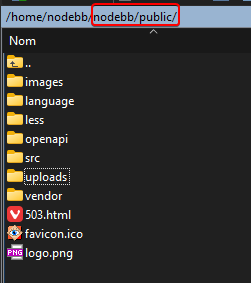
    e2ff90ba-6379-4c9d-bb52-167f0df89166-image.png

    EDIT:

    Sorry Existing path:
    http://192.168.1.53:4567/assets/plugins/nodebb-plugin-emoji/emoji/styles.css?v=6983dobg16u

    e4fd5733-8993-4dbb-8115-d87e8c5bc50e-image.png

  • wrote on last edited by DownPW
    #33

    @phenomlab

    I find the problem Mark 😉

    The error message indicated this path :

    http://localhost:4567/assets/plugins/nodebb-plugin-emoji/emoji/styles.css?v=6983dobg16u

    I change the path url on config.json
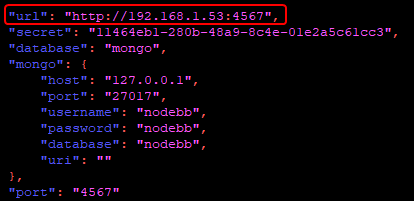
    47bacc80-f141-41e4-a261-3f8d650cc6f6-image.png

    And all it’s good 🙂

    Weird, I didn’t have to change that path before 1.19.3

    But this does not prevent the problem from a clean install with Emoji Plugin


    EDIT: After test, that resolv the problem installation for 1.18.x but not for 1.19.x (I have other error message when I run ./nodebb Setup

    For resume: NodeJS 16_x with 1.18.x is ok

  • DownPW DownPW has marked this topic as solved on

Did this solution help you?
Did you find the suggested solution useful? Support 💗 Sudonix with a coffee ☕
If your organisation needs deeper expertise around infrastructure, security, or technology leadership, learn more about Phenomlab Ltd. Many of the deeper technical guides behind Sudonix are published there.

Related Topics
  • What’s going on with NodeBB?

    Performance nodebb script die
    20
    8 Votes
    20 Posts
    5k Views
    phenomlab
    @cagatay The most reliable way to upgrade Node.js on Ubuntu depends on how you originally installed it. Method 1: Using NVM (Recommended) If you already use Node Version Manager (NVM), upgrading is simple. NVM allows you to keep both versions and switch between them if needed. Install Node 22: nvm install 22 Switch to Node 22: nvm use 22 Set it as your default: nvm alias default 22 Verify the change: node -v Method 2: Using NodeSource (PPA) If you installed Node.js via apt using the NodeSource repository, you need to update the repository script to point to the new version. Remove the old NodeSource list (optional but cleaner): sudo rm /etc/apt/sources.list.d/nodesource.list Download and run the NodeSource setup script for Node 22: curl -fsSL [https://deb.nodesource.com/setup_22.x](https://deb.nodesource.com/setup_22.x) | sudo -E bash - Install/Upgrade Node.js: sudo apt-get install -y nodejs Verify the installation: node -v Method 3: Using the ‘n’ Package If you have npm installed, you can use the n interactive manager. Clear the npm cache: sudo npm cache clean -f Install the ‘n’ helper: sudo npm install -g n Install Node 22: sudo n 22 Update your shell: hash -r Troubleshooting Permission Denied: If you see permission errors using Method 2 or 3, ensure you are using sudo. Path Issues: If node -v still shows version 20 after upgrading via NVM, restart your terminal or run source ~/.bashrc. Conflicts: Avoid mixing these methods. If you switch from apt to nvm, it is best to sudo apt remove nodejs first to avoid path conflicts.
  • NodeBB socket with CloudFlare

    Solved Performance socket cloudflare nodebb
    24
    3 Votes
    24 Posts
    14k Views
    DownPW
    Solved. Tuto here and here
  • Where are widgets stored?

    Solved Configure nodebb
    3
    1 Votes
    3 Posts
    1k Views
    Panda
    @phenomlab Thanks, have DMed you
  • Collapsing blockquotes on Harmony

    General nodebb harmony collapsible quotes
    2
    1
    2 Votes
    2 Posts
    980 Views
    phenomlab
    @dave1904 that’s a really good point actually. I know it was there previously on Persona, but you’re right - no such function exists on harmony. However, putting something in place to mimick the behaviour of Persona won’t be hard from the js standpoint, although I wonder if perhaps we should ask the NodeBB developers is this feature was overlooked?
  • build nodebb Warning in entrypoint size limit

    Solved Performance nodebb
    2
    0 Votes
    2 Posts
    1k Views
    phenomlab
    @eeeee they are nothing to worry about, and can be ignored.
  • NODEBB: Nginx error performance & High CPU

    Solved Performance performance nodebb nginx
    69
    4
    14 Votes
    69 Posts
    63k Views
    DownPW
    @phenomlab Seems to be better with some scaling fix for redis on redis.conf. I haven’t seen the message yet since the changes I made # I increase it to the value of /proc/sys/net/core/somaxconn tcp-backlog 4096 # I'm uncommenting because it can slow down Redis. Uncommented by default !!!!!!!!!!!!!!!!!!! #save 900 1 #save 300 10 #save 60 10000 If you have other Redis optimizations. I take all your advice https://severalnines.com/blog/performance-tuning-redis/
  • Title on homepage of nodebb forum

    Solved Customisation nodebb
    2
    1 Votes
    2 Posts
    2k Views
    phenomlab
    @eveh Welcome board The code you are referring to is custom written as no such functionality exists under NodeBB. However, adding the functionality is relatively trivial. Below are the required steps Navigate to /admin/appearance/customise#custom-header Add the below code to your header, and save once completed <ol id="mainbanner" class="breadcrumb"><li id="addtext">Your Title Goes Here</li></ol> Navigate to /admin/appearance/customise#custom-js and add the below code, then save $(document).ready(function() { $(window).on('action:ajaxify.end', function(data) { // Initialise mainbanner ID, but hide it from view $('#mainbanner').hide(); var pathname = window.location.pathname; if (pathname === "/") { $("#addtext").text("Your Title"); $('#mainbanner').show(); } else {} // If we want to add a title to a sub page, uncomment the below and adjust accordingly //if (pathname === "/yourpath") { //$("#addtext").text("Your Title"); //$('#mainbanner').show(); //} }); }); Navigate to /admin/appearance/customise#custom-css and add the below CSS block .breadcrumb { right: 0; margin-right: auto; text-align: center; background: #0086c4; color: #ffffff; width: 100vw; position: relative; margin-left: -50vw; left: 50%; top: 50px; position: fixed; z-index: 1020; } Note, that you will need to adjust your CSS code to suit your own site / requirements.
  • NodeBB Discord Plugins

    Unsolved Customisation nodebb discord plugin

    7
    0 Votes
    7 Posts
    4k Views
    phenomlab
    @RiekMedia hi. Just following up on this thread (I know it’s old) but was curious to understand if it’s still an issue or not ?