[NODEBB] Stats
-
@jac said in [NODEBB] Stats:
Absolutely! no issue with it at all, doesn’t bother me and infact could potentially look to be a few online which could lead to further sign-ups if people see there’s activity.
Maybe your are right

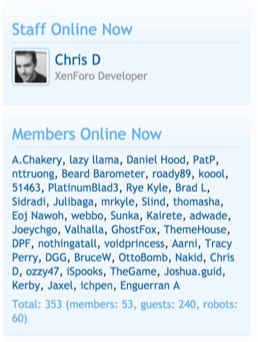
Personally, it didn’t show the same thing on the number of users online.
For example:
On https://XXXXX.XXX/users?section=online indicates 7 users active
and 5 users active displaying on the plugin Widget.
I prefer real time information or same as users?section=online
PW and WS Spirit alive
-
@jac said in [NODEBB] Stats:
Absolutely! no issue with it at all, doesn’t bother me and infact could potentially look to be a few online which could lead to further sign-ups if people see there’s activity.
Maybe your are right
Personally, it didn’t show the same thing on the number of users online.
For example:
On https://XXXXX.XXX/users?section=online indicates 7 users active
and 5 users active displaying on the plugin Widget.
I prefer real time information or same as users?section=online
@downpw yes, that’s the disconnect I mentioned.
-
-
@downpw I agree. You’d think there would be consistency
Mark Cutting also advises organisations as a Fractional CIO, Fractional CISO and Executive Advisor, helping boards improve technology governance, cyber resilience and executive decision making. Learn more at Phenomlab Ltd
-
@phenomlab Of course, but I don’t think there’s a fix to this. I mentioned the same thing over at the NodeBB forum months ago.
-
@phenomlab Of course, but I don’t think there’s a fix to this. I mentioned the same thing over at the NodeBB forum months ago.
@jac Not so much a lack of fix - more of a reluctance to provide one
Mark Cutting also advises organisations as a Fractional CIO, Fractional CISO and Executive Advisor, helping boards improve technology governance, cyber resilience and executive decision making. Learn more at Phenomlab Ltd
-
@phenomlab said in [NODEBB] Stats:
@jac Not so much a lack of fix - more of a reluctance to provide one
very true.
See here - https://community.nodebb.org/topic/6287/users-online-information-wrong?_=1642345765412&lang=en-US -
@phenomlab said in [NODEBB] Stats:
@jac Not so much a lack of fix - more of a reluctance to provide one
very true.
See here - https://community.nodebb.org/topic/6287/users-online-information-wrong?_=1642345765412&lang=en-US@jac Yeah, not really a fix, but an explanation
https://github.com/NodeBB/nodebb-theme-persona/issues/54#issuecomment-90645268
-
Exactly mate, if there’s enough complaining then maybe they’d do a fix or is there simply not one?
-
Exactly mate, if there’s enough complaining then maybe they’d do a fix or is there simply not one?
@jac or I land up fixing it
Mark Cutting also advises organisations as a Fractional CIO, Fractional CISO and Executive Advisor, helping boards improve technology governance, cyber resilience and executive decision making. Learn more at Phenomlab Ltd
-




Hello! It looks like you're interested in this conversation, but you don't have an account yet.
Getting fed up of having to scroll through the same posts each visit? When you register for an account, you'll always come back to exactly where you were before, and choose to be notified of new replies (either via email, or push notification). You'll also be able to save bookmarks and upvote posts to show your appreciation to other community members.
With your input, this post could be even better 💗
Register LoginRelated Topics
-
-
-
-
Embedding external URLs
Solved General -
-
-
-
NodeBB Discord Plugins
Unsolved Customisation