Skip to content

[NODEBB] CSS Style Sheets SelectBox

Locked Solved Customisation
112 2 63.3k 1
  • @phenomlab

    It’s better.

    I have just to set space between icon

    For the red, i have disable CSS on line number 415, it’s not that

    wrote on last edited by
    #31

    @downpw said in [NODEBB] CSS Style Sheets SelectBox:

    For the red, i have disable CSS on line number 415, it’s not that

    Odd. This will stop it

    #switcher .btn-link:hover {
        background: none !important;
    }
    
  • wrote on last edited by
    #32

    Yeah It’s good

  • Yeah It’s good

    wrote on last edited by
    #33

    @downpw Great. I think we’re done, yes ?

  • wrote on last edited by
    #34

    Hmm I search to reducs space between Icon search bar and notification icon
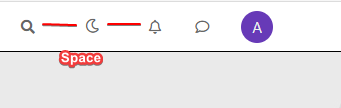
  • Hmm I search to reducs space between Icon search bar and notification icon

    wrote on last edited by
    #35

    @downpw Can you provide a screenshot to explain what you are looking for ?

  • wrote on last edited by DownPW
    #36

    off course @phenomlab
    I search to reducs space between Icon search bar and notification icon

    4c1df3fb-ffe3-4097-b058-f6fd7011f679-image.png

  • off course @phenomlab
    I search to reducs space between Icon search bar and notification icon

    4c1df3fb-ffe3-4097-b058-f6fd7011f679-image.png

    wrote on last edited by
    #37

    @downpw Try

    #switcher {
        margin-right: -15px;
        margin-left: -15px;
    }
  • wrote on last edited by
    #38

    @phenomlab said in [NODEBB] CSS Style Sheets SelectBox:

    #switcher {
    margin-right: -15px;
    margin-left: -15px;
    }

    Yes very Good !!!
    Like this The button is well : Thanks

    baaaa269-6f3e-4a51-acc6-b05138b51349-image.png

  • @phenomlab said in [NODEBB] CSS Style Sheets SelectBox:

    #switcher {
    margin-right: -15px;
    margin-left: -15px;
    }

    Yes very Good !!!
    Like this The button is well : Thanks

    baaaa269-6f3e-4a51-acc6-b05138b51349-image.png

    wrote on last edited by
    #39

    @downpw

    Right. I moved the custom HTML to a HTML based global widget, and that works 🙂 Give it a try

    Also, not sure why you are using the html class for the background images. You should use body. I just tried it, and it works fine

  • wrote on last edited by
    #40

    @DownPW some additional advice. The images you are calling remotely should be hosted on your own server. This will prevent unnecessary remote calls, and will also load faster. I’m seeing delay times of up to a second before the wallpaper appears 🙂

  • wrote on last edited by
    #41

    @phenomlab

    Ok if I understood, I can’t use custom ACP Header for HTML code. I must use an HTML widgets.

    For background, I use the code on NodeBB forum but if you have a code working great on desktop and mobile. II want it a lot
    🙂

  • @phenomlab

    Ok if I understood, I can’t use custom ACP Header for HTML code. I must use an HTML widgets.

    For background, I use the code on NodeBB forum but if you have a code working great on desktop and mobile. II want it a lot
    🙂

    wrote on last edited by phenomlab
    #42

    @downpw 🙂 If you move the background CSS you are using out of the html element and into the body for each stylesheet, it’ll work.

    Not sure why the custom HTML works fine in a widget, but… well - it works !

  • wrote on last edited by
    #43

    For Wallpaper, i will test your solution. That solutino work on mobile ?

  • For Wallpaper, i will test your solution. That solutino work on mobile ?

    wrote on last edited by
    #44

    @downpw Yes, it does.

  • wrote on last edited by
    #45

    like this ? @phenomlab

    /* Smartphone */
    @media (min-width: 320px) {
    body {
            background: url(https://i.imgur.com/XXXX.png) no-repeat center center fixed; 
            -webkit-background-size: cover;
            -moz-background-size: cover;
            -o-background-size: cover;
            background-size: cover;
    }
    }
    
    /* Desktop */
    @media (min-width: 1281px) {
        body {
            background: url(https://i.imgur.com/XXXX.png) no-repeat center center fixed; 
            -webkit-background-size: cover;
            -moz-background-size: cover;
            -o-background-size: cover;
            background-size: cover;
        }
    }
    
  • like this ? @phenomlab

    /* Smartphone */
    @media (min-width: 320px) {
    body {
            background: url(https://i.imgur.com/XXXX.png) no-repeat center center fixed; 
            -webkit-background-size: cover;
            -moz-background-size: cover;
            -o-background-size: cover;
            background-size: cover;
    }
    }
    
    /* Desktop */
    @media (min-width: 1281px) {
        body {
            background: url(https://i.imgur.com/XXXX.png) no-repeat center center fixed; 
            -webkit-background-size: cover;
            -moz-background-size: cover;
            -o-background-size: cover;
            background-size: cover;
        }
    }
    
    wrote on last edited by
    #46

    @downpw Yep. That should work.

  • wrote on last edited by DownPW
    #47

    @phenomlab

    Whoops, I have test and not work on mobile 😞
    Just fix this and it’s perfect for me

  • @phenomlab

    Whoops, I have test and not work on mobile 😞
    Just fix this and it’s perfect for me

    wrote on last edited by
    #48

    @downpw So it’s working now ?

  • wrote on last edited by DownPW
    #49

    no.
    white background on mobile

  • no.
    white background on mobile

    wrote on last edited by
    #50

    @downpw Ok. Checking now.


Did this solution help you?
Did you find the suggested solution useful? Support 💗 Sudonix with a coffee ☕
If your organisation needs deeper expertise around infrastructure, security, or technology leadership, learn more about Phenomlab Ltd. Many of the deeper technical guides behind Sudonix are published there.

Related Topics
  • How to style tool tip of nodebb-plugin-user-level

    Solved Customisation user level css
    4
    1
    5 Votes
    4 Posts
    3k Views
    phenomlab
    @DownPW thanks. I forgot about that.
  • Widget | CSS customization

    Solved WordPress css
    53
    17 Votes
    53 Posts
    19k Views
    phenomlab
    @Sala the only way you can achieve this is to use a robots.txt file and disallow access to those links.
  • Footer bar add center text

    Solved Customisation css
    41
    1
    8 Votes
    41 Posts
    19k Views
    DownPW
    @phenomlab said in Footer bar add center text: div#console-nav-tab Ah ok test with bottom: 0px !important; idem
  • who is read NodeBB

    Customisation read post nodebb
    6
    0 Votes
    6 Posts
    3k Views
    phenomlab
    @cagatay You should ask in the NodeBB forums. Perhaps reference this post https://discuss.flarum.org/d/23066-who-read
  • Bug Navbar CSS

    Solved Customisation navbar css
    3
    1 Votes
    3 Posts
    2k Views
    DownPW
    Not better way. Thanks.
  • NodeBB Design help

    Solved Customisation
    8
    3
    2 Votes
    8 Posts
    4k Views
    phenomlab
    @riekmedia I’ve applied some new CSS to your site. Can you reload the page and try again ? For the record, this is what I added #footer { background: #2d343e; border-top: 4px solid #2d343e; font-size: 0.9em; margin-top: 70px; padding: 80px 0 0; position: relative; clear: both; bottom: 0; left: 0; right: 0; z-index: 1000; margin-left: -15px; margin-right: -338px; } The /categories page seems a bit messed up, so looking at that currently EDIT - issued some override CSS in the CATEGORIES widget <!--- CSS fix for overspill on /categories page - DO NOT DELETE --> <style> #footer { margin-right: -45px; } </style> That should resolve the /categories issue.
  • CSS Help on my Flarum

    Solved Customisation
    5
    2
    2 Votes
    5 Posts
    3k Views
    phenomlab
    @mike-jones Yes, you’ll typically see this type of behaviour if there is another style that has higher priority in the sense that yours will be overridden. Using !important will override the higher preference, but should be used sparingly rather than everywhere.
  • NodeBB customisation

    Locked Customisation
    332
    27 Votes
    332 Posts
    274k Views
    phenomlab
    @jac Given your departure away from your previous project, I’m going to close this thread…