[NODEBB] CSS Style Sheets SelectBox
-
@DownPW another way…
Remove
#switcher{
    position: absolute;
    right: 33%;
}
Add
.navbar-default {
    height: 50px;
}
This way, it’s aesthetic…I just set the changes. Let me know what you think.

It’s better.
I have just to set space between icon
For the red, i have disable CSS on line number 415, it’s not that
PW and WS Spirit alive
-
It’s better.
I have just to set space between icon
For the red, i have disable CSS on line number 415, it’s not that

@downpw said in [NODEBB] CSS Style Sheets SelectBox:
For the red, i have disable CSS on line number 415, it’s not that
Odd. This will stop it
#switcher .btn-link:hover { background: none !important; } -
-
Yeah It’s good
-
-
Hmm I search to reducs space between Icon search bar and notification icon
-
off course @phenomlab
I search to reducs space between Icon search bar and notification icon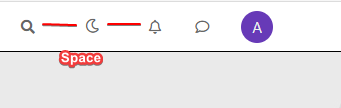
PW and WS Spirit alive
-
off course @phenomlab
I search to reducs space between Icon search bar and notification icon -
@phenomlab said in [NODEBB] CSS Style Sheets SelectBox:
#switcher {
    margin-right: -15px;
    margin-left: -15px;
}Yes very Good !!!
Like this The button is well : Thanks
PW and WS Spirit alive
-
@phenomlab said in [NODEBB] CSS Style Sheets SelectBox:
#switcher {
margin-right: -15px;
margin-left: -15px;
}Yes very Good !!!
Like this The button is well : Thanks -
-
Ok if I understood, I can’t use custom ACP Header for HTML code. I must use an HTML widgets.
For background, I use the code on NodeBB forum but if you have a code working great on desktop and mobile. II want it a lot

PW and WS Spirit alive
-
Ok if I understood, I can’t use custom ACP Header for HTML code. I must use an HTML widgets.
For background, I use the code on NodeBB forum but if you have a code working great on desktop and mobile. II want it a lot
-
-
For Wallpaper, i will test your solution. That solutino work on mobile ?
-
like this ? @phenomlab
/* Smartphone */
@media (min-width: 320px) {
body {
        background: url(https://i.imgur.com/XXXX.png) no-repeat center center fixed;
        -webkit-background-size: cover;
        -moz-background-size: cover;
        -o-background-size: cover;
        background-size: cover;
}
}

/* Desktop */
@media (min-width: 1281px) {
    body {
        background: url(https://i.imgur.com/XXXX.png) no-repeat center center fixed;
        -webkit-background-size: cover;
        -moz-background-size: cover;
        -o-background-size: cover;
        background-size: cover;
    }
}
PW and WS Spirit alive
-
like this ? @phenomlab
/* Smartphone */ @media (min-width: 320px) { body { background: url(https://i.imgur.com/XXXX.png) no-repeat center center fixed; -webkit-background-size: cover; -moz-background-size: cover; -o-background-size: cover; background-size: cover; } } /* Desktop */ @media (min-width: 1281px) { body { background: url(https://i.imgur.com/XXXX.png) no-repeat center center fixed; -webkit-background-size: cover; -moz-background-size: cover; -o-background-size: cover; background-size: cover; } } -
Whoops, I have test and not work on mobile

Just fix this and it’s perfect for mePW and WS Spirit alive
-
Whoops, I have test and not work on mobile
Just fix this and it’s perfect for me -
Hello! It looks like you're interested in this conversation, but you don't have an account yet.
Getting fed up of having to scroll through the same posts each visit? When you register for an account, you'll always come back to exactly where you were before, and choose to be notified of new replies (either via email, or push notification). You'll also be able to save bookmarks and upvote posts to show your appreciation to other community members.
With your input, this post could be even better 💗
Register LoginDid this solution help you?
Related Topics
-
-
-
-
Bug Navbar CSS
Solved Customisation -
-
-

Customising NodeBB
Locked Customisation -