NodeBB customisation
-
@jac said in NodeBB customisation:
@jac said in NodeBB customisation:
@jac said in NodeBB customisation:
@phenomlab said in NodeBB customisation:
@jac It’s in the above post

Apologies!

Worked a treat! Many thanks again

 .
.Am ok to keep posting little tweaks that I am looking to change?
Looking to change the font & number of read posts.
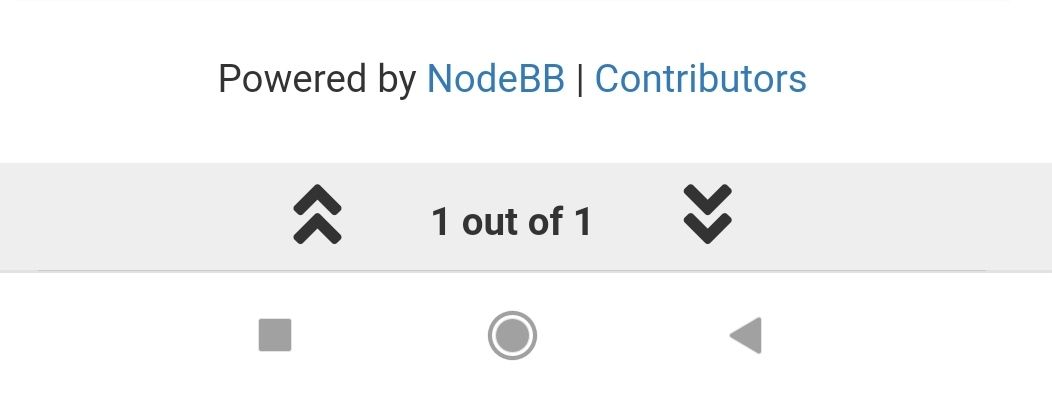
Looking to change this to blue white a white font and then as the posts are read it changes to yellow?
Is this something that is possible? I seem to remember it working out well on the last installation.
Many thanks.
I’ve actually found a screenshot of how grtit looked last time. The font etc and the bottom bar looked great!
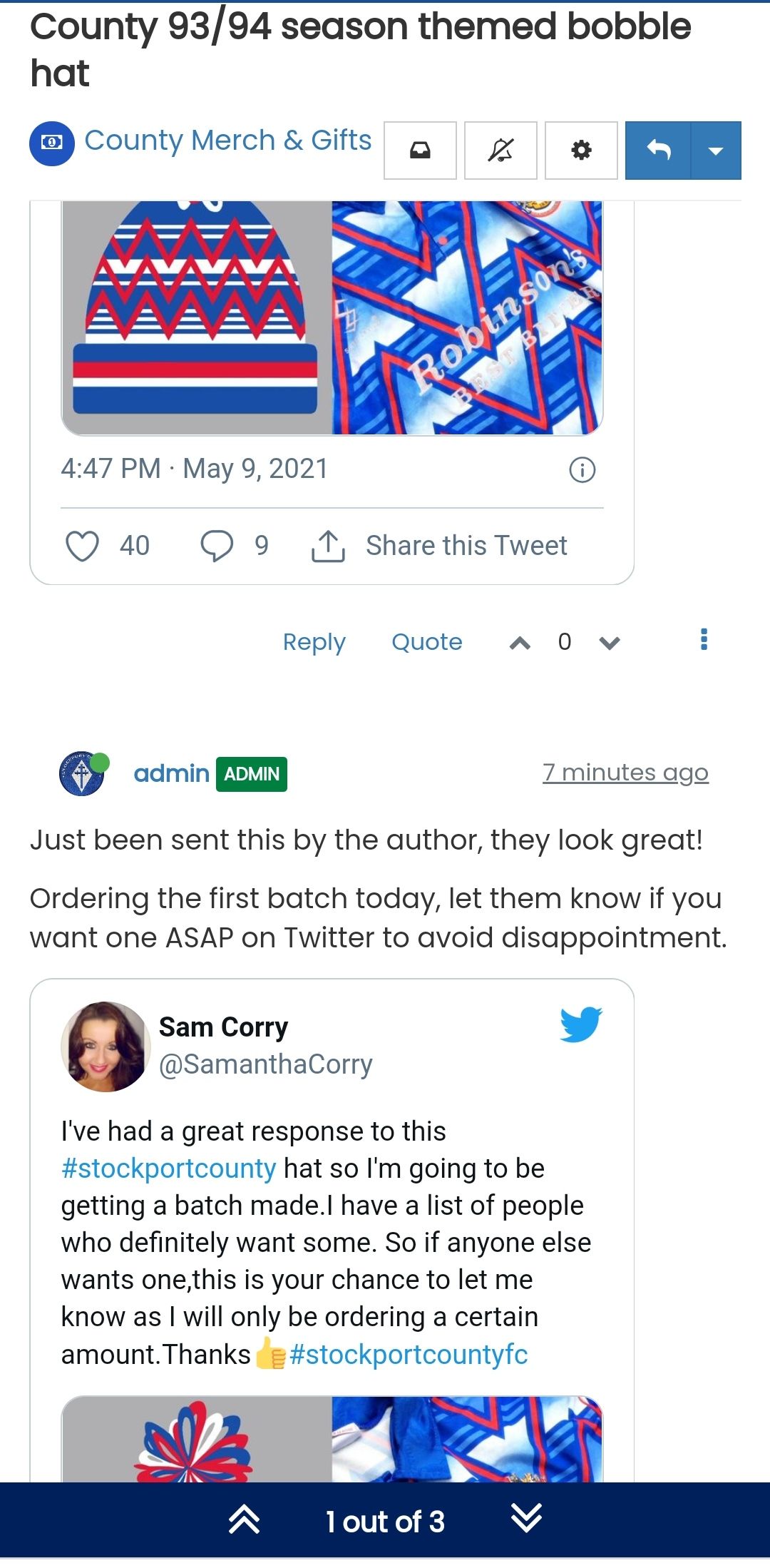
Is there any way to change the member name colour on the quote? As this clashes with the colour.
Thanks
.
@jac Sorry for late reply. You can use the below for this. I also noticed that the blockquote text was black, so the second line
blockquote pwill also resolve that.blockquote a.plugin-mentions-user.plugin-mentions-a, blockquote p { color: #ffffff; }Mark Cutting also advises organisations as a Fractional CIO, Fractional CISO and Executive Advisor, helping boards improve technology governance, cyber resilience and executive decision making. Learn more at Phenomlab Ltd
-
@jac Sorry for late reply. You can use the below for this. I also noticed that the blockquote text was black, so the second line
blockquote pwill also resolve that.blockquote a.plugin-mentions-user.plugin-mentions-a, blockquote p { color: #ffffff; }@phenomlab said in NodeBB customisation:
@jac Sorry for late reply. You can use the below for this. I also noticed that the blockquote text was black, so the second line
blockquote pwill also resolve that.blockquote a.plugin-mentions-user.plugin-mentions-a, blockquote p { color: #ffffff; }No problem Mark
That’s worked a treat, thank you very much!
-
@jac said in NodeBB customisation:
@jac said in NodeBB customisation:
@jac said in NodeBB customisation:
@phenomlab said in NodeBB customisation:
@jac It’s in the above post
Apologies!
Worked a treat! Many thanks again
.Am ok to keep posting little tweaks that I am looking to change?
Looking to change the font & number of read posts.
Looking to change this to blue white a white font and then as the posts are read it changes to yellow?
Is this something that is possible? I seem to remember it working out well on the last installation.
Many thanks.
I’ve actually found a screenshot of how grtit looked last time. The font etc and the bottom bar looked great!
Although the bottom colour is a little dark for County still looked great
@jac said in NodeBB customisation:
@jac said in NodeBB customisation:
@jac said in NodeBB customisation:
@jac said in NodeBB customisation:
@phenomlab said in NodeBB customisation:
@jac It’s in the above post
Apologies!
Worked a treat! Many thanks again
.Am ok to keep posting little tweaks that I am looking to change?
Looking to change the font & number of read posts.
Looking to change this to blue white a white font and then as the posts are read it changes to yellow?
Is this something that is possible? I seem to remember it working out well on the last installation.
Many thanks.
I’ve actually found a screenshot of how grtit looked last time. The font etc and the bottom bar looked great!
Although the bottom colour is a little dark for County still looked great
Off work today so hopefully I can achieve some more changes
-
@jac said in NodeBB customisation:
@jac said in NodeBB customisation:
@jac said in NodeBB customisation:
@jac said in NodeBB customisation:
@phenomlab said in NodeBB customisation:
@jac It’s in the above post
Apologies!
Worked a treat! Many thanks again
.Am ok to keep posting little tweaks that I am looking to change?
Looking to change the font & number of read posts.
Looking to change this to blue white a white font and then as the posts are read it changes to yellow?
Is this something that is possible? I seem to remember it working out well on the last installation.
Many thanks.
I’ve actually found a screenshot of how grtit looked last time. The font etc and the bottom bar looked great!
Although the bottom colour is a little dark for County still looked great
Off work today so hopefully I can achieve some more changes
@jac ok.
-
@jac said in NodeBB customisation:
@jac said in NodeBB customisation:
@jac said in NodeBB customisation:
@phenomlab said in NodeBB customisation:
@jac It’s in the above post
Apologies!
Worked a treat! Many thanks again
.Am ok to keep posting little tweaks that I am looking to change?
Looking to change the font & number of read posts.
Looking to change this to blue white a white font and then as the posts are read it changes to yellow?
Is this something that is possible? I seem to remember it working out well on the last installation.
Many thanks.
I’ve actually found a screenshot of how grtit looked last time. The font etc and the bottom bar looked great!
Is there any way to change the member name colour on the quote? As this clashes with the colour.
Thanks
.@jac said in NodeBB customisation:
@jac said in NodeBB customisation:
@jac said in NodeBB customisation:
@jac said in NodeBB customisation:
@phenomlab said in NodeBB customisation:
@jac It’s in the above post
Apologies!
Worked a treat! Many thanks again
.Am ok to keep posting little tweaks that I am looking to change?
Looking to change the font & number of read posts.
Looking to change this to blue white a white font and then as the posts are read it changes to yellow?
Is this something that is possible? I seem to remember it working out well on the last installation.
Many thanks.
I’ve actually found a screenshot of how grtit looked last time. The font etc and the bottom bar looked great!
Is there any way to change the member name colour on the quote? As this clashes with the colour.
Thanks
.How can I achieve this font and look again?
-
@jac said in NodeBB customisation:
@jac said in NodeBB customisation:
@jac said in NodeBB customisation:
@jac said in NodeBB customisation:
@phenomlab said in NodeBB customisation:
@jac It’s in the above post
Apologies!
Worked a treat! Many thanks again
.Am ok to keep posting little tweaks that I am looking to change?
Looking to change the font & number of read posts.
Looking to change this to blue white a white font and then as the posts are read it changes to yellow?
Is this something that is possible? I seem to remember it working out well on the last installation.
Many thanks.
I’ve actually found a screenshot of how grtit looked last time. The font etc and the bottom bar looked great!
Is there any way to change the member name colour on the quote? As this clashes with the colour.
Thanks
.How can I achieve this font and look again?
@jac The Font that Sudonix uses ?
Mark Cutting also advises organisations as a Fractional CIO, Fractional CISO and Executive Advisor, helping boards improve technology governance, cyber resilience and executive decision making. Learn more at Phenomlab Ltd
-
@phenomlab said in NodeBB customisation:
@jac The Font that Sudonix uses ?
Is it the same font sorry?
Do you want me to choose something else?
I thought it looked a little bolder?
Many thanks
-
Is there any way to achieve a notification to let users know that the forum isn’t quite up to scratch yet etc?
Many thanks
-
Is there any way to achieve a notification to let users know that the forum isn’t quite up to scratch yet etc?
Many thanks
@jac Do you want something like the banner that appears on this site at the top with a link to the welcome page ?

If so, this is simple html that can be added as a widget and placed anywhere you want specifically, or globally if you prefer.
Mark Cutting also advises organisations as a Fractional CIO, Fractional CISO and Executive Advisor, helping boards improve technology governance, cyber resilience and executive decision making. Learn more at Phenomlab Ltd
-
@jac Do you want something like the banner that appears on this site at the top with a link to the welcome page ?
If so, this is simple html that can be added as a widget and placed anywhere you want specifically, or globally if you prefer.
@phenomlab said in NodeBB customisation:
@jac Do you want something like the banner that appears on this site at the top with a link to the welcome page ?
If so, this is simple html that can be added as a widget and placed anywhere you want specifically, or globally if you prefer.
Looks great, I did install the announcement plugin as I thought that would display an announcement at the top of the forum but I think it’s actually for something else.
-
@phenomlab said in NodeBB customisation:
@jac Do you want something like the banner that appears on this site at the top with a link to the welcome page ?
If so, this is simple html that can be added as a widget and placed anywhere you want specifically, or globally if you prefer.
Looks great, I did install the announcement plugin as I thought that would display an announcement at the top of the forum but I think it’s actually for something else.
@jac Yeah, I fell into that trap also. Let me know what you want the banner to display and I’ll provide the code and placement.
Mark Cutting also advises organisations as a Fractional CIO, Fractional CISO and Executive Advisor, helping boards improve technology governance, cyber resilience and executive decision making. Learn more at Phenomlab Ltd
-
@jac Yeah, I fell into that trap also. Let me know what you want the banner to display and I’ll provide the code and placement.
@phenomlab said in NodeBB customisation:
@jac Yeah, I fell into that trap also. Let me know what you want the banner to display and I’ll provide the code and placement.
Apologies, I haven’t seen this until now. I’m more than happy to go ahead and use the code with a blue background with white writing as long as you are ok with it?
I just want to let users know the forum is new and far from finished
. -
@phenomlab said in NodeBB customisation:
@jac Yeah, I fell into that trap also. Let me know what you want the banner to display and I’ll provide the code and placement.
Apologies, I haven’t seen this until now. I’m more than happy to go ahead and use the code with a blue background with white writing as long as you are ok with it?
I just want to let users know the forum is new and far from finished
.@jac Ok. Provide me with some text you’d like, and I’ll update the site for you

Mark Cutting also advises organisations as a Fractional CIO, Fractional CISO and Executive Advisor, helping boards improve technology governance, cyber resilience and executive decision making. Learn more at Phenomlab Ltd
-
@phenomlab said in NodeBB customisation:
@jac Ok. Provide me with some text you’d like, and I’ll update the site for you
Chat incoming >>>>
Many thanks
-
@phenomlab said in NodeBB customisation:
@jac Ok. Provide me with some text you’d like, and I’ll update the site for you
Chat incoming >>>>
Many thanks
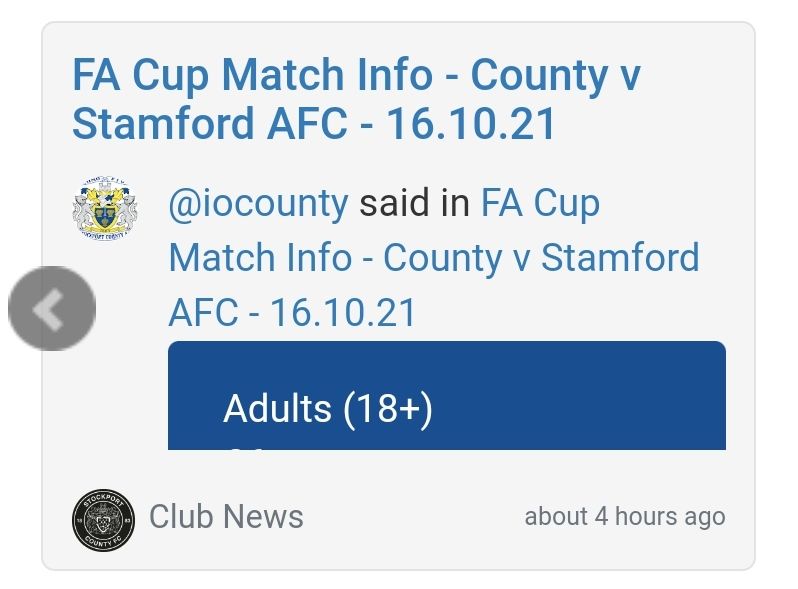
Do you remember how to remove the quote area out of the slider at all Mark?
I remember it being done last time.
Thanks
. -
Do you remember how to remove the quote area out of the slider at all Mark?
I remember it being done last time.
Thanks
.@jac said in NodeBB customisation:
Do you remember how to remove the quote area out of the slider at all Mark?
I remember it being done last time.
Thanks
.
-
@jac said in NodeBB customisation:
Do you remember how to remove the quote area out of the slider at all Mark?
I remember it being done last time.
Thanks
.@jac Try this
.recent-card-body blockquote, .recent-card-body blockquote p {
    background: none;
    color: #000000;
    border-left: none;
}
.recent-card-body blockquote:after {
    border: none;
}
Mark Cutting also advises organisations as a Fractional CIO, Fractional CISO and Executive Advisor, helping boards improve technology governance, cyber resilience and executive decision making. Learn more at Phenomlab Ltd
-
@jac Try this
.recent-card-body blockquote, .recent-card-body blockquote p { background: none; color: #000000; border-left: none; } .recent-card-body blockquote:after { border: none; }@phenomlab said in NodeBB customisation:
@jac Try this
.recent-card-body blockquote, .recent-card-body blockquote p {
    background: none;
    color: #000000;
    border-left: none;
}
.recent-card-body blockquote:after {
    border: none;
}
Many thanks mate, that’s worked
. -
@phenomlab said in NodeBB customisation:
@jac Try this
.recent-card-body blockquote, .recent-card-body blockquote p {
    background: none;
    color: #000000;
    border-left: none;
}
.recent-card-body blockquote:after {
    border: none;
}
Many thanks mate, that’s worked
.@jac said in NodeBB customisation:
@phenomlab said in NodeBB customisation:
@jac Try this
.recent-card-body blockquote, .recent-card-body blockquote p {
    background: none;
    color: #000000;
    border-left: none;
}
.recent-card-body blockquote:after {
    border: none;
}
Many thanks mate, that’s worked
.Whilst I’m at it am I ok to suggest this change? -
 the read posts bar at the bottom of the page?
Maybe have that in a yellow and then changing to blue once it has been read?
Is this possible? I remember it being done last time. What a fool I was to not back it up properly last time, I lost some good CSS changes mate as you know.
-
@jac said in NodeBB customisation:
@phenomlab said in NodeBB customisation:
@jac Try this
.recent-card-body blockquote, .recent-card-body blockquote p {
    background: none;
    color: #000000;
    border-left: none;
}
.recent-card-body blockquote:after {
    border: none;
}
Many thanks mate, that’s worked
.Whilst I’m at it am I ok to suggest this change? -
the read posts bar at the bottom of the page?Maybe have that in a yellow and then changing to blue once it has been read?
Is this possible? I remember it being done last time. What a fool I was to not back it up properly last time, I lost some good CSS changes mate as you know.
@jac Try this
.topic .pagination-block {
    background-color: #ffc557;
}
.topic .pagination-block .progress-bar {
    background-color: #194f90;
}
.topic .pagination-block .wrapper,
.topic .pagination-block .pagination-text  {
    color: #ffffff;
}
Mark Cutting also advises organisations as a Fractional CIO, Fractional CISO and Executive Advisor, helping boards improve technology governance, cyber resilience and executive decision making. Learn more at Phenomlab Ltd


Hello! It looks like you're interested in this conversation, but you don't have an account yet.
Getting fed up of having to scroll through the same posts each visit? When you register for an account, you'll always come back to exactly where you were before, and choose to be notified of new replies (either via email, or push notification). You'll also be able to save bookmarks and upvote posts to show your appreciation to other community members.
With your input, this post could be even better 💗
Register LoginRelated Topics
-
-
-
-
-
-
NodeBB Footer
Solved Customisation -
-