Skip to content

Switch between list and card view function
Moved Let's Build It
107 4 56.6k 1
  • wrote on last edited by DownPW
    #46

    yes same with admin account in new incognito
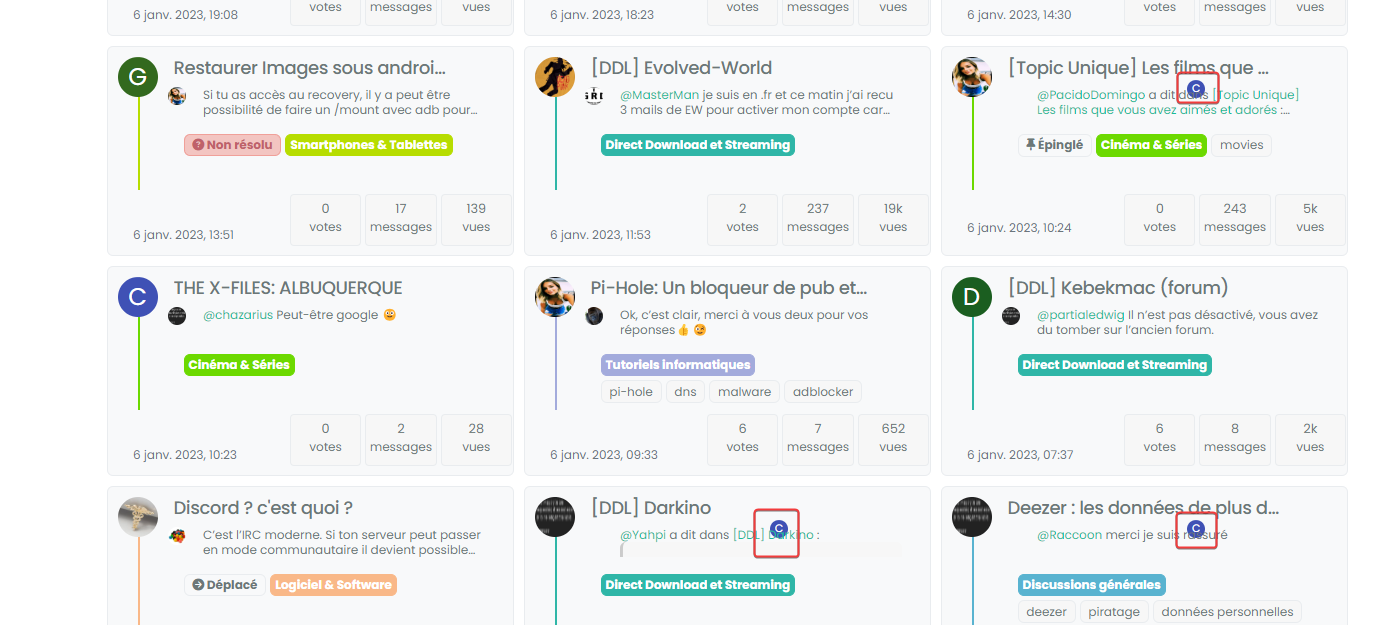
    image.png

  • yes same with admin account in new incognito

    image.png

    wrote on last edited by
    #47

    @DownPW can you target both the correctly positioned elements and the incorrectly positioned and compare the results?

    I’m guessing they are different, but shouldn’t be.

  • wrote on last edited by
    #48

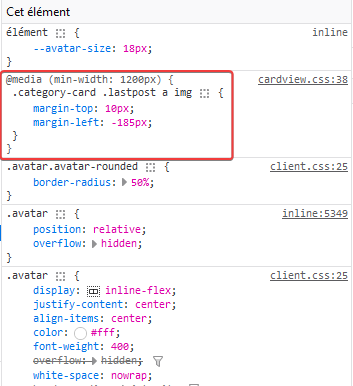
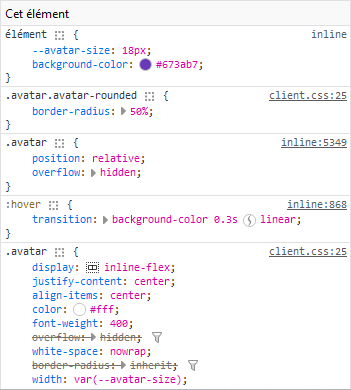
    correctly positionned :

    891bb641-cfbc-4e49-aa8f-ddc3466a9fd7-image.png
    428e9115-7af1-4043-8685-91332636dbb1-image.png

    incorrectly positioned :

    07648995-1a18-445e-b3e1-64cad7f8a89c-image.png
    5ba06a13-8122-4ac1-9cd1-f24733546cfe-image.png

  • correctly positionned :

    891bb641-cfbc-4e49-aa8f-ddc3466a9fd7-image.png
    428e9115-7af1-4043-8685-91332636dbb1-image.png

    incorrectly positioned :

    07648995-1a18-445e-b3e1-64cad7f8a89c-image.png
    5ba06a13-8122-4ac1-9cd1-f24733546cfe-image.png

    wrote on last edited by
    #49

    @DownPW so the class isn’t being applied. Thanks. Let me have another look at this.

  • wrote on last edited by
    #50

    @DownPW from my further testing, this is 100% CF, but I don’t know why. I’ve tried Page Rules, Cache Rules, setting security in the page rules to “Essentially Off” - nothing seems to work (for me at least). I’ve stripped back my testing domain and disabled CF completely, and everything works as intended.

    I was never able to reproduce the issue here, and that’s because I don’t use CF !

  • wrote on last edited by DownPW
    #51

    Too bad. I will therefore not be able to use this function or perhaps by just deleting the problematic avatar if that is possible

  • Too bad. I will therefore not be able to use this function or perhaps by just deleting the problematic avatar if that is possible

    wrote on last edited by
    #52

    @DownPW you could use `display: none’ to hide that specific class? I do intend to try and identify the issue with CF but it’s difficult because I don’t traditionally use it.

  • wrote on last edited by DownPW
    #53

    I can possibly use this code if you find a solution (or not)
    With just a left border on post-content

    .category-card .lastpost .post-content {
        border-left: 2px solid grey;
    }
    
    .category-card .lastpost a img {
        display: none;
    }
    
    .category-card .line-clamp-sm-2 {
        margin-left: 38px !important;
    }
    

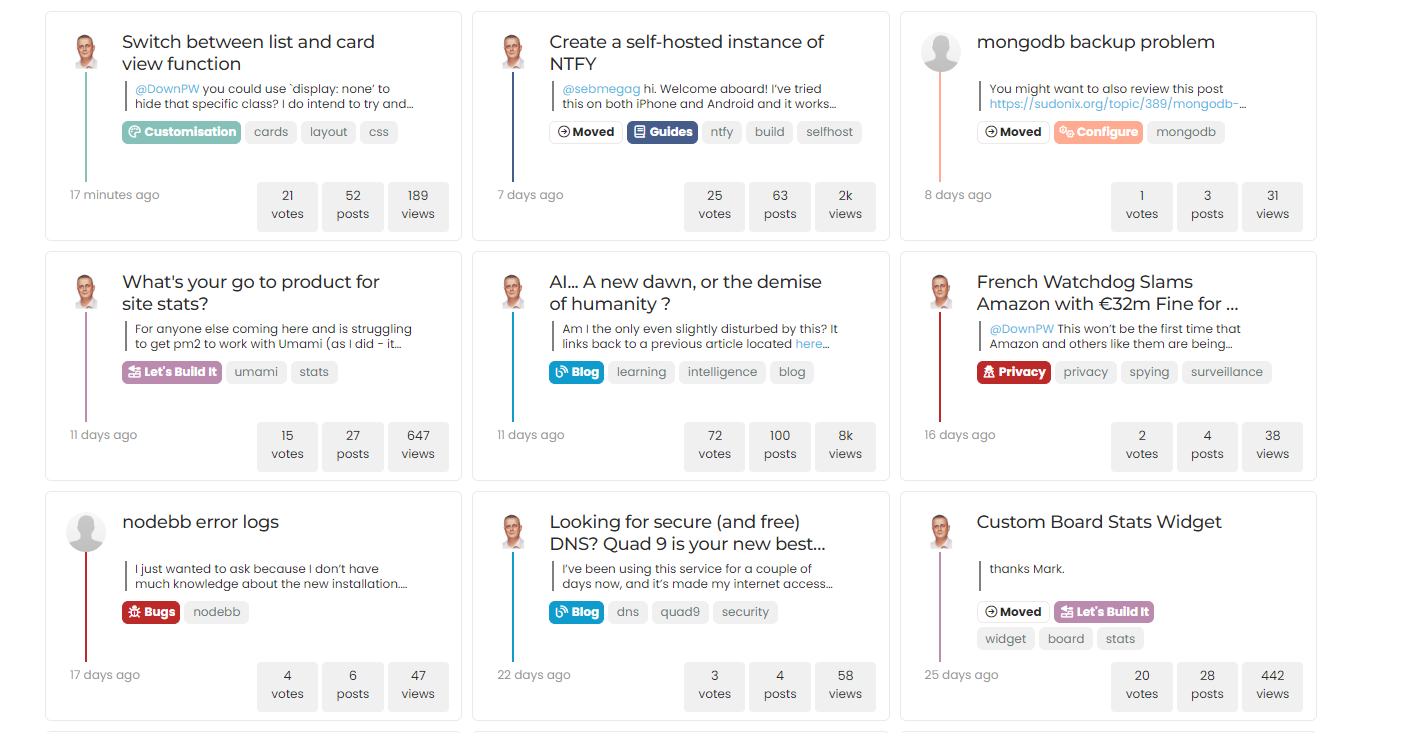
    Result :

    8235af26-ad1f-49de-8463-27314ed8d0bb-image.png

  • wrote on last edited by DownPW
    #54

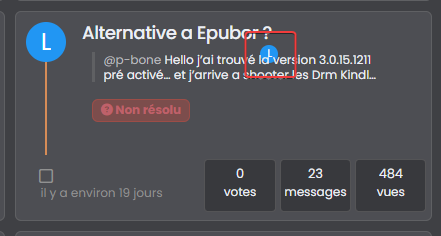
    hmmm, on my website, in fact the elements on the class have not been applied are still displayed 😞

    c5b2d73d-de9f-4fa7-ab4f-fcc6ab610549-image.png

    Is there a way to prevent them from showing up either?

  • I can possibly use this code if you find a solution (or not)
    With just a left border on post-content

    .category-card .lastpost .post-content {
        border-left: 2px solid grey;
    }
    
    .category-card .lastpost a img {
        display: none;
    }
    
    .category-card .line-clamp-sm-2 {
        margin-left: 38px !important;
    }
    

    Result :

    8235af26-ad1f-49de-8463-27314ed8d0bb-image.png

    wrote on last edited by
    #55

    @DownPW that looks really good!

  • wrote on last edited by DownPW
    #56

    hmm no @phenomlab
    it’s ok on your site but not on mine 😞

    look at the screens above


    if I not display this class too, I have no avatar on all the site because it’s the original class .

    In fact I can’t do anything. In all cases, avatars with the wrong location are displayed in the same way

    or you would have to make sure that this element never appears with card view on this page but I’m not even sure that would work

  • wrote on last edited by
    #57

    if you have solution for me, I take it

  • if you have solution for me, I take it

    wrote on last edited by phenomlab
    #58

    @DownPW I’ll need to put something together based on your dev site.

    EDIT: If you have a look at sudonix.dev (closed dev site, so you’ll need to login) you’ll see that this is no longer exposed to CF, and works as intended.

  • wrote on last edited by
    #59

    Yes I believe you that it works without CF 🙂

    I would just like to see if a solution is possible with CF even if it means deleting this d**n avatar on post-content

  • Yes I believe you that it works without CF 🙂

    I would just like to see if a solution is possible with CF even if it means deleting this d**n avatar on post-content

    wrote on last edited by phenomlab
    #60

    @DownPW I’m sure we can do something here.

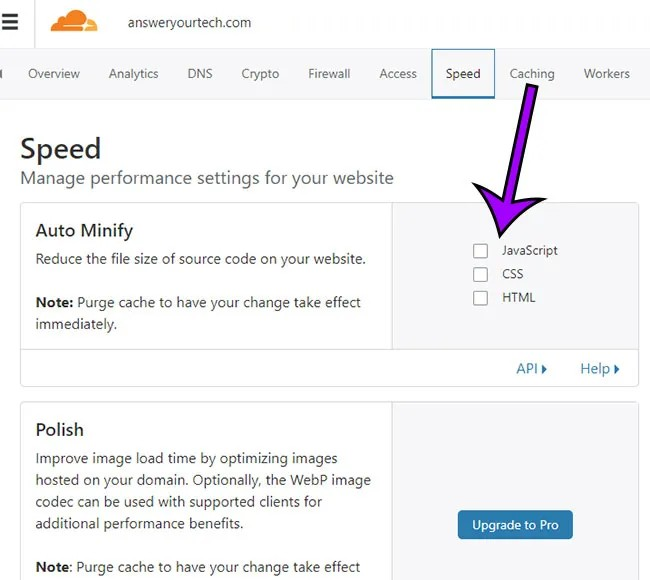
    Actually, can you try and remove the minification etc on CSS and JS in CF for your domain and see if this makes any difference?

  • @DownPW I’m sure we can do something here.

    Actually, can you try and remove the minification etc on CSS and JS in CF for your domain and see if this makes any difference?

    wrote on last edited by DownPW
    #61

    @phenomlab said in Switch between list and card view function:

    Actually, can you try and remove the minification etc on CSS and JS in CF for your domain and see if t

    Sorry my friend, can you be more specific ?

  • @phenomlab said in Switch between list and card view function:

    Actually, can you try and remove the minification etc on CSS and JS in CF for your domain and see if t

    Sorry my friend, can you be more specific ?

    wrote on last edited by
    #62

    @DownPW this setting

    27c7b6e7-2f63-4fbe-94f4-e46279093008-image.png

  • wrote on last edited by
    #63

    hello.

    how OK

    minification etc on CSS and JS in CF is already disabled

  • hello.

    how OK

    minification etc on CSS and JS in CF is already disabled

    wrote on last edited by
    #64

    @DownPW thanks. Just wanted to eliminate a thought I had around the JS being executed in the wrong order.

  • hmmm, on my website, in fact the elements on the class have not been applied are still displayed 😞
    c5b2d73d-de9f-4fa7-ab4f-fcc6ab610549-image.png

    Is there a way to prevent them from showing up either?

    wrote on last edited by phenomlab
    #65

    @DownPW said in Switch between list and card view function:

    Is there a way to prevent them from showing up either?

    You should be able to use the below CSS to hide that specific avatar

    .category-card .lastpost a img {
        margin-top: 10px;
        margin-left: -185px;
        display: none;
    }
    

    And

    .category-card span.avatar.avatar-tooltip.not-responsive.avatar-rounded {
        display: none;
    }
    

Related Topics
  • Extended functions for Q&A NodeBB plugin

    Let's Build It q&a panels cards
    3
    4
    5 Votes
    3 Posts
    3k Views
    DownPW
    Very good like always
  • Material View Support for Stock NodeBB

    Unsolved Let's Build It material view javascript css
    51
    4
    15 Votes
    51 Posts
    27k Views
    DownPW
    Oh yes, that’s what’s super cool, I learn something every day. Afterwards I start from so low in JS
  • Create a dynamic category list

    Moved Let's Build It dynamic categories api
    16
    3
    14 Votes
    16 Posts
    7k Views
    phenomlab
    Hmm - seems I never committed this code. I’ll do that now… EDIT - here it is https://github.com/phenomlab/category-list/tree/main
  • answers appearance css code request

    Solved Customisation css answers
    11
    1
    1 Votes
    11 Posts
    4k Views
    phenomlab
    @DownPW yes, because of the modifications that Sudonix uses, you’ll need to tailor to fit your needs.
  • [NodeBB] greeting message

    Solved Customisation css nodebb javascript
    2
    1
    3 Votes
    2 Posts
    2k Views
    phenomlab
    @pwsincd welcome to sudonix, and thanks for the comments. What your looking for is here https://sudonix.com/topic/195/nodebb-welcome-message/3?_=1648295651358
  • [NODEBB] Scroll Button

    Solved Customisation css javascript html scroll button
    7
    1
    0 Votes
    7 Posts
    3k Views
    phenomlab
    @downpw ooops. Forgot that. Thanks for adding.
  • Avatar on Topic Header

    Solved Customisation css avatar header
    9
    1
    0 Votes
    9 Posts
    3k Views
    JAC
    @jac said in Avatar on Topic Header: @downpw said in Avatar on Topic Header: Great Plugin I make it a bit cleaner via this CSS code: /*------------------------------------------------------------------*/ /*---------------- nodebb-plugin-browsing-users -----------------*/ /*------------------------------------------------------------------*/ /*Space between the avatar and the RSS icon */ .topic [component="topic/browsing-users"] { margin-bottom: -5px; padding-left: 10px; } /*Space between avatars*/ .pull-left { float: left!important; padding-right: 5px; } Do you have a screenshot of how this looks with the CSS change? Just added this change, thanks @DownPW
  • [NODEBB] CSS Style Sheets SelectBox

    Locked Solved Customisation css
    112
    24 Votes
    112 Posts
    63k Views
    phenomlab
    @DownPW as discussed in PM Seems to have been solved with the new JS code that you added allowing the version CSS file change!! Cache problem therefore with the JS of the Switcher theme Based on this, I will close this thread and reference https://sudonix.com/topic/207/nodebb-help-for-my-custom-css/27