Threaded post support for NodeBB

-
I don’t use this line, I commented out this line as stipulated in the script
$('.topic .sticky-tools ul .hidden-xs').append(threadView);But use this line :
$('.topic .sticky-tools ul [component="topic/browsing-users"]:last-of-type').append(threadView);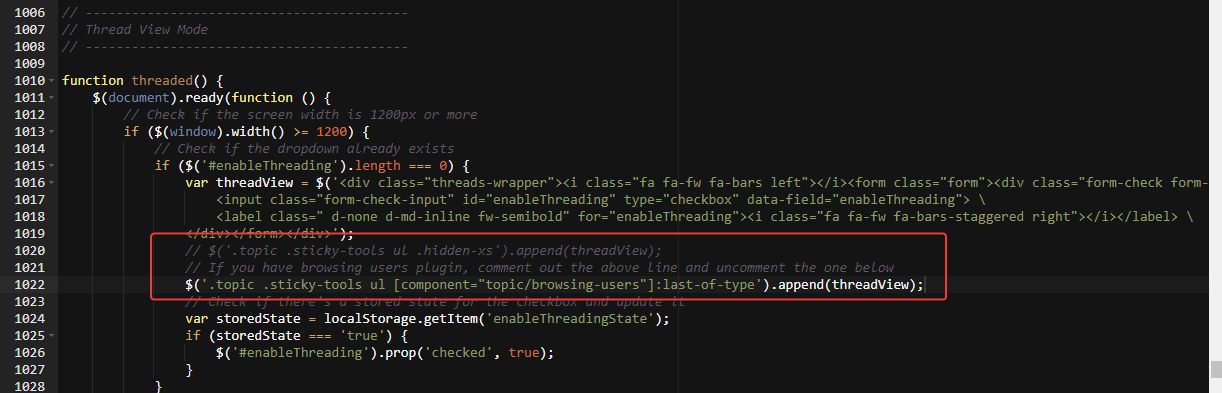
maybe change for this ?
$('.topic .sticky-tools ul.list-unstyled [component="topic/browsing-users"]:last-of-type').append(threadView);PW and WS Spirit alive
-
I don’t use this line, I commented out this line as stipulated in the script
$('.topic .sticky-tools ul .hidden-xs').append(threadView);But use this line :
$('.topic .sticky-tools ul [component="topic/browsing-users"]:last-of-type').append(threadView);maybe change for this ?
$('.topic .sticky-tools ul.list-unstyled [component="topic/browsing-users"]:last-of-type').append(threadView);@DownPW sorry, use this one.
$('.topic .sticky-tools ul.list-unstyled').append(threadView);Replace any existing line
-

With this code the entire plugin is now displayed to the left of the Thread View button. I even think I prefer the way it was before.
I find it more logical that all users are displayed to the right of the button and not to the left.PW and WS Spirit alive
-
With this code the entire plugin is now displayed to the left of the Thread View button. I even think I prefer the way it was before.
I find it more logical that all users are displayed to the right of the button and not to the left.@DownPW up to you of course but the browsing users plugin makes several adjustments to element positioning, and without moving the threading toggle outside of that, you’ll always have the issue where the composing user appears on the left because under the old code, the threading toggle shares the same space which causes the alignment issue.
Moving outside of that div is the only way to resolve the issue. There is another way which is to append the topic tools element but that then means that users without adequate permissions will not be able to use the threading toggle at all.
-
PW and WS Spirit alive
-
@DownPW yes, that’s definitely a
z-indexissue. -
After test, seems to be good with add this in JS function in
ifandelse:$('[component="topic/quickreply/container"]').addClass('threaded'); //test $('[component="topic/quickreply/container"]').removeClass('threaded'); //testand this to CSS :
[component="topic/quickreply/container"].threaded {
    z-index: -1 !important;
    position: relative;
}
Tell me if this seems correct to you @phenomlab
PW and WS Spirit alive
-
After test, seems to be good with add this in JS function in
ifandelse:$('[component="topic/quickreply/container"]').addClass('threaded'); //test $('[component="topic/quickreply/container"]').removeClass('threaded'); //testand this to CSS :
[component="topic/quickreply/container"].threaded {
    z-index: -1 !important;
    position: relative;
}
Tell me if this seems correct to you @phenomlab
@DownPW seems fine, yes. Any obvious conflict with other elements?
-
I haven’t tested everything. this is something to watch out for
-
I have the same problem for thread but this time I can’t solve it

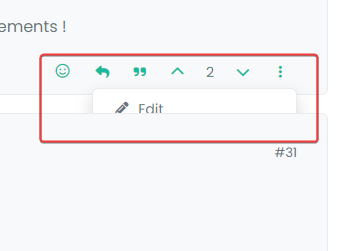
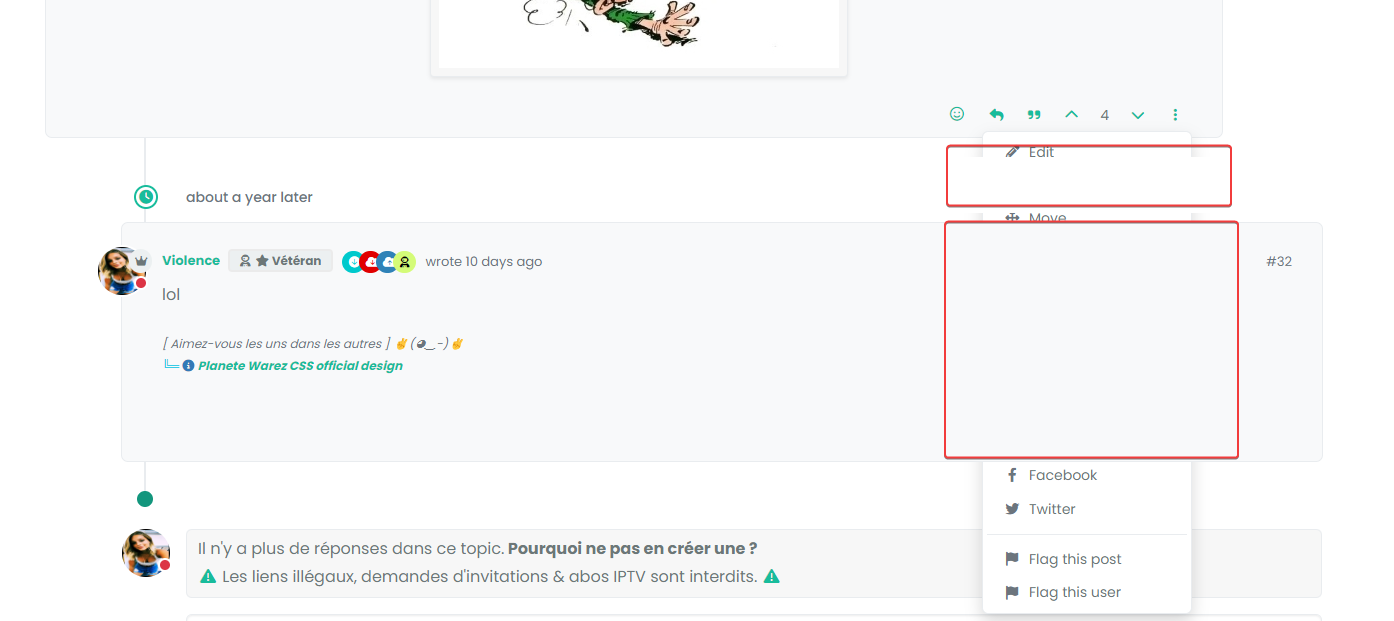
PW and WS Spirit alive
-
@DownPW Let me have a look.
Mark Cutting also advises organisations as a Fractional CIO, Fractional CISO and Executive Advisor, helping boards improve technology governance, cyber resilience and executive decision making. Learn more at Phenomlab Ltd
-
@phenomlab said in Threading support for NodeBB:
@DownPW Let me have a look.
Thanks Mark

@phenomlab said in Threading support for NodeBB:
@DownPW seems fine, yes. Any obvious conflict with other elements?
Besides, my solution above is only partial. It turns out that sometimes I can no longer click to reply to the post via quick Reply. Nothing happens when I click to enter text
It’s a bit the same problem as the previous bug.
It would be more interesting to act on the dropdown menu than the other elements one by one but my attempts are not fruitful for the moment.
We could kill one stone/two birds
PW and WS Spirit alive
-
@phenomlab said in Threading support for NodeBB:
@DownPW Let me have a look.
Thanks Mark
@phenomlab said in Threading support for NodeBB:
@DownPW seems fine, yes. Any obvious conflict with other elements?
Besides, my solution above is only partial. It turns out that sometimes I can no longer click to reply to the post via quick Reply. Nothing happens when I click to enter text
It’s a bit the same problem as the previous bug.
It would be more interesting to act on the dropdown menu than the other elements one by one but my attempts are not fruitful for the moment.
We could kill one stone/two birds
@DownPW I see the issue. Can you please make the below CSS changes - notice the ones commented out and their replacements (which you should follow)
.page-topic .topic .posts.timeline .timeline-event, .page-topic .topic .posts.timeline > [component="post/placeholder"], .page-topic .topic .posts.timeline > [component=post] {
    border-left: none;
    /* transition: transform 0.3s ease !important; */
    transition: margin-left 0.3s ease, margin-right 0.3s ease !important;
    background: var(--bs-body-bg);
    border-radius: var(--bs-border-radius);
}

li[component=post].threaded {
    /* transform: translateX(-100px); */
    /* transition: transform 0.3s ease !important; */
    margin-left: -75px !important;
    transition: margin-left 0.3s ease, margin-right 0.3s ease !important;
}
My expectation is that this will still work (but using
margininstead oftransform), and also ensure that the reverse dropdown is not being hidden by the[component="post"]elements.When you use
transformon an element, a new stacking order is created for it. As you are transforming a parent which doesn’t havez-indexof it’s own, a new stacking order for itself and child elements is created. As a result, the child element withz-indexremains below the[component="post"]elements.If you want to see this in action before applying the CSS, you can remove
translateX(-100px)from theli[component=post].threadedclass and then try the dropdown menu again. You’ll notice it appears correctly this time, although the content is not being shifted because thetranslatehas been removed.We replace it with
marginwhich is slightly less performant when it comes to animation, but the nature of NodeBB is to lazyload posts, therefore, this negates the overall impact to theDOM.Let me know if this works.
-
Thats work. Many thanks for resolve
Thanks for the information, I understand better.Would have a working solution other than mine for this :
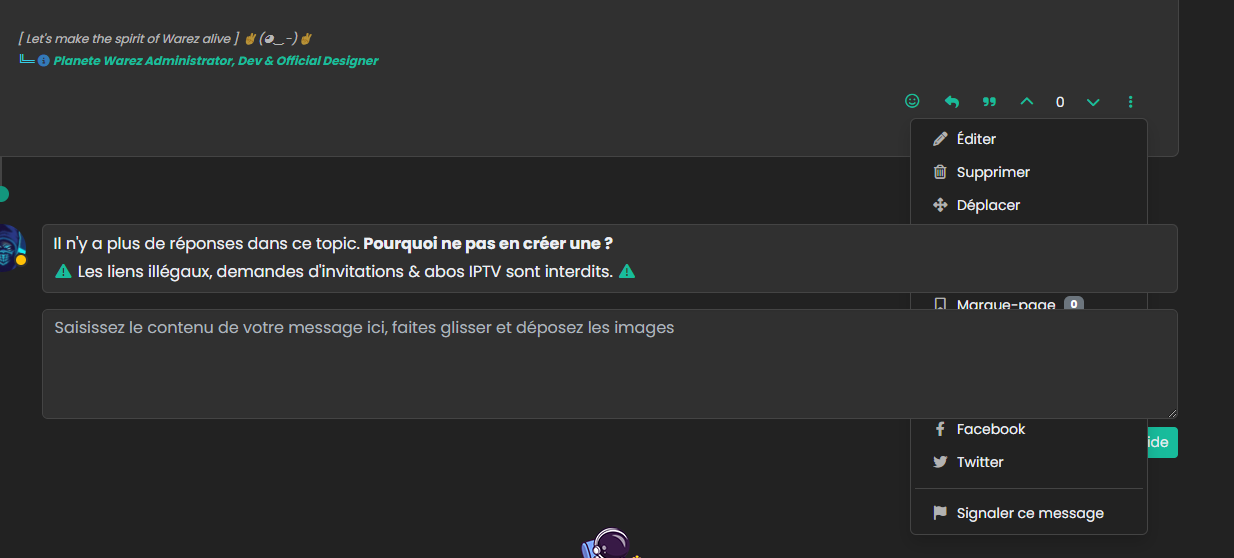
PW and WS Spirit alive
-
Thats work. Many thanks for resolve
Thanks for the information, I understand better.Would have a working solution other than mine for this :
@DownPW is that still an issue? I can’t replicate that on your dev site?
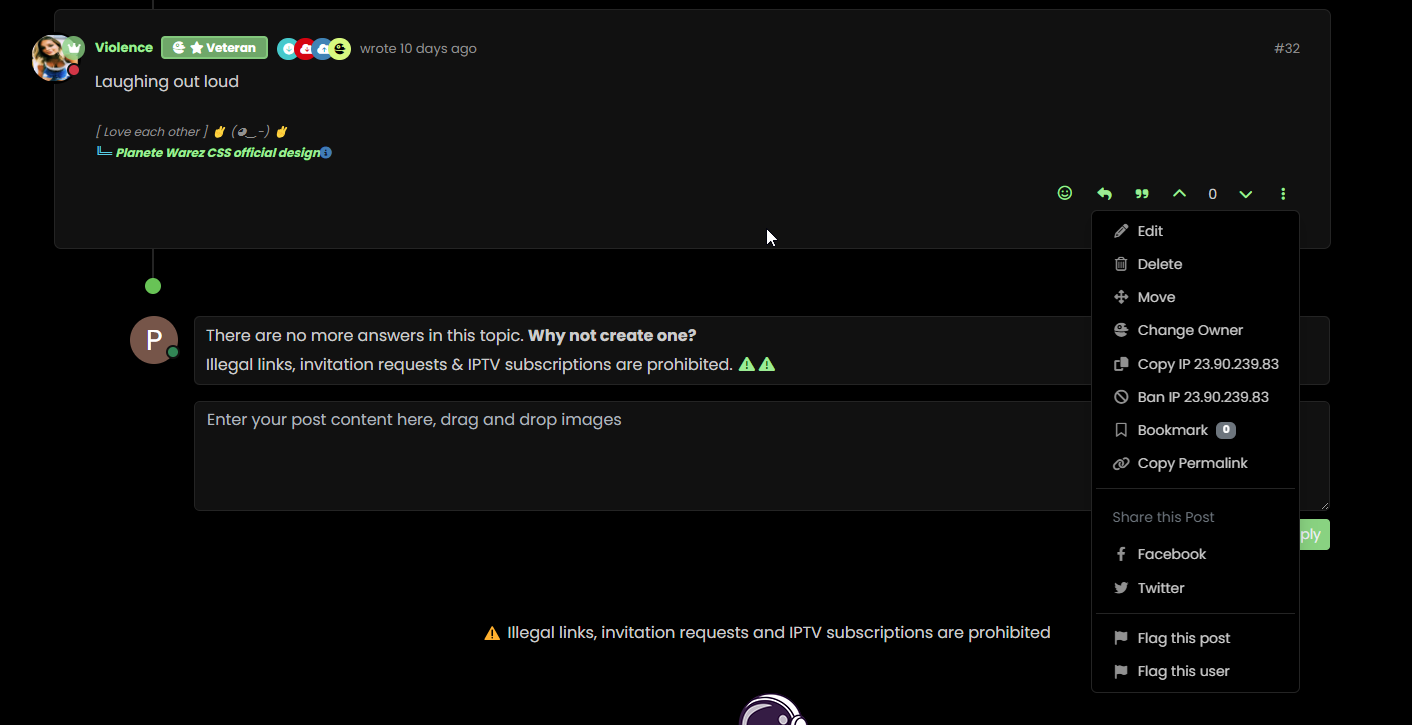
-
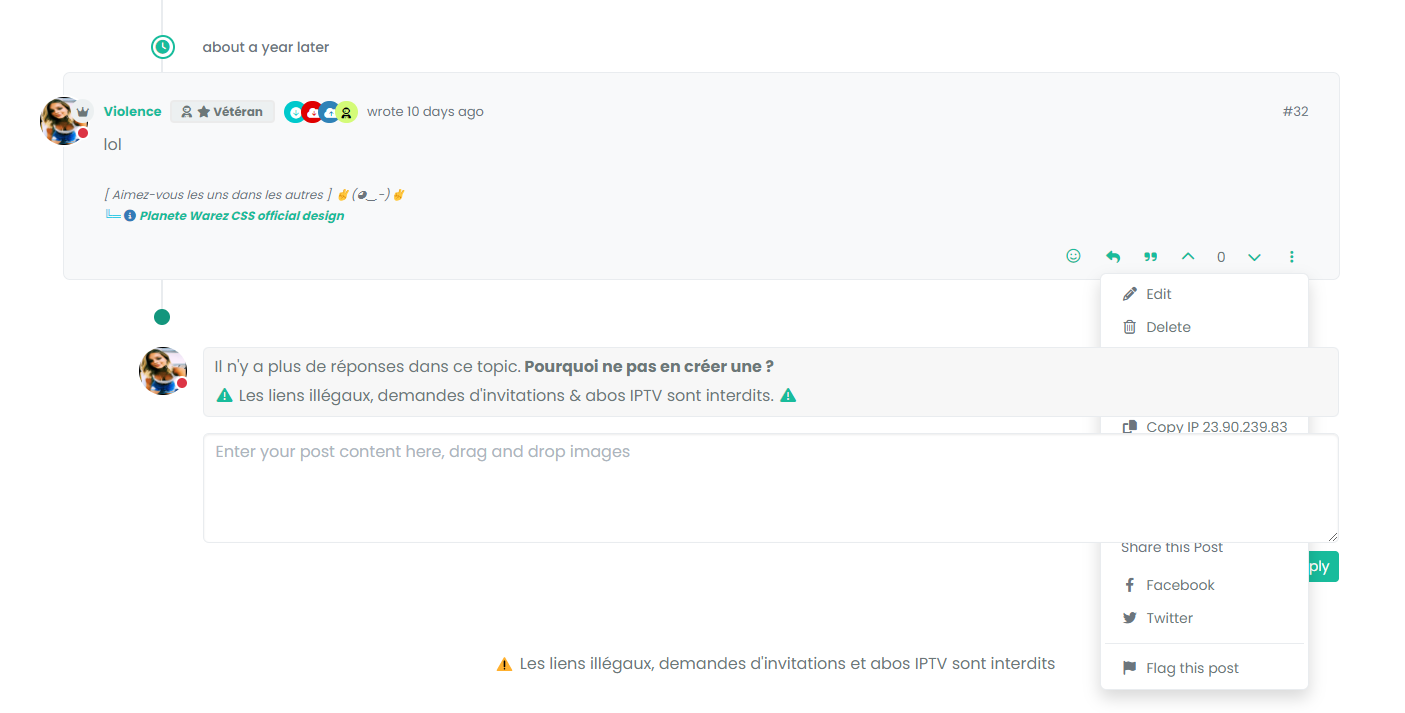
Besides, my solution above is only partial. It turns out that sometimes I can no longer click to reply to the post via quick Reply. Nothing happens when I click to enter text
cache maybe. I have delete the bugfix because not bug fix
PW and WS Spirit alive
-
Besides, my solution above is only partial. It turns out that sometimes I can no longer click to reply to the post via quick Reply. Nothing happens when I click to enter text
cache maybe. I have delete the bugfix because not bug fix
@DownPW said in Threading support for NodeBB:
cache maybe. I have delete the bugfix because not bug fix
Yes, I can’t reproduce this.
-
I mean bug is present but my bug fix don’t work properly.
test to delete my cache and tell you
-
 undefined phenomlab referenced this topic on
-
-
@phenomlab not cache
@DownPW PM me the link to the post.

Hello! It looks like you're interested in this conversation, but you don't have an account yet.
Getting fed up of having to scroll through the same posts each visit? When you register for an account, you'll always come back to exactly where you were before, and choose to be notified of new replies (either via email, or push notification). You'll also be able to save bookmarks and upvote posts to show your appreciation to other community members.
With your input, this post could be even better 💗
Register LoginRelated Topics
-
-
-
-
-
-
restarting nodebb on boot
Unsolved Configure -
-