Composer options on nodebb
-
I have made posts on the nodebb forum about this, but have additional question here.
The composer screen (to make posts) is a weak spot for NodeBB, horrible array of icons which confuse new users. Picture upload is particularly confusing.
Is the icon list bar configurable? in settings I only see this option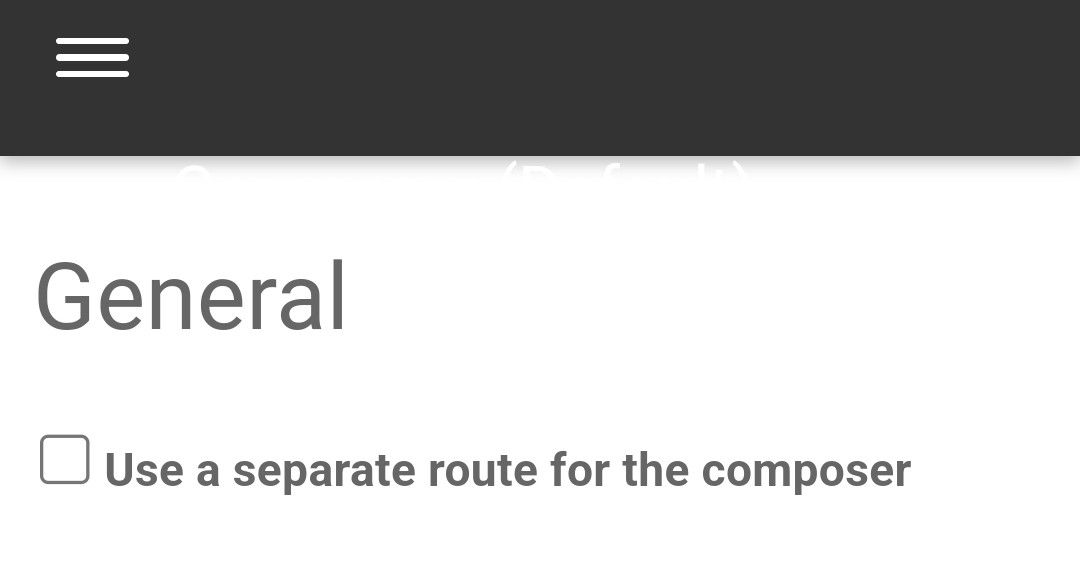
What option does this even do? What is it meaning by route?
-
I have made posts on the nodebb forum about this, but have additional question here.
The composer screen (to make posts) is a weak spot for NodeBB, horrible array of icons which confuse new users. Picture upload is particularly confusing.
Is the icon list bar configurable? in settings I only see this optionWhat option does this even do? What is it meaning by route?
@Panda said in Composer options on nodebb:
The composer screen (to make posts) is a weak spot for NodeBB, horrible array of icons which confuse new users. Picture upload is particularly confusing.
Is the icon list bar configurable?I think it is, but you need a function or a plugin to change it. What most people do is target the buttons they do not not need or want in CSS and hide them. I agree with the picture upload - there are two actually - one for pictures themselves which is obvious, and one for files.
in settings I only see this option
All this setting does is allow the composer to start in a new window independently and not part of the current form.
Mark Cutting also advises organisations as a Fractional CIO, Fractional CISO and Executive Advisor, helping boards improve technology governance, cyber resilience and executive decision making. Learn more at Phenomlab Ltd
-
@Panda said in Composer options on nodebb:
The composer screen (to make posts) is a weak spot for NodeBB, horrible array of icons which confuse new users. Picture upload is particularly confusing.
Is the icon list bar configurable?I think it is, but you need a function or a plugin to change it. What most people do is target the buttons they do not not need or want in CSS and hide them. I agree with the picture upload - there are two actually - one for pictures themselves which is obvious, and one for files.
in settings I only see this option
All this setting does is allow the composer to start in a new window independently and not part of the current form.
@phenomlab there are 3 icons actually that can be confused for upload image, the first is upload pic by url. This confuses people as it uses the conventional pic icon that people associate with uploading an image.
So how using CSS (uggghh) can I stop that one showing in the composer iconbar? -
@phenomlab there are 3 icons actually that can be confused for upload image, the first is upload pic by url. This confuses people as it uses the conventional pic icon that people associate with uploading an image.
So how using CSS (uggghh) can I stop that one showing in the composer iconbar?@Panda that’s explained here
Mark Cutting also advises organisations as a Fractional CIO, Fractional CISO and Executive Advisor, helping boards improve technology governance, cyber resilience and executive decision making. Learn more at Phenomlab Ltd
-
@phenomlab
Ok thanks, so I assume I add something like this to custom css/* removing buttons from composer */ .composer .formatting-bar .formatting-group li[data-format="????"] { display: none; }How can i find out what ??? = for url pic, if thats one I want to disable ?
Where are these icon names defined -
@phenomlab
Ok thanks, so I assume I add something like this to custom css/* removing buttons from composer */ .composer .formatting-bar .formatting-group li[data-format="????"] { display: none; }How can i find out what ??? = for url pic, if thats one I want to disable ?
Where are these icon names defined@Panda Here you go
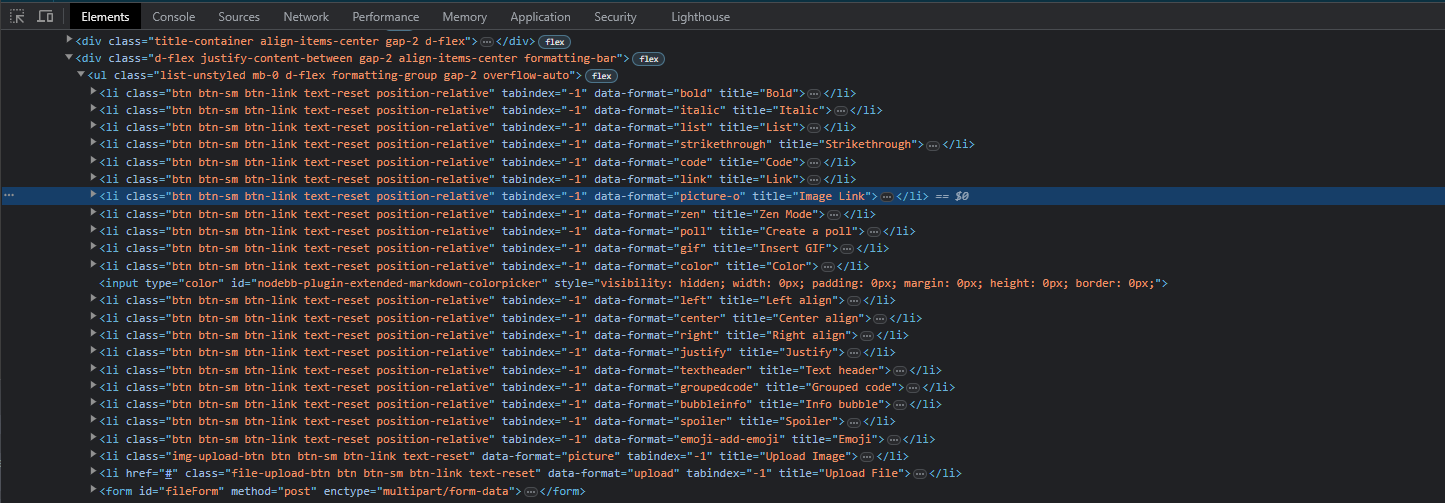
-
 undefined Panda has marked this topic as solved on
-
Back with another question, as although you gave me the list, I cant workout which ids are:
orangle circled (for thumbnail)
Purple circled (dont know what)
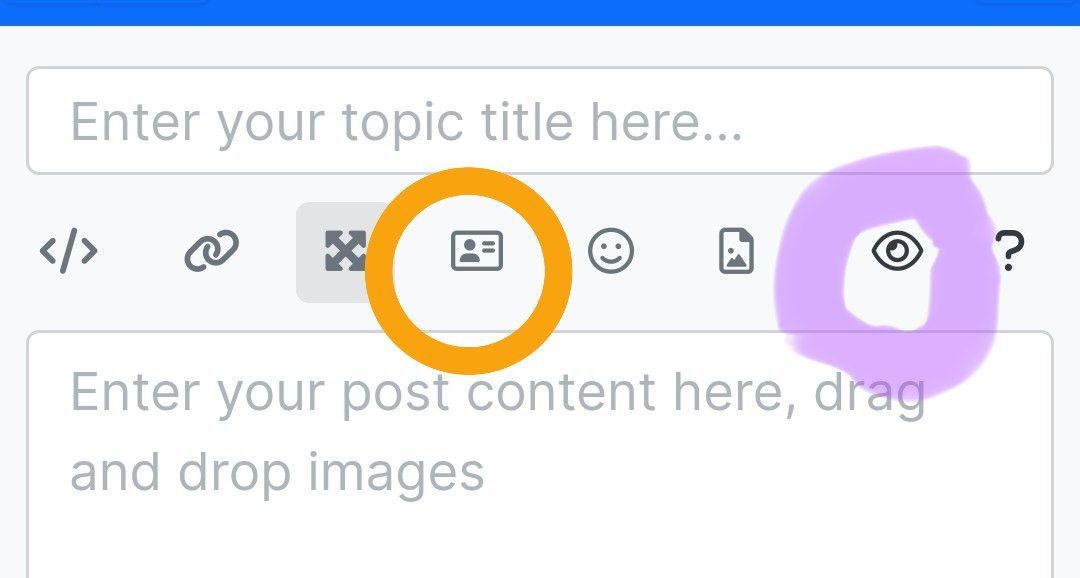
Im trying to get as many removed so that pic upload appears without needing to scroll!
-
Back with another question, as although you gave me the list, I cant workout which ids are:
orangle circled (for thumbnail)
Purple circled (dont know what)
Im trying to get as many removed so that pic upload appears without needing to scroll!
@Panda You should be able to expose the CSS for these using F12 to get into console

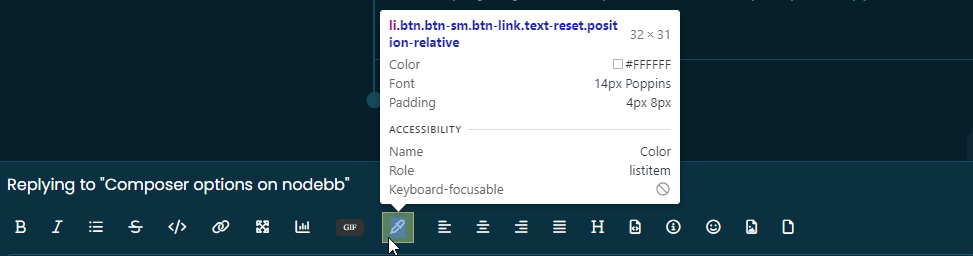
That should then expose the element once selected
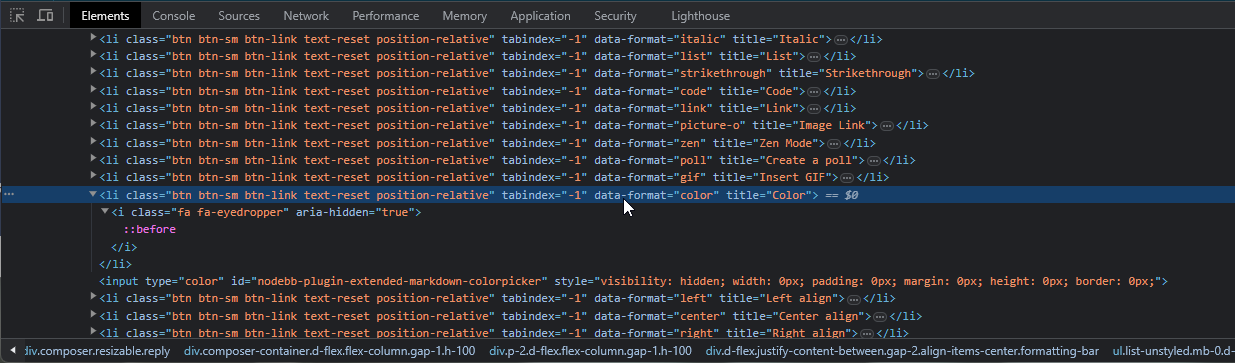
Here’s the below CSS you need based on the screenshot provided.
.composer .formatting-bar .formatting-group li[data-format="picture-o"], .composer .formatting-bar .formatting-group li[data-format="spoiler"] {
    display: none;
}

Hello! It looks like you're interested in this conversation, but you don't have an account yet.
Getting fed up of having to scroll through the same posts each visit? When you register for an account, you'll always come back to exactly where you were before, and choose to be notified of new replies (either via email, or push notification). You'll also be able to save bookmarks and upvote posts to show your appreciation to other community members.
With your input, this post could be even better 💗
Register Login