Heading text on NodeBB forum
-
@phenomlab
(1) That’s right, it’s purely cosmetic and not for SEO/crawlers.(2) For the ABOUT page in the top menu link:
I just checked the NAVIGATION in V3 and can see the exact settings as seen on your screenshot. So, I toggled the DROPDOWN to ON and added the line:
<li><a href=“/about> About </a></li>
Nothing appeared on the page.
Is this because of what you mentioned about V3 being different to V2?(3) Sudonix.dev: You mean access to the ACP to see how you’ve set it all up and I can just mirror those for my own site? If so, YES PLEASE! That would be super helpful for me. Thank you!
@mventures
UPDATEI placed this script in the GLOBAL HEADER widget, a remake of the existing Footer class script

<header id="header" class="container header">
	<div>
		<a target="_blank" href="https://MYSITE.COM/about">About</a> |
<a target="_blank" href="https://MYSITE.COM/meetups">Meetups</a> |
	</div>
</header>
And I got the below:
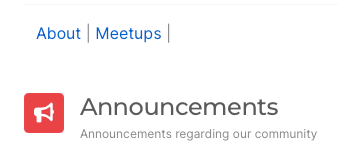
Not exactly the dropdown Menu Link you have, but it serves the purpose for now
-
@phenomlab
(1) That’s right, it’s purely cosmetic and not for SEO/crawlers.(2) For the ABOUT page in the top menu link:
I just checked the NAVIGATION in V3 and can see the exact settings as seen on your screenshot. So, I toggled the DROPDOWN to ON and added the line:
<li><a href=“/about> About </a></li>
Nothing appeared on the page.
Is this because of what you mentioned about V3 being different to V2?(3) Sudonix.dev: You mean access to the ACP to see how you’ve set it all up and I can just mirror those for my own site? If so, YES PLEASE! That would be super helpful for me. Thank you!
@mventures said in Title on homepage of nodebb forum:
(2) For the ABOUT page in the top menu link:
I just checked the NAVIGATION in V3 and can see the exact settings as seen on your screenshot. So, I toggled the DROPDOWN to ON and added the line:
<li><a href=“/about> About </a></li>
Nothing appeared on the page.
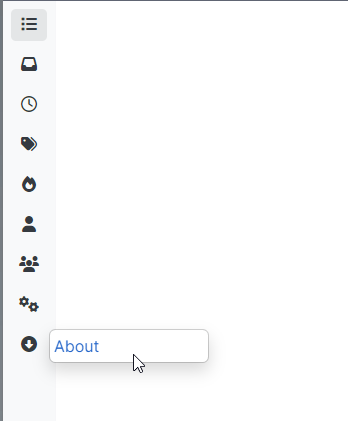
Is this because of what you mentioned about V3 being different to V2?Be careful what you alter, as you’ve changed the behaviour of the
categoriespage so now it does this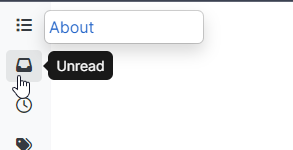
The way this works is as below
You drag the custom route to the navbar
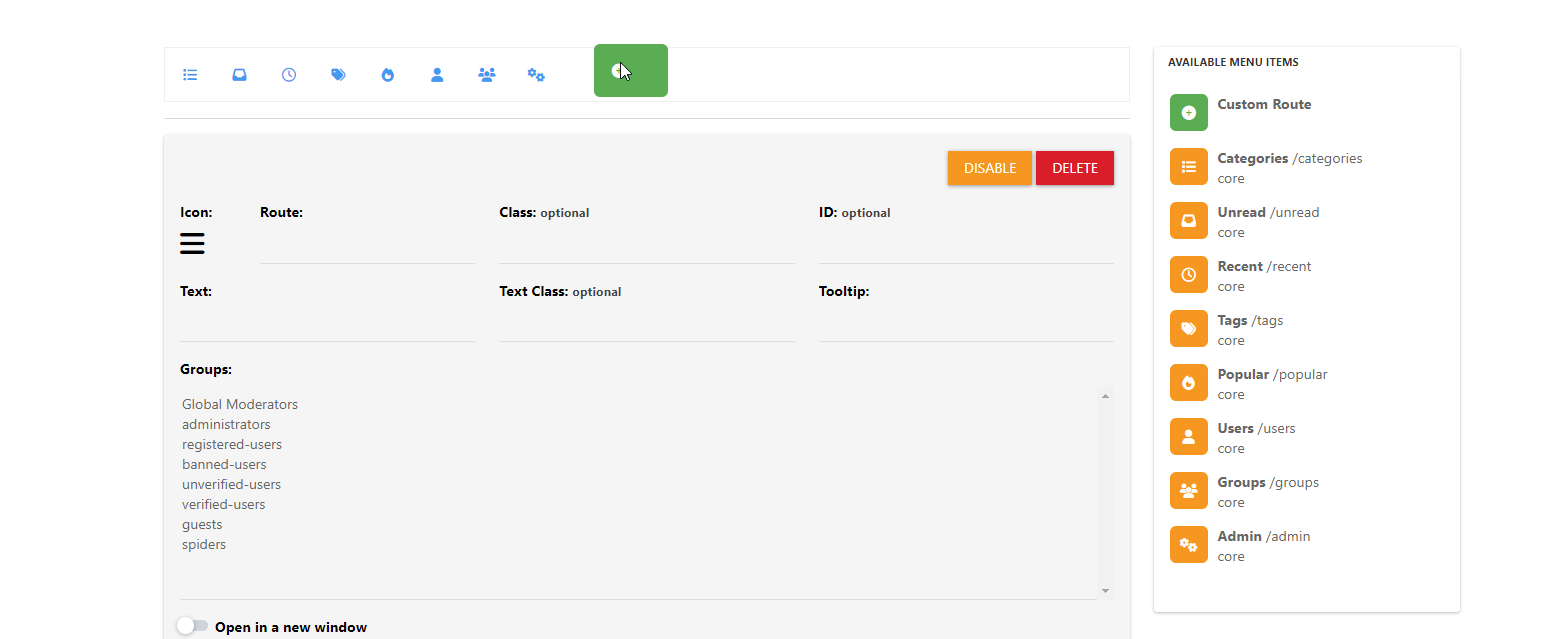
Select an icon
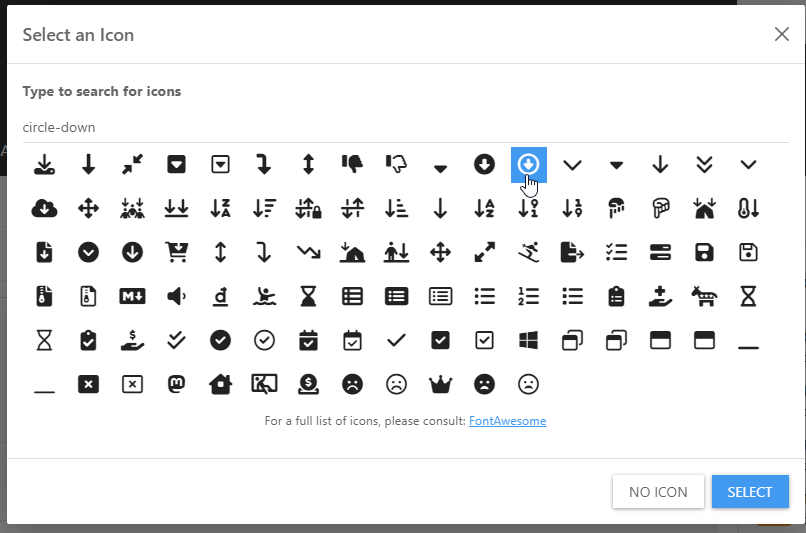
Enable the dropdown, and add the code
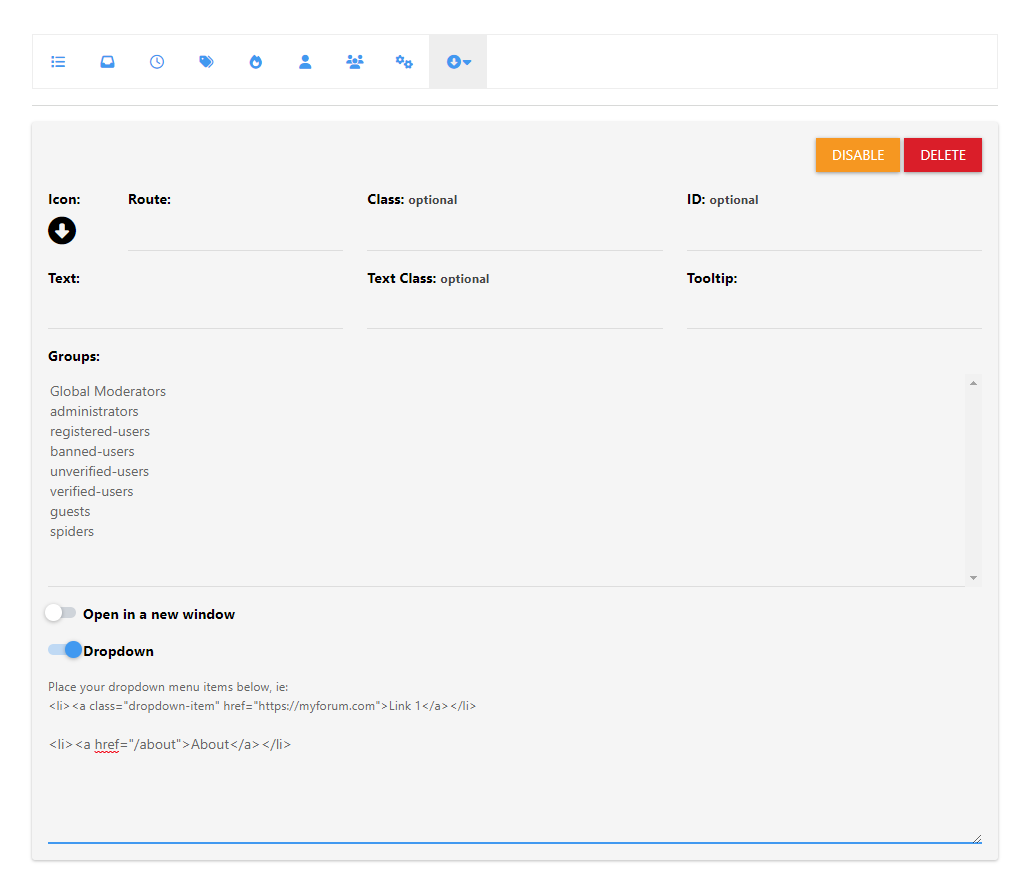
Save
Reload the page, and you’ll see an additional menu created
Mark Cutting also advises organisations as a Fractional CIO, Fractional CISO and Executive Advisor, helping boards improve technology governance, cyber resilience and executive decision making. Learn more at Phenomlab Ltd
-
@phenomlab
(1) That’s right, it’s purely cosmetic and not for SEO/crawlers.(2) For the ABOUT page in the top menu link:
I just checked the NAVIGATION in V3 and can see the exact settings as seen on your screenshot. So, I toggled the DROPDOWN to ON and added the line:
<li><a href=“/about> About </a></li>
Nothing appeared on the page.
Is this because of what you mentioned about V3 being different to V2?(3) Sudonix.dev: You mean access to the ACP to see how you’ve set it all up and I can just mirror those for my own site? If so, YES PLEASE! That would be super helpful for me. Thank you!
@mventures said in Title on homepage of nodebb forum:
(3) Sudonix.dev: You mean access to the ACP to see how you’ve set it all up and I can just mirror those for my own site? If so, YES PLEASE! That would be super helpful for me. Thank you!
No, an account that has access to the site so you can see how it is laid out. No access to the ACP is granted, because it isn’t needed.
-
@mventures said in Title on homepage of nodebb forum:
(2) For the ABOUT page in the top menu link:
I just checked the NAVIGATION in V3 and can see the exact settings as seen on your screenshot. So, I toggled the DROPDOWN to ON and added the line:
<li><a href=“/about> About </a></li>
Nothing appeared on the page.
Is this because of what you mentioned about V3 being different to V2?Be careful what you alter, as you’ve changed the behaviour of the
categoriespage so now it does thisThe way this works is as below
You drag the custom route to the navbar
Select an icon
Enable the dropdown, and add the code
Save
Reload the page, and you’ll see an additional menu created
@phenomlab I shall go through this tomorrow and check what the issue on Categories is about, although I can’t see any issue at my end on Chrome and Safari.
By the way, how do you upload a full-length image/photo onto a page like what you have on the ABOUT page?
-
@phenomlab I shall go through this tomorrow and check what the issue on Categories is about, although I can’t see any issue at my end on Chrome and Safari.
By the way, how do you upload a full-length image/photo onto a page like what you have on the ABOUT page?
@mventures said in Title on homepage of nodebb forum:
I shall go through this tomorrow and check what the issue on Categories is about, although I can’t see any issue at my end on Chrome and Safari.
You won’t do now as I rectified it
Mark Cutting also advises organisations as a Fractional CIO, Fractional CISO and Executive Advisor, helping boards improve technology governance, cyber resilience and executive decision making. Learn more at Phenomlab Ltd
-
@mventures said in Title on homepage of nodebb forum:
I shall go through this tomorrow and check what the issue on Categories is about, although I can’t see any issue at my end on Chrome and Safari.
You won’t do now as I rectified it
@phenomlab Oh wow! Thanks again, so much! I can see the page menu in the “down” arrow on the left navigation bar now.
How do I get that one small tagline bar up at the top, perhaps next to the logo, as its a white blank space, since the menu is to the left now? I can create a JPG/PNG image of my statement which can be loaded there. If that’s a bad idea, then something I can type up there.
-
@phenomlab Oh wow! Thanks again, so much! I can see the page menu in the “down” arrow on the left navigation bar now.
How do I get that one small tagline bar up at the top, perhaps next to the logo, as its a white blank space, since the menu is to the left now? I can create a JPG/PNG image of my statement which can be loaded there. If that’s a bad idea, then something I can type up there.
@mventures I think I know what you’re after, but could you explain and clarify? Perhaps a mock-up sketch would help.
Mark Cutting also advises organisations as a Fractional CIO, Fractional CISO and Executive Advisor, helping boards improve technology governance, cyber resilience and executive decision making. Learn more at Phenomlab Ltd
-
@mventures I think I know what you’re after, but could you explain and clarify? Perhaps a mock-up sketch would help.
@phenomlab Here is an example of what I meant:

Basically, having the tagline in the header, where the logo is.
The tagline can be a JPEG banner that I can create and upload or it can be a text that can appear there. -
@phenomlab Here is an example of what I meant:
Basically, having the tagline in the header, where the logo is.
The tagline can be a JPEG banner that I can create and upload or it can be a text that can appear there.@mventures You could achieve this effect with a
:psuedoCSS class. Let me have a look at this -
@phenomlab Here is an example of what I meant:
Basically, having the tagline in the header, where the logo is.
The tagline can be a JPEG banner that I can create and upload or it can be a text that can appear there.@mventures I forked this into it’s own topic as it deviates from the original thread.
-
@phenomlab Here is an example of what I meant:
Basically, having the tagline in the header, where the logo is.
The tagline can be a JPEG banner that I can create and upload or it can be a text that can appear there.@mventures How’s this ?

To achieve this look
- Create a Brand Header widget
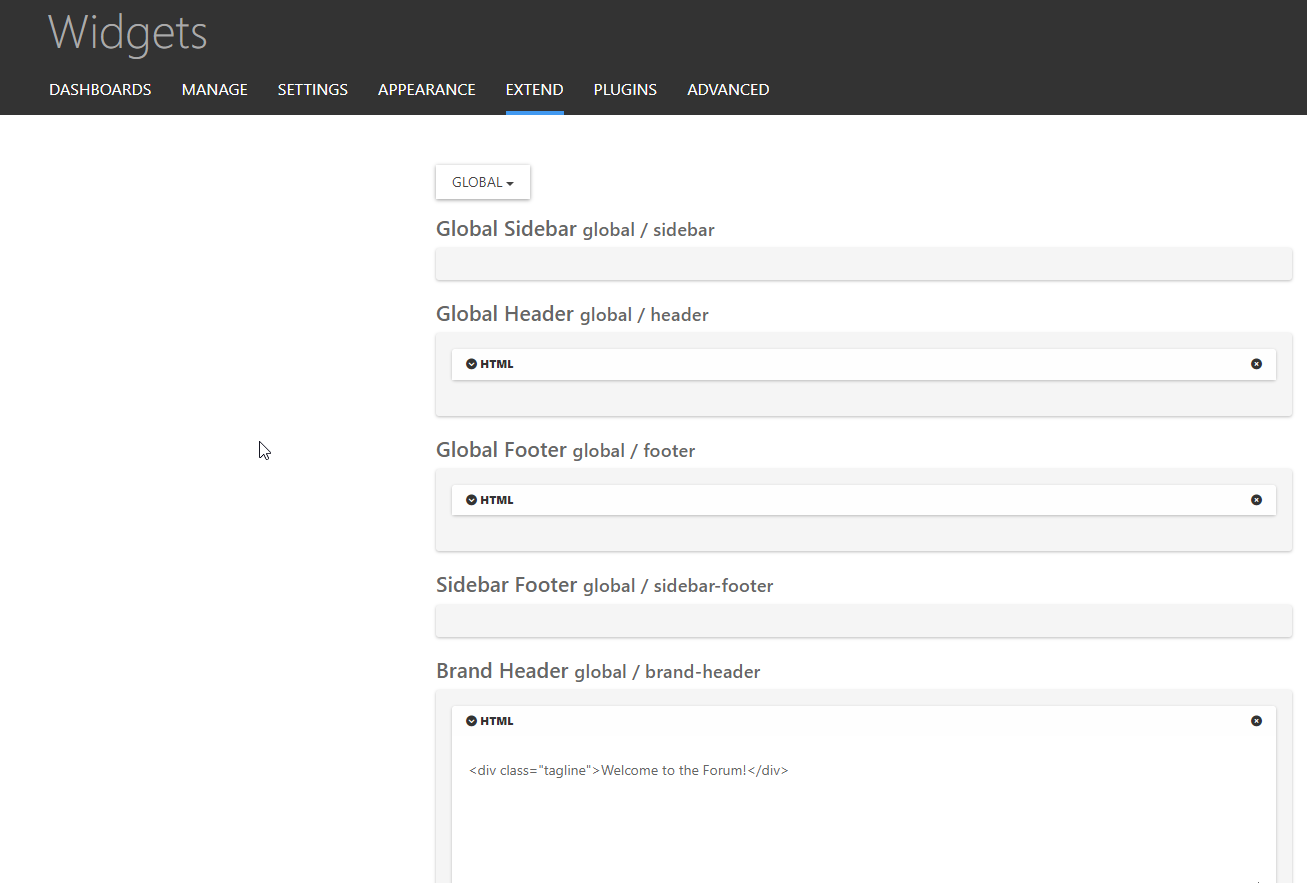
Save
- Go to
admin/appearance/customise#custom-css - Add the below CSS
[data-widget-area="brand-header"] {
    display: contents;
}
.tagline {
    position: relative;
    margin-left: 10px;
    margin-top: 20px;
}
Save
Mark Cutting also advises organisations as a Fractional CIO, Fractional CISO and Executive Advisor, helping boards improve technology governance, cyber resilience and executive decision making. Learn more at Phenomlab Ltd
-
 undefined phenomlab has marked this topic as solved on
-
@mventures How’s this ?
To achieve this look
- Create a Brand Header widget
Save
- Go to
admin/appearance/customise#custom-css - Add the below CSS
[data-widget-area="brand-header"] {
    display: contents;
}
.tagline {
    position: relative;
    margin-left: 10px;
    margin-top: 20px;
}
Save
@phenomlab That’s awesome! Keen to give that a try right now! Thank you
I shall be back. -
UPDATE: It worked
Thank you again. I added a few sentences and had to do a hard refresh for everything to appear and its exactly how I need it to be.
Was that BRAND HEADER widget always there or did you create it just now?? -
UPDATE: It worked
Thank you again. I added a few sentences and had to do a hard refresh for everything to appear and its exactly how I need it to be.
Was that BRAND HEADER widget always there or did you create it just now??@mventures The brand widget is part of the Harmony theme, so it already exists.
Also, I added another CSS class so that the tagline is hidden on mobiles. With all that text, it’ll wrap and take half of the mobile screen estate, which will look awful.
@media (max-width: 576px) {
.tagline {
    display: none;
}
}
Mark Cutting also advises organisations as a Fractional CIO, Fractional CISO and Executive Advisor, helping boards improve technology governance, cyber resilience and executive decision making. Learn more at Phenomlab Ltd
-
@mventures The brand widget is part of the Harmony theme, so it already exists.
Also, I added another CSS class so that the tagline is hidden on mobiles. With all that text, it’ll wrap and take half of the mobile screen estate, which will look awful.
@media (max-width: 576px) { .tagline { display: none; } }@phenomlab That’s a great idea! I didn’t think of that. Thank you.
-
@mventures The brand widget is part of the Harmony theme, so it already exists.
Also, I added another CSS class so that the tagline is hidden on mobiles. With all that text, it’ll wrap and take half of the mobile screen estate, which will look awful.
@media (max-width: 576px) { .tagline { display: none; } }@phenomlab Sorry I am back on this one. I just noticed on the desktop a blue bar appears across the header region when you visit any of the categories. Does it have to do with your CSS class insertion? It doesn’t appear on the homepage but the channel pages only.

-
UPDATE: That blue bar has now disappeared and I did nothing. Perhaps, you @phenomlab ?
-
UPDATE: That blue bar has now disappeared and I did nothing. Perhaps, you @phenomlab ?
@mventures I’ve not done anything here.

Hello! It looks like you're interested in this conversation, but you don't have an account yet.
Getting fed up of having to scroll through the same posts each visit? When you register for an account, you'll always come back to exactly where you were before, and choose to be notified of new replies (either via email, or push notification). You'll also be able to save bookmarks and upvote posts to show your appreciation to other community members.
With your input, this post could be even better 💗
Register LoginDid this solution help you?
Related Topics
-
-
-
-
NodeBB Footer
Solved Customisation -
-
-
-