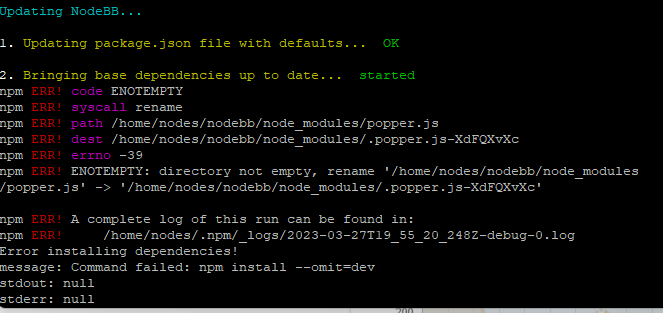
Upgrade Problem from 2.8.3 to 2.8.4
-
@phenomlab i deleted emoji plugin but while upgraded to 2.8.6 faced same problem.
cant understand whats going on.@cagatay can you provide the logs?
Mark Cutting also advises organisations as a Fractional CIO, Fractional CISO and Executive Advisor, helping boards improve technology governance, cyber resilience and executive decision making. Learn more at Phenomlab Ltd
-
-
@cagatay does it work if you remove this plugin, perform the upgrade, and then put it back afterwards?
Mark Cutting also advises organisations as a Fractional CIO, Fractional CISO and Executive Advisor, helping boards improve technology governance, cyber resilience and executive decision making. Learn more at Phenomlab Ltd
-
@cagatay does it work if you remove this plugin, perform the upgrade, and then put it back afterwards?
@phenomlab i removed the plugin then upgraded but faced same eror…
-
@phenomlab i removed the plugin then upgraded but faced same eror…
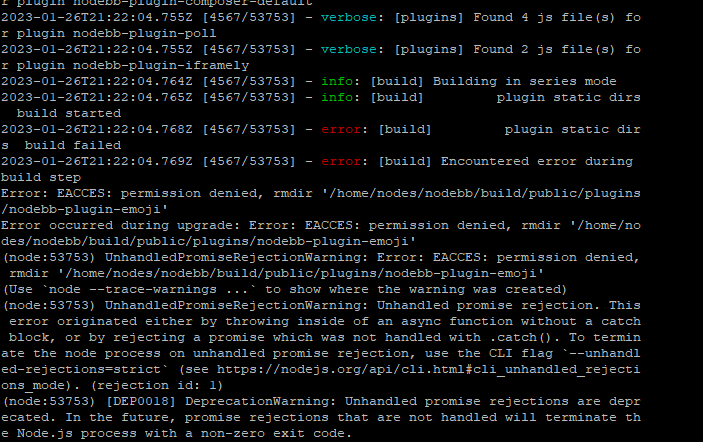
Maybe reset permissions on all nodebb directory like this ?
chown -R yournodebbuser:yournodebbuser /home/youruser/yournodebbdirectorychown -R nodes:nodes /home/nodes/nodebbbecause I see permissions error on
/home/nodes/nodebb/builds/....in the last screenshotAnd .upgrade and or rebuild nodebb
??
PW and WS Spirit alive
-
Maybe reset permissions on all nodebb directory like this ?
chown -R yournodebbuser:yournodebbuser /home/youruser/yournodebbdirectorychown -R nodes:nodes /home/nodes/nodebbbecause I see permissions error on
/home/nodes/nodebb/builds/....in the last screenshotAnd .upgrade and or rebuild nodebb
??
@DownPW yes, but we really need to understand why and how these permissions are changing.
Mark Cutting also advises organisations as a Fractional CIO, Fractional CISO and Executive Advisor, helping boards improve technology governance, cyber resilience and executive decision making. Learn more at Phenomlab Ltd
-
@DownPW yes, but we really need to understand why and how these permissions are changing.
@DownPW @cagatay I found the reason why. This plugin is in fact faulty. I installed it myself because I wanted to add that feature to Sudonix. Not only does it push socket.io through the roof (and adds at least 2 seconds lag to each transaction)
It also is impossible to remove by using the GUI - see my experience below, which is exactly the same as @cagatay
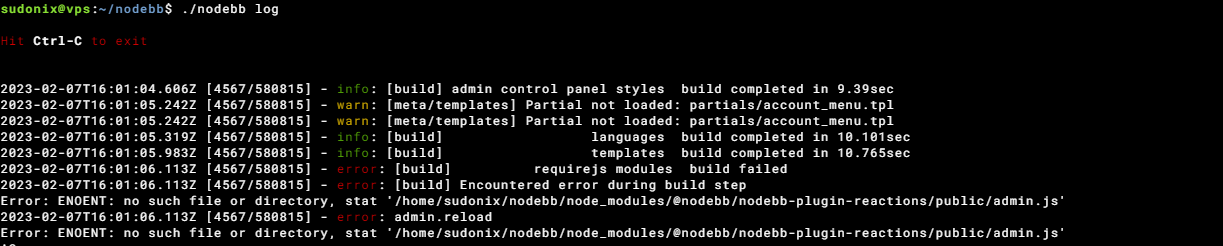
Not great. The only way to remove this cleanly is from the CLI
npm remove @nodebb/nodebb-plugin-reactions
./nodebb build
./nodebb restart
I remember flagging this a while back - it’s here
https://github.com/NodeBB/NodeBB/issues/10582
And here (one I raised)
https://github.com/NodeBB-Community/nodebb-plugin-reactions/issues/8
So, my advice is NOT to use this plugin currently as the unnecessary load it places on your forum isn’t worth the functionality it provides.
Mark Cutting also advises organisations as a Fractional CIO, Fractional CISO and Executive Advisor, helping boards improve technology governance, cyber resilience and executive decision making. Learn more at Phenomlab Ltd
-
@DownPW @cagatay I found the reason why. This plugin is in fact faulty. I installed it myself because I wanted to add that feature to Sudonix. Not only does it push socket.io through the roof (and adds at least 2 seconds lag to each transaction)
It also is impossible to remove by using the GUI - see my experience below, which is exactly the same as @cagatay
Not great. The only way to remove this cleanly is from the CLI
npm remove @nodebb/nodebb-plugin-reactions
./nodebb build
./nodebb restart
I remember flagging this a while back - it’s here
https://github.com/NodeBB/NodeBB/issues/10582
And here (one I raised)
https://github.com/NodeBB-Community/nodebb-plugin-reactions/issues/8
So, my advice is NOT to use this plugin currently as the unnecessary load it places on your forum isn’t worth the functionality it provides.
@phenomlab i dont have this plugin Mark. So the problem is currently continue.
-
@phenomlab i dont have this plugin Mark. So the problem is currently continue.
@cagatay Sorry - my mistake.
Mark Cutting also advises organisations as a Fractional CIO, Fractional CISO and Executive Advisor, helping boards improve technology governance, cyber resilience and executive decision making. Learn more at Phenomlab Ltd
-
-
@phenomlab not fixed yet.
@cagatay are you installing this plugin as root, or as the user running NodeBB?
Mark Cutting also advises organisations as a Fractional CIO, Fractional CISO and Executive Advisor, helping boards improve technology governance, cyber resilience and executive decision making. Learn more at Phenomlab Ltd
-
@phenomlab as user.
as a root i dont want to use for Nodebb.
on the other hand the forum is working normally. it is happening just when i m upgrading. -
@phenomlab as user.
as a root i dont want to use for Nodebb.
on the other hand the forum is working normally. it is happening just when i m upgrading.@cagatay I’m not able to replicate this issue within my test environment. What permissions are set for the file and folders on this specific plugin?
Mark Cutting also advises organisations as a Fractional CIO, Fractional CISO and Executive Advisor, helping boards improve technology governance, cyber resilience and executive decision making. Learn more at Phenomlab Ltd
-
@cagatay I’m not able to replicate this issue within my test environment. What permissions are set for the file and folders on this specific plugin?
@phenomlab its not problem as for the this moment. lets forget about it.
we should focus on v3
-
@phenomlab its not problem as for the this moment. lets forget about it.
we should focus on v3@cagatay I can work with that

-
You are getting that message because you have the three plugins below installed which all depend on nodebb-plugin-emoji so you cannot remove the main plugin without first removing those

I’ve done it for you anyway
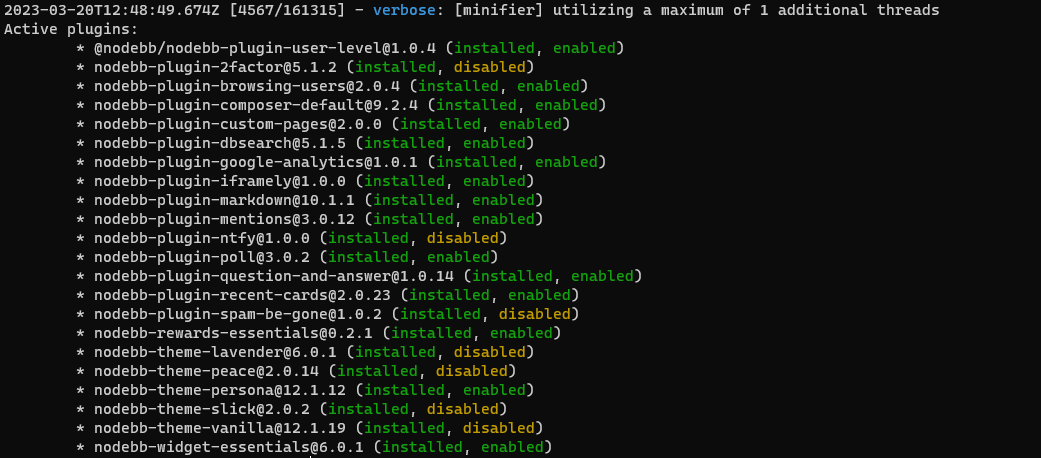
You should be able to upgrade now.
-
 undefined phenomlab has marked this topic as solved on
-
Users can not use emoji from now
 how i can fix it?
 -
@cagatay Did you reinstall the plugins? They were removed so you could complete the upgrade
-
-
@cagatay any error messages in the logs ? Would be helpful if you could post them here.

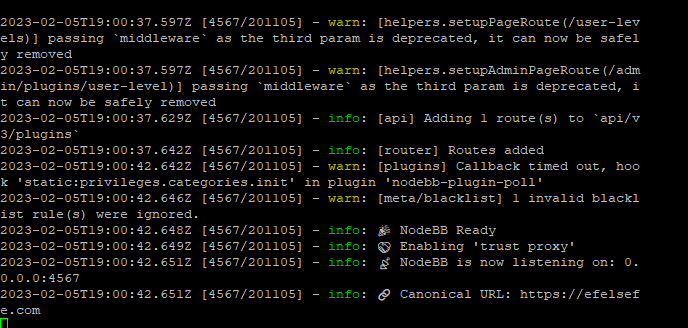
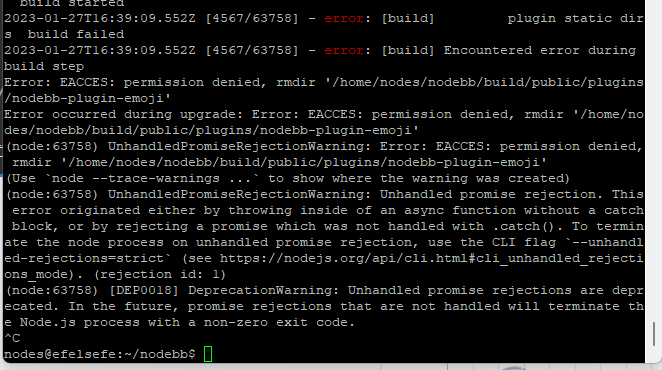

Hello! It looks like you're interested in this conversation, but you don't have an account yet.
Getting fed up of having to scroll through the same posts each visit? When you register for an account, you'll always come back to exactly where you were before, and choose to be notified of new replies (either via email, or push notification). You'll also be able to save bookmarks and upvote posts to show your appreciation to other community members.
With your input, this post could be even better 💗
Register Login