[NODEBB] Help for my custom CSS
-
Hello Mark

I use this css code for reduce the image size :
.topic .posts .content .img-responsive {
    max-width: 45%;
    width: auto;
    padding: 1px;
    border-radius: 4px;
    border: 1px solid #c3c3c3;
    background-color: #F5F5F5;
    margin-top: 5px;
    margin-bottom: 5px;
}
Would it be possible to have a separate max size just for GIFs extension files (.gif) ?
I would like the gifs to be smaller than the imagesThanks in advance @phenomlab
@DownPW Possible, yes, but it may be a little on the “greedy” side.
Try this - obviously, remove the red border I used for testing and add your own code
img[src$="gif"] {
    border: 10px solid red !important;
}
This is also very useful as a reference
Mark Cutting also advises organisations as a Fractional CIO, Fractional CISO and Executive Advisor, helping boards improve technology governance, cyber resilience and executive decision making. Learn more at Phenomlab Ltd
-
@DownPW Possible, yes, but it may be a little on the “greedy” side.
Try this - obviously, remove the red border I used for testing and add your own code
img[src$="gif"] {
    border: 10px solid red !important;
}
This is also very useful as a reference
@phenomlab said in [NODEBB] Help for my custom CSS:
@DownPW Possible, yes, but it may be a little on the “greedy” side.
Try this - obviously, remove the red border I used for testing and add your own code
img[src$="gif"] {
    border: 10px solid red !important;
}
This is also very useful as a reference
–> it seem to work with this code:

/* max-width for IMG Files */
.topic .posts .content .img-responsive {
    max-width: 45%;
}

/* max-width for GIF Files */
.topic .posts .content .img-responsive[src$="gif"] {
    max-width: 10% !important;
}
Thanks @phenomlab for the attribute that I don’t find
-
Hello @phenomlab
It’s possible to add video background (mp4 for example)on nodebb for one theme and not for the other?
PW and WS Spirit alive
-
Hello @phenomlab
It’s possible to add video background (mp4 for example)on nodebb for one theme and not for the other?
@DownPW yes, but you have to be careful with performance. This can impact the loading of the site depending on the size of the MP4 file and where it is being accessed from.
Mark Cutting also advises organisations as a Fractional CIO, Fractional CISO and Executive Advisor, helping boards improve technology governance, cyber resilience and executive decision making. Learn more at Phenomlab Ltd
-
@DownPW yes, but you have to be careful with performance. This can impact the loading of the site depending on the size of the MP4 file and where it is being accessed from.
@phenomlab said in [NODEBB] Help for my custom CSS:
@DownPW yes, but you have to be careful with performance. This can impact the loading of the site depending on the size of the MP4 file and where it is being accessed from.
File accessible on the server and 22.6 mo
How can I 'm doing this for testing?
PW and WS Spirit alive
-
@phenomlab said in [NODEBB] Help for my custom CSS:
@DownPW yes, but you have to be careful with performance. This can impact the loading of the site depending on the size of the MP4 file and where it is being accessed from.
File accessible on the server and 22.6 mo
How can I 'm doing this for testing?
@DownPW Something like this would work
<video autoplay muted loop id="bg-video">
  <source src="file.mp4" type="video/mp4">
  Your browser does not support HTML5 video.
</video>
Then some CSS which you’ll need to play with (this is an example)
#bg-video{ position: fixed; right: 0; bottom: 0; min-width: 100%; min-height: 100%; } -
hello @phenomlab
I have a very odd bug that I didn’t have before
I have images and background color defined for each category
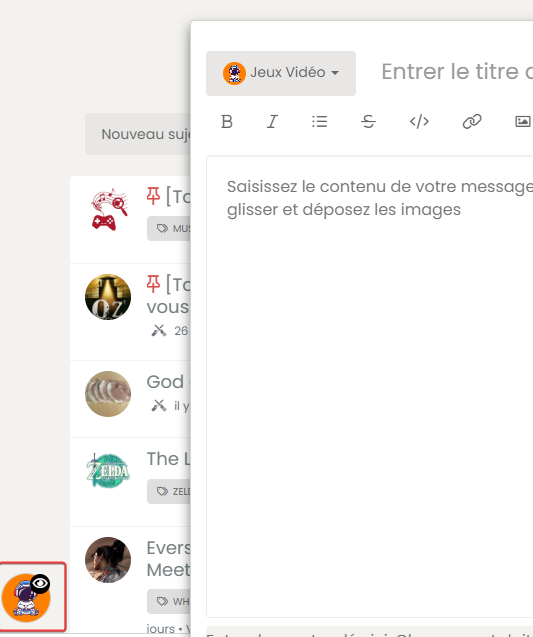
when I open a new topic, the fa icon on the bottom left taskbar does not appear like when I reply to a topic
Here a gif too see the problem :

And here is the result I want:

I have tried to play with the color or z-index variable in css but nothing works
I tried disabling the custom CSS on ACP but it’s the same. clear the cache = same
Have you an idea ?
You can test on production forum
PW and WS Spirit alive
-
hello @phenomlab
I have a very odd bug that I didn’t have before
I have images and background color defined for each category
when I open a new topic, the fa icon on the bottom left taskbar does not appear like when I reply to a topic
Here a gif too see the problem :
And here is the result I want:
I have tried to play with the color or z-index variable in css but nothing works
I tried disabling the custom CSS on ACP but it’s the same. clear the cache = same
Have you an idea ?
You can test on production forum
@DownPW I can’t see the images or videos, but I’ll have a look on your production site.
-
hello @phenomlab
I have a very odd bug that I didn’t have before
I have images and background color defined for each category
when I open a new topic, the fa icon on the bottom left taskbar does not appear like when I reply to a topic
Here a gif too see the problem :
And here is the result I want:
I have tried to play with the color or z-index variable in css but nothing works
I tried disabling the custom CSS on ACP but it’s the same. clear the cache = same
Have you an idea ?
You can test on production forum
@DownPW Seems to come from this code

It should look like this

Do you have any custom JS that is altering this, or perhaps a plugin ?
-
I will test without css, js, header and it’s the same

PW and WS Spirit alive
-
@DownPW What plugins do you have installed ?
-
Active plugins:
    * @nodebb/nodebb-plugin-reactions@1.0.2 (installed, enabled)
    * @nodebb/nodebb-plugin-user-level@1.0.4 (installed, enabled)
    * nodebb-plugin-beep@0.4.7 (installed, enabled)
    * nodebb-plugin-browsing-users@2.0.4 (installed, enabled)
    * nodebb-plugin-cards@0.3.1 (installed, enabled)
    * nodebb-plugin-composer-default@9.1.0 (installed, enabled)
    * nodebb-plugin-dbsearch@5.1.5 (installed, enabled)
    * nodebb-plugin-emoji@4.0.4 (installed, enabled)
    * nodebb-plugin-emoji-apple@3.0.0 (installed, enabled)
    * nodebb-plugin-extended-markdown@1.6.0 (installed, enabled)
    * nodebb-plugin-global-chat@2.0.0 (installed, enabled)
    * nodebb-plugin-iframely@0.7.16 (installed, enabled)
    * nodebb-plugin-imgur@2.0.5 (installed, enabled)
    * nodebb-plugin-markdown@10.1.0 (installed, enabled)
    * nodebb-plugin-mentions@3.0.11 (installed, enabled)
    * nodebb-plugin-ns-embed@6.0.0 (installed, enabled)
    * nodebb-plugin-poll@2.0.6 (installed, enabled)
    * nodebb-plugin-question-and-answer@0.12.25 (installed, enabled)
    * nodebb-plugin-recent-cards@2.0.22 (installed, enabled)
    * nodebb-plugin-spam-be-gone@1.0.0 (installed, enabled)
    * nodebb-plugin-tenor-gif@2.2.0 (installed, enabled)
    * nodebb-plugin-twitter@0.1.0 (installed, enabled)
    * nodebb-plugin-ws-dice@2.4.2 (installed, enabled)
    * nodebb-rewards-essentials@0.2.1 (installed, enabled)
    * nodebb-theme-persona@12.1.1 (installed, enabled)
    * nodebb-widget-essentials@6.0.0 (installed, enabled)
PW and WS Spirit alive
-
Active plugins:
* @nodebb/nodebb-plugin-reactions@1.0.2 (installed, enabled) * @nodebb/nodebb-plugin-user-level@1.0.4 (installed, enabled) * nodebb-plugin-beep@0.4.7 (installed, enabled) * nodebb-plugin-browsing-users@2.0.4 (installed, enabled) * nodebb-plugin-cards@0.3.1 (installed, enabled) * nodebb-plugin-composer-default@9.1.0 (installed, enabled) * nodebb-plugin-dbsearch@5.1.5 (installed, enabled) * nodebb-plugin-emoji@4.0.4 (installed, enabled) * nodebb-plugin-emoji-apple@3.0.0 (installed, enabled) * nodebb-plugin-extended-markdown@1.6.0 (installed, enabled) * nodebb-plugin-global-chat@2.0.0 (installed, enabled) * nodebb-plugin-iframely@0.7.16 (installed, enabled) * nodebb-plugin-imgur@2.0.5 (installed, enabled) * nodebb-plugin-markdown@10.1.0 (installed, enabled) * nodebb-plugin-mentions@3.0.11 (installed, enabled) * nodebb-plugin-ns-embed@6.0.0 (installed, enabled) * nodebb-plugin-poll@2.0.6 (installed, enabled) * nodebb-plugin-question-and-answer@0.12.25 (installed, enabled) * nodebb-plugin-recent-cards@2.0.22 (installed, enabled) * nodebb-plugin-spam-be-gone@1.0.0 (installed, enabled) * nodebb-plugin-tenor-gif@2.2.0 (installed, enabled) * nodebb-plugin-twitter@0.1.0 (installed, enabled) * nodebb-plugin-ws-dice@2.4.2 (installed, enabled) * nodebb-rewards-essentials@0.2.1 (installed, enabled) * nodebb-theme-persona@12.1.1 (installed, enabled) * nodebb-widget-essentials@6.0.0 (installed, enabled)@DownPW This is going to be painful, but it’s possible that one of these plugins is the cause. Have you tried disabling each one to see if the issue subsides ?
-
The last plugins we installed is the dice plugin, Iframely, and twitter, to be tested…
Because the others are quite well known and I never noticed this bug with them, but I could be wrong.
PW and WS Spirit alive
-
The last plugins we installed is the dice plugin, Iframely, and twitter, to be tested…
Because the others are quite well known and I never noticed this bug with them, but I could be wrong.
@DownPW Hmm. You could use a simple jQuery function to replace that icon with the right one. Just seems a bit “overkill” but might be necessary
-
@phenomlab said in [NODEBB] Help for my custom CSS:
Hmm. You could use a simple jQuery function to replace that icon with the right one. Just seems a bit “overkill” but might be necessary
why not, if you can write this query I’m not saying no, just to test
PW and WS Spirit alive
-
@phenomlab said in [NODEBB] Help for my custom CSS:
Hmm. You could use a simple jQuery function to replace that icon with the right one. Just seems a bit “overkill” but might be necessary
why not, if you can write this query I’m not saying no, just to test
@DownPW might be a bit greedy, but try this
$(document).ready(function() { $(window).on('action:ajaxify.end', function(data) { $(this).find($(".fa")).removeClass('fa-nbb-none').addClass('fa-commenting-o'); }); }); -
JS code seems not working but…
I see on ACP, the image of category is uploaded to imgur :
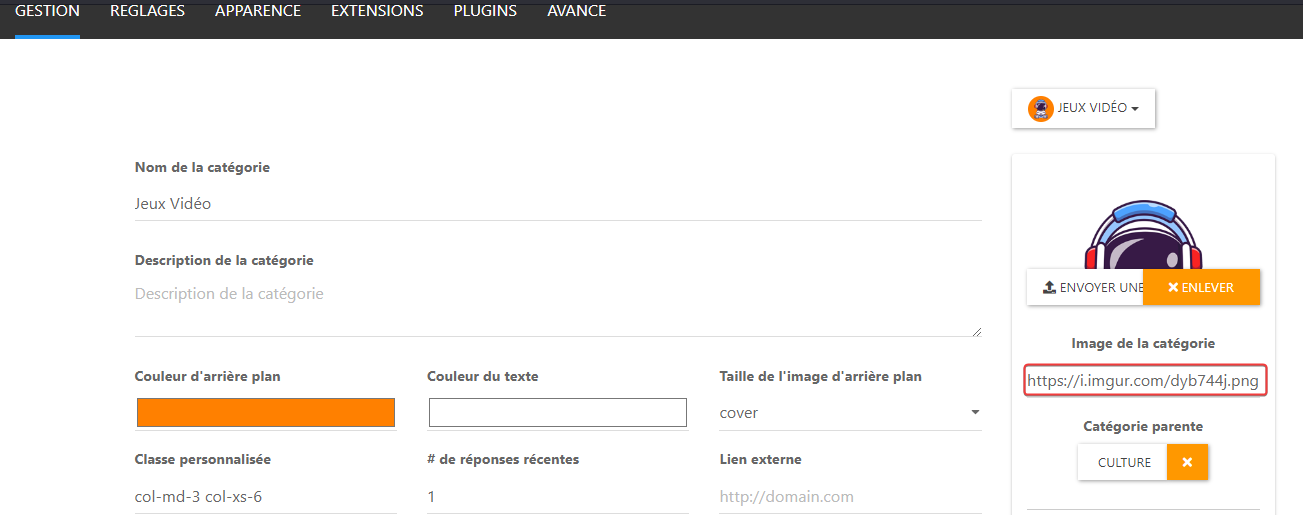
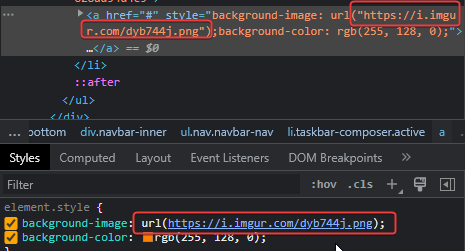
and I see this on dev console :
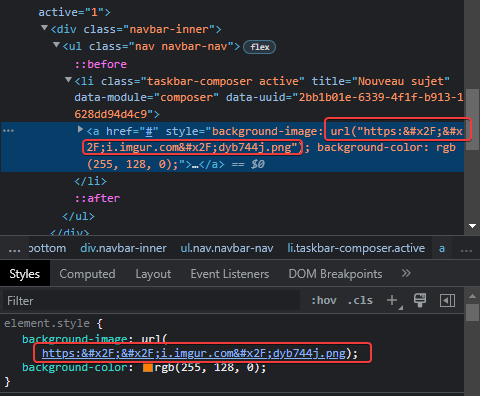
The url seems to not be encoded correctly, I don’t know why ???
If I change manually the URL in the dev console, it’s OK:
PW and WS Spirit alive
-
JS code seems not working but…
I see on ACP, the image of category is uploaded to imgur :
and I see this on dev console :
The url seems to not be encoded correctly, I don’t know why ???
If I change manually the URL in the dev console, it’s OK:
@DownPW said in [NODEBB] Help for my custom CSS:
The url seems to not be encoded correctly, I don’t know why ???
Yes, that certainly seems the case. I think you need to take this issue up with the plugin developer.
-
the trick is to know which plugin is in question!!
PW and WS Spirit alive


Hello! It looks like you're interested in this conversation, but you don't have an account yet.
Getting fed up of having to scroll through the same posts each visit? When you register for an account, you'll always come back to exactly where you were before, and choose to be notified of new replies (either via email, or push notification). You'll also be able to save bookmarks and upvote posts to show your appreciation to other community members.
With your input, this post could be even better 💗
Register LoginDid this solution help you?
Related Topics
-
Please help me, I can't install nodebb
Locked Solved Customisation -
-
-
-
-
NodeBB Footer
Solved Customisation -
-