[NODEBB] Welcome Message
-

Hi @phenomlab
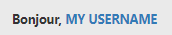
I see a welcome Message at the right of your website

I have an HTML widget on ACP with this code :
<div class="getUsername">Bonjour, <a href="/me"><span class="username">MY USERNAME</span></a></div>And my CSS :
.getUsername {
    padding-top: 20px;
    padding-bottom: 5px;
    text-align: right;
    font-size: 90%;
    line-height: 2.4;
    font-weight: bold;
}
Everything is good except the main one, the display of the username.
I saw that you used the /me on aHref, that can be added in the URL (https://XXXXX.XX/me) to point to the user profile
But how do you display the name of it because my HTML code displays what I ask it to display. In other words “MY USERNAME”
In other words how do you display the name of the user? With JS?
Other things, At this time it is indicated “good evening”.
Quiz of when is the start of the day

PW and WS Spirit alive
-
Hi @phenomlab
I see a welcome Message at the right of your website
I have an HTML widget on ACP with this code :
<div class="getUsername">Bonjour, <a href="/me"><span class="username">MY USERNAME</span></a></div>And my CSS :
.getUsername {
    padding-top: 20px;
    padding-bottom: 5px;
    text-align: right;
    font-size: 90%;
    line-height: 2.4;
    font-weight: bold;
}
Everything is good except the main one, the display of the username.
I saw that you used the /me on aHref, that can be added in the URL (https://XXXXX.XX/me) to point to the user profile
But how do you display the name of it because my HTML code displays what I ask it to display. In other words “MY USERNAME”
In other words how do you display the name of the user? With JS?
Other things, At this time it is indicated “good evening”.
Quiz of when is the start of the day

@downpw said in [NODEBB] Welcome Message:
Other things, At this time it is indicated “good evening”.
good idea @phenomlab, this should be implemented into core IMO.
-
@downpw said in [NODEBB] Welcome Message:
Other things, At this time it is indicated “good evening”.
good idea @phenomlab, this should be implemented into core IMO.

@jac @DownPW here’s the function I put together than will need to be added into your Custom JS
$(window).on('action:ajaxify.end', function (data) {
    function updateUsername() {
        $('.getUsername .username').text(app.user.username);
    }
    if (document.readyState === 'loading') {
        document.addEventListener('DOMContentLoaded', updateUsername);
    } else {
        updateUsername();
    }
    var thehours = new Date().getHours();
	var themessage;
	var morning = ('Good morning');
	var afternoon = ('Good afternoon');
	var evening = ('Good evening');

	if (thehours >= 0 && thehours < 12) {
		themessage = morning;

	} else if (thehours >= 12 && thehours < 17) {
		themessage = afternoon;

	} else if (thehours >= 17 && thehours < 24) {
		themessage = evening;
	}

	$('.getUsername').prepend(themessage);
});
Then use a custom HTML widget with the below
<!-- IF loggedIn -->
<div class="getUsername">, <a href="/me"><span class="username"></span></a></div>
<!-- ENDIF loggedIn -->
Mark Cutting also advises organisations as a Fractional CIO, Fractional CISO and Executive Advisor, helping boards improve technology governance, cyber resilience and executive decision making. Learn more at Gratmore Ltd
-
@jac @DownPW here’s the function I put together than will need to be added into your Custom JS
$(window).on('action:ajaxify.end', function (data) {
    function updateUsername() {
        $('.getUsername .username').text(app.user.username);
    }
    if (document.readyState === 'loading') {
        document.addEventListener('DOMContentLoaded', updateUsername);
    } else {
        updateUsername();
    }
    var thehours = new Date().getHours();
	var themessage;
	var morning = ('Good morning');
	var afternoon = ('Good afternoon');
	var evening = ('Good evening');

	if (thehours >= 0 && thehours < 12) {
		themessage = morning;

	} else if (thehours >= 12 && thehours < 17) {
		themessage = afternoon;

	} else if (thehours >= 17 && thehours < 24) {
		themessage = evening;
	}

	$('.getUsername').prepend(themessage);
});
Then use a custom HTML widget with the below
<!-- IF loggedIn -->
<div class="getUsername">, <a href="/me"><span class="username"></span></a></div>
<!-- ENDIF loggedIn -->
Oh my God ^^
I wonder where did you learn to code JS like this? -
@jac @DownPW here’s the function I put together than will need to be added into your Custom JS
$(window).on('action:ajaxify.end', function (data) {
    function updateUsername() {
        $('.getUsername .username').text(app.user.username);
    }
    if (document.readyState === 'loading') {
        document.addEventListener('DOMContentLoaded', updateUsername);
    } else {
        updateUsername();
    }
    var thehours = new Date().getHours();
	var themessage;
	var morning = ('Good morning');
	var afternoon = ('Good afternoon');
	var evening = ('Good evening');

	if (thehours >= 0 && thehours < 12) {
		themessage = morning;

	} else if (thehours >= 12 && thehours < 17) {
		themessage = afternoon;

	} else if (thehours >= 17 && thehours < 24) {
		themessage = evening;
	}

	$('.getUsername').prepend(themessage);
});
Then use a custom HTML widget with the below
<!-- IF loggedIn -->
<div class="getUsername">, <a href="/me"><span class="username"></span></a></div>
<!-- ENDIF loggedIn -->
@phenomlab No idea if this is for me or @DownPW but it is very clever indeed! does it show on mobile?
The idea is fantastic Mark, is there a point where you think yes my ideas are used by others but having the same features across a few forums, does that bother you or would you say this is why you created Sudonix?
-
Oh my God ^^
I wonder where did you learn to code JS like this?
@downpw said in [NODEBB] Welcome Message:
I wonder where did you learn to code JS like this?
30 years experience
-
@phenomlab No idea if this is for me or @DownPW but it is very clever indeed! does it show on mobile?
The idea is fantastic Mark, is there a point where you think yes my ideas are used by others but having the same features across a few forums, does that bother you or would you say this is why you created Sudonix?
@jac said in [NODEBB] Welcome Message:
very clever indeed! does it show on mobile?
Yes, natively, but I use CSS to hide it.
@jac said in [NODEBB] Welcome Message:
The idea is fantastic Mark, is there a point where you think yes my ideas are used by others but having the same features across a few forums, does that bother you or would you say this is why you created Sudonix?
Absolutely not. I know that my ideas have been accepted and used by @JAC @DownPW @kurulumuNet and I’m happy that others find them useful. There’s no copyright here - anything you want to take and use is, like the platform itself, free.
Mark Cutting also advises organisations as a Fractional CIO, Fractional CISO and Executive Advisor, helping boards improve technology governance, cyber resilience and executive decision making. Learn more at Gratmore Ltd
-
Oh my God ^^
I wonder where did you learn to code JS like this?
@downpw said in [NODEBB] Welcome Message:
I wonder where did you learn to code JS like this?
The firm I work for uses a worfkflows system which I wrote from scratch. It’s used to track the onboarding, departures, application requests etc of users, and is also an audit source. Been a developer for years…
-
@jac said in [NODEBB] Welcome Message:
very clever indeed! does it show on mobile?
Yes, natively, but I use CSS to hide it.
@jac said in [NODEBB] Welcome Message:
The idea is fantastic Mark, is there a point where you think yes my ideas are used by others but having the same features across a few forums, does that bother you or would you say this is why you created Sudonix?
Absolutely not. I know that my ideas have been accepted and used by @JAC @DownPW @kurulumuNet and I’m happy that others find them useful. There’s no copyright here - anything you want to take and use is, like the platform itself, free.
@phenomlab said in [NODEBB] Welcome Message:
@jac said in [NODEBB] Welcome Message:
very clever indeed! does it show on mobile?
Yes, natively, but I use CSS to hide it.
@jac said in [NODEBB] Welcome Message:
The idea is fantastic Mark, is there a point where you think yes my ideas are used by others but having the same features across a few forums, does that bother you or would you say this is why you created Sudonix?
Absolutely not. I know that my ideas have been accepted and used by @JAC @DownPW @kurulumuNet and I’m happy that others find them useful. There’s no copyright here - anything you want to take and use is, like the platform itself, free.
Brilliant Mark, thank you as always for the work on my forum and for the continuation of help.
-
@phenomlab said in [NODEBB] Welcome Message:
@jac said in [NODEBB] Welcome Message:
very clever indeed! does it show on mobile?
Yes, natively, but I use CSS to hide it.
@jac said in [NODEBB] Welcome Message:
The idea is fantastic Mark, is there a point where you think yes my ideas are used by others but having the same features across a few forums, does that bother you or would you say this is why you created Sudonix?
Absolutely not. I know that my ideas have been accepted and used by @JAC @DownPW @kurulumuNet and I’m happy that others find them useful. There’s no copyright here - anything you want to take and use is, like the platform itself, free.
Brilliant Mark, thank you as always for the work on my forum and for the continuation of help.
-
@jac said in [NODEBB] Welcome Message:
very clever indeed! does it show on mobile?
Yes, natively, but I use CSS to hide it.
@jac said in [NODEBB] Welcome Message:
The idea is fantastic Mark, is there a point where you think yes my ideas are used by others but having the same features across a few forums, does that bother you or would you say this is why you created Sudonix?
Absolutely not. I know that my ideas have been accepted and used by @JAC @DownPW @kurulumuNet and I’m happy that others find them useful. There’s no copyright here - anything you want to take and use is, like the platform itself, free.
@phenomlab said in [NODEBB] Welcome Message:
Absolutely not. I know that my ideas have been accepted and used by @JAC @DownPW @kurulumuNet and I’m happy that others find them useful. There’s no copyright here - anything you want to take and use is, like the platform itself, free.
TWO WORDS: RESPECT, THANKS
-
DownPW has marked this topic as solved on
-
@jac said in [NODEBB] Welcome Message:
very clever indeed! does it show on mobile?
Yes, natively, but I use CSS to hide it.
@jac said in [NODEBB] Welcome Message:
The idea is fantastic Mark, is there a point where you think yes my ideas are used by others but having the same features across a few forums, does that bother you or would you say this is why you created Sudonix?
Absolutely not. I know that my ideas have been accepted and used by @JAC @DownPW @kurulumuNet and I’m happy that others find them useful. There’s no copyright here - anything you want to take and use is, like the platform itself, free.
@phenomlab said in [NODEBB] Welcome Message:
Yes, natively, but I use CSS to hide it.
Can you give me your CSS code for hide on mobile ?
PW and WS Spirit alive
-
DownPW has marked this topic as unsolved on
-
@phenomlab said in [NODEBB] Welcome Message:
Yes, natively, but I use CSS to hide it.
Can you give me your CSS code for hide on mobile ?
@downpw Sure. Very simple - just place this in your mobile CSS block
.getUsername {
  display: none;
}
Mark Cutting also advises organisations as a Fractional CIO, Fractional CISO and Executive Advisor, helping boards improve technology governance, cyber resilience and executive decision making. Learn more at Gratmore Ltd
-
-
DownPW has marked this topic as solved on
-
What is your CSS for this @phenomlab ?
I have small bug on Unread categorie for example with this code I wrote:.getUsername { float: right; font-family: 'Poppins'; font-size: 1.6rem; line-height: 1.8; color: #898989; font-weight: 400; }
PW and WS Spirit alive
-
What is your CSS for this @phenomlab ?
I have small bug on Unread categorie for example with this code I wrote:.getUsername { float: right; font-family: 'Poppins'; font-size: 1.6rem; line-height: 1.8; color: #898989; font-weight: 400; } -
@downpw Sure. Very simple - just place this in your mobile CSS block
.getUsername {
  display: none;
}
@phenomlab
To hide only on mobile / tablet you can use max-width,
For example:@media (max-width: 970px) { .getUsername { display: none; } } -
@jac @DownPW here’s the function I put together than will need to be added into your Custom JS
$(window).on('action:ajaxify.end', function (data) {
    function updateUsername() {
        $('.getUsername .username').text(app.user.username);
    }
    if (document.readyState === 'loading') {
        document.addEventListener('DOMContentLoaded', updateUsername);
    } else {
        updateUsername();
    }
    var thehours = new Date().getHours();
	var themessage;
	var morning = ('Good morning');
	var afternoon = ('Good afternoon');
	var evening = ('Good evening');

	if (thehours >= 0 && thehours < 12) {
		themessage = morning;

	} else if (thehours >= 12 && thehours < 17) {
		themessage = afternoon;

	} else if (thehours >= 17 && thehours < 24) {
		themessage = evening;
	}

	$('.getUsername').prepend(themessage);
});
Then use a custom HTML widget with the below
<!-- IF loggedIn -->
<div class="getUsername">, <a href="/me"><span class="username"></span></a></div>
<!-- ENDIF loggedIn -->
For anyone reviewing this post, there’s an updated version here that also includes an sunrise / sun / moon icon depending on the time of day
https://sudonix.com/topic/233/nodebb-welcome-message-with-logo-footer-change/3?_=1645445273209
-
phenomlab referenced this topic on
-
Hello,
I have a question regarding a problem my user is experiencing with this Welcome message.
This user is not in France.It’s 7:40 a.m. for him, so 1:40 a.m. in France, and the banner wishes me a “good afternoon.” I don’t know what time zone it thinks I’m in, but it’s wrong…
And nodebb displays 11:40 p.m. on the right once posted, so GMT.
Which isn’t the afternoon either.How does this script get the time? It looks like it’s getting the time from the client, meaning the computer or device of the person visiting your site.
But it seems that in this specific case, the correct time isn’t being retrieved.How can I fix this?
PW and WS Spirit alive
-
Hello,
I have a question regarding a problem my user is experiencing with this Welcome message.
This user is not in France.It’s 7:40 a.m. for him, so 1:40 a.m. in France, and the banner wishes me a “good afternoon.” I don’t know what time zone it thinks I’m in, but it’s wrong…
And nodebb displays 11:40 p.m. on the right once posted, so GMT.
Which isn’t the afternoon either.How does this script get the time? It looks like it’s getting the time from the client, meaning the computer or device of the person visiting your site.
But it seems that in this specific case, the correct time isn’t being retrieved.How can I fix this?

Hello! It looks like you're interested in this conversation, but you don't have an account yet.
Getting fed up of having to scroll through the same posts each visit? When you register for an account, you'll always come back to exactly where you were before, and choose to be notified of new replies (either via email, or push notification). You'll also be able to save bookmarks and upvote posts to show your appreciation to other community members.
With your input, this post could be even better 💗
Register Login