[NODEBB] CSS Style Sheets SelectBox
-
@phenomlab said in [NODEBB] CSS Style Sheets SelectBox:
@downpw doesn’t seem to be working ?
It seems to work on my mobile. Maybe your cache ?
PW and WS Spirit alive
-
@phenomlab said in [NODEBB] CSS Style Sheets SelectBox:
@downpw doesn’t seem to be working ?
It seems to work on my mobile. Maybe your cache ?
@downpw probably. Let me try again
EDIT - All good in incognito session
-
@DownPW I think we’re done now, yes ?
-
Oh yeah @phenomlab
The post can be marked Resolved. No problem…
And I thanks you again for your hard workA question:
I have customised the Theme Chooser menu for mobile.
Moreover, if anyone is interested here is the code:@media all and (max-width: 1024px) { .dropdown-menu>li>a { display: block; padding: 3px 20px; clear: both; font-weight: 400; line-height: 1.42857143; color: #fff; white-space: nowrap; background: #3A3C41; } #theme.dropdown-menu { position: fixed; top: 140px; left: 15px; z-index: 1000; float: left; min-width: 160px; padding: 5px 0; margin: 2px 0 0; list-style: none; font-size: 14px; text-align: left; /* background-clip: padding-box; */ background: #3A3C41; width: 30px; border: 1px solid white; }I want to change the color of these elements, when the button is selectionned (on mobile). Actually, there blue by default and I wanted to change for white or grey for :
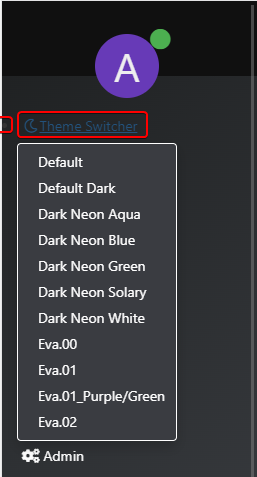
And change the color of these icons :

If you have an idea @phenomlab
PW and WS Spirit alive
-
Oh yeah @phenomlab
The post can be marked Resolved. No problem…
And I thanks you again for your hard workA question:
I have customised the Theme Chooser menu for mobile.
Moreover, if anyone is interested here is the code:@media all and (max-width: 1024px) { .dropdown-menu>li>a { display: block; padding: 3px 20px; clear: both; font-weight: 400; line-height: 1.42857143; color: #fff; white-space: nowrap; background: #3A3C41; } #theme.dropdown-menu { position: fixed; top: 140px; left: 15px; z-index: 1000; float: left; min-width: 160px; padding: 5px 0; margin: 2px 0 0; list-style: none; font-size: 14px; text-align: left; /* background-clip: padding-box; */ background: #3A3C41; width: 30px; border: 1px solid white; }I want to change the color of these elements, when the button is selectionned (on mobile). Actually, there blue by default and I wanted to change for white or grey for :
And change the color of these icons :
If you have an idea @phenomlab@downpw said in [NODEBB] CSS Style Sheets SelectBox:
I want to change the color of these elements, when the button is selectionned (on mobile). Actually, there blue by default and I wanted to change for white or grey for :
Find
@media all and (max-width: 1024px)
{
.btn-link:focus, .btn-link:hover {
    /*color: #23527c;*/
    color: lightgrey; /*Any color you want*/
    text-decoration: underline;
    background-color: transparent;
}
}
I haven’t yet found for point shaped marker. I will search
-
@downpw said in [NODEBB] CSS Style Sheets SelectBox:
I haven’t yet found for point shaped marker. I will search
Hi @phenomlab
I still haven’t found a way to remove the dot to the left of the Theme Switcher button on mobile (See Screenshot).
If you have an idea, I’m interested
Cya
PW and WS Spirit alive
-
@downpw said in [NODEBB] CSS Style Sheets SelectBox:
I haven’t yet found for point shaped marker. I will search
Hi @phenomlab
I still haven’t found a way to remove the dot to the left of the Theme Switcher button on mobile (See Screenshot).
If you have an idea, I’m interested
Cya
@downpw add
list-style: none;to the classMark Cutting also advises organisations as a Fractional CIO, Fractional CISO and Executive Advisor, helping boards improve technology governance, cyber resilience and executive decision making. Learn more at Phenomlab Ltd
-
Thanks @phenomlab
Moreover, if anyone is interested here is the code:
@media all and (max-width: 1024px) { .navbar-form { left: 20px; box-shadow: none; list-style: none; } } -
I have another CSS problem for me @phenomlab
I have set the icon of theme switcher on white with this code:
.navbar-default .btn-link {
    color: #fff;
}
I have set the icon of theme switcher on black when I dropdwown on the menu with this code :
.navbar-default .btn-link:focus, .navbar-default .btn-link:hover {
    color: black;
}
The problem I have:
Example on aqua theme, I dropdown the menu for change a theme and I have selected a wrong theme: I select the one already used (aqua)
At this moment, the icon becomes white again and I would like it to remain black.
It’s possible to do that ?
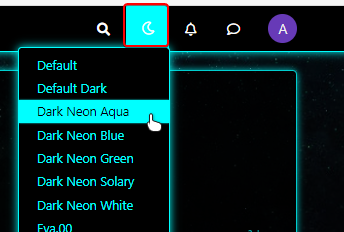
PW and WS Spirit alive
-
EDIT:
Others things I have :
If I Click on fa-faw icon, The icon is black (its’ good) on dropdown :
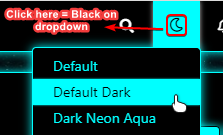
But if I click on background (here aqua), the icon is white on dropdown :
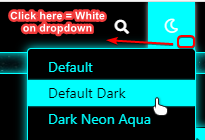
Thanks in advance @phenomlab for your help. See the older post for seeing my code
-
Hi @phenomlab
How are you ?
I know you are a busy man.Can you look at my last 2 posts?
I have 2 small issues to solve and I think this is fairly straightforward for you.
I’m a little lost with the fa-faw
Thanks in advance
-
I have another CSS problem for me @phenomlab
I have set the icon of theme switcher on white with this code:
.navbar-default .btn-link {
    color: #fff;
}
I have set the icon of theme switcher on black when I dropdwown on the menu with this code :
.navbar-default .btn-link:focus, .navbar-default .btn-link:hover {
    color: black;
}
The problem I have:
Example on aqua theme, I dropdown the menu for change a theme and I have selected a wrong theme: I select the one already used (aqua)
At this moment, the icon becomes white again and I would like it to remain black.
It’s possible to do that ?
@downpw You should be able to use this in each stylesheet (obviously, set the colour you actually want)
[data-original-title="Theme Switcher"] i { color: #000; } -
The code just change The color icon but not the color when I dropdown to the menu
I prefer 2 colors :
- One on the navbar
- On on hover icon and dropdown
-
-
Ola @phenomlab
If you want we can use team viewer for see that.
@downpw you may need to do this with jQuery. Can you provide a mock-up of what you’re looking for ?
-
Ola @phenomlab
If you want we can use team viewer for see that.
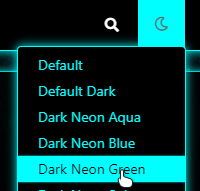
If I don’t use your code, here the icon = KO (Not White like other) :

Icon on Mouse Over and on Click = OK: aqua background, black icon

After click, when dropdown the menu = OK: aqua background, black icon
I I use your code with White color :
[data-original-title="Theme Switcher"] i {
    color: #fff;
}
the icon is white like others = OK

Icon on Mouse Over and on Click = OK: aqua background, black icon
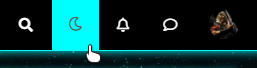
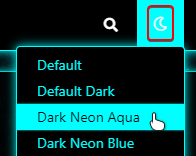
After click, when dropdown the menu = KO : the icon is white and not black

-
In fact , I would loike:
-
The dominant color of each theme in the background of the icon when the mouse is hovered, when the mouse is clicked and when dropdown in the menu.
-
White color of the icon in normal.
-
Black color of the icon when the mouse is hovered, when the mouse is clicked and when dropdown in the menu. (Even choose the color for each theme if possible)
PW and WS Spirit alive
-
-
In fact , I would loike:
-
The dominant color of each theme in the background of the icon when the mouse is hovered, when the mouse is clicked and when dropdown in the menu.
-
White color of the icon in normal.
-
Black color of the icon when the mouse is hovered, when the mouse is clicked and when dropdown in the menu. (Even choose the color for each theme if possible)
@downpw Having looked at this, it will indeed require jQuery. I’m going to look further into this today hopefully.
-
-
Great man
On the default theme. All it’s perfect !!!
That’s why I thought of a CSS problem. Like a variable that I would have forgotten for examplePW and WS Spirit alive
-
Great man
On the default theme. All it’s perfect !!!
That’s why I thought of a CSS problem. Like a variable that I would have forgotten for example@downpw Yes, I saw that. Let me know when the server is available and I’ll have a look.


Hello! It looks like you're interested in this conversation, but you don't have an account yet.
Getting fed up of having to scroll through the same posts each visit? When you register for an account, you'll always come back to exactly where you were before, and choose to be notified of new replies (either via email, or push notification). You'll also be able to save bookmarks and upvote posts to show your appreciation to other community members.
With your input, this post could be even better 💗
Register LoginDid this solution help you?
Related Topics
-
-
-
-
NodeBB Footer
Solved Customisation -
Bug Navbar CSS
Solved Customisation -
-
-
Customising NodeBB
Locked Customisation