help me configuring cron job for fof/sitemap - flarum
-
i am setting a corn job for flarum fof sitemap
the first corn job is for reference and it is working correctly

*/1 * * * * cd /home/master/applications/aa/public_html/ask && /usr/bin/php flarum queue:work --stop-when-empty
new corn job suggestion needed for sitemap and i modified considering this reference at flarum’s sitemap page
*/1 * * * * cd /home/master/applications/aa/public_html/ask && /usr/bin/php flarum fof:sitemap:cache --stop-when-emptyshould i just need set as
cd /home/master/applications/aa/public_html/ask && /usr/bin/php flarum fof:sitemap:cache --stop-when-emptyor
cd /home/master/applications/aa/public_html/ask && /usr/bin/php flarum fof:sitemap:cachedo I need to add the timer?
-
i am setting a corn job for flarum fof sitemap
the first corn job is for reference and it is working correctly
*/1 * * * * cd /home/master/applications/aa/public_html/ask && /usr/bin/php flarum queue:work --stop-when-empty
new corn job suggestion needed for sitemap and i modified considering this reference at flarum’s sitemap page
*/1 * * * * cd /home/master/applications/aa/public_html/ask && /usr/bin/php flarum fof:sitemap:cache --stop-when-emptyshould i just need set as
cd /home/master/applications/aa/public_html/ask && /usr/bin/php flarum fof:sitemap:cache --stop-when-emptyor
cd /home/master/applications/aa/public_html/ask && /usr/bin/php flarum fof:sitemap:cachedo I need to add the timer?

@hari this one will work fine
cd /home/master/applications/aa/public_html/ask && /usr/bin/php flarum fof:sitemap:cacheYou’ll need to run a schedule. Typically, once every few hours should be enough. It doesn’t need to run continuously
Mark Cutting also advises organisations as a Fractional CIO, Fractional CISO and Executive Advisor, helping boards improve technology governance, cyber resilience and executive decision making. Learn more at Gratmore Ltd
-
@hari this one will work fine
cd /home/master/applications/aa/public_html/ask && /usr/bin/php flarum fof:sitemap:cacheYou’ll need to run a schedule. Typically, once every few hours should be enough. It doesn’t need to run continuously
@phenomlab said in help me configuring corn job for fof/sitemap - flarum:
cd /home/master/applications/aa/public_html/ask && /usr/bin/php flarum fof:sitemap:cache
so we need not to add something like
*******24(stars) something like that? 24hr
just the command which you have mentioned will be automatically called every 24hr? without the stars? (trying to understand corn jobs)

-
@phenomlab said in help me configuring corn job for fof/sitemap - flarum:
cd /home/master/applications/aa/public_html/ask && /usr/bin/php flarum fof:sitemap:cache
so we need not to add something like
*******24(stars) something like that? 24hr
just the command which you have mentioned will be automatically called every 24hr? without the stars? (trying to understand corn jobs)
-
@phenomlab that is really one easy and interesting website to understand corn jobs
* 23 * * * cd /home/master/applications/aa/public_html/ask && /usr/bin/php flarum fof:sitemap:cache --write-xml-filejust need final confirmation, so will this line make to run once for every 23 hour? (once per day?)
when i enter 24hr it is not showing 24, so i have selected 23hr
@hari said in help me configuring corn job for fof/sitemap - flarum:
that is really one easy and interesting website to understand corn jobs
Yes, super easy, and a good reference guide I’ve used for years
-
phenomlab unlocked this topic on
-
phenomlab referenced this topic on
-
Old
*/2 * * * * cd /home/master/applications/jmzhcbrggs/public_html/ && /usr/bin/php flarum schedule:run >> /dev/null 2>&1
*/1 * * * * cd /home/master/applications/jmzhcbrggs/public_html/ && /usr/bin/php flarum queue:work --stop-when-empty
new
*/2 * * * * cd /home/ask/public_html/ && /usr/bin/php flarum schedule:run >> /dev/null 2>&1
*/1 * * * * cd /home/ask/public_html/ && /usr/bin/php flarum queue:work --stop-when-empty
are these correct for my Virtualmin environment?
@Hari Yep

Mark Cutting also advises organisations as a Fractional CIO, Fractional CISO and Executive Advisor, helping boards improve technology governance, cyber resilience and executive decision making. Learn more at Gratmore Ltd
-
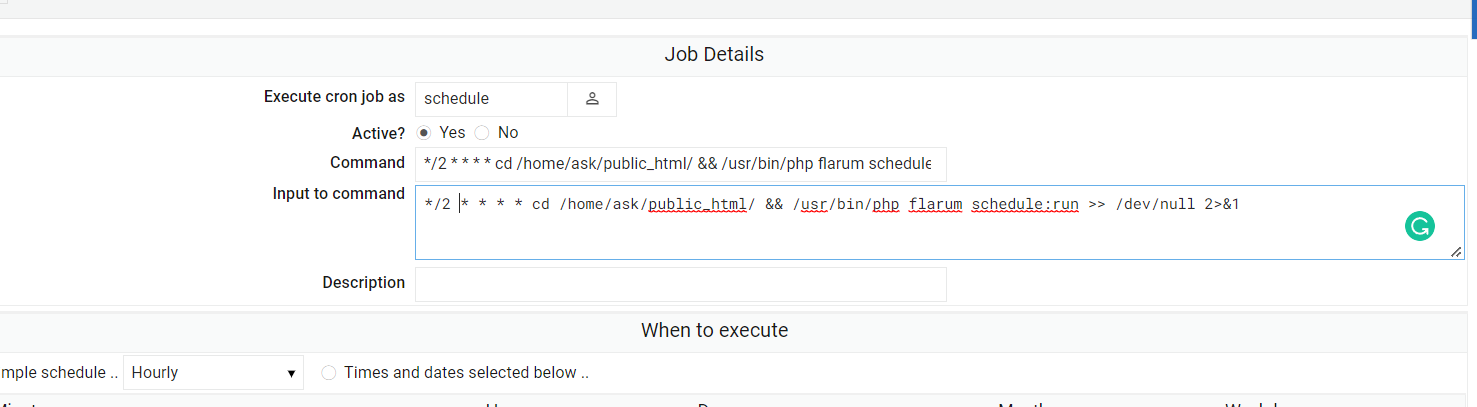
@phenomlab am i entering correctly sorry for asking step to step
 i am not sure how many extensions i need to fix more for flarum
-
@phenomlab am i entering correctly sorry for asking step to step
i am not sure how many extensions i need to fix more for flarum
Mark Cutting also advises organisations as a Fractional CIO, Fractional CISO and Executive Advisor, helping boards improve technology governance, cyber resilience and executive decision making. Learn more at Gratmore Ltd
-
Failed to save cron job : The user 'schedule' is not allowed to access cronnow opening flarum schedule instructions

do i need to install these via ssh? or we already have corn?
got it i have to mention user name

-
Failed to save cron job : The user 'schedule' is not allowed to access cronnow opening flarum schedule instructions
do i need to install these via ssh? or we already have corn?
got it i have to mention user name
@Hari Yes.
Mark Cutting also advises organisations as a Fractional CIO, Fractional CISO and Executive Advisor, helping boards improve technology governance, cyber resilience and executive decision making. Learn more at Gratmore Ltd
-
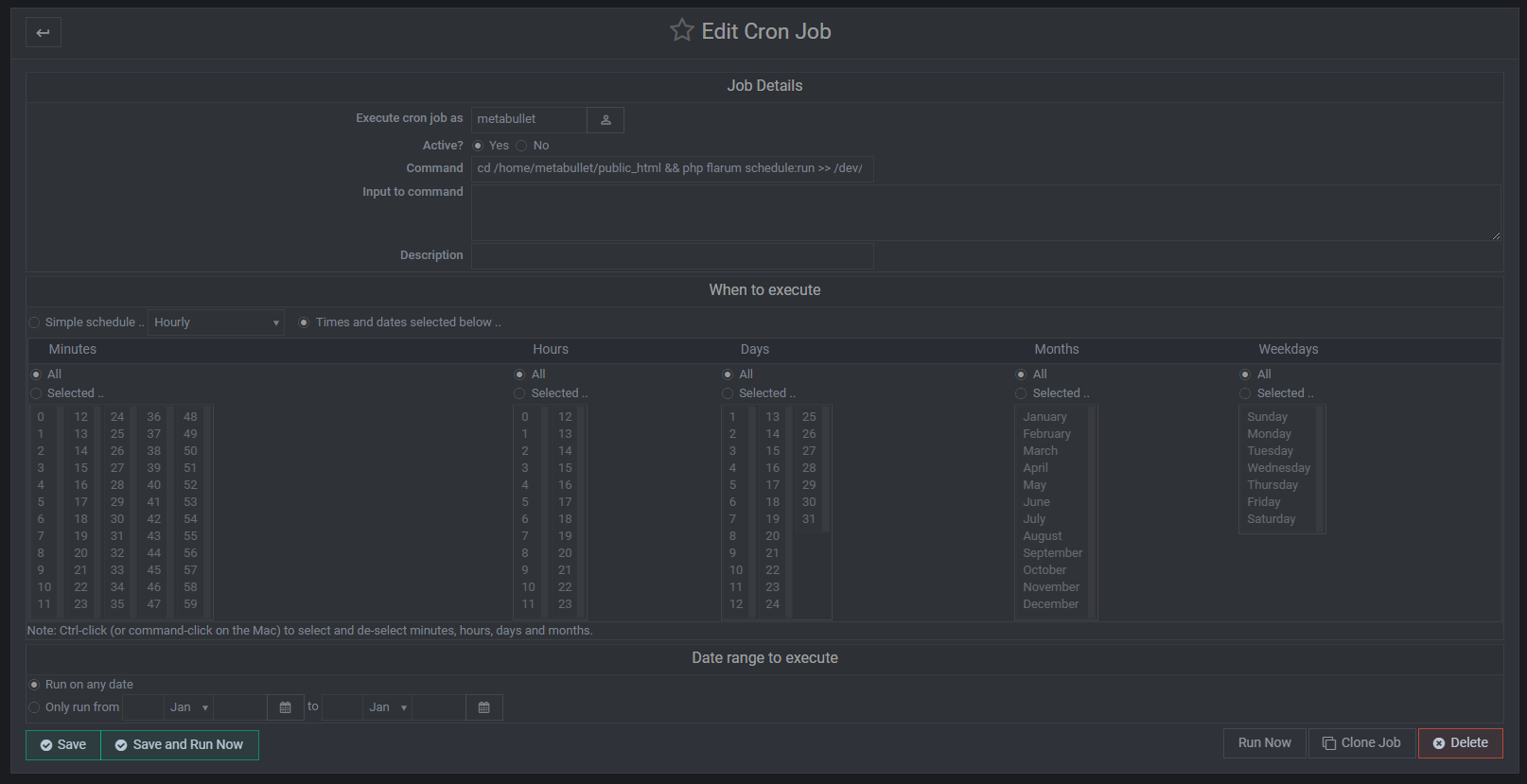
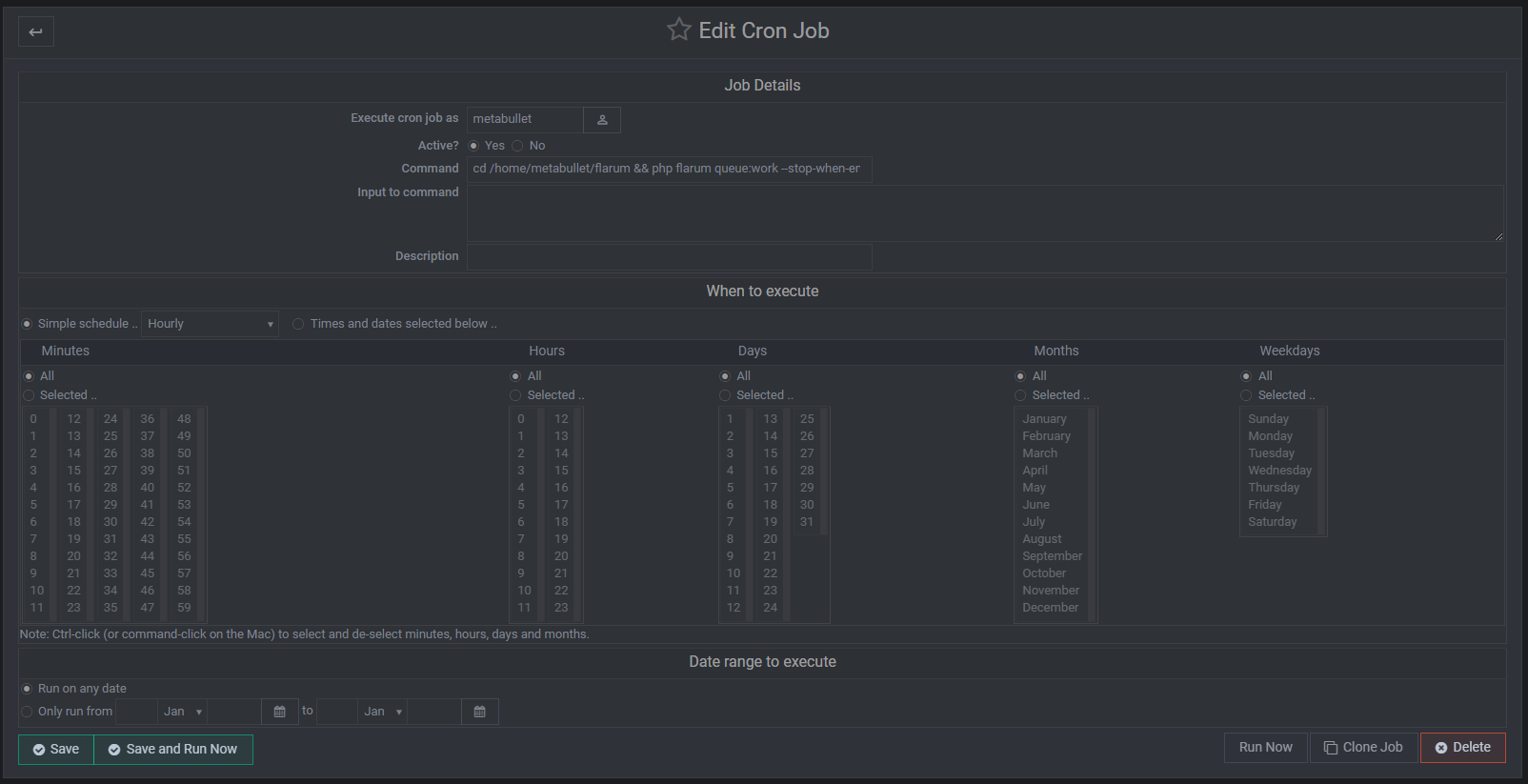
@phenomlab does these settings mean run for every one min?
when i am using like this its not running for every one minute

edit
- Solved
-
@phenomlab does these settings mean run for every one min?
when i am using like this its not running for every one minute
edit
- Solved
@Hari no, that setting means it will execute at one minute past each hour.
Mark Cutting also advises organisations as a Fractional CIO, Fractional CISO and Executive Advisor, helping boards improve technology governance, cyber resilience and executive decision making. Learn more at Gratmore Ltd
-
-
@phenomlab how to select 1min intervel?
@Hari you should select every single minute from 00 - 59
Mark Cutting also advises organisations as a Fractional CIO, Fractional CISO and Executive Advisor, helping boards improve technology governance, cyber resilience and executive decision making. Learn more at Gratmore Ltd
-
@phenomlab what does this setting mean? will it always runs?
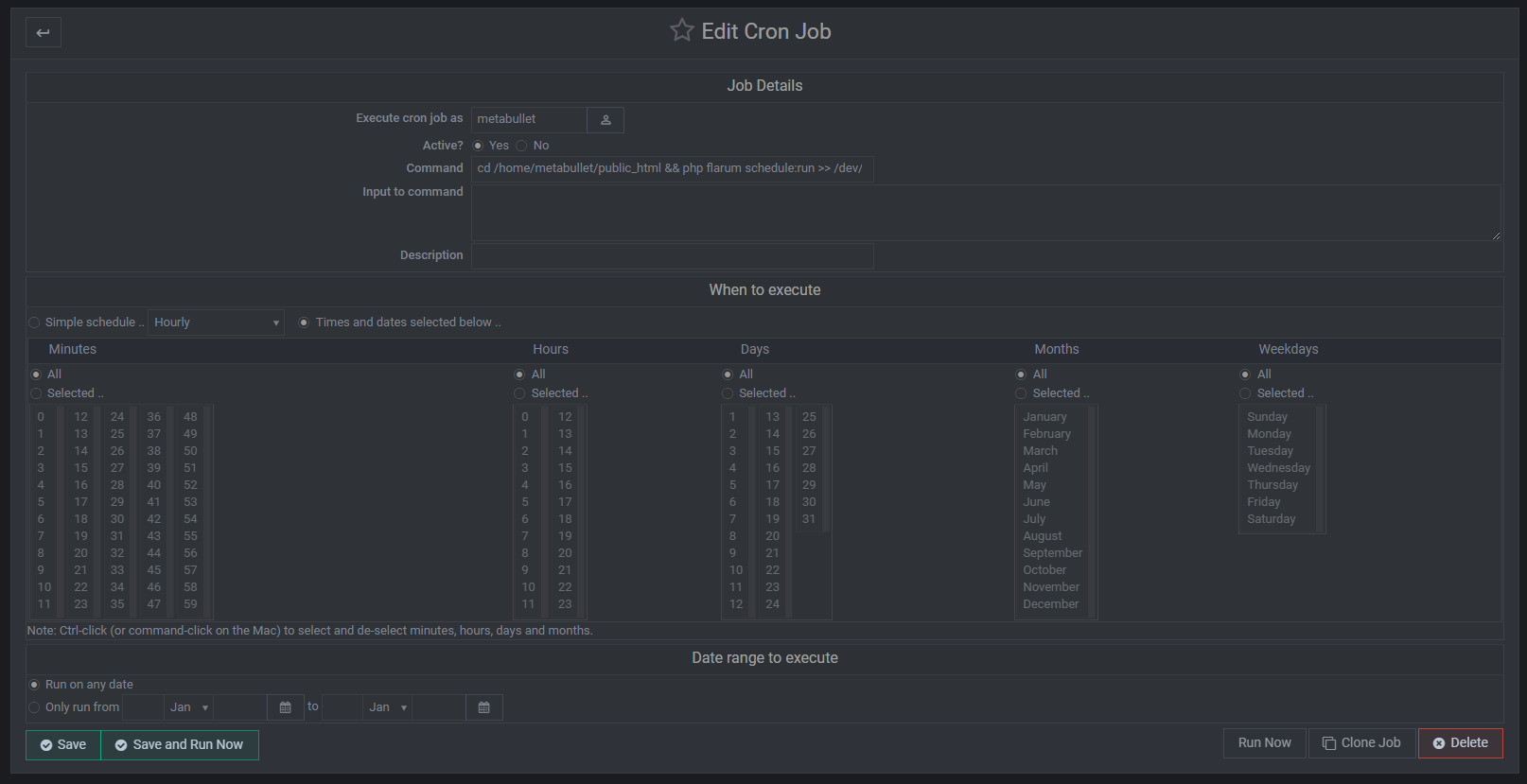
@phenomlab said in help me configuring cron job for fof/sitemap - flarum:
you should select every single minute from 00 - 59
could you share one example setting for 2min
-
@phenomlab what does this setting mean? will it always runs?
@phenomlab said in help me configuring cron job for fof/sitemap - flarum:
you should select every single minute from 00 - 59
could you share one example setting for 2min
-
@phenomlab what does this setting mean? will it always runs?
@phenomlab said in help me configuring cron job for fof/sitemap - flarum:
you should select every single minute from 00 - 59
could you share one example setting for 2min
@Hari said in help me configuring cron job for fof/sitemap - flarum:
could you share one example setting for 2min
If you want to select every two minutes, you need to select 00, 02, 04 etc until you reach 58
Mark Cutting also advises organisations as a Fractional CIO, Fractional CISO and Executive Advisor, helping boards improve technology governance, cyber resilience and executive decision making. Learn more at Gratmore Ltd

Hello! It looks like you're interested in this conversation, but you don't have an account yet.
Getting fed up of having to scroll through the same posts each visit? When you register for an account, you'll always come back to exactly where you were before, and choose to be notified of new replies (either via email, or push notification). You'll also be able to save bookmarks and upvote posts to show your appreciation to other community members.
With your input, this post could be even better 💗
Register Login