installing flarum with plesk
-
@Hari File
redis.confshould not be empty. If it were, then REDIS does not work - what’s the output oflocate redis.conf?@phenomlab said in installing flarum with plesk:
locate redis.conf
root@admiring-goldwasser:~# su - site_sdxtjg95b7 site_sdxtjg95b7@admiring-goldwasser:~$ locate redis.conf Command 'locate' not found, but can be installed with: apt install mlocate Please ask your administrator. site_sdxtjg95b7@admiring-goldwasser:~$ exit logout root@admiring-goldwasser:~# apt install mlocate Reading package lists... Done Building dependency tree Reading state information... Done The following package was automatically installed and is no longer required: plesk-py27-pycrypto Use 'apt autoremove' to remove it. Suggested packages: nocache The following NEW packages will be installed: mlocate 0 upgraded, 1 newly installed, 0 to remove and 0 not upgraded. Need to get 50.1 kB of archives. After this operation, 258 kB of additional disk space will be used. Get:1 http://mirrors.digitalocean.com/ubuntu focal/main amd64 mlocate amd64 0.26-3ubuntu3 [50.1 kB] Fetched 50.1 kB in 0s (326 kB/s) Selecting previously unselected package mlocate. (Reading database ... 146957 files and directories currently installed.) Preparing to unpack .../mlocate_0.26-3ubuntu3_amd64.deb ... Unpacking mlocate (0.26-3ubuntu3) ... Setting up mlocate (0.26-3ubuntu3) ... update-alternatives: using /usr/bin/mlocate to provide /usr/bin/locate (locate) in auto mode Adding group `mlocate' (GID 121) ... Done. Initializing mlocate database; this may take some time... done Processing triggers for man-db (2.9.1-1) ... root@admiring-goldwasser:~# locate redis.conf /var/lib/dpkg/info/plesk-php74-redis.conffiles /var/lib/dpkg/info/plesk-php80-redis.conffiles root@admiring-goldwasser:~# -
@phenomlab said in installing flarum with plesk:
locate redis.conf
root@admiring-goldwasser:~# su - site_sdxtjg95b7 site_sdxtjg95b7@admiring-goldwasser:~$ locate redis.conf Command 'locate' not found, but can be installed with: apt install mlocate Please ask your administrator. site_sdxtjg95b7@admiring-goldwasser:~$ exit logout root@admiring-goldwasser:~# apt install mlocate Reading package lists... Done Building dependency tree Reading state information... Done The following package was automatically installed and is no longer required: plesk-py27-pycrypto Use 'apt autoremove' to remove it. Suggested packages: nocache The following NEW packages will be installed: mlocate 0 upgraded, 1 newly installed, 0 to remove and 0 not upgraded. Need to get 50.1 kB of archives. After this operation, 258 kB of additional disk space will be used. Get:1 http://mirrors.digitalocean.com/ubuntu focal/main amd64 mlocate amd64 0.26-3ubuntu3 [50.1 kB] Fetched 50.1 kB in 0s (326 kB/s) Selecting previously unselected package mlocate. (Reading database ... 146957 files and directories currently installed.) Preparing to unpack .../mlocate_0.26-3ubuntu3_amd64.deb ... Unpacking mlocate (0.26-3ubuntu3) ... Setting up mlocate (0.26-3ubuntu3) ... update-alternatives: using /usr/bin/mlocate to provide /usr/bin/locate (locate) in auto mode Adding group `mlocate' (GID 121) ... Done. Initializing mlocate database; this may take some time... done Processing triggers for man-db (2.9.1-1) ... root@admiring-goldwasser:~# locate redis.conf /var/lib/dpkg/info/plesk-php74-redis.conffiles /var/lib/dpkg/info/plesk-php80-redis.conffiles root@admiring-goldwasser:~#@Hari How did you install Redis ?
Mark Cutting also advises organisations as a Fractional CIO, Fractional CISO and Executive Advisor, helping boards improve technology governance, cyber resilience and executive decision making. Learn more at Phenomlab Ltd
-
-
@Hari Ok, but this would denote that the service is already listening on
127.0.0.1and not0.0.0.0as originally stated ?Mark Cutting also advises organisations as a Fractional CIO, Fractional CISO and Executive Advisor, helping boards improve technology governance, cyber resilience and executive decision making. Learn more at Phenomlab Ltd
-
@Hari Ok, but this would denote that the service is already listening on
127.0.0.1and not0.0.0.0as originally stated ?@phenomlab i have mentioned 1.0.0.0 it is actually my server IP i masked it.
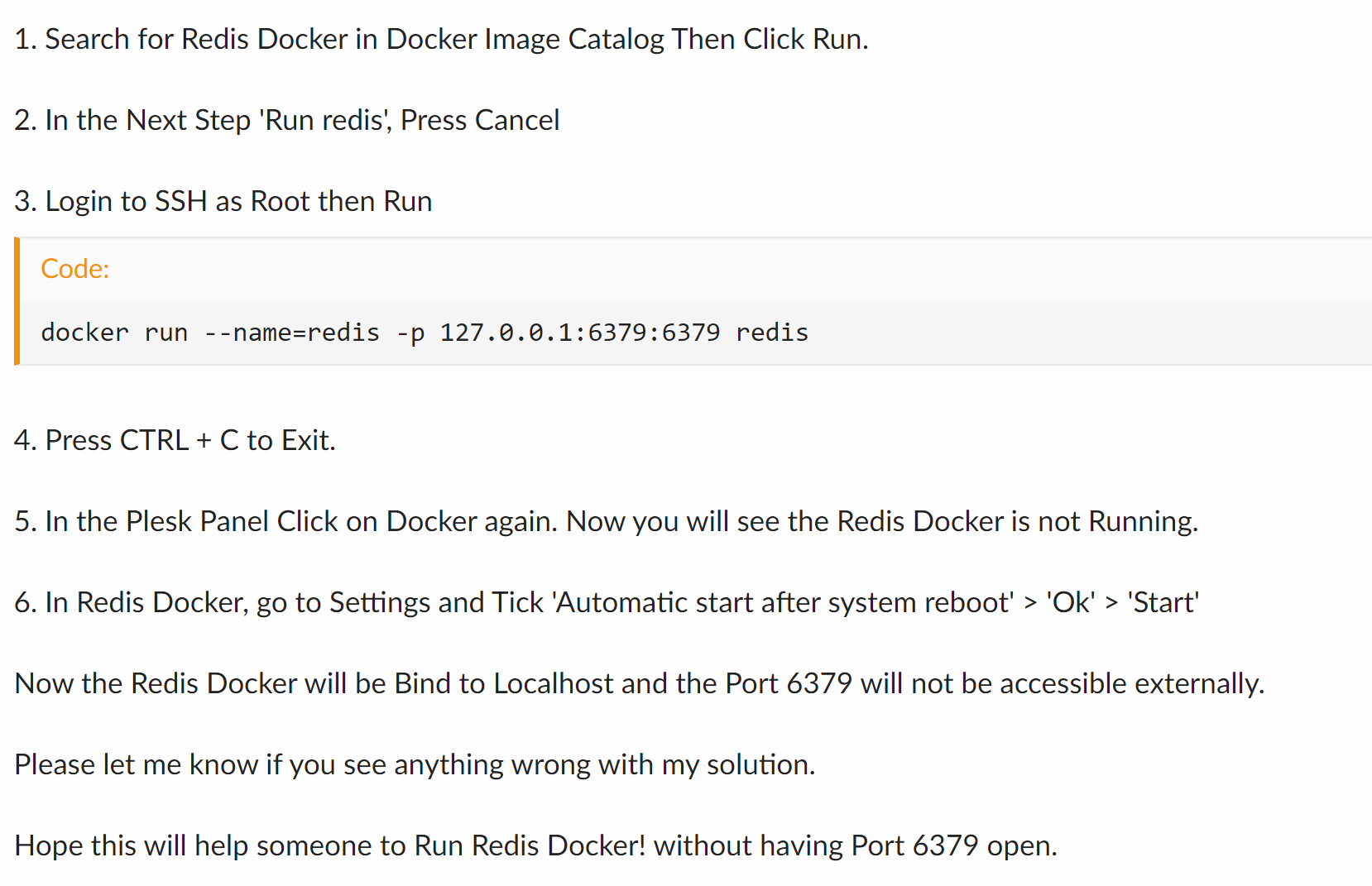
after receiving the email saying 111.111.111.111 is getting exposed i have deleted the existing redis docker and followed the above guide as mentioned in Plesk site.
do you think now everything is correctly running?
-
@phenomlab i have mentioned 1.0.0.0 it is actually my server IP i masked it.
after receiving the email saying 111.111.111.111 is getting exposed i have deleted the existing redis docker and followed the above guide as mentioned in Plesk site.
do you think now everything is correctly running?
@Hari Yes, but the screenshot above shows
127.0.0.1? -
@phenomlab i have mentioned 1.0.0.0 it is actually my server IP i masked it.
after receiving the email saying 111.111.111.111 is getting exposed i have deleted the existing redis docker and followed the above guide as mentioned in Plesk site.
do you think now everything is correctly running?
@Hari said in installing flarum with plesk:
do you think now everything is correctly running?
One way to test would be to execute this command from any machine connected to the internet
telnet <ip address> 6379If it appears to answer, then it’s still exposed. PM me the IP address if you’d like me to check
Mark Cutting also advises organisations as a Fractional CIO, Fractional CISO and Executive Advisor, helping boards improve technology governance, cyber resilience and executive decision making. Learn more at Phenomlab Ltd
-
@Hari said in installing flarum with plesk:
do you think now everything is correctly running?
One way to test would be to execute this command from any machine connected to the internet
telnet <ip address> 6379If it appears to answer, then it’s still exposed. PM me the IP address if you’d like me to check
C:\Users\Hari>telnet 11.11.11.11 6379 Telnet Win32 v2.1b2, Copyright (C) 2000 Paul Brannan <pbranna@clemson.edu> and the team. This program comes with ABSOLUTELY NO WARRANTY; for details read LICENSE.TXT. This is free software, and you are welcome to redistribute it under certain conditions. Loading configuration options from R:\laragon\bin\telnet\telnet.ini. Loading ANSI from R:\laragon\bin\telnet\telnet.cfg. Use configuration: ANSI. keymap ansi There are 1 maps. Trying 11.11.11.11:6379... Connection timed out. -
C:\Users\Hari>telnet 11.11.11.11 6379 Telnet Win32 v2.1b2, Copyright (C) 2000 Paul Brannan <pbranna@clemson.edu> and the team. This program comes with ABSOLUTELY NO WARRANTY; for details read LICENSE.TXT. This is free software, and you are welcome to redistribute it under certain conditions. Loading configuration options from R:\laragon\bin\telnet\telnet.ini. Loading ANSI from R:\laragon\bin\telnet\telnet.cfg. Use configuration: ANSI. keymap ansi There are 1 maps. Trying 11.11.11.11:6379... Connection timed out.@Hari Yes, looks good
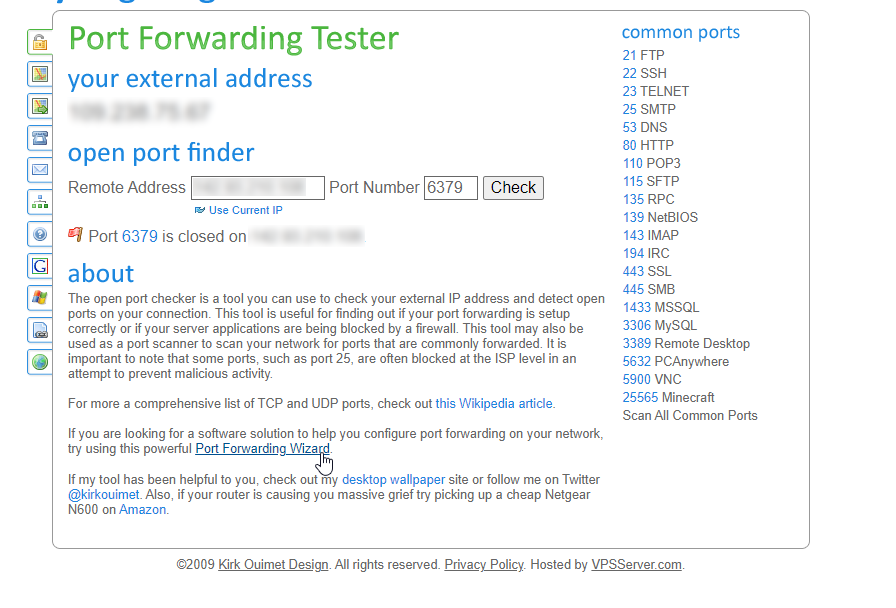
Mark Cutting also advises organisations as a Fractional CIO, Fractional CISO and Executive Advisor, helping boards improve technology governance, cyber resilience and executive decision making. Learn more at Phenomlab Ltd
-
@phenomlab thanks a lot, have a nice day



Hello! It looks like you're interested in this conversation, but you don't have an account yet.
Getting fed up of having to scroll through the same posts each visit? When you register for an account, you'll always come back to exactly where you were before, and choose to be notified of new replies (either via email, or push notification). You'll also be able to save bookmarks and upvote posts to show your appreciation to other community members.
With your input, this post could be even better 💗
Register Login