
Virgin Media Broadband
-
@phenomlab said in Virgin Media Broadband:
@jac Do you have login access to your Virgin Hub ? We need to ensure that this new router has collected a network address from the hub itself (which it should have done)
I think it’s on the bottom of the box mate, will check.

@jac Yes, there’s a slide-out red tag that has the details on it (provided you haven’t previously removed it)
Mark Cutting also advises organisations as a Fractional CIO, Fractional CISO and Executive Advisor, helping boards improve technology governance, cyber resilience and executive decision making. Learn more at Gratmore Ltd
-
@jac said in Virgin Media Broadband:
would this work in the next room or does it have to be in the main room?
If you are referring to accessing the Virgin Media Hub, then it’ll work from anywhere provided you have an adequate Wifi connection
Mark Cutting also advises organisations as a Fractional CIO, Fractional CISO and Executive Advisor, helping boards improve technology governance, cyber resilience and executive decision making. Learn more at Gratmore Ltd
-
@jac No. Do the following
- Plug one powerline adapter into the wall next to the Virgin Hub
- Plug a network cable into the powerline adapter you just plugged in, and then plug the other end of the cable into the Virgin Hub (any free port)
- Plug the remaining powerline adapter into the wall in the room where you want the router to live
- Plug a network cable into the powerline adapter you just plugged in, and then plug the other end of the cable into the new router into the WAN port
- Power on the router (and powerline adapters if you haven’t already)
Let me know when you are finished with that

@phenomlab said in Virgin Media Broadband:
@jac No. Do the following
- Plug one powerline adapter into the wall next to the Virgin Hub
- Plug a network cable into the powerline adapter you just plugged in, and then plug the other end of the cable into the Virgin Hub (any free port)
- Plug the remaining powerline adapter into the wall in the room where you want the router to live
- Plug a network cable into the powerline adapter you just plugged in, and then plug the other end of the cable into the new router into the WAN port
- Power on the router (and powerline adapters if you haven’t already)
Let me know when you are finished with that
Done all

-
@jac Yes, there’s a slide-out red tag that has the details on it (provided you haven’t previously removed it)
@phenomlab said in Virgin Media Broadband:
@jac Yes, there’s a slide-out red tag that has the details on it (provided you haven’t previously removed it)
Thanks, do I need this right now mate?
-
@jac said in Virgin Media Broadband:
would this work in the next room or does it have to be in the main room?
If you are referring to accessing the Virgin Media Hub, then it’ll work from anywhere provided you have an adequate Wifi connection
@phenomlab said in Virgin Media Broadband:
@jac said in Virgin Media Broadband:
would this work in the next room or does it have to be in the main room?
If you are referring to accessing the Virgin Media Hub, then it’ll work from anywhere provided you have an adequate Wifi connection
Sorry mate I was referring to having it in the next room instead of the one we sleep in?
-
@phenomlab said in Virgin Media Broadband:
@jac Yes, there’s a slide-out red tag that has the details on it (provided you haven’t previously removed it)
Thanks, do I need this right now mate?
@jac Ideally yes as we need to ensure that the new router has connected itself to the hub
Mark Cutting also advises organisations as a Fractional CIO, Fractional CISO and Executive Advisor, helping boards improve technology governance, cyber resilience and executive decision making. Learn more at Gratmore Ltd
-
@phenomlab no problem, I’ll get it.
As for the power line adapters they are just green.
-
@phenomlab no problem, I’ll get it.
As for the power line adapters they are just green.
-
@phenomlab said in Virgin Media Broadband:
@jac Ideally yes as we need to ensure that the new router has connected itself to the hub
Got this now.
-
@jac the three lights indicates a good connection, so that should be ok.
Mark Cutting also advises organisations as a Fractional CIO, Fractional CISO and Executive Advisor, helping boards improve technology governance, cyber resilience and executive decision making. Learn more at Gratmore Ltd
-
@phenomlab said in Virgin Media Broadband:
@jac the three lights indicates a good connection, so that should be ok.
Great

-
@phenomlab said in Virgin Media Broadband:
@jac Ideally yes as we need to ensure that the new router has connected itself to the hub
Got this now.
@jac said in Virgin Media Broadband:
@phenomlab said in Virgin Media Broadband:
@jac Ideally yes as we need to ensure that the new router has connected itself to the hub
Got this now.
This has the WiFi network name (SSID) and WiFi password on it, is that the one?
-
@jac said in Virgin Media Broadband:
@phenomlab said in Virgin Media Broadband:
@jac Ideally yes as we need to ensure that the new router has connected itself to the hub
Got this now.
This has the WiFi network name (SSID) and WiFi password on it, is that the one?
@jac If you try accessing the hub directly on http://192.168.0.1/ it should pop up with a screen asking for a password (which should actually be on the tag you have)
Mark Cutting also advises organisations as a Fractional CIO, Fractional CISO and Executive Advisor, helping boards improve technology governance, cyber resilience and executive decision making. Learn more at Gratmore Ltd
-
@jac If you try accessing the hub directly on http://192.168.0.1/ it should pop up with a screen asking for a password (which should actually be on the tag you have)
@phenomlab said in Virgin Media Broadband:
@jac If you try accessing the hub directly on http://192.168.0.1/ it should pop up with a screen asking for a password (which should actually be on the tag you have)
Thanks mate, do you require access at all? Or is this something I’m able to set up?
-
@phenomlab said in Virgin Media Broadband:
@jac If you try accessing the hub directly on http://192.168.0.1/ it should pop up with a screen asking for a password (which should actually be on the tag you have)
Thanks mate, do you require access at all? Or is this something I’m able to set up?
@jac If you are able to get into the hub, for the moment, we just need to see if the router has connected (it should have). Once logged into the hub, go to “connected devices”
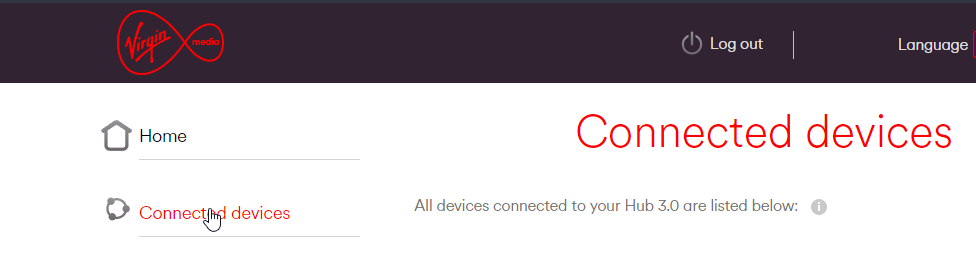
Then send me a screenshot of what you are able to see listed as connected
Mark Cutting also advises organisations as a Fractional CIO, Fractional CISO and Executive Advisor, helping boards improve technology governance, cyber resilience and executive decision making. Learn more at Gratmore Ltd
-
@jac If you are able to get into the hub, for the moment, we just need to see if the router has connected (it should have). Once logged into the hub, go to “connected devices”
Then send me a screenshot of what you are able to see listed as connected
@phenomlab said in Virgin Media Broadband:
@jac If you are able to get into the hub, for the moment, we just need to see if the router has connected (it should have). Once logged into the hub, go to “connected devices”
Then send me a screenshot of what you are able to see listed as connected
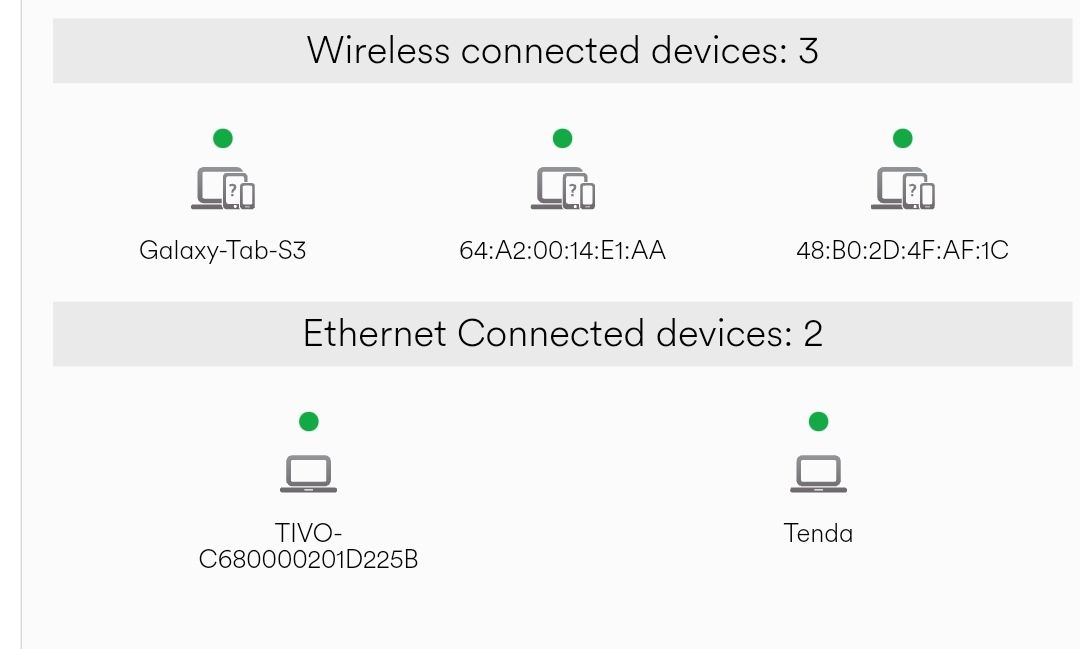
‘Tenda’ which is the new router.
-
@phenomlab said in Virgin Media Broadband:
@jac If you are able to get into the hub, for the moment, we just need to see if the router has connected (it should have). Once logged into the hub, go to “connected devices”
Then send me a screenshot of what you are able to see listed as connected
‘Tenda’ which is the new router.
@jac Yep - all good.
Now for the “fun” part.
We need to ensure that the new router is in fact going to act as a Wifi access point in it’s own right. We need to do the following
- Take another device - laptop, phone, whatever, up into the room where the new router is
- Disconnect from any current Wifi connections and search for the SSID that is provided by the new router
- Connect to the Wifi point (new router) using the PSK (password) that should also be set as default (this should all be in the box)
- Test the Wifi connection once validated

Mark Cutting also advises organisations as a Fractional CIO, Fractional CISO and Executive Advisor, helping boards improve technology governance, cyber resilience and executive decision making. Learn more at Gratmore Ltd
-
@jac said in Virgin Media Broadband:
hopefully it isn’t sensitive information. Feel free to remove once discussed.
It’s only the device MAC addresses. There’s nothing sensitive there as there is no attribution to any IP addresses. I can remove if you’d prefer.
-
@jac Yep - all good.
Now for the “fun” part.
We need to ensure that the new router is in fact going to act as a Wifi access point in it’s own right. We need to do the following
- Take another device - laptop, phone, whatever, up into the room where the new router is
- Disconnect from any current Wifi connections and search for the SSID that is provided by the new router
- Connect to the Wifi point (new router) using the PSK (password) that should also be set as default (this should all be in the box)
- Test the Wifi connection once validated
@phenomlab said in Virgin Media Broadband:
Take another device - laptop, phone, whatever, up into the room where the new router is
Disconnect from any current Wifi connections and search for the SSID that is provided by the new routerCommencing…

Hello! It looks like you're interested in this conversation, but you don't have an account yet.
Getting fed up of having to scroll through the same posts each visit? When you register for an account, you'll always come back to exactly where you were before, and choose to be notified of new replies (either via email, or push notification). You'll also be able to save bookmarks and upvote posts to show your appreciation to other community members.
With your input, this post could be even better 💗
Register Login
