Skip to content

Forum registration email goes to spam

Moved Solved Configure
6 2 2.3k 1
  • wrote on last edited by phenomlab
    #1

    I’ve just ran a test email from my forum and it’s gone straight to spam - (Gmail).

    I think looking back from the other day in a different thread there may have been some settings that are maybe not configured causing this issue.

  • JAC JAC

    I’ve just ran a test email from my forum and it’s gone straight to spam - (Gmail).

    I think looking back from the other day in a different thread there may have been some settings that are maybe not configured causing this issue.

    wrote on last edited by
    #2

    @jac As discussed, this should be resolved in your forum. Can you confirm that this is in fact the case ?

  • phenomlab phenomlab moved this topic from Bugs on
  • wrote on last edited by
    #3

    @jac I’m going to mark this as resolved. Let me know if this isn’t the case ?

  • phenomlab phenomlab has marked this topic as solved on
  • @jac I’m going to mark this as resolved. Let me know if this isn’t the case ?

    wrote on last edited by
    #4

    @phenomlab Thanks Mark, I’ll have to test, although running out of browsers 😆.

  • JAC JAC

    @phenomlab Thanks Mark, I’ll have to test, although running out of browsers 😆.

    wrote on last edited by
    #5

    @jac Browsers, or email addresses ? 🙂

  • @jac Browsers, or email addresses ? 🙂

    wrote on last edited by
    #6

    @phenomlab emails mate, although I seem to have used a different email on each browser to remain logged in for cough cough posts 😉.


Did this solution help you?
Did you find the suggested solution useful? Support 💗 Sudonix with a coffee ☕
If your organisation needs deeper expertise around infrastructure, security, or technology leadership, learn more about Phenomlab Ltd. Many of the deeper technical guides behind Sudonix are published there.

Related Topics
  • Spam spam spam

    Solved Configure nodebb
    6
    2 Votes
    6 Posts
    3k Views
    phenomlab
    @Panda said in Spam spam spam: ok, yes Ive seen the queue, it shows IP, but doesnt have a field for comments from registrant. It’s not designed for that. It merely serves as a gateway between posts appearing on your form or not. @Panda said in Spam spam spam: It would be better if nodebb had this plugin included in ACP list, as not only then do you know its approved and should work, but many people cant or dont want to use CLI on the server That’s a question for the NodeBB devs but in all honesty you can’t not use the CLI when installing nodebb so to be this isn’t a big deal.
  • Nodebb and emails

    Solved Configure nodebb
    27
    5 Votes
    27 Posts
    10k Views
    phenomlab
    @Panda it will use SMTP. In all cases, I never use any plugin to send email. I’ll always send it raw.
  • Email set up on OVH Cloud

    Solved Configure email
    21
    1 Votes
    21 Posts
    8k Views
    phenomlab
    @mventures that’s not an issue provided there is a password to go with the username
  • Email Server Settings

    Solved Configure mx entry
    25
    10 Votes
    25 Posts
    11k Views
    phenomlab
    @Onix said in Email Server Settings: If anyone has long-term experience with self-hosted SMTP + DNS set-ups that remain stable, would be great to hear which configurations worked best. I can help with this
  • 5 Votes
    13 Posts
    3k Views
    DownPW
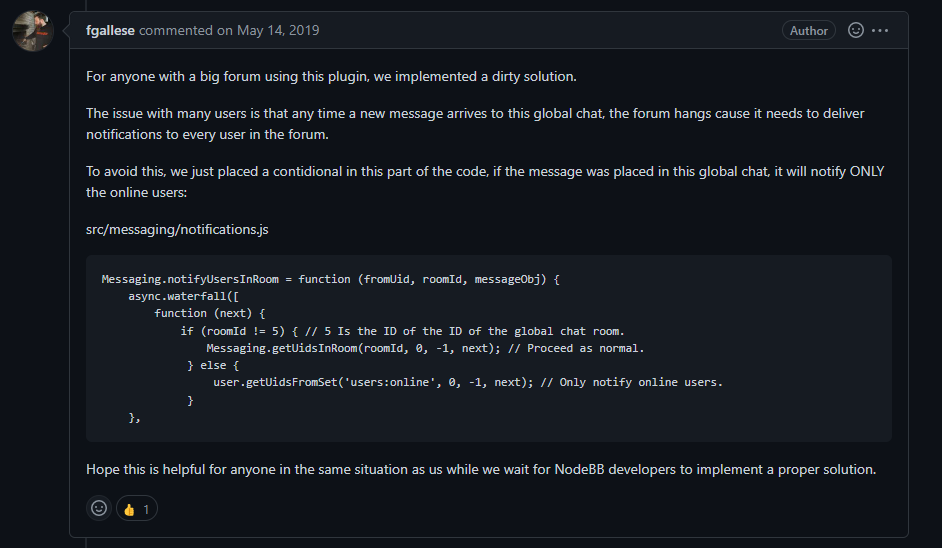
    'use strict'; const winston = require('winston'); const user = require('../user'); const notifications = require('../notifications'); const sockets = require('../socket.io'); const plugins = require('../plugins'); const meta = require('../meta'); module.exports = function (Messaging) { Messaging.notifyQueue = {}; // Only used to notify a user of a new chat message, see Messaging.notifyUser Messaging.notifyUsersInRoom = async (fromUid, roomId, messageObj) => { let uids = await Messaging.getUidsInRoom(roomId, 0, -1); uids = await user.blocks.filterUids(fromUid, uids); let data = { roomId: roomId, fromUid: fromUid, message: messageObj, uids: uids, }; data = await plugins.hooks.fire('filter:messaging.notify', data); if (!data || !data.uids || !data.uids.length) { return; } uids = data.uids; uids.forEach((uid) => { data.self = parseInt(uid, 10) === parseInt(fromUid, 10) ? 1 : 0; Messaging.pushUnreadCount(uid); sockets.in(`uid_${uid}`).emit('event:chats.receive', data); }); if (messageObj.system) { return; } // Delayed notifications let queueObj = Messaging.notifyQueue[`${fromUid}:${roomId}`]; if (queueObj) { queueObj.message.content += `\n${messageObj.content}`; clearTimeout(queueObj.timeout); } else { queueObj = { message: messageObj, }; Messaging.notifyQueue[`${fromUid}:${roomId}`] = queueObj; } queueObj.timeout = setTimeout(async () => { try { await sendNotifications(fromUid, uids, roomId, queueObj.message); } catch (err) { winston.error(`[messaging/notifications] Unabled to send notification\n${err.stack}`); } }, meta.config.notificationSendDelay * 1000); }; async function sendNotifications(fromuid, uids, roomId, messageObj) { const isOnline = await user.isOnline(uids); uids = uids.filter((uid, index) => !isOnline[index] && parseInt(fromuid, 10) !== parseInt(uid, 10)); if (!uids.length) { return; } if (roomId != 11) { // 5 Is the ID of the ID of the global chat room. Messaging.getUidsInRoom(roomId, 0, -1); // Proceed as normal. } else { user.getUidsFromSet('users:online', 0, -1); // Only notify online users. } const { displayname } = messageObj.fromUser; const isGroupChat = await Messaging.isGroupChat(roomId); const notification = await notifications.create({ type: isGroupChat ? 'new-group-chat' : 'new-chat', subject: `[[email:notif.chat.subject, ${displayname}]]`, bodyShort: `[[notifications:new_message_from, ${displayname}]]`, bodyLong: messageObj.content, nid: `chat_${fromuid}_${roomId}`, from: fromuid, path: `/chats/${messageObj.roomId}`, }); delete Messaging.notifyQueue[`${fromuid}:${roomId}`]; notifications.push(notification, uids); } };
  • is "night mode" shifting the forum several pixels up?

    Solved Configure nodebb
    8
    4 Votes
    8 Posts
    3k Views
    phenomlab
    @crazycells hmm. Good point. I actually use my own version of the dark mode plugin, so not entirely sure. However, I think the CSS is probably the same. I’m not at my PC currently but can check and advise later.
  • Forum not loading

    Solved Configure
    27
    0 Votes
    27 Posts
    12k Views
    JAC
    @phenomlab Brilliant!! Thanks ever so much!! Now I need to try pull in new members
  • Cloudflare now handling email routing, YAY 🚀

    Configure cloudflare
    1
    0 Votes
    1 Posts
    1k Views
    No one has replied