Skip to content

What’s going on with NodeBB?

Performance
20 3 5.5k 1
  • wrote on last edited by
    #1

    I used to follow this forum script very actively and with great interest, but it seems like it has lost its charm lately. What do you think? Do you believe NodeBB is heading toward the same fate as other forum scripts?

  • I used to follow this forum script very actively and with great interest, but it seems like it has lost its charm lately. What do you think? Do you believe NodeBB is heading toward the same fate as other forum scripts?

    wrote on last edited by
    #2

    @cagatay Good question. I too have noticed that things seem to be very quiet, and there seems to be less of an appetite from the developers to respond. This could be to do with workload though, and not the desire to “ignore”. My main observation would be a significant amount of effort is being placed on federation.

  • wrote on last edited by
    #3

    I also have the federation plugin or whatever it’s called, but its working principle is really not good. The World section isn’t active at all, and since I use a Turkish forum, the posts there are in English, no one understands, reads, or shows any interest.

  • I also have the federation plugin or whatever it’s called, but its working principle is really not good. The World section isn’t active at all, and since I use a Turkish forum, the posts there are in English, no one understands, reads, or shows any interest.

    wrote on last edited by
    #4

    @cagatay Yes, and that’s where federation has limits - unless the content being shared in /world matches the language of your forum, it’s useless.

  • phenomlab phenomlab marked this topic as a regular topic on
  • wrote on last edited by
    #5

    Mark, if I want to switch to another script, what forum script would you recommend?

  • Mark, if I want to switch to another script, what forum script would you recommend?

    wrote on last edited by
    #6

    @cagatay Sorry - when you say “script”, can you provide more detail?

  • wrote on last edited by
    #7

    for example xenforo, vbulletin, flarum etc.

  • for example xenforo, vbulletin, flarum etc.

    wrote on last edited by
    #8

    @cagatay That is quite the jump as importers from one forum platform to another are notoriously unreliable and could land up being quite costly if it requires managed services.

  • wrote on last edited by
    #9

    After the latest update, my entire system crashed and I’m unable to bring it back up.

  • After the latest update, my entire system crashed and I’m unable to bring it back up.

    wrote on last edited by
    #10

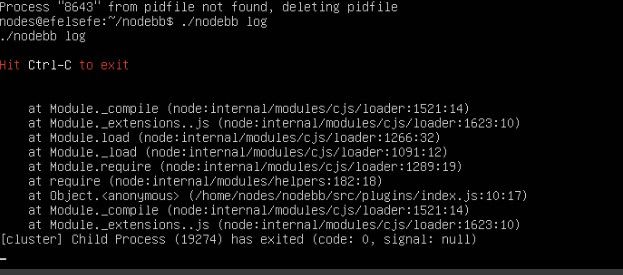
    @cagatay what is in the nodebb log?

  • wrote on last edited by
    #11

    070b5b55-d31b-4c03-820e-88145a1af601-image.jpeg

  • wrote on last edited by
    #12

    I downgraded the version, and now it is working. I think the issue is related to the version.

  • I downgraded the version, and now it is working. I think the issue is related to the version.

    wrote on last edited by DownPW
    #13

    @cagatay said:

    I downgraded the version, and now it is working. I think the issue is related to the version.

    Maybe yes, maybe no. it can be plugins compatibility, nodejs, npm etc.

    I don’t upgrade for now. I still waiting a little before upgrade.
    I’m on 4.10.3

  • @cagatay said:

    I downgraded the version, and now it is working. I think the issue is related to the version.

    Maybe yes, maybe no. it can be plugins compatibility, nodejs, npm etc.

    I don’t upgrade for now. I still waiting a little before upgrade.
    I’m on 4.10.3

    wrote on last edited by
    #14

    @DownPW I tend to stay at least one release behind intentionally to ensure maturity before upgrading - unless there is a good reason to do so immediately - such as identified vulnerabilities

  • wrote on last edited by DownPW
    #15

    That’s exactly our approach on PW now. Learned it the hard way , upgraded too early once or twice and paid the price. Actually sitting two releases behind at the moment, not just one. Stability over bleeding edge, unless a vulnerability forces the hand. Solid policy.

  • wrote on last edited by
    #16

    To be honest, I really regret moving to NodeBB. I should have stayed with XenForo. 😞

  • wrote on last edited by DownPW
    #17

    Honestly, I don’t regret the move at all on my side but I get that the experience can be very different depending on how comfortable you are with the technical side. XenForo is definitely more forgiving if you don’t want to deal with the server.

    One thing worth keeping in mind though: your install has some custom code on it, and need to know what it does or stay to stock nodebb witout modification

    What’s actually frustrating you the most right now? If it’s day-to-day admin stuff, there might be simpler fixes than rebuilding everything on XenForo.

  • wrote on last edited by
    #18

    I don’t want to keep worrying about whether the script will break with every update. Yes, we invested a lot of effort, yes, I have custom code, and yes, everything works well but somehow I end up facing issues after every update. And honestly, I think they have a development approach that doesn’t really listen to users. They just add or remove things based on their own ideas. The social plugins were a complete disaster

  • wrote on last edited by
    #19

    how to upgrade nodejs v20 to v22?

  • how to upgrade nodejs v20 to v22?

    wrote on last edited by
    #20

    @cagatay The most reliable way to upgrade Node.js on Ubuntu depends on how you originally installed it.

    Method 1: Using NVM (Recommended)

    If you already use Node Version Manager (NVM), upgrading is simple. NVM allows you to keep both versions and switch between them if needed.

    1. Install Node 22:
      nvm install 22
    2. Switch to Node 22:
      nvm use 22
    3. Set it as your default:
      nvm alias default 22
    4. Verify the change:
      node -v

    Method 2: Using NodeSource (PPA)

    If you installed Node.js via apt using the NodeSource repository, you need to update the repository script to point to the new version.

    1. Remove the old NodeSource list (optional but cleaner):
      sudo rm /etc/apt/sources.list.d/nodesource.list
    2. Download and run the NodeSource setup script for Node 22:
      curl -fsSL [https://deb.nodesource.com/setup_22.x](https://deb.nodesource.com/setup_22.x) | sudo -E bash -
    3. Install/Upgrade Node.js:
      sudo apt-get install -y nodejs
    4. Verify the installation:
      node -v

    Method 3: Using the ‘n’ Package

    If you have npm installed, you can use the n interactive manager.

    1. Clear the npm cache:
      sudo npm cache clean -f
    2. Install the ‘n’ helper:
      sudo npm install -g n
    3. Install Node 22:
      sudo n 22
    4. Update your shell:
      hash -r

    Troubleshooting

    • Permission Denied: If you see permission errors using Method 2 or 3, ensure you are using sudo.
    • Path Issues: If node -v still shows version 20 after upgrading via NVM, restart your terminal or run source ~/.bashrc.
    • Conflicts: Avoid mixing these methods. If you switch from apt to nvm, it is best to sudo apt remove nodejs first to avoid path conflicts.

Related Topics
  • CSS codes to prevent votes to disappear

    Solved Customisation nodebb
    3
    1 Votes
    3 Posts
    1k Views
    crazycells
    @phenomlab yes, it is thanks a lot…
  • Following the API docs but its not clear ...

    Solved Customisation api nodebb
    8
    2 Votes
    8 Posts
    3k Views
    phenomlab
    @Panda you’d be surprised. If you consider that you’d need to use the API to be able to populate a WordPress widget for example (which in turn would of course be PHP), taking this route is still immensely popular.
  • Further Widgets question

    Solved Configure nodebb
    4
    1
    1 Votes
    4 Posts
    2k Views
    phenomlab
    @Panda category is for a category in its own, so for example, “fruit” whereas categories is the page that contains all categories as a list.
  • NodeBB v3 Chat Very Slow

    Moved Performance nodebb v3 nodebb chat
    47
    11 Votes
    47 Posts
    21k Views
    phenomlab
    @DownPW Seems fine.
  • adding some console.log to Nodebb

    Solved Customisation nodebb
    4
    1 Votes
    4 Posts
    2k Views
    phenomlab
    @eeeee if you’re using the console, you could try node app.js > app.log 2>&1 This would redirect stdout to a file named app.log and redirect stderr to stdout. I’m not sure about standard logging under NodeBB, but there is an error log located at logs/error.log. Failing that, you could always stop the NodeBB service then use ./nodebb dev from the console which would then provide debug output.
  • Optimum config for NodeBB under NGINX

    Performance nginx performance
    4
    3 Votes
    4 Posts
    2k Views
    phenomlab
    @crazycells hi - no security reason, or anything specific in this case. However, the nginx.conf I posted was from my Dev environment which uses this port as a way of not interfering with production. And yes, I use clustering on this site with three instances.
  • NODEBB: Nginx error performance & High CPU

    Solved Performance performance nodebb nginx
    69
    4
    14 Votes
    69 Posts
    63k Views
    DownPW
    @phenomlab Seems to be better with some scaling fix for redis on redis.conf. I haven’t seen the message yet since the changes I made # I increase it to the value of /proc/sys/net/core/somaxconn tcp-backlog 4096 # I'm uncommenting because it can slow down Redis. Uncommented by default !!!!!!!!!!!!!!!!!!! #save 900 1 #save 300 10 #save 60 10000 If you have other Redis optimizations. I take all your advice https://severalnines.com/blog/performance-tuning-redis/
  • NodeBB 1.19.3

    Solved Performance nodebb 1.19.3 performance
    33
    4 Votes
    33 Posts
    16k Views
    DownPW
    @phenomlab I find the problem Mark The error message indicated this path : http://localhost:4567/assets/plugins/nodebb-plugin-emoji/emoji/styles.css?v=6983dobg16u I change the path url on config.json [image: 47bacc80-f141-41e4-a261-3f8d650cc6f6-image.png] And all it’s good Weird, I didn’t have to change that path before 1.19.3 But this does not prevent the problem from a clean install with Emoji Plugin EDIT: After test, that resolv the problem installation for 1.18.x but not for 1.19.x (I have other error message when I run ./nodebb Setup For resume: NodeJS 16_x with 1.18.x is ok