Category For User
-
Mark hi
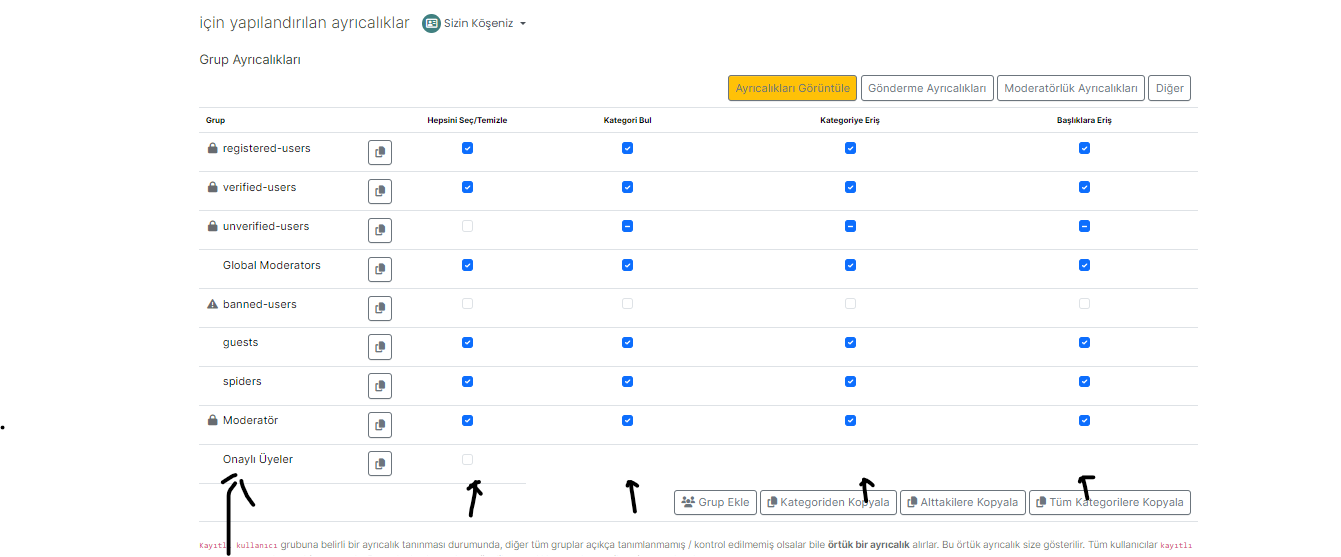
I can not give permission for one user to set special category for it.
I can not to cancel others write on that category expect one user.
How can i set it? -
Closing this, as a confirmed bug and will be resolved in
3.5.1https://community.nodebb.org/topic/17623/nodebb-3-5-0/18?_=1699903831824
-
Mark hi
I can not give permission for one user to set special category for it.
I can not to cancel others write on that category expect one user.
How can i set it?@cagatay Can you provide a bit more detail (screenshots etc) of what you’ve tried so far?
Mark Cutting also advises organisations as a Fractional CIO, Fractional CISO and Executive Advisor, helping boards improve technology governance, cyber resilience and executive decision making. Learn more at Phenomlab Ltd
-
@cagatay Can you provide a bit more detail (screenshots etc) of what you’ve tried so far?
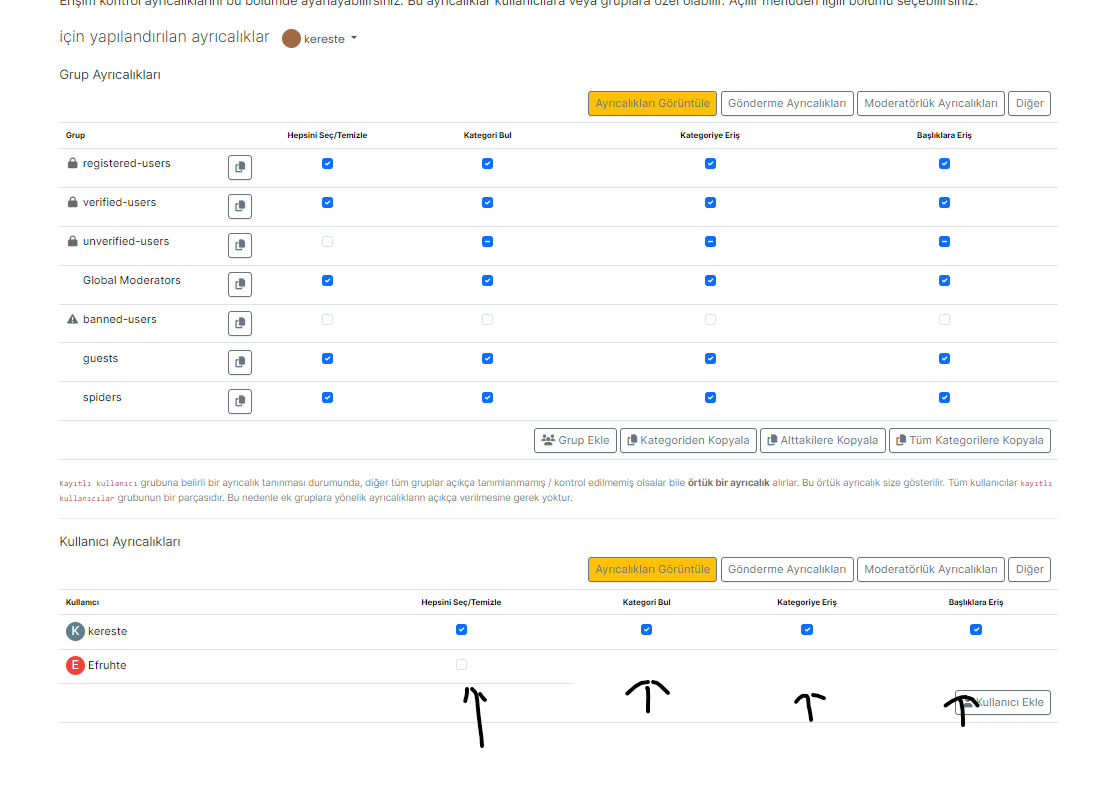
@phenomlab for example Efruthe user can not edit nothing and i can not chose what he/she can do this category

-
@phenomlab for example Efruthe user can not edit nothing and i can not chose what he/she can do this category
@cagatay Do you get the same issues if you create a group, add the user, and then try to set permissions on that rather than individual users?
Mark Cutting also advises organisations as a Fractional CIO, Fractional CISO and Executive Advisor, helping boards improve technology governance, cyber resilience and executive decision making. Learn more at Phenomlab Ltd
-
@cagatay Do you get the same issues if you create a group, add the user, and then try to set permissions on that rather than individual users?
@phenomlab said in Category For User:
Do you get the same issues if you create a group, add the user, and then try to set permissions on that rather than individual users?
yes Mark, i have registered and verified group.
but when updated 3.5 it will not work for verified group and others also. i thinks its a bug on 3.5 version.
-
@phenomlab said in Category For User:
Do you get the same issues if you create a group, add the user, and then try to set permissions on that rather than individual users?
yes Mark, i have registered and verified group.
but when updated 3.5 it will not work for verified group and others also. i thinks its a bug on 3.5 version.
@cagatay yes, I’ve seen this reported on nodebb via @crazycells
Mark Cutting also advises organisations as a Fractional CIO, Fractional CISO and Executive Advisor, helping boards improve technology governance, cyber resilience and executive decision making. Learn more at Phenomlab Ltd
-
@cagatay yes, I’ve seen this reported on nodebb via @crazycells
@phenomlab yes, let’s wait until @barisusakli fixes the bug…
-
-
@cagatay definitely looks like a bug
-
Closing this, as a confirmed bug and will be resolved in
3.5.1https://community.nodebb.org/topic/17623/nodebb-3-5-0/18?_=1699903831824
-
 undefined phenomlab has marked this topic as solved on
-
3.5.1has now been released. I’ve just deployed it, so safe to do so!


Hello! It looks like you're interested in this conversation, but you don't have an account yet.
Getting fed up of having to scroll through the same posts each visit? When you register for an account, you'll always come back to exactly where you were before, and choose to be notified of new replies (either via email, or push notification). You'll also be able to save bookmarks and upvote posts to show your appreciation to other community members.
With your input, this post could be even better 💗
Register LoginDid this solution help you?
Related Topics
-
Nodebb to Xenforo
Solved Configure -
Spam spam spam
Solved Configure -
Nodebb and emails
Solved Configure -
-
Test of youtube embeds
Solved Configure -
-
MogoDB v6 to v7 upgrade
Solved Configure -