Display tweets in widget [NodeBB]
-
It’s probably a long shot, I did think about posting this in the NodeBB forum, but thought I’d come here first to see if yourself or anyone else knows if this is possible…
I wonder if there is a way to get the latest tweets say for a category so ‘Wordpress’ for example and display Wordpress tweets or Tweets from the WordPress account if a post is generated in the WordPress category for example.
I’m looking to do this with my football forum , so for example The club account Tweets next to the ‘Official Club News’ topic etc.
Academy tweets next to academy news etc…
Many thanks


-
@phenomlab wow! How did you manage that? That’s brilliant!!
@jac Very easily done. You just use the HTML widgets and place them where you want

Mark Cutting also advises organisations as a Fractional CIO, Fractional CISO and Executive Advisor, helping boards improve technology governance, cyber resilience and executive decision making. Learn more at Phenomlab Ltd
-
It’s probably a long shot, I did think about posting this in the NodeBB forum, but thought I’d come here first to see if yourself or anyone else knows if this is possible…
I wonder if there is a way to get the latest tweets say for a category so ‘Wordpress’ for example and display Wordpress tweets or Tweets from the WordPress account if a post is generated in the WordPress category for example.
I’m looking to do this with my football forum , so for example The club account Tweets next to the ‘Official Club News’ topic etc.
Academy tweets next to academy news etc…
Many thanks
Mark Cutting also advises organisations as a Fractional CIO, Fractional CISO and Executive Advisor, helping boards improve technology governance, cyber resilience and executive decision making. Learn more at Phenomlab Ltd
-
@phenomlab said in Display tweets in widget [NodeBB]:
Wow, yes something just like this!
The only issue is it’s 6 years old that thread but maybe it would still work. Another issue probably could be the width of the tweet/ Twitter profile.
-
@phenomlab said in Display tweets in widget [NodeBB]:
Wow, yes something just like this!
The only issue is it’s 6 years old that thread but maybe it would still work. Another issue probably could be the width of the tweet/ Twitter profile.
@jac neither of those will be an issue from what I can see.
Mark Cutting also advises organisations as a Fractional CIO, Fractional CISO and Executive Advisor, helping boards improve technology governance, cyber resilience and executive decision making. Learn more at Phenomlab Ltd
-
@phenomlab said in Display tweets in widget [NodeBB]:
@jac neither of those will be an issue from what I can see.
Brilliant! Unfortunately like the one earlier I’ve only just seen this.

-
@phenomlab said in Display tweets in widget [NodeBB]:
@jac neither of those will be an issue from what I can see.
Brilliant! Unfortunately like the one earlier I’ve only just seen this.
Essentially on desktop / tablet I’m looking to display a widget of the latest tweets but it needs to be categorised so catagory based where it allows you to add a widget, now that is something I’m not quite sure is possible as a feature, but if it could be done it would be a very welcome addition to the forum indeed!
-
Essentially on desktop / tablet I’m looking to display a widget of the latest tweets but it needs to be categorised so catagory based where it allows you to add a widget, now that is something I’m not quite sure is possible as a feature, but if it could be done it would be a very welcome addition to the forum indeed!
@jac I think it’s one of those things we’d need to test first to see what the output is. We can then play with the CSS afterwards.
Mark Cutting also advises organisations as a Fractional CIO, Fractional CISO and Executive Advisor, helping boards improve technology governance, cyber resilience and executive decision making. Learn more at Phenomlab Ltd
-
@jac I think it’s one of those things we’d need to test first to see what the output is. We can then play with the CSS afterwards.
@phenomlab said in Display tweets in widget [NodeBB]:
@jac I think it’s one of those things we’d need to test first to see what the output is. We can then play with the CSS afterwards.
Of course, sounds fantastic!
 .
. -
@jac I think it’s one of those things we’d need to test first to see what the output is. We can then play with the CSS afterwards.
@phenomlab said in Display tweets in widget [NodeBB]:
@jac I think it’s one of those things we’d need to test first to see what the output is. We can then play with the CSS afterwards.
Looking forward to delving deeper into this over the weekend after work
. -
@phenomlab said in Display tweets in widget [NodeBB]:
@jac I think it’s one of those things we’d need to test first to see what the output is. We can then play with the CSS afterwards.
Looking forward to delving deeper into this over the weekend after work
.@jac let me know how you get on. I’m planning something similar in fact.
Mark Cutting also advises organisations as a Fractional CIO, Fractional CISO and Executive Advisor, helping boards improve technology governance, cyber resilience and executive decision making. Learn more at Phenomlab Ltd
-
@phenomlab said in Display tweets in widget [NodeBB]:
@jac let me know how you get on. I’m planning something similar in fact.
Great, it’ll be interesting to see both results. I simply plan to display a Twitter profile of the news / content displayed, I’m hoping it works out although displaying widgets for specific categories could be an issue.
-
@phenomlab said in Display tweets in widget [NodeBB]:
@jac let me know how you get on. I’m planning something similar in fact.
Great, it’ll be interesting to see both results. I simply plan to display a Twitter profile of the news / content displayed, I’m hoping it works out although displaying widgets for specific categories could be an issue.
Still yet to do this. Have you had any success?
I’m curious to see how it will look.
-
@jac not yet.
Mark Cutting also advises organisations as a Fractional CIO, Fractional CISO and Executive Advisor, helping boards improve technology governance, cyber resilience and executive decision making. Learn more at Phenomlab Ltd
-
@phenomlab said in Display tweets in widget [NodeBB]:
@jac not yet.
Did you ever get round to this? I still need to test myself, although I do wonder how it can be done specifically for categories.
-
@phenomlab said in Display tweets in widget [NodeBB]:
@jac not yet.
Did you ever get round to this? I still need to test myself, although I do wonder how it can be done specifically for categories.
@jac I haven’t done anything with this since we last briefly discussed it. When you say “tweets” are you referring to content directly from Twitter ?
Mark Cutting also advises organisations as a Fractional CIO, Fractional CISO and Executive Advisor, helping boards improve technology governance, cyber resilience and executive decision making. Learn more at Phenomlab Ltd
-
@jac I haven’t done anything with this since we last briefly discussed it. When you say “tweets” are you referring to content directly from Twitter ?
@phenomlab I am indeed mate, so for example the ‘Stockport County’ category content would display a widget that shows the club’s official tweets or Twitter profile. May not be possible but would definitely be good if it could be pulled off. It’s just whether this sort of thing would impact load times etc.
-
@phenomlab I am indeed mate, so for example the ‘Stockport County’ category content would display a widget that shows the club’s official tweets or Twitter profile. May not be possible but would definitely be good if it could be pulled off. It’s just whether this sort of thing would impact load times etc.
@jac As a quick POC I decided to create a Twitter widget on your Categories page - see below for what it looks like
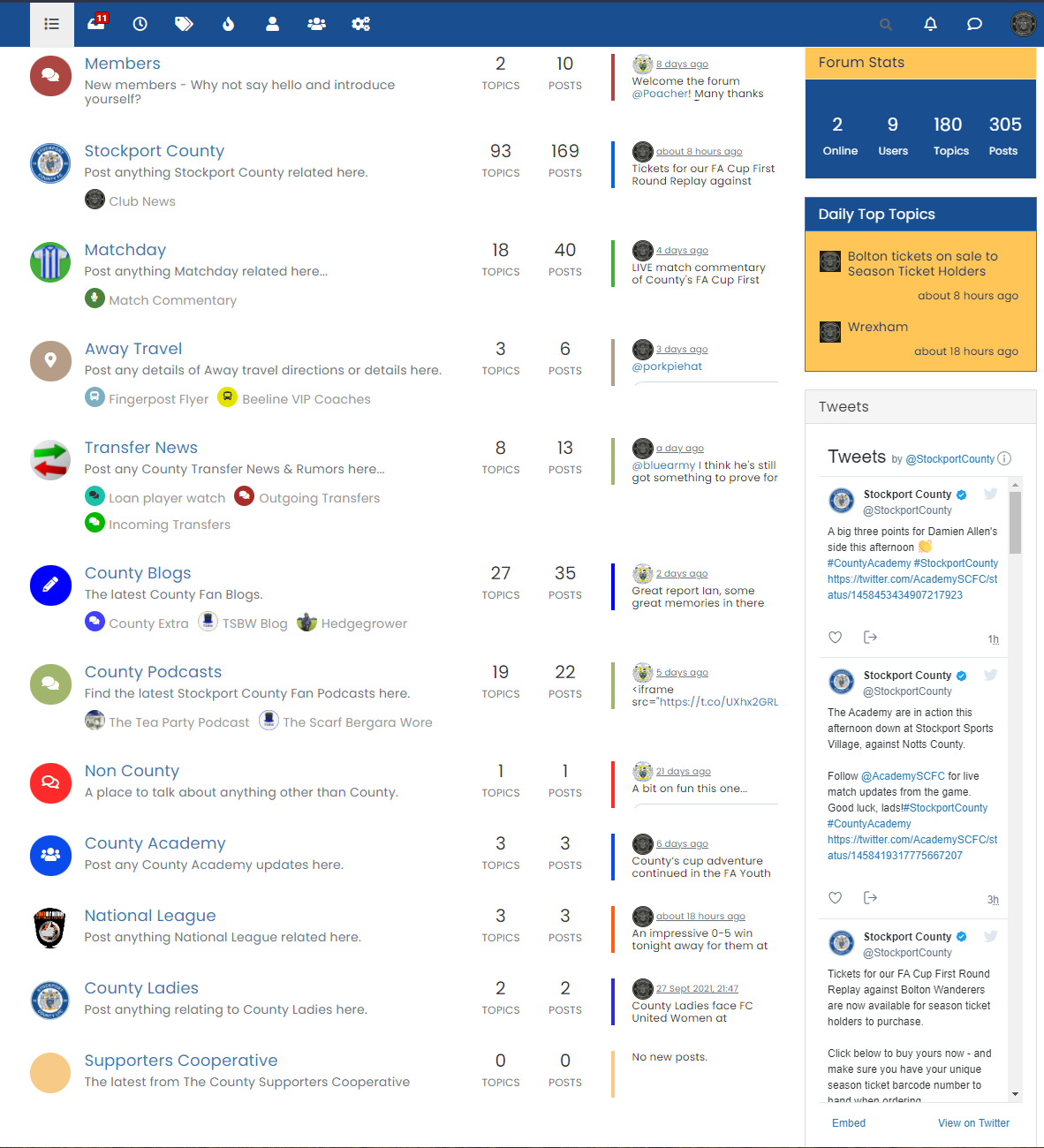
It’s not styled as such yet, but is nothing more than a widget taken from Twitter directly here
This then gives you the code to place into any widget
<a class="twitter-timeline" data-height="800" data-dnt="true" data-theme="light" href="https://twitter.com/StockportCounty?ref_src=twsrc%5Etfw">Tweets by StockportCounty</a> <script async src="https://platform.twitter.com/widgets.js" charset="utf-8"></script>The widget code is shown as below
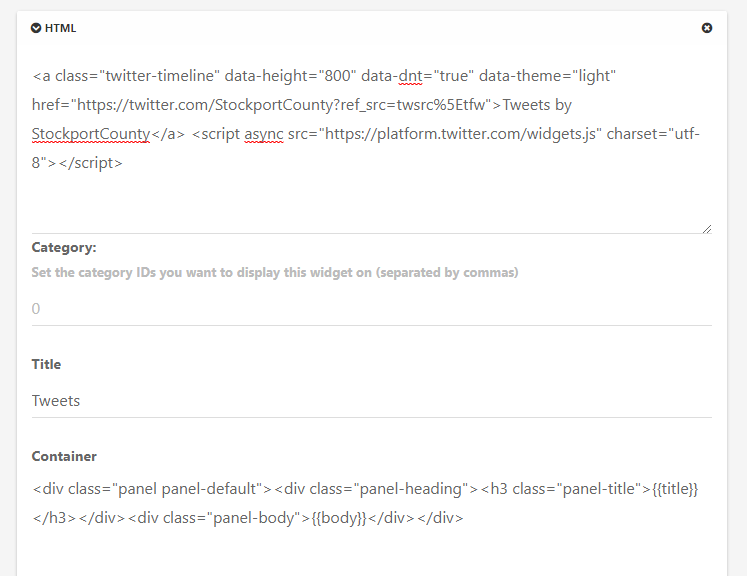
Save the widget, and off you go
Clearly, you need to tailor this a little depending on what you actually want to capture, but this is the overall concept.
Mark Cutting also advises organisations as a Fractional CIO, Fractional CISO and Executive Advisor, helping boards improve technology governance, cyber resilience and executive decision making. Learn more at Phenomlab Ltd
-
@jac As a quick POC I decided to create a Twitter widget on your Categories page - see below for what it looks like
It’s not styled as such yet, but is nothing more than a widget taken from Twitter directly here
This then gives you the code to place into any widget
<a class="twitter-timeline" data-height="800" data-dnt="true" data-theme="light" href="https://twitter.com/StockportCounty?ref_src=twsrc%5Etfw">Tweets by StockportCounty</a> <script async src="https://platform.twitter.com/widgets.js" charset="utf-8"></script>The widget code is shown as below
Save the widget, and off you go
Clearly, you need to tailor this a little depending on what you actually want to capture, but this is the overall concept.
@phenomlab said in Display tweets in widget [NodeBB]:
@jac As a quick POC I decided to create a Twitter widget on your Categories page - see below for what it looks like
It’s not styled as such yet, but is nothing more than a widget taken from Twitter directly here
This then gives you the code to place into any widget
<a class="twitter-timeline" data-height="800" data-dnt="true" data-theme="light" href="https://twitter.com/StockportCounty?ref_src=twsrc%5Etfw">Tweets by StockportCounty</a> <script async src="https://platform.twitter.com/widgets.js" charset="utf-8"></script>The widget code is shown as below
Save the widget, and off you go
Clearly, you need to tailor this a little depending on what you actually want to capture, but this is the overall concept.
Wow, looks phenomenal mate, is there any way to limit the amount of tweets shown at all? And more specifically how can they be displayed on each category?
-
@phenomlab said in Display tweets in widget [NodeBB]:
@jac As a quick POC I decided to create a Twitter widget on your Categories page - see below for what it looks like
It’s not styled as such yet, but is nothing more than a widget taken from Twitter directly here
This then gives you the code to place into any widget
<a class="twitter-timeline" data-height="800" data-dnt="true" data-theme="light" href="https://twitter.com/StockportCounty?ref_src=twsrc%5Etfw">Tweets by StockportCounty</a> <script async src="https://platform.twitter.com/widgets.js" charset="utf-8"></script>The widget code is shown as below
Save the widget, and off you go
Clearly, you need to tailor this a little depending on what you actually want to capture, but this is the overall concept.
Wow, looks phenomenal mate, is there any way to limit the amount of tweets shown at all? And more specifically how can they be displayed on each category?
@jac said in Display tweets in widget [NodeBB]:
is there any way to limit the amount of tweets shown at all?
Yes, but only by adjusting the height of the widget itself (via Twitter) from what I recall seeing.
And more specifically how can they be displayed on each category?
That part I’m not so sure of. I’d say I’m 99% certain it’ll be possible, but I haven’t invested any time yet to determine this.
Mark Cutting also advises organisations as a Fractional CIO, Fractional CISO and Executive Advisor, helping boards improve technology governance, cyber resilience and executive decision making. Learn more at Phenomlab Ltd
-
@jac said in Display tweets in widget [NodeBB]:
is there any way to limit the amount of tweets shown at all?
Yes, but only by adjusting the height of the widget itself (via Twitter) from what I recall seeing.
And more specifically how can they be displayed on each category?
That part I’m not so sure of. I’d say I’m 99% certain it’ll be possible, but I haven’t invested any time yet to determine this.
@phenomlab said in Display tweets in widget [NodeBB]:
@jac said in Display tweets in widget [NodeBB]:
is there any way to limit the amount of tweets shown at all?
Yes, but only by adjusting the height of the widget itself (via Twitter) from what I recall seeing.
And more specifically how can they be displayed on each category?
That part I’m not so sure of. I’d say I’m 99% certain it’ll be possible, but I haven’t invested any time yet to determine this.
Thanks Mark, at least it’s there and can be added on when possible
.


Hello! It looks like you're interested in this conversation, but you don't have an account yet.
Getting fed up of having to scroll through the same posts each visit? When you register for an account, you'll always come back to exactly where you were before, and choose to be notified of new replies (either via email, or push notification). You'll also be able to save bookmarks and upvote posts to show your appreciation to other community members.
With your input, this post could be even better 💗
Register LoginDid this solution help you?
Related Topics
-
-
-
Forum Icons NodeBB
Solved Customisation -
-
-
-
-
Customising NodeBB
Locked Customisation