NodeBB v3 Chat Very Slow
-
Absolutely

Weeding, mower, vegetable garden, sowing, tiller, etc.
I’ve been on it for 2 whole weekends but the weather is nice and it’s good for the mind to take a little nature breakPW and WS Spirit alive
-
Absolutely
Weeding, mower, vegetable garden, sowing, tiller, etc.
I’ve been on it for 2 whole weekends but the weather is nice and it’s good for the mind to take a little nature break@DownPW two weekends? Do you have a garden, or a field?

-
1000m2 of garden including 35m2 of vegetable garden. we had to turn over, beaker, weed the vegetable garden with grelinette then plant everything: potatoes, green beans, tomatoes, cherry tomatoes, salads, cucumber, zucchini… and mulch everything
Then I weeded all my flower beds and then mowed the lawn. I mow once a week at the moment or maximum every 2 weeks.
I also planter 2 beds tulip land (2x 5m)
In short, a lot of work casually and with the 2 children at home, including a 2-year-old to watch, it’s not easy.


PW and WS Spirit alive
-
1000m2 of garden including 35m2 of vegetable garden. we had to turn over, beaker, weed the vegetable garden with grelinette then plant everything: potatoes, green beans, tomatoes, cherry tomatoes, salads, cucumber, zucchini… and mulch everything
Then I weeded all my flower beds and then mowed the lawn. I mow once a week at the moment or maximum every 2 weeks.
I also planter 2 beds tulip land (2x 5m)
In short, a lot of work casually and with the 2 children at home, including a 2-year-old to watch, it’s not easy.
@DownPW that’s a huge garden, and great that you’re growing your own produce too. A lot of work though… Impressive

-
After upgrading 3.2.0, the typing field is narrowed.
-
@cagatay In where, and what ?
-
Here I think

PW and WS Spirit alive
-
That’s a regression bug I think. You now have to press ALT + ENTER to get an extra line appear
-
@DownPW said in NodeBB v3 Chat Very Slow:
Here I think
yes you are right @DownPW
@phenomlab how can i expand it? -
Odd, node like that on nodebb communauty
PW and WS Spirit alive
-
@DownPW as I said previously, likely a regression introduced by 3.2.0
-
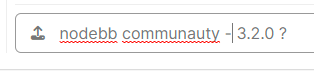
But nodebb forum communauty is on 3.2.0 no ?
If yes, they don’t have this problem -
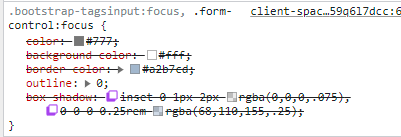
They deactivate background and box shadow on nodebb communauty :
PW and WS Spirit alive
-
@DownPW None of those will impact the box size. Let me have a look.
-
yep not box size but we don’t see the bug
PW and WS Spirit alive
-
@DownPW what exactly is the bug? I’ve tested it, and it behaves normally from what I see (unless I completely missed something)?
-
Size is good, is just the focus when we type text it has changed
on 3.1.7 :

On 3.2.0 here :

PW and WS Spirit alive
-
Size is good, is just the focus when we type text it has changed
on 3.1.7 :
On 3.2.0 here :
@DownPW Yes, that’s
input:focus- it’s used to style much larger boxes on focus, but I’ll need to create an exemption here. -
-




Hello! It looks like you're interested in this conversation, but you don't have an account yet.
Getting fed up of having to scroll through the same posts each visit? When you register for an account, you'll always come back to exactly where you were before, and choose to be notified of new replies (either via email, or push notification). You'll also be able to save bookmarks and upvote posts to show your appreciation to other community members.
With your input, this post could be even better 💗
Register Login