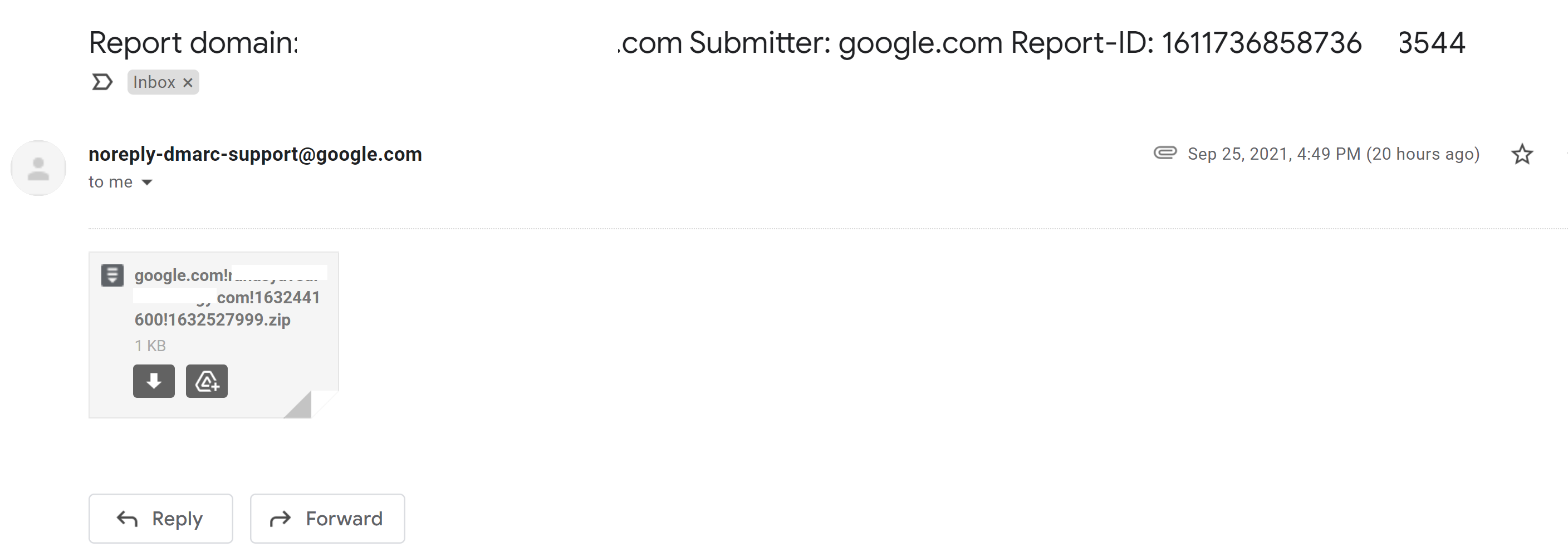
Email set up on OVH Cloud
-
@mventures you might want to take a look at this supplementary guide also
https://community.nodebb.org/topic/15072/nodebb-email-options@phenomlab I read through the essay in full - so technical but I took away these 2 points:
-
so you can use a Gmail account for instance to email your users.
-
“It very thoroughly explains our reasoning and suggestions to use third-party emailers”, a response from Julian
So, I think my idea of yesterday in using a 3rd party email service, is a better option.
-
-
Hi @phenomlab
- I have my emails working from a 3rd party
- I have verified the Single Identity verification on SendGrid.
- SendGrid is now asking to verify the domain, and this requires me to add new CNAME records. Will this negatively impact the website?
-
Hi @phenomlab
- I have my emails working from a 3rd party
- I have verified the Single Identity verification on SendGrid.
- SendGrid is now asking to verify the domain, and this requires me to add new CNAME records. Will this negatively impact the website?
Update: I have verified the domain and the email on SendGrid. All good and the website is still up! Phew.
Now, how do I get those email verification to new users configured? -
Update: I have verified the domain and the email on SendGrid. All good and the website is still up! Phew.
Now, how do I get those email verification to new users configured?@mventures Go to
/admin/settings/emailand see belowComplete as necessary using the SendGrid credentials you have
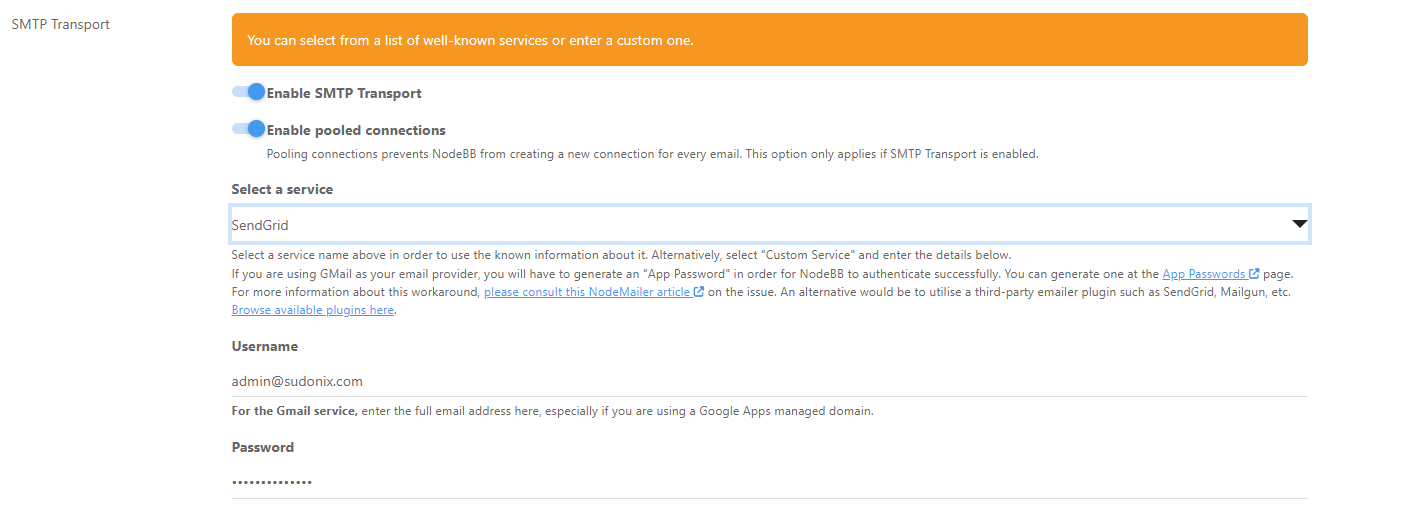
Save
-
 undefined phenomlab has marked this topic as solved on
-
Thank you!
- For the SMTP Transport section: Do I enter the password of my email client or the password of my SendGrid account?
- For Edit Email Template, I have chosen, “Verify-email” - Is that correct?
- For Email Testing, I have chosen, “Verify-email” - Is that correct?
-
Thank you!
- For the SMTP Transport section: Do I enter the password of my email client or the password of my SendGrid account?
- For Edit Email Template, I have chosen, “Verify-email” - Is that correct?
- For Email Testing, I have chosen, “Verify-email” - Is that correct?
@mventures see below
#1 you need to use the SendGrid username and password you have as you are transmitting over their services
#2 and #3 there is no need to select any of these. This is the email templating system which allows you to change the layout of the emails being sent, and in most cases you don’t touch them unless you actually want to change the content.
The testing section is exactly that. It enables you to send a test message using a specific template so you can verify that your settings work correctly.
Mark Cutting also advises organisations as a Fractional CIO, Fractional CISO and Executive Advisor, helping boards improve technology governance, cyber resilience and executive decision making. Learn more at Phenomlab Ltd
-
@mventures see below
#1 you need to use the SendGrid username and password you have as you are transmitting over their services
#2 and #3 there is no need to select any of these. This is the email templating system which allows you to change the layout of the emails being sent, and in most cases you don’t touch them unless you actually want to change the content.
The testing section is exactly that. It enables you to send a test message using a specific template so you can verify that your settings work correctly.
-
The username I have for SendGrid is not an email id. It’s just a word. Is it OK to use that in NodeBB also?
-
Regarding the template - the default selection is “Banned”, for both “Edit Email Template” and “Email Testing”?
-
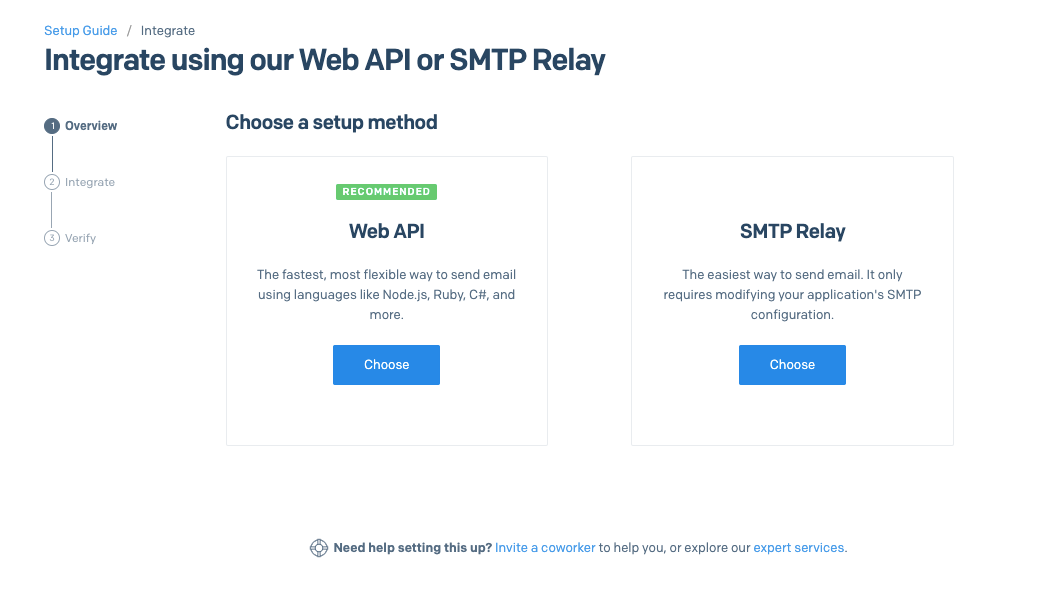
On my SendGrid - is there anything left to do there?
-
-
-
The username I have for SendGrid is not an email id. It’s just a word. Is it OK to use that in NodeBB also?
-
Regarding the template - the default selection is “Banned”, for both “Edit Email Template” and “Email Testing”?
-
On my SendGrid - is there anything left to do there?
@mventures said in Email set up on OVH Cloud:
On my SendGrid - is there anything left to do there?
Yes - you would want to choose “SMTP Relay” as this will provide the credentials you’d need in order to send email from NodeBB.
Mark Cutting also advises organisations as a Fractional CIO, Fractional CISO and Executive Advisor, helping boards improve technology governance, cyber resilience and executive decision making. Learn more at Phenomlab Ltd
-
-
@mventures said in Email set up on OVH Cloud:
On my SendGrid - is there anything left to do there?
Yes - you would want to choose “SMTP Relay” as this will provide the credentials you’d need in order to send email from NodeBB.
@phenomlab Thank you! Could you help me with questions 1 and 2 also from the previous message also, please? Regarding username and template.
-
-
The username I have for SendGrid is not an email id. It’s just a word. Is it OK to use that in NodeBB also?
-
Regarding the template - the default selection is “Banned”, for both “Edit Email Template” and “Email Testing”?
-
On my SendGrid - is there anything left to do there?
@mventures said in Email set up on OVH Cloud:
- The username I have for SendGrid is not an email id. It’s just a word. Is it OK to use that in NodeBB also?
No, it needs to be a username and password which is why you need the SMTP relay
- Regarding the template - the default selection is “Banned”, for both “Edit Email Template” and “Email Testing”?
Yes. You don’t need to change anything here. The point of those is so you can make changes to the email design.
Mark Cutting also advises organisations as a Fractional CIO, Fractional CISO and Executive Advisor, helping boards improve technology governance, cyber resilience and executive decision making. Learn more at Phenomlab Ltd
-
-
@mventures said in Email set up on OVH Cloud:
- The username I have for SendGrid is not an email id. It’s just a word. Is it OK to use that in NodeBB also?
No, it needs to be a username and password which is why you need the SMTP relay
- Regarding the template - the default selection is “Banned”, for both “Edit Email Template” and “Email Testing”?
Yes. You don’t need to change anything here. The point of those is so you can make changes to the email design.
@phenomlab Sorry, what I meant on (1) is when I signed up on SendGrid, my username was a word and not an email id. SendGrid asks you set up a username when you join them. They are not using email id as the username. At least, in my case.
-
@phenomlab Sorry, what I meant on (1) is when I signed up on SendGrid, my username was a word and not an email id. SendGrid asks you set up a username when you join them. They are not using email id as the username. At least, in my case.
@mventures that’s not an issue provided there is a password to go with the username

Hello! It looks like you're interested in this conversation, but you don't have an account yet.
Getting fed up of having to scroll through the same posts each visit? When you register for an account, you'll always come back to exactly where you were before, and choose to be notified of new replies (either via email, or push notification). You'll also be able to save bookmarks and upvote posts to show your appreciation to other community members.
With your input, this post could be even better 💗
Register LoginDid this solution help you?
Related Topics
-
Nodebb and emails
Solved Configure -
Best email provider?
Solved Privacy -
-
-
-
Email Server Settings
Solved Configure -
-