Skip to content

node vs nodejs confusion?

Solved Configure
2 2 849 1
  • This was so confusing that I think its worth a forum post on it. I’m sure I wont be the last person to be thrown by this.
    So it started two days ago when I wanted to update Nodejs (or should I say node) to version 18.x on a server, and it seemed to download it but …
    nodejs --version always gave a very old number
    Thanks to @phenomlab I now realise the command to use should be
    node --version
    … but how confusing that there are two similarly named packages, and I seemed to have both.
    Whats more the terms node and nodejs are used interchangeably in some places.
    For example although NodeBB uses node
    On the nodebb instructions, the install command writes nodejs!

    sudo apt-get install -y nodejs
    

    So while I sort this out in my head, if the NodeBB uses ‘node’, why is the install command stating nodejs ?

  • This was so confusing that I think its worth a forum post on it. I’m sure I wont be the last person to be thrown by this.
    So it started two days ago when I wanted to update Nodejs (or should I say node) to version 18.x on a server, and it seemed to download it but …
    nodejs --version always gave a very old number
    Thanks to @phenomlab I now realise the command to use should be
    node --version
    … but how confusing that there are two similarly named packages, and I seemed to have both.
    Whats more the terms node and nodejs are used interchangeably in some places.
    For example although NodeBB uses node
    On the nodebb instructions, the install command writes nodejs!

    sudo apt-get install -y nodejs
    

    So while I sort this out in my head, if the NodeBB uses ‘node’, why is the install command stating nodejs ?

    @eeeee have a look at the below

    https://docs.nodebb.org/installing/os/ubuntu/

    curl -sL https://deb.nodesource.com/setup_lts.x | sudo -E bash -
    sudo apt-get install -y nodejs


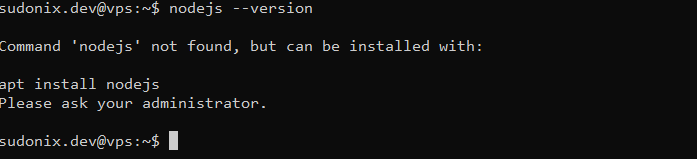
    You’ll notice that we are in fact “installing” NodeJS but never actually have a need to reference it. Here’s the nodejs --version command on my dev system

    6eb1482e-0c9b-454d-aa84-199bcc845702-image.png

    More detail here

    https://askubuntu.com/questions/1030622/why-do-i-see-different-versions-of-node-and-nodejs

  • phenomlabundefined phenomlab has marked this topic as solved on

Did this solution help you?
Did you find the suggested solution useful? Support 💗 Sudonix with a coffee
If your organisation needs deeper expertise around infrastructure, security, or technology leadership, learn more about Phenomlab Ltd. Many of the deeper technical guides behind Sudonix are published there.

Related Topics
  • Spam spam spam

    Solved Configure nodebb
    6
    2 Votes
    6 Posts
    854 Views
    @Panda said in Spam spam spam: ok, yes Ive seen the queue, it shows IP, but doesnt have a field for comments from registrant. It’s not designed for that. It merely serves as a gateway between posts appearing on your form or not. @Panda said in Spam spam spam: It would be better if nodebb had this plugin included in ACP list, as not only then do you know its approved and should work, but many people cant or dont want to use CLI on the server That’s a question for the NodeBB devs but in all honesty you can’t not use the CLI when installing nodebb so to be this isn’t a big deal.
  • Nodebb and emails

    Solved Configure nodebb
    27
    5 Votes
    27 Posts
    4k Views
    @Panda it will use SMTP. In all cases, I never use any plugin to send email. I’ll always send it raw.
  • Opening links in nodebb widget

    Solved Configure nodebb
    6
    4 Votes
    6 Posts
    2k Views
    A more efficient way of including this would be to not over complicate it and leverage a standard iframe (providing the CSP headers of the remote site permit this) like below <iframe src="https://www.classmarker.com/online-test/start/?quiz=gag66aea7922f0a5" width="700" height="800"></iframe> This works first time every time on your site as intended.
  • Pulling YouTube videos using RSS

    Configure rss youtube rsshub
    5
    7
    6 Votes
    5 Posts
    1k Views
    The perfect solution and walkthrough Mark, appreciated as always!
  • MogoDB v6 to v7 upgrade

    Solved Configure nodebb
    5
    1 Votes
    5 Posts
    1k Views
    @Panda if you used the Ubuntu PPA, I think this only goes as far as 6.x if I recall correctly.
  • How to deploy WordPress.org Developer theme

    Solved Configure wordpress theme github
    4
    1 Votes
    4 Posts
    1k Views
    @Hari the real issue here is that I don’t think it can be used as a theme for WordPress because of the dependencies it clearly has, including its own Web server. My view here is that this is designed to be a complete development environment outside of the WordPress core.
  • 21 Votes
    110 Posts
    28k Views
    @crazycells said in Setup OGProxy for use in NodeBB: are they cached for each user separately? No. It’s a shared cache @crazycells said in Setup OGProxy for use in NodeBB: additionally, this is also handling youtube videos etc, right? No. This is handled by nodebb-plugin-ns-embed
  • Updating Node and NPM

    General nodejs
    5
    1 Votes
    5 Posts
    979 Views
    @Sampo2910 said in Updating Node and NPM: Is there a way I can see what the app version of Node is? Then i could install ‘up to that’ and keep an eye out for any changes? Have a look in the source code for the app you are using, or better still, look at the GitHub page which should give you an idea of the version number which is the latest. In the source code you have running, there is typically a README file which should state the version you are running.