Skip to content

Chevron up before & after

Solved Configure
11 3 2.0k 1
  • Hi,
    How to colored red one of when user up or down rapped?
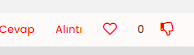
    8c5d9503-978a-4b63-b946-2a7be433ef09-image.png

  • @crazycells i use them (I want the heart and hand sign to have a red color inside after they are empty, with a hollow red edge before being pressed, and a full red when pressed)

    [Mod change - please post in English - translated]

    span.tag:before {
        content: "\f02c";
        font-family: "Font Awesome 5 Free";
        margin-right: 3px;
        margin-left: 2px;
        font-weight: 600;
    	font-size: 9px;
    	vertical-align: 0;
    }
    .fa-chevron-up:before {
        font-family: 'Font Awesome 5 Free';
    	font-weight: 300;
    	font-size: 16px;
    	content: '\f004';
    	margin-right: 4px;
    	vertical-align: -1px;
    	color: red;
    }
    
    .topic [component="post/upvote"].upvoted i::before {
        content: "\f004";
        color: red;
    }
    
    .fa-chevron-down:before  {
        font-family: 'Font Awesome 5 Free';
    	font-weight: 300;
    	font-size: 16px;
    	content: '\f165';
    	margin-right: 4px;
    	vertical-align: -1px;
    	color: red;
    }
    

    @cagatay please try this:

    span.votes {
        .fa-chevron-up:before {
            content: "\f004";
            font-weight: 400;
        }
        .upvoted .fa-chevron-up:before {
            content: "\f004";
            font-weight: 900;
            color: red; 
        }
     }
    
  • Hi,
    How to colored red one of when user up or down rapped?

    8c5d9503-978a-4b63-b946-2a7be433ef09-image.png

    @cagatay this will be a simple state change based on CSS. Do you want a different colour for downvote and upvote ?

  • @cagatay this will be a simple state change based on CSS. Do you want a different colour for downvote and upvote ?

    @phenomlab i want that for example the heart will red color mean all inside when uptoved.

  • @phenomlab i want that for example the heart will red color mean all inside when uptoved.

    @cagatay you want the heart to become red filled when someone upvotes ? CSS on its own won’t be enough for this. It’ll require a js based trigger to accomplish this.

  • @cagatay you want the heart to become red filled when someone upvotes ? CSS on its own won’t be enough for this. It’ll require a js based trigger to accomplish this.

    @phenomlab said in Chevron up before & after:

    @cagatay you want the heart to become red filled when someone upvotes ? CSS on its own won’t be enough for this. It’ll require a js based trigger to accomplish this.

    maybe something like this might work?

    This is what we use for “thumbs up” and “thumbs down” icons…

    span.votes {
        .fa-chevron-up:before {
            content: "\f164";
            font-weight: 400;
            padding-right: 5px;
            margin-left: 20px;
    
        }
        .upvoted .fa-chevron-up:before {
            content: "\f164";
            font-weight: 900;
            padding-right: 5px;
            margin-left: 20px;
        }
        
        .fa-chevron-down:before {
            content: "\f165";
            font-weight: 400;
            padding-left: 5px;
        }
        .downvoted .fa-chevron-down:before {
            content: "\f165";
            font-weight: 900;
            padding-left: 5px;
        }
    }
    
  • @phenomlab i want that for example the heart will red color mean all inside when uptoved.

    @cagatay actually, I just realised you’re using the heart icon for upvote - apologies - I thought that this was the reactions plugin.

    In this case, CSS would in fact work.

  • @phenomlab said in Chevron up before & after:

    @cagatay you want the heart to become red filled when someone upvotes ? CSS on its own won’t be enough for this. It’ll require a js based trigger to accomplish this.

    maybe something like this might work?

    This is what we use for “thumbs up” and “thumbs down” icons…

    span.votes {
        .fa-chevron-up:before {
            content: "\f164";
            font-weight: 400;
            padding-right: 5px;
            margin-left: 20px;
    
        }
        .upvoted .fa-chevron-up:before {
            content: "\f164";
            font-weight: 900;
            padding-right: 5px;
            margin-left: 20px;
        }
        
        .fa-chevron-down:before {
            content: "\f165";
            font-weight: 400;
            padding-left: 5px;
        }
        .downvoted .fa-chevron-down:before {
            content: "\f165";
            font-weight: 900;
            padding-left: 5px;
        }
    }
    

    @crazycells i use them (I want the heart and hand sign to have a red color inside after they are empty, with a hollow red edge before being pressed, and a full red when pressed)

    [Mod change - please post in English - translated]

    span.tag:before {
        content: "\f02c";
        font-family: "Font Awesome 5 Free";
        margin-right: 3px;
        margin-left: 2px;
        font-weight: 600;
    	font-size: 9px;
    	vertical-align: 0;
    }
    .fa-chevron-up:before {
        font-family: 'Font Awesome 5 Free';
    	font-weight: 300;
    	font-size: 16px;
    	content: '\f004';
    	margin-right: 4px;
    	vertical-align: -1px;
    	color: red;
    }
    
    .topic [component="post/upvote"].upvoted i::before {
        content: "\f004";
        color: red;
    }
    
    .fa-chevron-down:before  {
        font-family: 'Font Awesome 5 Free';
    	font-weight: 300;
    	font-size: 16px;
    	content: '\f165';
    	margin-right: 4px;
    	vertical-align: -1px;
    	color: red;
    }
    
  • @crazycells i use them (I want the heart and hand sign to have a red color inside after they are empty, with a hollow red edge before being pressed, and a full red when pressed)

    [Mod change - please post in English - translated]

    span.tag:before {
        content: "\f02c";
        font-family: "Font Awesome 5 Free";
        margin-right: 3px;
        margin-left: 2px;
        font-weight: 600;
    	font-size: 9px;
    	vertical-align: 0;
    }
    .fa-chevron-up:before {
        font-family: 'Font Awesome 5 Free';
    	font-weight: 300;
    	font-size: 16px;
    	content: '\f004';
    	margin-right: 4px;
    	vertical-align: -1px;
    	color: red;
    }
    
    .topic [component="post/upvote"].upvoted i::before {
        content: "\f004";
        color: red;
    }
    
    .fa-chevron-down:before  {
        font-family: 'Font Awesome 5 Free';
    	font-weight: 300;
    	font-size: 16px;
    	content: '\f165';
    	margin-right: 4px;
    	vertical-align: -1px;
    	color: red;
    }
    

    @cagatay please try this:

    span.votes {
        .fa-chevron-up:before {
            content: "\f004";
            font-weight: 400;
        }
        .upvoted .fa-chevron-up:before {
            content: "\f004";
            font-weight: 900;
            color: red; 
        }
     }
    
  • @cagatay please try this:

    span.votes {
        .fa-chevron-up:before {
            content: "\f004";
            font-weight: 400;
        }
        .upvoted .fa-chevron-up:before {
            content: "\f004";
            font-weight: 900;
            color: red; 
        }
     }
    

    @crazycells up is working but i used same code changed as down type but the image is hidden while voted.

    span.votes {
        .fa-chevron-down:before {
            content: "\f165";
            font-weight: 400;
        }
        .upvoted .fa-chevron-down:before {
            content: "\f165";
            font-weight: 900;
            color: red; 
        }
     }
    
  • @crazycells up is working but i used same code changed as down type but the image is hidden while voted.

    span.votes {
        .fa-chevron-down:before {
            content: "\f165";
            font-weight: 400;
        }
        .upvoted .fa-chevron-down:before {
            content: "\f165";
            font-weight: 900;
            color: red; 
        }
     }
    

    @cagatay I believe the bottom .upvoted should be .downvoted

  • @cagatay I believe the bottom .upvoted should be .downvoted

    @crazycells you are right 🙂 thank you.

  • cagatayundefined cagatay has marked this topic as solved on

Did this solution help you?
Did you find the suggested solution useful? Support 💗 Sudonix with a coffee
If your organisation needs deeper expertise around infrastructure, security, or technology leadership, learn more about Phenomlab Ltd. Many of the deeper technical guides behind Sudonix are published there.

Related Topics
  • 3 Votes
    1 Posts
    661 Views
    No one has replied
  • Nodebb design

    Solved General nodebb
    2
    1 Votes
    2 Posts
    951 Views
    @Panda said in Nodebb design: One negative is not being so good for SEO as more Server side rendered forums, if web crawlers dont run the JS to read the forum. From recollection, Google and Bing have the capability to read and process JS, although it’s not in the same manner as a physical person will consume content on a page. It will be seen as plain text, but will be indexed. However, it’s important to note that Yandex and Baidu will not render JS, although seeing as Google has a 90% share of the content available on the web in terms of indexing, this isn’t something you’ll likely lose sleep over. @Panda said in Nodebb design: The “write api” is preferred for server-to-server interactions. This is mostly based around overall security - you won’t typically want a client machine changing database elements or altering data. This is why you have “client-side” which could be DOM manipulation etc, and “server-side” which performs more complex operations as it can communicate directly with the database whereas the client cannot (and if it can, then you have a serious security flaw). Reading from the API is perfectly acceptable on the client-side, but not being able to write. A paradigm here would be something like SNMP. This protocol exists as a UDP (UDP is very efficient, as it is “fire and forget” and does not wait for a response like TCP does) based service which reads performance data from a remote source, thus enabling an application to parse that data for use in a monitoring application. In all cases, SNMP access should be “RO” (Read Only) and not RW (Read Write). It is completely feasible to assume complete control over a firewall for example by having RW access to SNMP and then exposing it to the entire internet with a weak passphrase. You wouldn’t do it (at least, I hope you wouldn’t) and the same ethic applies to server-side rendering and the execution of commands.
  • Composer Zen icon?

    Solved Configure nodebb
    8
    1
    2 Votes
    8 Posts
    1k Views
    @DownPW exactly. Not really a new concept, and in all honesty, not something I’ve ever used. If you consider the need to add links and references, or citations, you’d need to be able to see other parts of the screen!
  • Email validation NodeBB

    Bugs nodebb
    21
    3 Votes
    21 Posts
    6k Views
    @Panda said in Email validation NodeBB: Did you configure that as a custom change to the usual quote icon. How do you do that? I notice on NodeBB site its a solid blue quotes Yes, I changed it. NodeBB by default users the free font awesome library whereas I use the pro (paid) version SDK have access to a wider set of icons, and at different thicknesses etc. The change of colour is just simple CSS.
  • How to fix size of photos & videos NodeBB

    Solved Customisation nodebb nodebb size
    7
    3 Votes
    7 Posts
    2k Views
    @crazycells pleasure. Using percentages makes much more sense in this case. It’s the same argument with px vs pt vs em with fonts, margins, padding, etc., in the sense that em is generally preferred over px and pt https://stackoverflow.com/questions/609517/why-em-instead-of-px
  • Adjusting the size of boxes in posts-list class

    Solved Customisation nodebb
    3
    3 Votes
    3 Posts
    1k Views
    @phenomlab thanks a lot, this combination works best .posts-list .posts-list-item .content { overflow: auto; max-height: 600px; }
  • [NODEBB] Help for my custom CSS

    Solved Customisation nodebb css bugfix
    237
    49 Votes
    237 Posts
    100k Views
    @baris said: You should change your selectors so it doesn’t look at the entire document. You probably only want to apply fancybox to stuff inside the #content element which is what changes when the user navigates around the page. So use $('#content a').... for your selectors then the forum logo in the header won’t be selected. I modified the JS Fancybox code now and this code and it seem better // --------------------------------------------- // Fancybox Media Reader (Without Website Logo) // --------------------------------------------- if (top.location.pathname !== '/login') { $(window).on('action:posts.loaded', function(data) { console.log("Polling DOM for lazyLoaded images to apply Fancybox"); $(document).ready(function() { $('#content a').not('.forum-logo').not(".avatar").not(".emoji").not(".bmac-noanimate").each(function() { $('#content a[href*=".jpg"], #content a[href*=".jpeg"], #content a[href*=".png"], #content a[href*=".gif"], #content a[href*=".webp"]').addClass("noanimate"); }); }); }); } if (top.location.pathname !== '/login') { $(document).ready(function() { $(window).on('action:ajaxify.end', function(data) { $('#content a').not('.logo').not(".avatar").not(".emoji").not(".bmac-noanimate").each(function() { $('#content a[href*=".jpg"], #content a[href*=".jpeg"], #content a[href*=".png"], #content a[href*=".gif"], #content a[href*=".webp"]').addClass("noanimate"); data.preventDefault() // Strip out the images contained inside blockquotes as this looks nasty :) $('#content blockquote img').remove(); }); Fancybox.bind( '#content a[href*=".jpg"], #content a[href*=".jpeg"], #content a[href*=".png"], #content a[href*=".gif"], #content a[href*=".webp"]', { groupAll: true, } ); }); }); } // Chat fancybox - fires when chat module loaded and AJAX calls new chat $(document).ready(function() { $(window).on('action:chat.loaded', function(data) { // >>> Se limiter au contenu principal uniquement <<< $('#content img').not('.forum-logo').not(".avatar").not(".emoji").not(".bmac-noanimate").each(function() { var newHref = $(this).attr("src"); $(this).wrap("<a class='fancybox' href='" + newHref + "'/>"); $('#content a[href*=".jpg"], #content a[href*=".jpeg"], #content a[href*=".png"], #content a[href*=".gif"], #content a[href*=".webp"]').addClass("noanimate"); data.preventDefault(); // Strip out the images contained inside blockquotes as this looks nasty :) $('#content blockquote img').remove(); }); Fancybox.bind( '#content a[href*=".jpg"], #content a[href*=".jpeg"], #content a[href*=".png"], #content a[href*=".gif"], #content a[href*=".webp"]', { groupAll: true, } ); }); }); For the logo, I must use overflow: visible !important; on [component="brand/logo"] /* --- Logo --- */ [component="brand/logo"] { max-height: 50px; width: auto; height: auto; max-width: 100%; display: block; object-fit: contain; object-position: left center; overflow: visible !important; } Better result !!
  • unable to upvote on forum

    Solved Performance
    10
    1
    3 Votes
    10 Posts
    2k Views
    @phenomlab yes, i can understand. it is working now